1. 제품 오버view
The SPYPOINT Force 24 is a non-cellular trail camera designed for capturing high-quality images and videos of wildlife and for security monitoring in areas without cellular coverage. It records 2K video with sound and captures 24-megapixel still photos. The camera features a fast 0.5-second trigger speed, a 70-foot detection range, and low-glow infrared LEDs for clear day and night captures without disturbing subjects. Footage is saved directly to an SD card, eliminating the need for data plans or subscriptions.

그림 1: 전면 view of the SPYPOINT Force 24 Trail Camera.
2. 패키지 내용
설치를 진행하기 전에 모든 항목이 있는지 확인하세요.
- SPYPOINT Force 24 Trail Camera
- 장착 스트랩
- 사용 설명서 (본 문서)
3. 설정
3.1. 배터리 설치
The Force 24 camera requires 8 AA batteries. For optimal performance and extended battery life, lithium or high-quality alkaline batteries are recommended. Rechargeable batteries can also be used.
- Open the camera latch on the side to access the internal compartment.
- 배터리함을 찾습니다.
- 배터리 8개를 넣고, 배터리 칸 안쪽에 표시된 대로 극성(+/-)을 올바르게 맞춰 넣으세요.
- 배터리 칸을 단단히 닫으세요.
3.2. SD 카드 삽입
A MicroSD card (not included) is required to store photos and videos. The camera supports cards up to 32 GB.
- 카메라 뚜껑을 열고 SD 카드 슬롯을 찾으세요.
- Insert a formatted MicroSD card into the slot until it clicks into place. Ensure the card is inserted in the correct orientation.
- SD 카드는 처음 사용하기 전에 카메라 메뉴를 이용하여 포맷하는 것이 좋습니다.
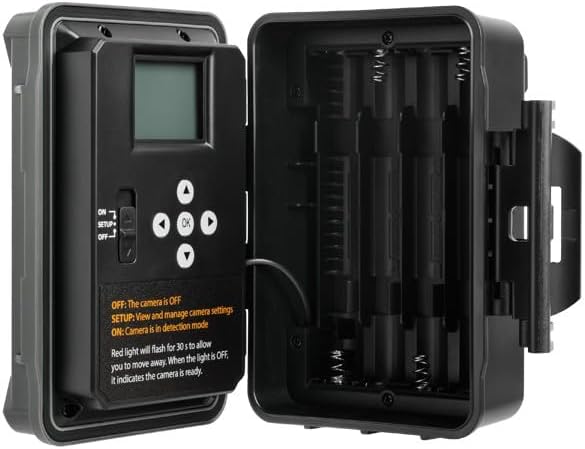
그림 2: 내부 view of the camera showing the control panel and battery compartment.
4. 작동 모드
The SPYPOINT Force 24 offers four versatile operating modes:
- 사진 모드 : 정지 이미지를 캡처합니다.
- 비디오 모드: 소리가 포함된 비디오 클립을 녹화합니다.
- 타임랩스 모드: 일정 간격으로 이미지를 촬영합니다.
- Time-Lapse Plus Mode: 타임랩스 촬영과 동작 감지 촬영을 결합했습니다.
4.1. 모드 선택
Use the camera's internal control panel to navigate through the menu and select your desired operating mode. Refer to the on-screen instructions for specific settings within each mode.
4.2. 동작 감지 및 트리거 속도
The camera features a 0.5-second trigger speed and a 70-foot detection range to ensure quick capture of moving subjects. The low-glow infrared LEDs provide discreet illumination for night captures.
5. Camera Interface and Controls
The camera's internal display and buttons allow for easy configuration and review 캡처된 미디어.
- ON/SETUP/OFF Switch: Controls the camera's power and enters setup mode.
- 탐색 버튼: Used to move through menu options and review 이미지/비디오.
- 확인 버튼: 선택 사항을 확인합니다.
- 메뉴 버튼: 메인 설정 메뉴에 접근합니다.
When in SETUP mode, the red light will flash for 30 seconds, allowing you time to move away before the camera enters detection mode. When the light is OFF, the camera is ready.
6. 유지관리
- 배터리 교체: Replace batteries when the low battery indicator appears on the screen or in the app.
- SD 카드 관리 : SD 카드 용량을 정기적으로 확인하세요. 중요한 파일은 옮겨 놓으세요. files to a computer and format the card periodically to maintain optimal performance.
- 청소: Keep the camera lens, PIR sensor, and infrared LEDs clean from dirt, dust, and debris using a soft, dry cloth.
- 환경 보호: Ensure the camera is securely mounted and latches are closed to protect against weather elements.
7. 문제 해결
- 카메라 전원이 켜지지 않음: 배터리 설치를 확인하고 배터리가 새 것인지 확인하세요.
- 사진/동영상이 촬영되지 않았습니다. Verify the SD card is inserted correctly and has sufficient space. Check motion detection settings and ensure the camera is in ON mode.
- 이미지 품질이 좋지 않음: Clean the camera lens and ensure there are no obstructions. Check the camera's position relative to the subject and lighting conditions.
- 배터리 수명이 짧음: Ensure high-quality batteries are used. Adjust camera settings such as detection delay and video length to conserve power.
8. 사양
- 모델: 포스-24
- 사진 해상도: 24메가픽셀
- 비디오 해상도: 2K with Sound
- 트리거 속도: 0.5초
- 감지 범위: 70 피트
- 플래시 범위: 70 feet (Low Glow IR)
- 전원: 8 AA 배터리(포함되지 않음)
- 저장: MicroSD Card (up to 32 GB, not included)
- 치수: 8 x 4 x 3 인치
- 품목 무게: 1 파운드
9. 보증 및 지원
The SPYPOINT Force 24 trail camera comes with a two-year warranty, ensuring reliable performance. For technical assistance, troubleshooting, or warranty claims, please refer to the official SPYPOINT support channels or visit their web대지.
추가 정보 및 리소스를 확인하려면 다음을 방문하세요. SPYPOINT Store.


