제품 끝view
The BOYA BOYALINK 3 is an advanced wireless lavalier microphone system designed for high-quality audio recording across multiple devices. Featuring AI-powered noise cancellation, studio-grade sound, and multi-device compatibility, it is ideal for vlogging, interviews, live streaming, and online teaching.

Image: The BOYA BOYALINK 3 system, showing the charging case, receiver, transmitters, and various adapters.
무엇이 포함됩니까?
아래 나열된 모든 구성 요소가 패키지에 들어 있는지 확인하세요.
- 1 x 수신기
- 2 x 송신기
- 1 x 충전 케이스
- 1 x USB-C 어댑터
- 라이트닝 어댑터 1개
- 1 x TRS to TRS Audio Cable
- 2 x Magnetic Mounts
- 2 x Magnetic Back Clips
- 2 x 모피 앞 유리
- USB-C-USB-A 충전 케이블 1개
- 1 x 휴대용 파우치

이미지: BOYALINK 3-01 패키지에 포함된 모든 구성품.
설치 가이드
시스템 충전
Before first use, fully charge the transmitters, receiver, and charging case. Place the transmitters and receiver into the charging case. Connect the charging case to a power source using the provided USB-C to USB-A charging cable.
장치에 연결
The BOYALINK 3 offers universal compatibility with various devices:
- iPhone/iOS 기기용: Attach the Lightning adapter to the receiver and plug it into your iPhone's Lightning port.
- For Android/USB-C Devices: Attach the USB-C adapter to the receiver and plug it into your Android device's USB-C port.
- For Cameras/Laptops/PCs (with 3.5mm input): Use the provided 3.5mm TRS to TRS audio cable to connect the receiver's 3.5mm output to your camera's or computer's audio input.
The system will automatically pair the transmitters with the receiver upon power-on. Ensure the blue indicator light on the receiver is solid, indicating a successful connection.
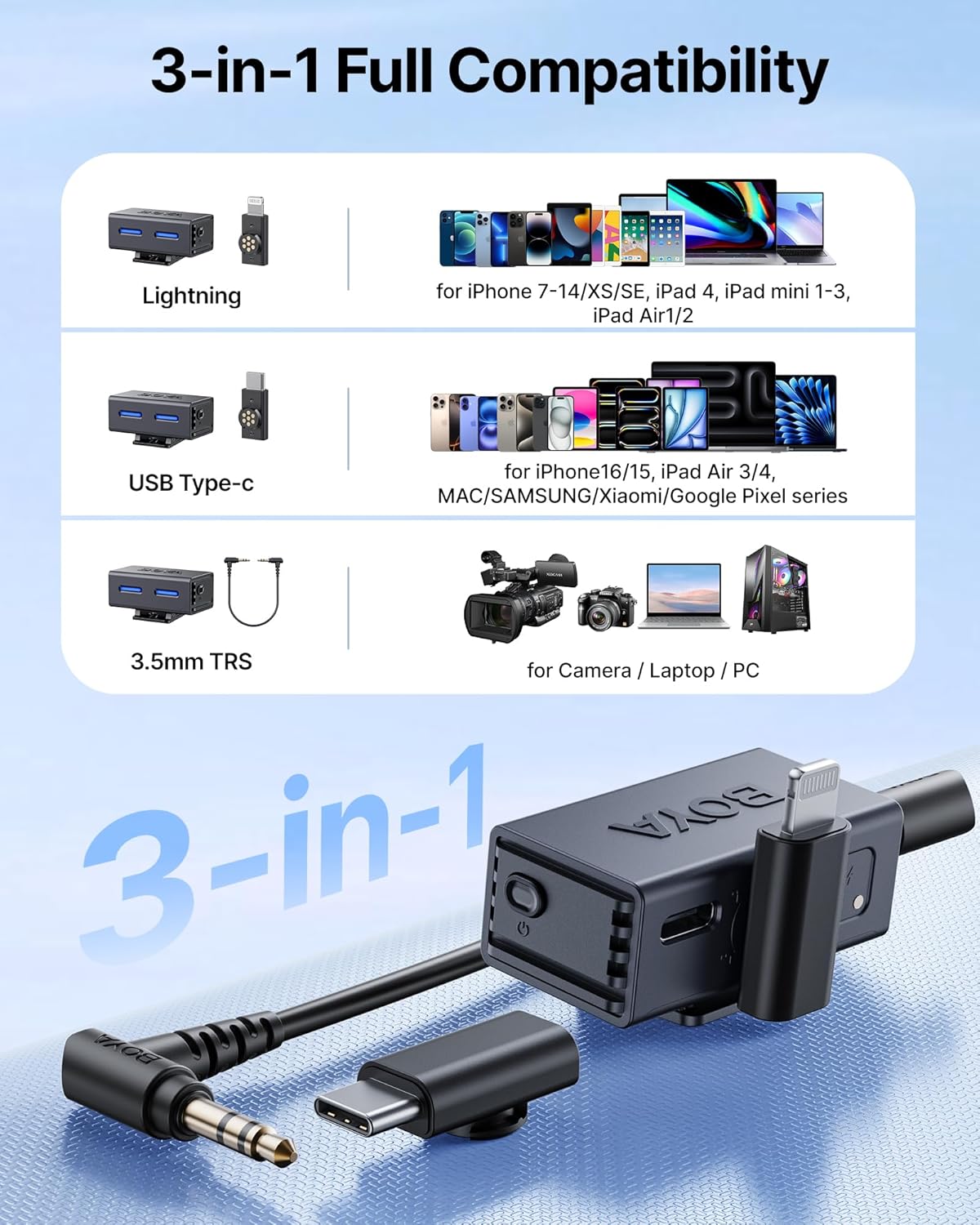
Image: The receiver with its interchangeable Lightning, USB-C, and 3.5mm TRS adapters for broad compatibility.
작동 지침
송신기 착용
Attach the transmitter to your clothing using the magnetic back clip or magnetic mount. For optimal audio quality, position the microphone approximately 6-8 inches (15-20 cm) from your mouth.

Image: The compact and lightweight design of the mini button microphone.
AI 노이즈 캔슬링
The BOYALINK 3 features AI-powered noise reduction. To cycle through Low, Medium, and High noise cancellation modes, double-press the RX button on the receiver. You can also control this feature via the BOYA Central app.

Image: Visual representation of the AI noise cancellation technology, showing its effectiveness against various noise types.
Using the BOYA Central App
Download the "BOYA Central" app from your device's app store for advanced control. The app allows you to:
- Adjust 4-level AI noise reduction.
- Customize EQ modes (Podcast, Music, Live).
- Sync multiple BOYALINK 3 devices.
- 펌웨어 업데이트를 수행합니다.
- Monitor audio with zero-latency.

Image: The BOYA Central app interface, demonstrating various audio adjustment options.
실시간 모니터링
Connect headphones to the receiver's 3.5mm output for real-time audio monitoring. This allows you to hear crystal-clear, uncompressed audio with less than 10ms delay, ensuring optimal recording quality.
Multi-Device Support (2TX-4RX)
The system supports one transmitter pairing with up to four receivers simultaneously. This feature is beneficial for multi-angle filming, live broadcasts, or collaborative projects, allowing real-time audio synchronization across various recording devices. Additional receivers are sold separately.

Image: Illustration of the multi-source sync recording system, showing one transmitter broadcasting to multiple receivers.
Extended Range and Battery Life
The BOYALINK 3 provides an ultra-stable transmission range of up to 984 feet (300 meters). Each microphone offers approximately 6 hours of runtime, extended to over 30 hours with the fully charged charging case. The microphones can be fast-charged in about 1.5 hours.

Image: Visual representation of the microphone's stable wireless range up to 984 feet.

Image: Illustration of the extended battery life, showing 6 hours of microphone use and over 30 hours with the charging case.
Professional-Grade Recording
Experience crystal-clear audio with 48kHz/24-bit resolution, a frequency response of 20Hz-20kHz, and a signal-to-noise ratio of 85 dB. The system incorporates Smart AGC (Automatic Gain Control) and distortion-limiting features to ensure studio-quality recordings with minimal post-editing required.

이미지: 상세 view of the microphone's internal structure, highlighting its 6mm Hi-Fi mic and low distortion.
유지
To ensure the longevity and optimal performance of your BOYA BOYALINK 3 system, follow these maintenance guidelines:
- 청소: Use a soft, dry cloth to wipe the transmitters, receiver, and charging case. Avoid using liquid cleaners or solvents.
- 저장: Store the system in its carrying pouch when not in use to protect it from dust and physical damage. Keep it in a cool, dry place away from direct sunlight and extreme temperatures.
- 배터리 관리 : For long-term storage, ensure the batteries are charged to approximately 50%. Recharge them every three months to prevent deep discharge, which can reduce battery life.
- 털 달린 앞유리: Clean the furry windshields gently with a soft brush if they accumulate dust or debris. Replace them if they become worn or damaged to maintain effective wind noise reduction.
문제 해결
If you encounter issues with your BOYA BOYALINK 3, refer to the following common problems and solutions:
| 문제 | 가능한 원인 | 해결책 |
|---|---|---|
| 오디오 출력이 없습니다 | Receiver not connected properly; low battery; incorrect device input selected. | Ensure receiver is securely plugged into your device. Check battery levels of transmitters and receiver. Verify correct audio input is selected on your recording device. |
| 오디오 품질이 좋지 않음/정적 | Interference; transmitter too far from receiver; microphone placement issues; high ambient noise. | Move closer to the receiver. Avoid strong electromagnetic interference sources. Adjust microphone placement. Activate AI noise cancellation via the RX button or BOYA Central app. |
| Transmitter not pairing | Out of range; pairing issue; low battery. | Ensure transmitter and receiver are within range. Power cycle both units. Check battery levels. If issues persist, refer to the app for re-pairing instructions. |
| 앱이 기기에 연결되지 않음 | Bluetooth/connection issue; outdated app firmware. | Ensure Bluetooth is enabled on your device. Restart the app and the microphone system. Check for app updates and firmware updates within the app. |
기술 사양
| 특징 | 세부 사항 |
|---|---|
| 모델명 | 보야링크 3-01 |
| 마이크 폼 팩터 | 라발리에 |
| 연결 기술 | 무선(2.4GHz) |
| 커넥터 유형 | Lightning, USB Type-C, 3.5 mm Jack |
| 극성 패턴 | 전방위 |
| 주파수 응답 | 20Hz - 20kHz |
| 신호 대 잡음 비율 | 85데시벨 |
| 오디오 해상도 | 48kHz/24비트 |
| 전송 범위 | 최대 984피트(300m) |
| 송신기 배터리 수명 | 약 6시간 |
| 총 배터리 수명(케이스 포함) | 약 30시간 이상 |
| Charging Time (mics) | 약 1.5시간 |
| 품목 무게 (송신기) | 9그램(0.317온스) |
| 치수(길이 x 너비 x 높이) | 0.04 x 0.04 x 0.04인치(제품) |
| 재료 | 아크릴로 니트릴 부타디엔 스티렌 |
| 호환 장치 | 카메라, 스마트폰, 태블릿, 노트북, PC |
보증 및 지원
보증 정보 및 기술 지원에 대해서는 BOYA 공식 웹사이트를 참조하십시오. website or contact BOYA customer service directly. Keep your purchase receipt as proof of purchase for warranty claims.
BOYA 공식 Web대지: www.boya-mic.com


