1. 이상view
The VAIO SX-R Laptop is a high-performance portable computer designed for productivity and creative tasks. It features an Intel Core Ultra 7 processor, a vibrant 14-inch WQXGA touch display, amp대용량 메모리와 빠른 저장 장치를 모두 Windows 11 Pro에서 실행합니다.

Figure 1: VAIO SX-R Laptop, open view.
2. 제품 특징
- 인텔 코어 울트라 7 프로세서: Equipped with 16 cores and AI-enhanced performance for speed and intelligent task management.
- 14" WQXGA Touch Display (2560x1600): High-resolution screen with wide color gamut and touch capability.
- 32GB LPDDR5 RAM: Provides superior multitasking capabilities with instant responsiveness.
- 1TB PCIe NVMe SSD: Offers massive storage with ultra-fast read/write speeds.
- 윈도우 11 프로: Includes enterprise-grade security and productivity features.
- IR Camera & Fingerprint Reader: Enhanced security and convenient login options.
- 탄소 섬유 섀시: 가볍고 튼튼한 구조.
- Water Resistant Keyboard: Designed to withstand accidental spills.

Figure 2: Key features of the VAIO SX-R Laptop.
3. 신체적 이상view
3.1 포트 및 커넥터
The VAIO SX-R Laptop is equipped with a variety of ports for connectivity. Refer to the diagram below for port locations and types.
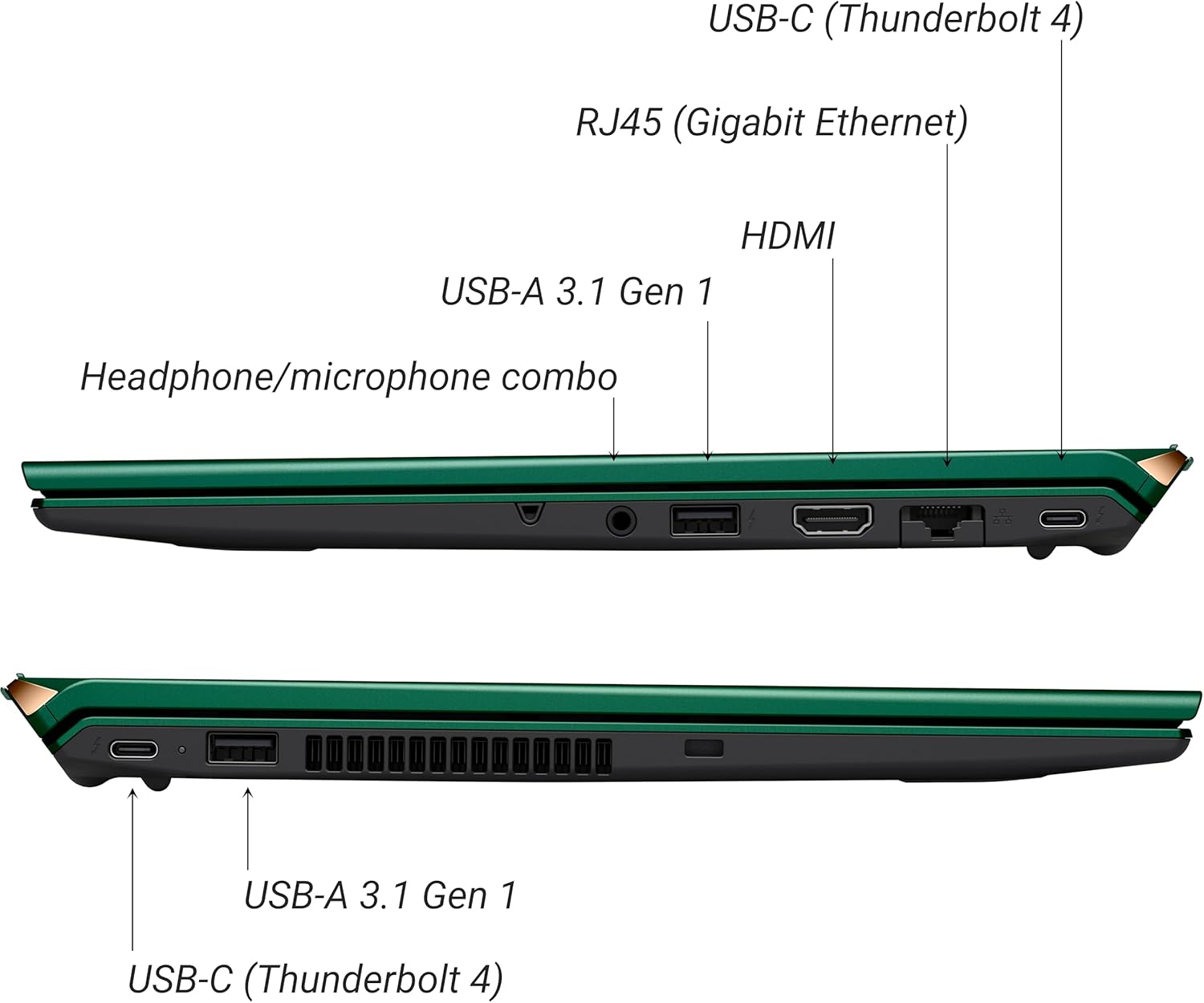
그림 3: 측면 view of VAIO SX-R Laptop ports.
- USB-C(Thunderbolt 4): High-speed data transfer, video output, and power delivery.
- RJ45 (Gigabit Ethernet): 유선 네트워크 연결의 경우.
- HDMI : 외부 디스플레이에 연결합니다.
- USB-A 3.1 1세대: USB 장치를 연결하는 데 사용됩니다.
- 헤드폰/마이크 콤보 잭: 오디오 입력 및 출력용.
3.2 키보드 및 터치패드
The laptop features a full-sized keyboard and a responsive touchpad for navigation and input.

그림 4: 키보드와 터치패드 레이아웃.
4. 설정
4.1 초기 전원 켜기
- Unpack the VAIO SX-R laptop and all accessories.
- 전원 어댑터를 노트북의 충전 포트에 연결한 다음 전원 콘센트에 연결하세요.
- Open the laptop lid. The system may power on automatically or you may need to press the power button located on the top right of the keyboard.
- 화면의 지침에 따라 언어, 지역, 네트워크 연결, 사용자 계정 생성 등 Windows 11 Pro 설정을 완료하세요.
4.2 네트워크 연결
- 와이파이: During initial setup or via Windows settings, select your preferred Wi-Fi network and enter the password. The VAIO SX-R supports Wi-Fi 7 for fast and stable wireless connectivity.
- 유선(이더넷): 라우터 또는 모뎀에서 노트북의 RJ45 포트로 이더넷 케이블을 연결하세요.
5. 사용 설명서
5.1 전원 켜기/끄기 및 절전 모드
- 전원 켜기: Open the lid or press the power button.
- 종료: 시작 버튼을 클릭한 다음 전원 > 시스템 종료를 클릭합니다.
- 잠: 뚜껑을 닫거나 시작 버튼을 클릭한 다음 전원 > 절전을 클릭합니다.
5.2 터치 디스플레이 사용
The 14-inch WQXGA display supports touch input. You can interact with the screen using gestures similar to a tablet or smartphone.
5.3 IR Camera and Fingerprint Reader
For enhanced security and convenience, the laptop includes an IR camera for Windows Hello face recognition and a fingerprint reader.
- Windows Hello Face Recognition: Configure this feature in Windows Settings > Accounts > Sign-in options. The IR camera will recognize your face to unlock the device.
- 지문 인식기: Set up your fingerprint in Windows Settings > Accounts > Sign-in options for quick and secure access.
6. 유지관리
6.1 일반 관리
- 노트북은 깨끗하고 건조한 환경에 보관하십시오.
- 노트북을 극한의 온도나 직사광선에 노출시키지 마세요.
- 노트북 위에 무거운 물건을 올려놓지 마세요.
6.2 청소
- 부드럽고 보푸라기가 없는 천을 사용하여 화면과 외부를 청소하세요.
- 완고한 얼룩의 경우 가볍게 damp천에 물이나 화면 세척액을 묻힙니다.
- Do not spray cleaners directly onto the laptop.
6.3 배터리 관리
- 배터리 수명을 연장하려면 배터리를 자주 완전히 방전하지 마세요.
- 장기간 사용하지 않을 경우 노트북을 50% 정도 충전된 상태로 보관하세요.
7. 문제 해결
7.1 전원 문제
- 노트북이 켜지지 않습니다: 전원 어댑터가 제대로 연결되어 있고 콘센트가 제대로 작동하는지 확인하세요. 다른 콘센트를 사용해 보세요.
- 배터리가 충전되지 않음: 전원 어댑터와 케이블에 손상이 있는지 확인하십시오. 충전 포트가 깨끗한지 확인하십시오.
7.2 디스플레이 문제
- 디스플레이 없음: 외부 모니터를 연결하여 노트북 내장 디스플레이에 문제가 있는지 확인해 보세요.
- 터치스크린이 반응하지 않음: 노트북을 다시 시작하세요. 디스플레이 드라이버가 최신 상태인지 확인하세요.
7.3 연결 문제
- Wi-Fi 연결 없음: Check if Wi-Fi is enabled in Windows settings. Restart your router. Update wireless drivers.
- 블루투스가 작동하지 않습니다: Ensure Bluetooth is enabled and your device is discoverable.
8. 사양
| 특징 | 세부 사항 |
|---|---|
| 모델명 | VAIO SX-R (VJS4R1X0811G) |
| 프로세서 | Intel Core Ultra 7 (16-Core, AI-Boosted) |
| 운영 체제 | 윈도우 11 프로 |
| 표시하다 | 14 Inches WQXGA Touch (2560x1600) |
| 숫양 | 32GB LPDDR5 |
| 저장 | 1TB PCIe NVMe SSD |
| 제도법 | 통합 Intel Arc 그래픽 |
| 무선 연결 | 802.11ax(Wi-Fi 7), 블루투스 |
| 포트 | USB-C (Thunderbolt 4) x2, USB-A 3.1 Gen 1 x3, HDMI x1, RJ45 (Gigabit Ethernet) x1, Headphone/microphone combo x1 |
| 카메라 | IR Camera (Windows Hello compatible) |
| 보안 기능 | Fingerprint Reader, IR Camera |
| 배터리 수명 | 최대 10시간 (평균) |
| 무게 | 3.1파운드 |
| 치수(길이x너비x높이) | 14.2 x 15 x 3.3 인치 |
9. Durability and Testing
VAIO laptops are engineered with Japanese precision and undergo rigorous quality control to ensure reliability and performance. This includes various tests to withstand daily use.
9.1 Manufacturing and Quality Assurance
Video 1: VAIO Manufacturing and Durability Testing. This video demonstrates the quality control processes and durability tests performed on VAIO laptops, including keystroke testing, dust testing, LCD screen pressure testing, and opening/closure testing.
9.2 Key Durability Features
- Water Resistant Keyboard: The keyboard is designed to resist damage from accidental liquid spills.
- 화면 내구성: The display undergoes pressure testing to ensure resilience.
- 낙하 시험: The laptop is tested to withstand drops from up to 3 feet.

Figure 5: Water resistant keyboard testing.

Figure 6: Screen durability test in progress.

Figure 7: 3-foot drop test for VAIO laptops.
10. 보증 및 지원
Your VAIO SX-R Laptop comes with a standard manufacturer's warranty. For specific warranty terms and conditions, please refer to the documentation included with your product or visit the official VAIO support web대지.
For technical support, troubleshooting assistance, or service requests, please contact VAIO customer support. Information regarding support channels can be found on the VAIO web사이트 또는 제품 포장에 포함되어 있습니다.
Protection plans are available for purchase to extend coverage beyond the standard warranty. Options include 2-Year and 4-Year Protection Plans, as well as a Complete Protect + Norton 360 monthly plan.


