소개
블랙을 선택해 주셔서 감사합니다.view W50PRO Smartwatch. This manual provides essential information for setting up, operating, and maintaining your device. Please read it carefully to ensure optimal performance and a safe user experience. Keep this manual for future reference.
패키지 내용
패키지에 모든 품목이 들어 있는지 확인하세요.
- 검은색view W50PRO Smartwatch
- 실리콘 스트랩
- Replacement Nylon Braided Strap
- 자기 충전 케이블
- 사용 설명서 (본 문서)

Image: Package contents and product dimensions.
제품 끝view
블랙view W50PRO Smartwatch features a 1.45-inch HD touchscreen display, function buttons, a powerful flashlight, and a comfortable silicone strap. Its robust design is suitable for various activities.

이미지: 검정색view W50PRO Smartwatch with its key features labeled.
설정
1. 장치 충전
처음 사용하기 전에 스마트워치를 완전히 충전하십시오. 마그네틱 충전 케이블을 시계 뒷면의 충전 단자에 연결하고 USB 단자를 전원 어댑터(별매) 또는 컴퓨터의 USB 포트에 꽂으십시오. 시계에 충전 표시등이 켜집니다.
- 일반적으로 완전 충전에는 약 3시간이 걸립니다.
- The 960mAh battery provides up to 30 days of typical use and 100 days of standby time.

Image: Battery capacity and charging information.
2. 앱 설치
다운로드하고 설치하세요 "다 핏" application on your smartphone. You can find it in the App Store (iOS) or Google Play Store (Android).
3. Device Pairing and Bluetooth Calls
To connect your smartwatch and enable Bluetooth calling:
- Download the Da Fit app from your phone's app store.
- 스마트폰에서 블루투스를 활성화하세요.
- Open the Da Fit app and add your device.
- Confirm the pairing request on your phone and watch.
- Grant necessary notification permissions within the Da Fit app for calls and messages.
- 페어링이 완료되면 시계에서 직접 전화를 걸고 받을 수 있습니다.

Image: Connection and calling setup guide.
작동 지침
1. 기본 탐색
- 터치스크린: 좌우 또는 상하로 스와이프하여 메뉴를 탐색하고 기능을 이용하세요. 탭하여 선택하세요.
- 기능 버튼: Use the physical buttons on the side of the watch for quick access to specific functions or to return to the home screen.
2. Flashlight and Compass
The W50PRO includes a built-in flashlight and compass for outdoor activities.
- 플래시: Activate the flashlight feature from the watch's menu. It offers fixed and intermittent modes for various situations.
- 나침반: Access the compass feature from the watch's menu for accurate directional guidance.
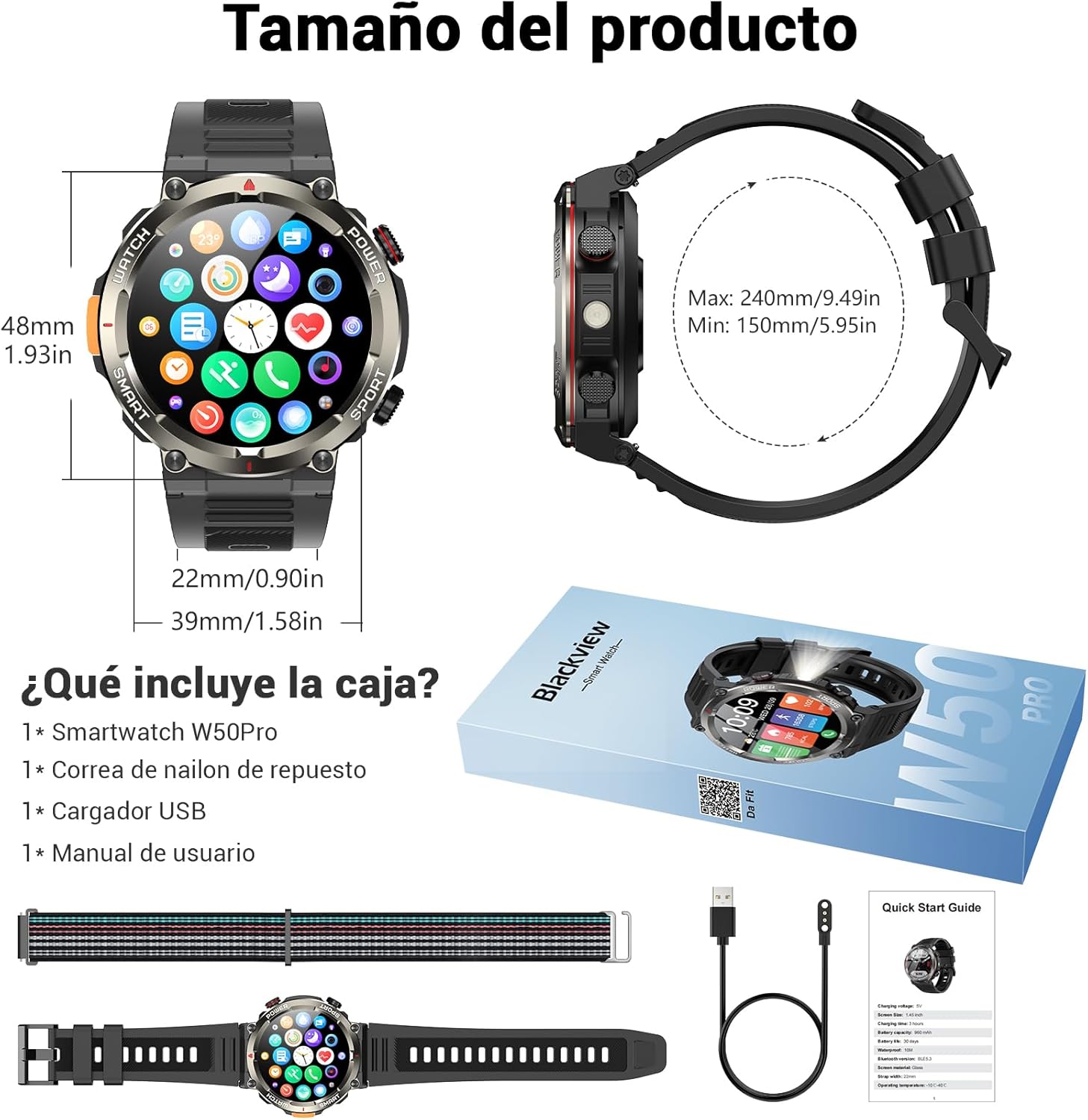
Image: Compass feature for outdoor navigation.

Image: Powerful LED flashlight in action.
3. Bluetooth 통화 및 알림
Once paired with your smartphone, the W50PRO allows you to manage calls and notifications directly from your wrist.
- 전화 걸기/받기: Use the integrated speaker and microphone to make or answer calls.
- 알림: Receive real-time alerts for text messages, emails, and social media apps.
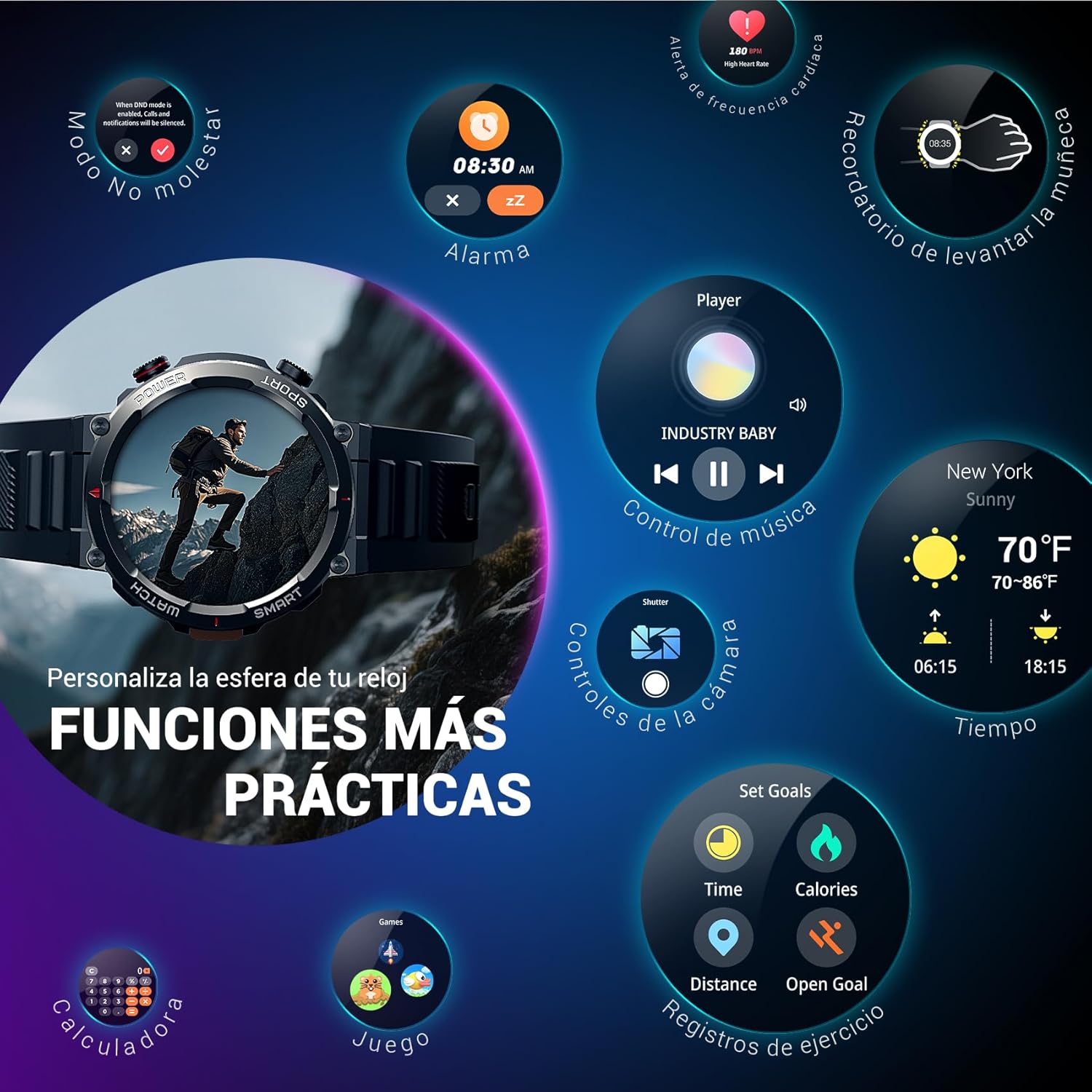
Image: Bluetooth calling and notification features.
4. 건강 모니터링
The smartwatch is equipped with high-precision sensors to monitor various health indicators:
- 심박수: 실시간 심박수 모니터링.
- 혈중 산소(SpO2): 혈중 산소 수치를 모니터링하세요.
- 수면 모니터: 수면의 질과 패턴을 추적합니다.
- 스트레스 수준: 스트레스 수준에 대한 통찰력을 제공합니다.
All health data synchronizes with the Da Fit app for detailed analysis and trend tracking.

Image: Real-time health monitoring features.
5. 스포츠 모드
The W50PRO offers over 100 integrated sports modes, including running, cycling, climbing, rope skipping, football, and basketball. It accurately records exercise time, distance, steps, calorie consumption, and heart rate changes, providing clear and intuitive performance data. Detailed data can be viewDa Fit 앱에서 편집했습니다.

이미지: 이상view of 100+ sports modes.
6. 시계 화면 사용자 정의
The Da Fit app provides a wide selection of watch faces to suit various styles. You can also upload personal photos as wallpaper and adjust text color and widget layout to create a unique watch interface.

Image: Customizable watch faces.
7. 기타 실용적인 기능
블랙view W50PRO includes additional features for daily convenience:
- 날씨 예보
- 음악 제어
- 카메라 원격 제어
- 알람
- 앉아서 보내는 시간 알림
- 물 마시기 알림
- 스톱워치
- 카운트다운 타이머
- 전화 찾기
- 계산자
- 계략
- 밝기 조정

Image: Multiple smart functions available on the smartwatch.
유지
1. 청소
피부 자극을 방지하고 기기 기능을 유지하려면 스마트워치와 스트랩을 정기적으로 청소하십시오. 부드러운 천을 사용하세요.amp 화면을 닦는 천과 casing. For the strap, follow the manufacturer's cleaning recommendations based on the material (silicone or nylon).
2. 방수성
블랙view W50PRO Smartwatch features an IP68 water resistance rating. This means it is protected against dust ingress and can withstand immersion in water up to 1.5 meters for up to 30 minutes. It is suitable for daily use, such as hand washing or light rain. Avoid using it in hot water, saunas, or during diving, as steam and high pressure can compromise the seals.

Image: Durability features including IP68 water resistance.
3. 배터리 관리
배터리 수명을 연장하려면:
- 극한의 온도를 피하세요.
- 배터리가 자주 완전히 방전되지 않도록 하세요.
- Charge the device using the provided magnetic charging cable.
문제 해결
블랙 제품 사용 중 문제가 발생하면view W50PRO Smartwatch, try the following:
- 장치가 켜지지 않음: 시계가 완전히 충전되었는지 확인하세요.
- 휴대폰과 페어링할 수 없습니다: Check if Bluetooth is enabled on both devices. Restart both the watch and phone. Ensure the Da Fit app has necessary permissions.
- 부정확한 건강 데이터: 손목에 시계가 꼭 맞게 착용되었는지 확인하십시오. 센서를 정기적으로 청소하십시오.
- 알림을 받지 못했습니다: Verify that notification permissions are granted in the Da Fit app and your phone's settings. Ensure the app is running in the background.
- 짧은 배터리 수명: Reduce screen brightness, disable unnecessary features, and limit frequent heart rate monitoring.
For persistent issues, refer to the Da Fit app's help section or contact customer support.
명세서
| 특징 | 사양 |
|---|---|
| 상표 | 검은색view |
| 모델 | W50프로 |
| 디스플레이 크기 | 1.45인치 |
| 디스플레이 유형 | 액정표시장치 |
| 해결 | 360 x 360 픽셀 |
| 배터리 용량 | 960mAh |
| 일반적인 배터리 수명 | 최대 30일 |
| 대기 시간 | 최대 100일 |
| 충전 시간 | 약 3시간 |
| 연결성 | 블루투스 |
| 휴먼 인터페이스 입력 | Buttons, Microphone |
| 방수성 | IP68 |
| 호환되는 전화 모델 | iOS 및 안드로이드 |
| 제품 치수 | 8.8 x 2.2 x 18.1cm |
| 제품 무게 | 136g |
보증 및 지원
For warranty information and technical support, please refer to the documentation included with your purchase or visit the official Blackview web사이트. 보증 청구를 위해 구매 증빙 자료를 보관하세요.


