1. 서론
This manual provides essential information for the proper use and maintenance of your HOTWAV R9 Pro Rugged Tablet. Please read it thoroughly before operating the device to ensure optimal performance and longevity.

이미지: 앞면과 뒷면 view of the HOTWAV R9 Pro Rugged Tablet, highlighting its robust design and 11-inch display.
2. 상자 안에 무엇이 들어있나요?
모든 품목이 포장에 들어 있는지 확인하세요.
- 1x HOTWAV R9 Pro Rugged Tablet
- 1x 사용 설명서 (본 문서)
- 1x 포장 상자
- 1x Explosion-proof Film
- 1x USB 타입-C 케이블
- 1x OTG Cable
3. 제품 오버view 및 주요 특징
3.1. 견고한 디자인 및 내구성
The HOTWAV R9 Pro is engineered for extreme environments, featuring IP68/IP69K waterproof and dustproof ratings, and MIL-STD-810H certification for shock resistance. Its construction includes a double-shot TPU+PC+glass fiber back cover for enhanced protection.

Image: Visual representation of the tablet's ruggedness, showing it submerged in water, covered in dust, and surviving a drop, alongside its LED camping light in use.
3.2. 배터리 및 충전
Equipped with a large 20080mAh battery, the R9 Pro offers extended usage times. It supports 20W fast charging to quickly replenish power.

Image: Diagram illustrating the 20080mAh battery capacity and 20W fast charging capability of the tablet.
3.3. 디스플레이
The tablet features an 11-inch FHD+ display with a resolution of 1200x1920 pixels and 450cd/m² brightness. It is protected by Corning Glass 3 and supports glove touch functionality, making it suitable for outdoor use.

Image: The tablet's 11-inch display showing various applications, alongside icons indicating FHD+ resolution, 60Hz refresh rate, and dual SIM support.
3.4. 성능 및 저장
Powered by an Octa-Core Unisoc T606 processor, the R9 Pro includes 20GB RAM (6GB physical + 14GB virtual) and 256GB internal storage. Storage can be expanded up to 2TB using a T-flash card.

Image: A visual representation of the Unisoc T606 octa-core chipset, detailing 20GB RAM and 256GB ROM with 2TB expandable memory.
3.5. 카메라 시스템
The tablet features a 64MP rear camera with PDAF and f/1.8 aperture, and a 16MP front camera for photography and video calls.

이미지: 전amples of photos taken with the 64MP rear camera and the 16MP front camera, demonstrating their capabilities.
3.6. 통합 Camp잉 라이트
A unique 6W camping light with 350 lumens and 246 LEDs is integrated into the tablet, providing illumination for various outdoor activities or emergencies.
4. 설정
4.1. 태블릿 충전하기
Before first use, fully charge the tablet using the provided USB Type-C cable and a compatible 20W power adapter (not included). Connect the cable to the tablet's USB-C port and the adapter to a power outlet. The charging indicator will show the charging status.
4.2. Installing SIM and T-flash Cards
The tablet supports dual SIM cards and a T-flash (microSD) card for expandable storage.
- 태블릿 측면에서 SIM/SD 카드 트레이를 찾으세요.
- 제공된 SIM 꺼내기 도구를 사용하여 트레이를 엽니다.
- Carefully place your Nano-SIM cards and/or T-flash card into the designated slots. Ensure correct orientation.
- 트레이를 태블릿에 다시 살짝 밀어 넣어 딸깍 소리가 나면서 제자리에 고정되도록 합니다.
4.3. 전원 켜기 / 끄기
- 전원을 켜려면: Press and hold the Power button until the HOTWAV logo appears.
- 전원을 끄려면: 전원 옵션 메뉴가 나타날 때까지 전원 버튼을 길게 누른 다음 "전원 끄기"를 선택하세요.
- 재시작하기 위해: 전원 옵션 메뉴가 나타날 때까지 전원 버튼을 길게 누른 다음 "다시 시작"을 선택합니다.
5. 사용 설명서
5.1. 안드로이드 14 운영체제
The HOTWAV R9 Pro runs on Android 14, offering a user-friendly interface and access to a wide range of applications via the Google Play Store.
5.2. 항해
Navigate the tablet using touch gestures:
- 수도꼭지: 항목을 선택하세요.
- 강타: 화면이나 목록을 스크롤합니다.
- 꼬집기: 이미지 확대/축소 및 web 페이지.
- 길게 누르기 : 상황에 맞는 메뉴에 접근하거나 아이콘을 이동합니다.
5.3. Glove Touch Mode
The display supports glove touch, allowing you to operate the tablet while wearing gloves. This feature is automatically enabled.
5.4. 얼굴 인식 잠금 해제
For convenient and secure unlocking, set up Face Unlock:
- 이동하다 설정 > 보안 및 개인 정보 보호 > 얼굴 인식 잠금 해제.
- 화면의 안내에 따라 얼굴을 등록하세요.
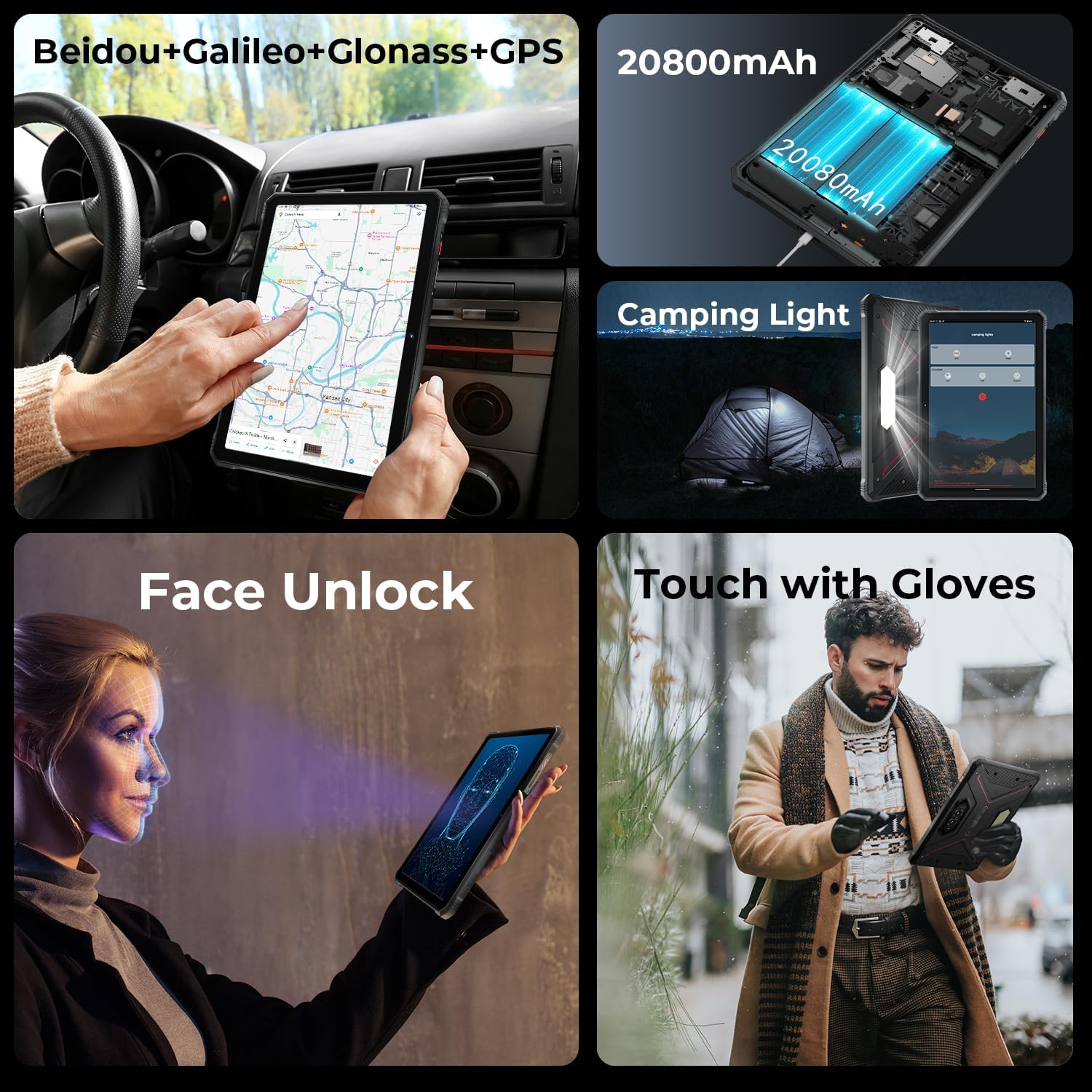
Image: A collage showing the tablet's GPS navigation, camping light in action, face unlock in progress, and a user operating the tablet with gloves.
5.5. 듀얼 SIM 기능
The tablet supports two SIM cards, allowing you to manage two different phone numbers or network providers simultaneously. You can configure preferred SIM for calls, messages, and data in 설정 > 네트워크 및 인터넷 > SIMs.
6. 카메라 사용
The HOTWAV R9 Pro is equipped with a 64MP rear camera and a 16MP front camera.
- 카메라 열기: 홈 화면이나 앱 서랍에서 카메라 아이콘을 탭하세요.
- 카메라 전환: 전면 카메라와 후면 카메라 사이를 전환하려면 카메라 전환 아이콘을 탭하세요.
- 사진 찍기: 셔터 버튼을 눌러 이미지를 촬영하세요.
- 비디오 녹화: 동영상 모드로 전환한 다음 녹화 버튼을 눌러 녹화를 시작/중지하세요.
- 카메라 설정: Access various settings like resolution, flash, and modes from within the camera app.
7. 씨amp조명 기능
The integrated 6W camping light provides powerful illumination.
- 빛을 활성화하기: 씨amping light can typically be activated via a dedicated button (if present) or through a quick settings toggle in the notification panel.
- 밝기/모드 조정: Some models may offer adjustable brightness levels or different lighting modes. Refer to the on-screen controls once the light is activated.
8. 연결성
- 와이파이: 무선 네트워크에 연결 설정 > 네트워크 및 인터넷 > 인터넷.
- 블루투스: 블루투스 기기(헤드폰, 스피커)와 페어링하려면 다음을 이용하세요. 설정 > 연결된 장치 > 연결 환경 설정 > 블루투스.
- GPS: The tablet supports Beidou, Galileo, Glonass, and GPS for accurate location services. Ensure location services are enabled in 설정 > 위치.
9. 유지관리
- 청소: 부드러운 d를 사용하세요amp cloth to clean the tablet's surface. Avoid harsh chemicals or abrasive materials.
- 물 노출: While waterproof, ensure all ports are securely closed before exposing the tablet to water. After water exposure, dry the tablet thoroughly, especially the charging port, before charging.
- 온도: Avoid exposing the tablet to extreme temperatures (hot or cold) for prolonged periods.
- 저장: 장기간 사용하지 않을 경우, 태블릿을 서늘하고 건조한 곳에 보관하세요.
10. 문제 해결
| 문제 | 가능한 해결책 |
|---|---|
| 태블릿의 전원이 켜지지 않습니다. | 배터리가 충전되어 있는지 확인하세요. 충전기에 최소 30분 이상 연결해 보세요. 그래도 반응이 없으면 전원 버튼을 10~15초 동안 눌러 강제 재시작을 시도해 보세요. |
| 성능이 느립니다. | Close unused applications. Clear cache regularly. Consider uninstalling unnecessary apps. Restart the tablet. |
| Wi-Fi 연결 문제. | Wi-Fi를 껐다가 켜세요. 라우터를 다시 시작하세요. 네트워크를 삭제하고 다시 연결하세요. |
| 배터리가 빨리 소모됩니다. | Reduce screen brightness. Close background apps. Disable unused features like GPS, Bluetooth, or Wi-Fi when not needed. Check battery usage in settings to identify power-hungry apps. |
| 카메라가 작동하지 않습니다. | Ensure the camera app has necessary permissions. Restart the tablet. Clear the camera app's cache and data in 설정 > 앱. |
11. 사양
| 특징 | 세부 사항 |
|---|---|
| 모델 | R9 프로 |
| 운영 체제 | 안드로이드 14 |
| 디스플레이 크기 | 11 인치 |
| 화면 해상도 | 1200 x 1920픽셀(FHD+) |
| 프로세서 | 유니소크 T606 옥타코어(1.6GHz) |
| 그래픽 코프로세서 | Mali G57 MP1@650MHz |
| 숫양 | 20GB(물리적 6GB + 가상 14GB) |
| 내부 저장소 | 256GB |
| 확장 가능한 스토리지 | Up to 2TB (T-flash card) |
| 후방 카메라 | 64MP (PDAF, f/1.8 aperture) |
| 전면 카메라 | 16MP |
| 배터리 용량 | 20080mAh |
| 충전 중 | 20W 급속 충전 |
| 견고함 | IP68/IP69K 방수 및 방진, MIL-STD-810H 규격 준수 |
| 연결성 | Dual SIM, Wi-Fi, Bluetooth, GPS (Beidou, Galileo, Glonass) |
| Camp잉 라이트 | 6W (350 lumens, 246 LEDs) |
| 치수(길이x너비x높이) | 10.61 x 0.7 x 7.16 인치 |
| 무게 | 2.35파운드 |
12. 보증 및 지원
HOTWAV offers comprehensive after-sales service for the R9 Pro Rugged Tablet:
- 반품 정책: 30일 이내 이유 불문 반품 가능.
- 보증: 2년 무료 보증.
- 기술 지원: 평생 기술 지원.
- 온라인 서비스: 연중무휴 온라인 고객 서비스.
For support, please contact HOTWAV customer service through their official channels or visit their web대지.


