1. 서론
구매해주셔서 감사합니다asing the iFFALCON 40S55T 40-inch Full HD Google TV. This manual provides essential information for the safe and efficient use of your television. Please read it thoroughly before operating the device and retain it for future reference.
The iFFALCON 40S55T is a tunerless smart TV designed for streaming content, offering a Full HD display, Google TV operating system, Chromecast built-in, and Dolby Audio for an immersive entertainment experience.
2. 안전 정보
화재, 감전, 부상의 위험을 줄이려면 이 텔레비전을 사용할 때 항상 기본적인 안전 예방 조치를 따르세요.
- TV를 비나 습기에 노출시키지 마세요.
- TV를 열지 마세요asing; 모든 서비스는 자격을 갖춘 인력에게 의뢰하세요.
- TV 주변의 환기가 잘 되는지 확인하세요.
- TV를 직사광선, 열원, 강한 자기장으로부터 멀리하세요.
- 제조사에서 제공한 전원 코드와 액세서리만 사용하십시오.
- 번개가 칠 때나 장기간 사용하지 않을 때는 TV의 플러그를 뽑아 두세요.
3. 패키지 내용
상자에 모든 품목이 들어 있는지 확인하세요.
- iFFALCON 40S55T 40-inch Full HD Google TV
- 원격 제어
- TV 스탠드(2개)
- TV 스탠드용 나사
- 전원 케이블
- 보증 카드
- 사용 설명서(본 문서)
4. 설정
4.1 TV 스탠드 부착
- 화면 손상을 방지하려면 부드럽고 평평한 표면에 TV를 뒤집어서 조심스럽게 놓으세요.
- 각 스탠드 조각을 TV 하단의 해당 슬롯에 맞춥니다.
- 제공된 나사를 사용하여 스탠드를 고정하세요. 나사가 단단히 조여졌는지 확인하세요.
4.2 전원 연결
전원 케이블을 TV의 전원 입력 단자에 연결한 다음 벽면 콘센트에 꽂으세요. TV가 대기 모드로 전환됩니다.
4.3 Initial Setup (Google TV & Network)
TV를 처음 켜면 Google TV 초기 설정 과정을 안내해 줍니다. 이 과정에는 다음이 포함됩니다.
- 언어 선택.
- Wi-Fi 네트워크에 연결 중입니다.
- Signing in with your Google account to access personalized content and apps.
- 이용 약관에 동의합니다.
4.4 연결성
The iFFALCON 40S55T offers various connection options for external devices.

이미지: 이상view of the TV's connectivity options, including HDMI, USB, Bluetooth, and Wi-Fi.
- HDMI 포트: Connect external devices like gaming consoles, Blu-ray players, or set-top boxes.
- USB 포트: USB 저장 장치를 연결하여 미디어를 재생하려면 files.
- 와이파이: For wireless internet connection to access streaming services and online features.
- 블루투스: For connecting wireless headphones, speakers, or other Bluetooth-enabled accessories.
4.5 Tunerless Operation
This TV is designed as a tunerless model, meaning it does not have a built-in tuner for terrestrial (over-the-air) broadcasts. To watch terrestrial, BS, or CS broadcasts, an external tuner is required and must be purchased separately.

Image: The iFFALCON 40S55T TV showcasing its smart features, highlighting its tunerless design and ability to enjoy internet video content without an antenna connection.
5. TV 작동
5.1 원격 제어view
The remote control provides access to all TV functions, including power, volume, channel navigation, and smart TV features. It also supports voice search via 'Hey Google'.

Image: The TV remote control, featuring quick access buttons for popular streaming services and a dedicated microphone button for voice commands.
- 전원 버튼: TV를 켜거나 끕니다.
- 탐색 버튼: 방향 패드와 확인 버튼을 사용하여 메뉴를 탐색하세요.
- 볼륨/채널 버튼: Adjust volume and change channels (if an external tuner is connected).
- 앱 바로가기 버튼: Direct access to popular streaming services like Netflix, YouTube, etc.
- 마이크 버튼: Press and hold to activate 'Hey Google' voice search.
5.2 Google TV 기능
Your iFFALCON TV runs on Google TV, providing a personalized and integrated entertainment experience.
- 콘텐츠 통합: Google TV organizes movies, shows, and live TV from all your apps and subscriptions into one place.
- 개인화된 추천: 귀하의 기준에 따라 viewing history and preferences, Google AI suggests content you might enjoy.
- 음성 검색: Use the 'Hey Google' feature on your remote to quickly find content, get information, or control smart home devices.
- Chromecast 내장: Easily cast content from your smartphone, tablet, or computer directly to your TV screen.

Image: A smartphone screen mirroring content to the iFFALCON TV, demonstrating the Chromecast built-in feature for enjoying mobile content on a larger display.
5.3 영상 설정
The TV incorporates advanced image processing technologies to deliver a superior view경험.
- AI PQ Processor: TCL's proprietary AiPQ Processor intelligently adjusts image quality at the pixel level, enhancing clarity, color, and contrast for a vivid and realistic picture.
- Full HD (FHD): Experience sharp and detailed images with Full High Definition resolution, offering 200% more detail than standard HD screens.

Image: A visual comparison illustrating the enhanced detail and clarity provided by Full HD resolution compared to standard HD.
- HDR10/HLG Support: Enjoy a wider range of colors and contrast with HDR10 and HLG compatibility, revealing stunning detail in both bright and dark scenes.

이미지: TV 화면에 표시된 내용asing the vibrant and detailed picture quality achieved with HDR10/HLG technology.
- 마이크로 디밍: This technology analyzes the image in hundreds of separate zones to adjust brightness and darkness independently, enhancing contrast and picture quality.

Image: A visual representation of Micro Dimming technology, illustrating how it enhances contrast and picture depth by adjusting brightness in specific areas of the screen.
5.4 Sound Settings (Dolby Audio)
The TV features Dolby Audio for clear, rich, and immersive sound.
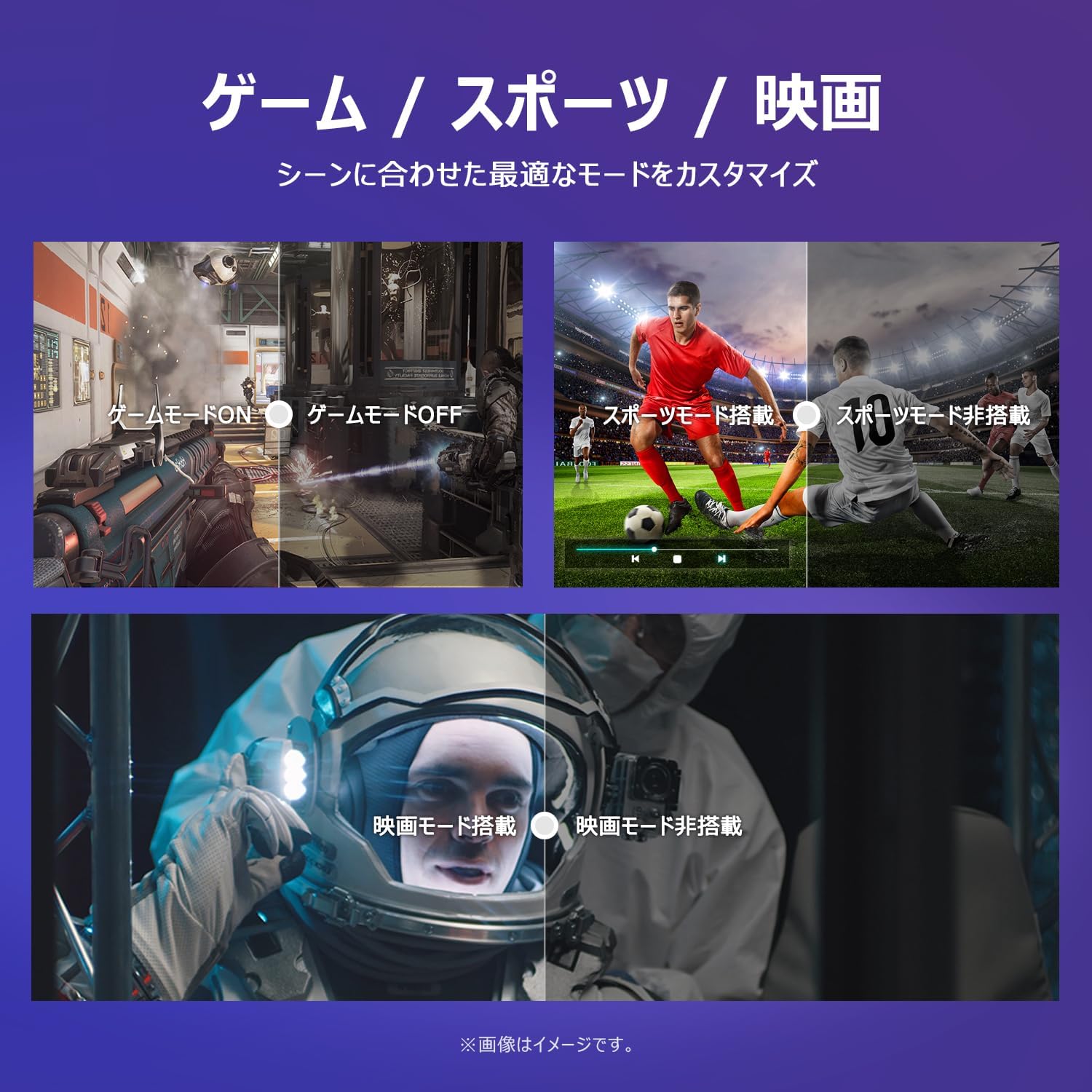
Image: The TV screen with a visual representation of sound, highlighting the immersive audio experience provided by Dolby Audio.
Access the sound settings menu to adjust modes like Standard, Music, Movie, or Custom to suit your preferences.
5.5 게임 모드
Activate Game Mode for an optimized gaming experience with reduced input lag.
Image: Visual comparisons demonstrating the optimized settings for Game Mode, Sports Mode, and Movie Mode, adapting the TV's performance to different content types.
The TV also offers dedicated Sports Mode and Movie Mode to enhance viewing for specific content types.
5.6 시스템 설정
The quick settings menu allows you to customize frequently used system settings and rearrange their order for intuitive and convenient access.

이미지: A view of the TV's quick system settings interface, illustrating how users can easily access and customize various functions like brightness, picture mode, and network settings.
6. 유지관리
적절한 관리와 유지 보수는 TV의 수명을 연장하는 데 도움이 됩니다.
- 화면 청소: 부드럽고 보풀이 없는 천으로 화면을 부드럽게 닦으세요. 잘 지워지지 않는 얼룩의 경우, TV용 화면 세척제를 천에 묻혀 사용하세요. 화면에 직접 묻히지 않도록 주의하세요.
- C 청소asing: 부드럽고 마른 천을 사용하여 TV를 닦으세요.asing. 연마성 세척제나 용제를 사용하지 마십시오.
- 통풍: 과열을 방지하려면 TV 뒷면의 통풍구가 막히지 않도록 하세요.
- 전원 코드: 전원 코드에 손상이 있는지 정기적으로 점검하십시오. 손상된 경우 고객 지원 센터에 연락하여 교체받으십시오.
7. 문제 해결
If you encounter issues with your TV, refer to the following common problems and solutions. If the problem persists, contact customer support.
| 문제 | 가능한 원인 | 해결책 |
|---|---|---|
| 전원이 없습니다 | 전원 케이블이 연결되지 않았습니다. 전원 콘센트가 작동하지 않습니다. | 전원 케이블이 제대로 꽂혀 있는지 확인하십시오. 다른 기기를 사용하여 콘센트가 제대로 작동하는지 테스트하십시오. |
| 화면은 나오지 않지만 소리는 나옵니다 | Incorrect input source; External device issue | Press the 'Input' button on the remote to select the correct source; Check external device connections |
| 소리는 나지 않지만 화면은 나옵니다 | 음량이 음소거되었거나 너무 작음; 외부 오디오 시스템 문제 | Unmute or increase volume; Check audio cable connections to external sound system |
| 리모컨이 작동하지 않습니다 | 배터리가 소진되었습니다. 리모컨과 TV 사이에 방해물이 있습니다. | 배터리를 교체하고, 장애물을 제거하고, 리모컨이 TV의 적외선 센서를 향하도록 하십시오. |
| Wi-Fi에 연결할 수 없습니다 | 비밀번호가 잘못되었습니다. 라우터 문제입니다. TV가 라우터에서 너무 멀리 떨어져 있습니다. | Wi-Fi 비밀번호를 확인하세요. 공유기를 재시작하세요. TV를 공유기 가까이 옮기거나 Wi-Fi 확장기를 사용하세요. |
8. 사양
Detailed technical specifications for the iFFALCON 40S55T TV:

Image: Dimensional drawing of the iFFALCON 40S55T TV, indicating its physical measurements.
| 특징 | 사양 |
|---|---|
| 화면 크기 | 40인치 |
| 디스플레이 유형 | VA Liquid Crystal |
| 해결 | 풀HD(1920 x 1080) |
| 새로 고침 빈도 | 60Hz |
| 종횡비 | 16시 9분 |
| 대비율 | 1000시 1분 |
| 운영 체제 | 구글 티비 |
| 오디오 출력 | 20 Watts (2.1 channels) |
| HDMI 포트 | 2 |
| USB 포트 | 1 |
| 무선 연결 | 와이파이, 블루투스 |
| 제품 치수 (W x H x D) | 89.2 x 55.8 x 18.4cm (스탠드 포함) |
| 제품 무게 | 4.63kg |
| 벽걸이 호환 | 예 |
| 포함된 액세서리 | Stand, Remote Control, Warranty Card, Power Cable |
9. 보증 및 지원
Your iFFALCON 40S55T TV comes with a manufacturer's warranty. Please refer to the included warranty card for specific terms, conditions, and duration of coverage.
For technical support, troubleshooting assistance beyond this manual, or warranty claims, please contact iFFALCON customer service. Contact information can typically be found on the warranty card or the official iFFALCON web대지.
Please have your model number (40S55T) and purchase date ready when contacting support.


