1. 서론
Thank you for choosing the Ewent EW3295 Backlit Wireless Keyboard. This full-size keyboard offers versatile connectivity options, including Bluetooth 5.0 and 2.4GHz wireless, allowing you to connect up to three devices simultaneously. Its slim design, silent keys, and adjustable backlight provide a comfortable and efficient typing experience. This manual provides detailed instructions for setup, operation, and maintenance to ensure optimal performance of your keyboard.

Figure 1.1: Slim and sturdy design of the EW3295 keyboard.
2. 주요 특징
- Wireless Multi-Device Connection: Connect up to 3 devices simultaneously via Bluetooth 5.0 (x2) or wireless 2.4 GHz. Easily switch between devices with just one button.
- 조정 가능한 백라이트: The keyboard's backlight is dimmable and can be turned off completely, ideal for various lighting conditions.
- Flat & Quiet Design: Flat, silent keys ensure a comfortable and low-noise typing experience, suitable for quiet environments.
- 12개의 멀티미디어 키: Quick access to functions like volume control, email, and other operations.
- 오래 지속되는 충전식 배터리: Equipped with a 300mAh lithium battery and intelligent energy-saving function for extended use.
- 폭넓은 호환성: Compatible with Windows (XP, 7, 8.1, 10, 11) and Android, suitable for PCs, laptops, and tablets.
- 튼튼하고 내구성 있는 디자인: Made of high-density polycarbonate, lightweight yet durable, with a compact design.
- 이탈리아식 레이아웃: Features an Italian QWERTY keyboard layout.
3. 패키지 내용
상자를 푼 후 패키지 내용물을 확인하세요.
- Ewent EW3295 Backlit Wireless Keyboard
- USB-A 2.4GHz Wireless Receiver
- USB-C to USB-A 충전 케이블
- 사용 설명서 (본 문서)
4. 설정 가이드
4.1 키보드 충전
The EW3295 keyboard is equipped with a built-in rechargeable 300mAh lithium battery. Before first use, it is recommended to fully charge the keyboard.
- Locate the USB Type-C charging port on the rear panel of the keyboard.
- Connect one end of the provided USB-C charging cable to the keyboard's USB-C port.
- Connect the other end of the USB-A cable to a USB power source (e.g., computer USB port, USB wall adapter).
- The charging indicator light (if present) will illuminate during charging and turn off when fully charged. A full charge takes less than 1 hour and provides over 1 month of use.

Figure 4.1: Rear panel of the keyboard with charging port and receiver compartment.
4.2 키보드 연결
The EW3295 keyboard supports three connection modes: 2.4GHz wireless and two Bluetooth 5.0 channels (BT1, BT2). You can connect up to three devices and switch between them.
4.2.1 2.4GHz 무선 연결
- Locate the USB-A wireless receiver, typically stored in a compartment on the rear panel of the keyboard.
- USB-A 수신기를 컴퓨터 또는 기기의 사용 가능한 USB 포트에 꽂으세요.
- 를 누르세요 Fn + 1 keys on the keyboard to switch to 2.4GHz mode. The indicator light for channel 1 will illuminate.
- 키보드가 자동으로 기기에 연결됩니다.

Figure 4.2: Ewent EW3295 keyboard and its USB wireless receiver.
4.2.2 블루투스 연결(BT1 / BT2)
- 를 누르세요 Fn + 2 keys to select Bluetooth channel 1 (BT1) or Fn + 3 keys to select Bluetooth channel 2 (BT2). The corresponding indicator light will flash, indicating pairing mode.
- 사용하시는 기기(PC, 노트북, 태블릿)에서 블루투스를 활성화하고 새 기기를 검색하세요.
- Select "EW3295" or a similar name from the list of available Bluetooth devices.
- Follow any on-screen prompts to complete the pairing process. Once connected, the indicator light will stop flashing and remain solid.
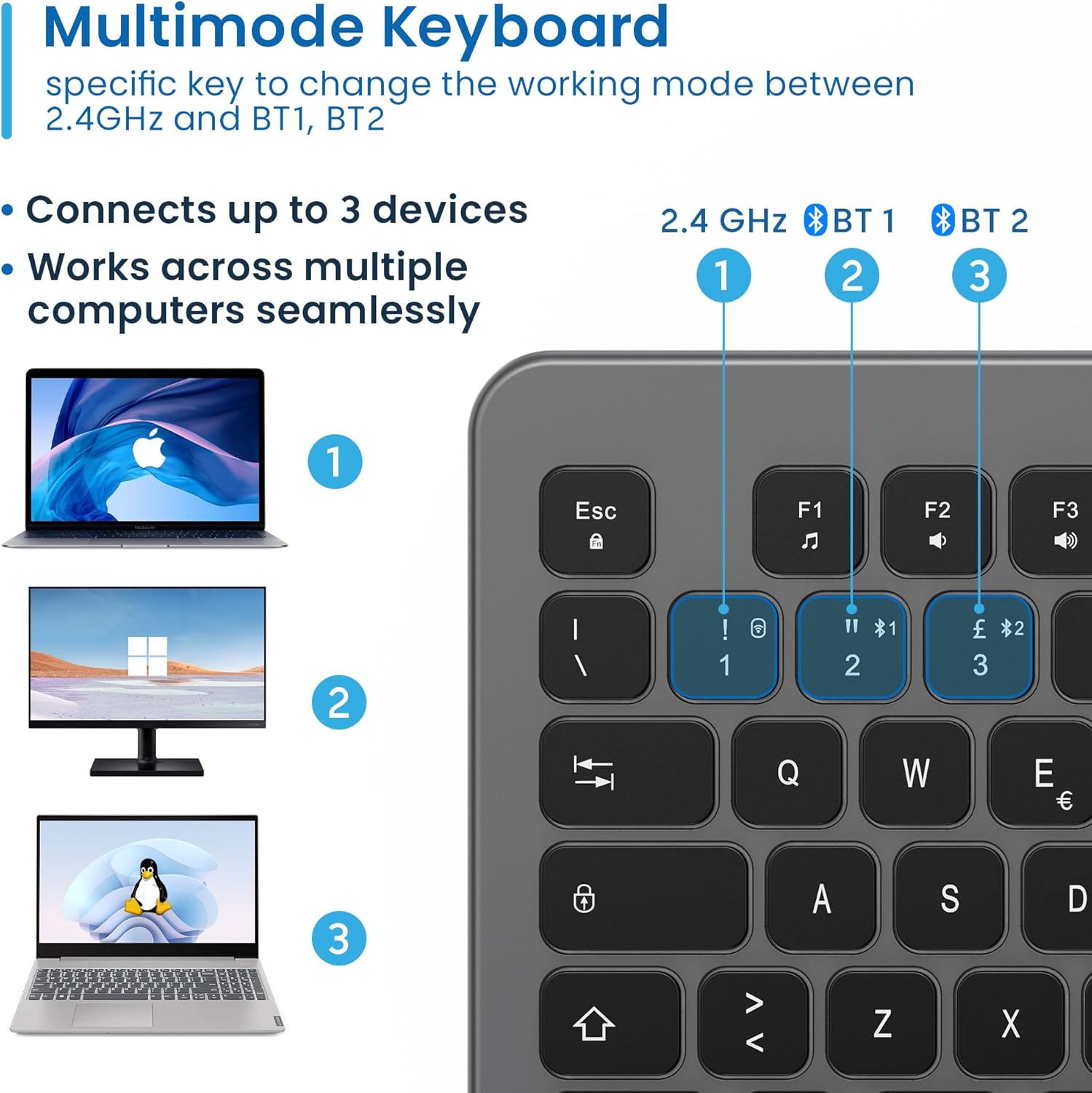
Figure 4.3: Multi-device connectivity options for the EW3295 keyboard.
4.2.3 연결된 장치 간 전환
Once multiple devices are paired, you can easily switch between them:
- 누르다 Fn + 1 to switch to the 2.4GHz connected device.
- 누르다 Fn + 2 to switch to the Bluetooth 1 connected device.
- 누르다 Fn + 3 to switch to the Bluetooth 2 connected device.
5. 사용 설명서
5.1 기본 타이핑
The EW3295 features a full-size Italian QWERTY layout. Its flat and silent keys provide a comfortable and precise typing experience, reducing noise in quiet environments.

Figure 5.1: Illuminated Italian QWERTY Keyboard Layout.

Figure 5.2: Silent keys for reduced noise.
5.2 백라이트 제어
The keyboard features an adjustable backlight for improved visibility in low-light conditions.
- 백라이트 켜기/끄기: 를 누르세요 블록스코어 key (often labeled with a lightbulb icon) to toggle the backlight on or off.
- Backlight Brightness Up: 누르다 Fn + Pag ↑ 백라이트 밝기를 높이려면.
- Backlight Brightness Down: 누르다 Fn + Pag ↓ 백라이트 밝기를 낮추려면.
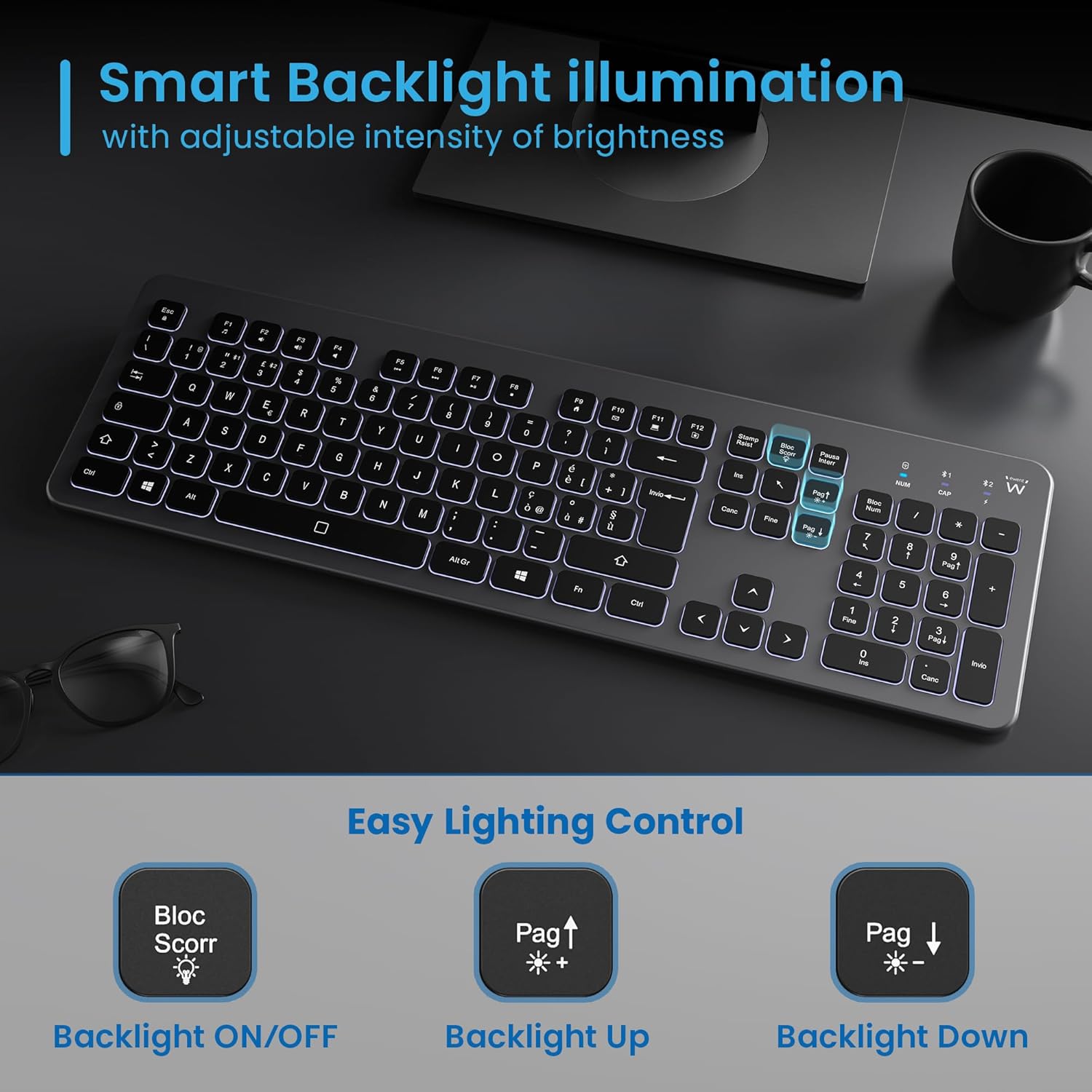
Figure 5.3: Backlight control keys.
5.3 멀티미디어 키
The keyboard includes 12 dedicated multimedia keys (F1-F12) that provide quick access to various functions. To use these functions, press the Fn 원하는 F 키와 동시에 키를 누릅니다.
| 키 조합 | 기능 |
|---|---|
| FN + F1 | 미디어 플레이어 |
| FN + F2 | 볼륨 낮추기 |
| FN + F3 | 볼륨을 높이다 |
| FN + F4 | 무음 |
| FN + F5 | 이전 트랙 |
| FN + F6 | 다음 트랙 |
| FN + F7 | 재생/일시정지 |
| FN + F8 | 멈추다 |
| FN + F9 | 홈페이지 |
| FN + F10 | 이메일 |
| FN + F11 | 내 컴퓨터 |
| FN + F12 | 계산자 |
6. 유지관리 및 관리
적절한 유지관리는 키보드의 수명과 최적의 성능을 보장합니다.
- 청소: 부드럽고 마른 보풀 없는 천을 사용하여 키보드 표면을 닦으세요. 잘 지워지지 않는 오염의 경우, 가볍게 두드리세요.amp천에 물이나 순하고 연마성이 없는 세제를 묻혀 닦아주세요. 과도한 습기는 피하세요.
- 액체를 피하세요: Do not spill liquids on the keyboard. In case of accidental spills, immediately disconnect the keyboard and allow it to dry completely before re-using.
- 저장: 장시간 사용하지 않을 경우 키보드를 직사광선과 극한의 온도를 피해 서늘하고 건조한 곳에 보관하세요.
- 배터리 관리 : To prolong battery life, avoid fully discharging the battery frequently. Charge the keyboard when the low battery indicator appears.
- 수신기 보관: When transporting the keyboard, store the USB wireless receiver in its dedicated compartment on the rear panel to prevent loss.
7. 문제 해결
If you encounter issues with your EW3295 keyboard, please refer to the following common solutions:
| 문제 | 가능한 원인 | 해결책 |
|---|---|---|
| 키보드가 응답하지 않습니다 (2.4GHz) | Low battery; Receiver not plugged in; Incorrect channel selected. | Charge the keyboard; Ensure USB receiver is securely plugged in; Press Fn + 1 to select 2.4GHz mode. |
| 키보드가 응답하지 않음(블루투스) | Low battery; Bluetooth not enabled on device; Not paired; Incorrect channel selected. | Charge the keyboard; Enable Bluetooth on your device; Re-pair the keyboard (see Section 4.2.2); Press Fn + 2 or Fn + 3 to select the correct Bluetooth channel. |
| 백라이트가 작동하지 않음 | 백라이트가 꺼졌습니다. 배터리가 부족합니다. | 누르다 블록스코어 to turn on/off; Increase brightness with Fn + Pag ↑; Charge the keyboard. |
| 키가 눌리거나 반응하지 않습니다. | Dirt or debris under keys; Physical damage. | Clean the keyboard (see Section 6); If physical damage, contact support. |
| 배터리 수명이 짧음 | Frequent backlight use; Battery degradation over time. | Reduce backlight brightness or turn it off when not needed; Ensure full charge cycles. |
8. 사양
| 특징 | 세부 사항 |
|---|---|
| 모델명 | Tastiera Wireless Retroilluminata EW3295 |
| 품목 모델 번호 | EW3295 |
| 상표 | 에웬트 |
| 연결 기술 | 블루투스 5.0(2개), 2.4GHz 무선 |
| 키보드 설명 | Multimedia, Full-size, Italian Layout |
| 호환 장치 | PC (Windows XP, 7, 8.1, 10, 11), Android |
| 배터리 유형 | 충전식 300mAh 리튬 배터리 |
| 백라이트 | 조절 가능한 강도 |
| 치수(길이 x 너비 x 높이) | 약 432mm x 122mm x 22mm |
| 무게 | 약 390g |
| 재료 | High-density Polycarbonate |

그림 8.1: 키보드 치수 및 무게.
9. 보증 정보
Ewent products are designed and manufactured to the highest quality standards. This product is covered by a limited warranty from the date of purchase. Please refer to the warranty card included with your product or visit the official Ewent web자세한 보증 약관은 해당 지역별로 다를 수 있으니, 관련 웹사이트를 참조하십시오. 보증은 일반적으로 정상적인 사용 조건에서 발생하는 재료 및 제조상의 결함에 적용됩니다.
10. 고객 지원
For technical support, troubleshooting assistance, or any questions regarding your Ewent EW3295 keyboard, please contact Ewent customer support. You can typically find contact information (phone, email, support portal) on the official Ewent web사이트 또는 제품 포장.
Please have your product model number (EW3295) and purchase details ready when contacting support.


