1. 제품 오버view
The JETBeam E26 is a high-performance, compact Everyday Carry (EDC) flashlight featuring a dual light source with a powerful white LED and a precise green beam. Designed for versatility and durability, it is suitable for various applications from daily tasks to outdoor adventures.
- 이중 광원: Combines a 3000-lumen white light with a <5mW green beam, which can be used simultaneously or independently.
- 컴팩트한 EDC 디자인: 슬림 프로file (0.62” thin, 4 oz with battery) with a sturdy two-way clip for easy pocket, hat, or backpack carry.
- 다중 모드: Features 5 brightness levels for white light (Ultra Low, Low, Medium, High, Highest) plus a strobe mode.
- 충전식 배터리: Equipped with a built-in 1700mAh Li-ion battery, offering up to 39 hours of runtime.
- 내구성 있는 구조: IPX8 waterproof rating (submersible up to 2 meters) and 1.5-meter drop resistance, made from anodized aviation aluminum.
- 메모리 기능: 편의를 위해 마지막으로 사용한 밝기 수준을 기억합니다.
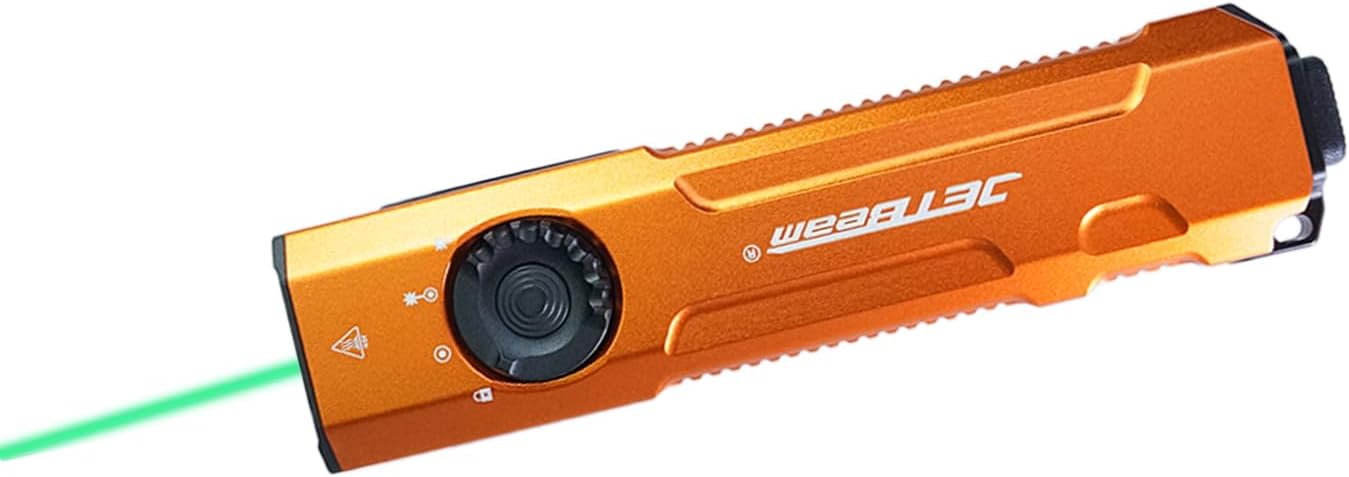
Image: The JETBeam E26 EDC Flashlight in orange, showcasing its slim design and the green beam in action.
2. 상자 안에 무엇이 들어있나요?
Upon opening your JETBeam E26 package, you should find the following items:
- E26 Flashlight (Battery Included) x 1
- 사용 설명서 x 1
- USB 충전 케이블 x 1
- 끈 x 1
3. 사양
| 특징 | 설명 |
|---|---|
| 모델 | E26 |
| 광원 | LED (White Light & Green Beam) |
| 흰색 밝기 | 3000 루멘(최대) |
| 녹색 빔 출력 | <5mW (520nm) |
| 빔 거리 | 885피트(약 270미터) |
| 배터리 | 내장형 1700mAh 리튬 이온 배터리 |
| 최대 런타임 | 39시간 |
| 방수성 | IPX8 (Underwater 2 meters) |
| 충격 저항성 | 1.5 미터 |
| 재료 | Anodized Aviation Aluminum |
| 치수(D x W x H) | 0.6인치 x 1.25인치 x 5인치 |
| 무게 | 4온스(배터리 포함) |
| 색온도 | 18300 켈빈 |
4. 설정
4.1 배터리 충전
The JETBeam E26 comes with a built-in rechargeable battery. Before first use, or when the power indicator shows low battery, charge the device using the provided USB charging cable.
- 손전등 측면에서 USB-C 충전 포트를 찾으세요.
- Connect the USB charging cable to the flashlight and to a compatible USB power source (e.g., computer, wall adapter).
- 전원 표시등이 충전 상태를 보여줍니다.

Image: Close-up of the JETBeam E26 showing the USB-C charging port and the power indicator light. The indicator shows battery levels: 35%-100% (green), 15%-35% (orange), Less than 15% (red, requires charging).
The power indicator will automatically work when the flashlight turns on and will shut down after 5 minutes.
4.2 Initial Use - Moonlight Mode Access
To access the ultra-low moonlight mode from the off state:
- Press and hold the side switch for several seconds.
- Release the switch to turn on the moonlight mode.
- If you continue to press and hold, the brightness will adjust normally through the other modes.
5. 사용 설명서
5.1 Power On/Off and Mode Switching (Side Switch)
The E26 features a side switch for primary control of the white light and green beam modes.
- 전원 켜기/끄기: 측면 스위치를 한 번 누르면 손전등이 켜지거나 꺼집니다.
- 밝기 조정: When the white light is on, single press the side switch to cycle through the 5 lighting modes: Ultra Low (20 lm), Low (300 lm), Medium (700 lm), High (1300 lm), Highest (3000 lm).
- 메모리 기능: The flashlight will remember the last used brightness level when turned off and on again.

Image: Diagram illustrating the side switch and the 5 lighting modes (Ultra Low, Low, Medium, High, Highest) with their respective lumen outputs.
5.2 Tactical Tail Button Operation
The tactical tail button provides quick access to high output and strobe modes.
- 하이라이트 모드: A heavy press of the tactical tail button will instantly activate the high light mode (3000 lumens). Release to turn off.
- 스트로브 모드: Slightly press the tactical tail button twice to activate the strobe mode.

Image: Visual guide demonstrating the tactical tail button for instant high light output and strobe mode activation.
5.3 Green Beam and Dual Light Source Operation
The E26 features a dedicated green beam and the ability to combine it with white light.
- Green Beam Only: From the off state, press and hold the side switch to activate the green beam.
- White Light + Green Beam: When the white light is on, activate the green beam by pressing and holding the side switch. Both lights can be on simultaneously. You can adjust the brightness of the white light while both are active.

Image: Illustration showing the different light combinations: white light only (3000lm), white light + green beam (3000lm + ≤5mW), and green beam only (≤5mW).

Image: Demonstrates the accurate green beam (520nm, <5mW) for presentations or pet interaction.
5.4 잠금 기능
The E26 features a locking mechanism to prevent accidental activation.
- 잠그려면: From the off state, press and hold the side switch until the light flashes twice, indicating it is locked. All functions will be ineffective.
- 잠금 해제하려면: When the flashlight is locked, press and hold the side switch until the light flashes once, indicating it is unlocked. The flashlight will restore ultra-low brightness.
6. 유지관리
Proper maintenance ensures the longevity and optimal performance of your JETBeam E26 flashlight.
- 청소: 손전등 본체를 부드러운 천으로 닦으세요.amp cloth. For the lens, use a lens cleaning cloth. Avoid harsh chemicals or abrasives.
- 방수 기능: The E26 is IPX8 waterproof. Ensure the USB-C port cover is securely closed before exposing it to water.
- 배터리 관리 : Recharge the battery regularly, especially if not used for extended periods, to maintain battery health. Avoid fully depleting the battery.
- 저장: 손전등은 직사광선과 극한의 온도를 피해 시원하고 건조한 곳에 보관하세요.

Image: The JETBeam E26 demonstrating its IPX8 waterproof capability (submerged in water) and 1.5-meter drop resistance (impact on ground), highlighting its robust and durable design.
7. 문제 해결
If you encounter issues with your JETBeam E26 flashlight, refer to the following common problems and solutions:
| 문제 | 가능한 원인 / 해결책 |
|---|---|
| 손전등이 켜지지 않습니다. |
|
| 조명 출력이 어둡거나 깜박입니다. |
|
| Green beam not working. |
|
| 손전등은 사용 중에 따뜻해집니다. | This is normal, especially on higher brightness settings, due to the high lumen output. The E26 has a built-in temperature control module (ATR) to prevent overheating. |
8. 제품 시연
Watch the official product video for a visual guide on the JETBeam E26's features and operation.
Video: Official demonstration of the JETBeam E26 flashlight, showcasing its UV light (though not listed in product features), green beam, mode switching, tactical tail switch, waterproof capabilities, and impact resistance. This video is provided by Huida Lighting, the seller.
9. 보증 및 지원
For warranty information, technical support, or any inquiries regarding your JETBeam E26 flashlight, please contact the manufacturer or the seller directly.
파는 사람: Huida Lighting
보증 청구를 위해 구매 영수증을 보관하세요.


