소개
Thank you for choosing the EvoFox One S Controller Clamp. This accessory is designed to securely attach your smartphone to your EvoFox One S controller, enhancing your mobile gaming experience. This manual provides essential information on how to set up, operate, and maintain your clamp. Please read these instructions carefully before use.
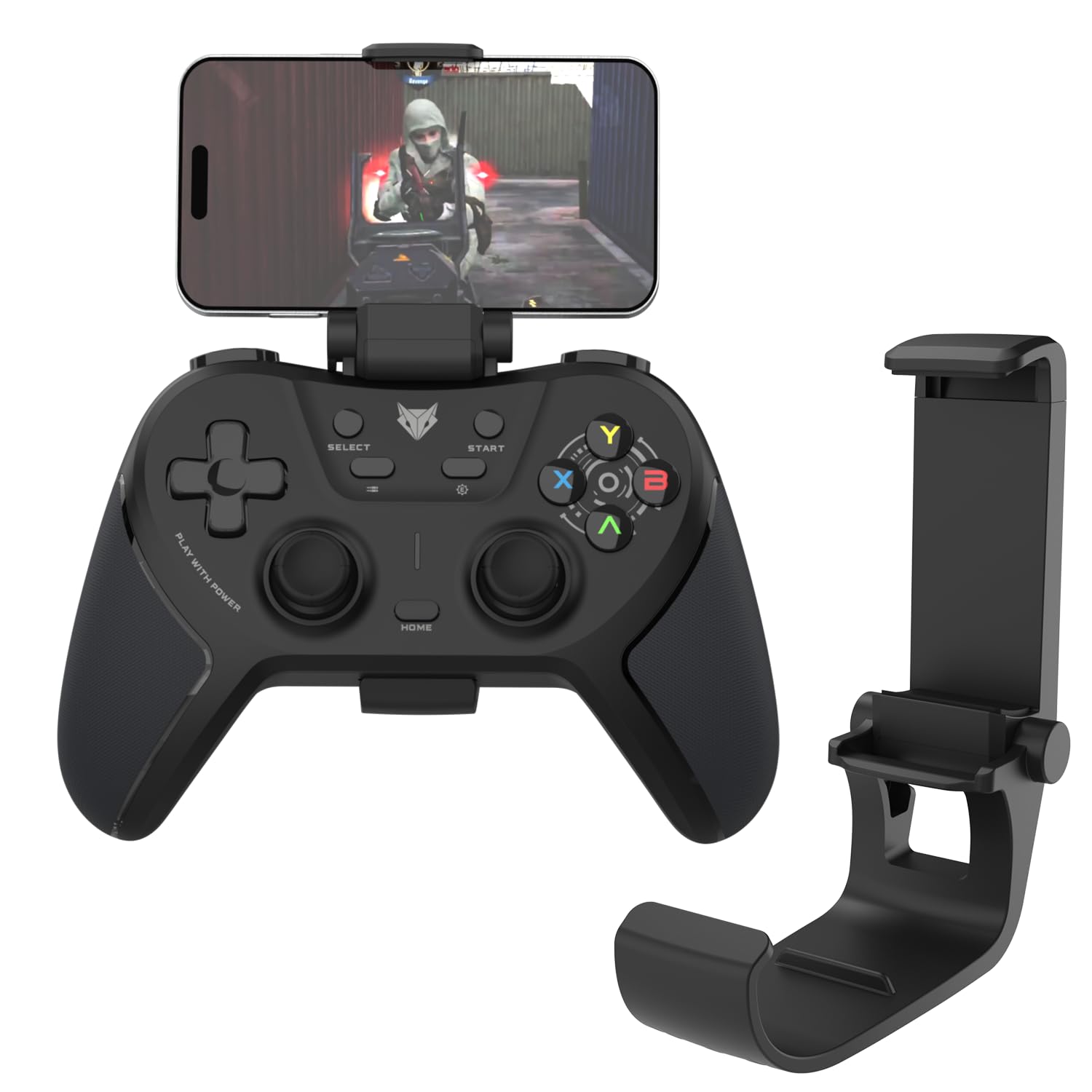
Image: The EvoFox One S Controller Clamp, shown in its folded state, ready for attachment.
설치 지침
Follow these steps to attach the clamp to your controller and secure your smartphone.
- Attaching to the Controller: Gently align the clamp's base with the top center of your EvoFox One S controller. The clamp is designed to snap securely into place without requiring tools. Ensure it is firmly seated. This clamp is compatible with the EvoFox One S Controller and upcoming EvoFox Universal Series controllers.
- 스마트폰 삽입하기: Extend the upper arm of the clamp. Carefully place your smartphone between the rubberized grips of the clamp. The extendable design accommodates various phone sizes. Ensure your phone is centered and held securely by the premium rubber gasket to prevent scratches and provide stability.

Image: An EvoFox One S controller with the clamp attached, holding a smartphone in landscape orientation.
Cl을 작동시키다amp
The EvoFox One S Controller Clamp is designed for ease of use during mobile gaming sessions.
- 조절할 수 있는 View각도: 더 클amp features a 160° adjustable hinge, allowing you to set your smartphone to the optimal viewing angle for comfortable gameplay. Adjust the angle by gently tilting your phone forward or backward while it is secured in the clamp.
- 휴대성: 더 클amp is lightweight (approximately 34g) and foldable. When not in use, remove your phone and fold the clamp for easy storage and transport in a pocket or bag.

Image: A person holding an EvoFox One S controller with the clamp and smartphone attached, demonstrating comfortable handheld gaming.
유지
To ensure the longevity and optimal performance of your EvoFox One S Controller Clamp다음의 간단한 유지 관리 지침을 따르세요.
- 청소: cl을 닦다amp 부드럽고, 건조하거나 약간 건조한amp cloth. Avoid using harsh chemicals or abrasive cleaners, as these can damage the ABS plastic and rubber components.
- 저장: CL을 저장amp 사용하지 않을 때는 직사광선과 극한 온도 변화를 피해 서늘하고 건조한 곳에 보관하십시오.
- 점검: Periodically check the rubber gaskets for any signs of wear or damage. Ensure the hinge mechanism operates smoothly.
문제 해결
If you encounter any issues with your EvoFox One S Controller Clamp, 다음의 일반적인 솔루션을 참조하세요.
| 문제 | 가능한 원인 | 해결책 |
|---|---|---|
| Clamp does not attach securely to the controller. | Incorrect alignment or incompatible controller model. | CL을 확인amp is aligned correctly with the EvoFox One S controller. This clamp is specifically designed for the EvoFox One S and upcoming EvoFox Universal Series controllers. |
| Smartphone is not held securely or slips. | Phone not centered, clamp not fully extended, or rubber gaskets worn. | Ensure the smartphone is centered between the rubberized grips. Fully extend the clamp to accommodate the phone's width. Inspect rubber gaskets for damage; contact support if worn. |
| Adjustable angle is stiff or loose. | Dust accumulation or normal wear. | Clean the hinge area. If the issue persists, it may be due to normal wear; the hinge is designed for a specific tension. |
명세서
- 모델: One S - Clamp
- 재료: ABS 플라스틱
- 무게: 약 34그램
- 크기(가로x세로x높이): 8.5 x 4.3 x 4.2cm (접힘)
- 조정 가능한 각도: 최대 160도
- 호환성: EvoFox One S Controller and upcoming EvoFox Universal Series controllers
- 특징: Extendable grip, premium rubber gasket, foldable design
- 원산지: 중국
- 제조업체: Allied Electronics & Magnetics Private Limited
보증 및 지원
For warranty information and customer support, please refer to the official EvoFox web사이트를 방문하거나 판매점에 문의하세요. 보증 청구를 위해 구매 영수증을 보관하세요.
제조사 연락처:
Allied Electronics & Magnetics Private Limited
C-64/4, Okhla Phase - 2, New Delhi - 110020
추가 지원이 필요하면 다음을 방문하세요. EvoFox Store on Amazon.


