1. 서론
Thank you for choosing the AURIOL Color Display Weather Station. This device provides comprehensive weather information, including indoor and outdoor temperature and humidity, animated weather forecasts, moon phase, and a clock with alarm functions. Please read this manual carefully before use to ensure proper operation and to maximize the lifespan of your product.
2. 안전 정보
- Keep the device away from extreme temperatures, direct sunlight, strong vibrations, and impacts.
- The main unit is designed for indoor use only. The outdoor sensor is splash-proof (IPX4) but should not be submerged in water.
- 기기를 직접 열거나 수리하지 마십시오. 모든 정비는 자격을 갖춘 기술자에게 맡기십시오.
- 배터리는 어린이의 손이 닿지 않는 곳에 보관하십시오. 사용한 배터리는 지역 규정에 따라 폐기하십시오.
- 본체에는 제공된 전원 어댑터만 사용하십시오.
3. 패키지 내용
다음 품목이 패키지에 포함되어 있는지 확인하세요.
- AURIOL Color Display Weather Station (Main Unit)
- Wireless Outdoor Sensor (IPX4 splash-proof)
- 메인 유닛용 전원 어댑터
- 4 x Alkaline Batteries (2 x 1.5 V AA for sensor, 2 x 1.5 V AAA for main unit backup)
- 사용 설명서 (본 문서)
4. 제품 오버view
기상 관측소의 주요 구성 요소를 숙지하십시오.

그림 4.1: Main unit (right) displaying time, date, indoor/outdoor temperature, humidity, and weather forecast. Wireless outdoor sensor (left) showing its own temperature and humidity.

그림 4.2: Close-up of the main unit's color display, highlighting the animated weather forecast symbols, moon phase indicator, and alarm icons (AL1, AL2).
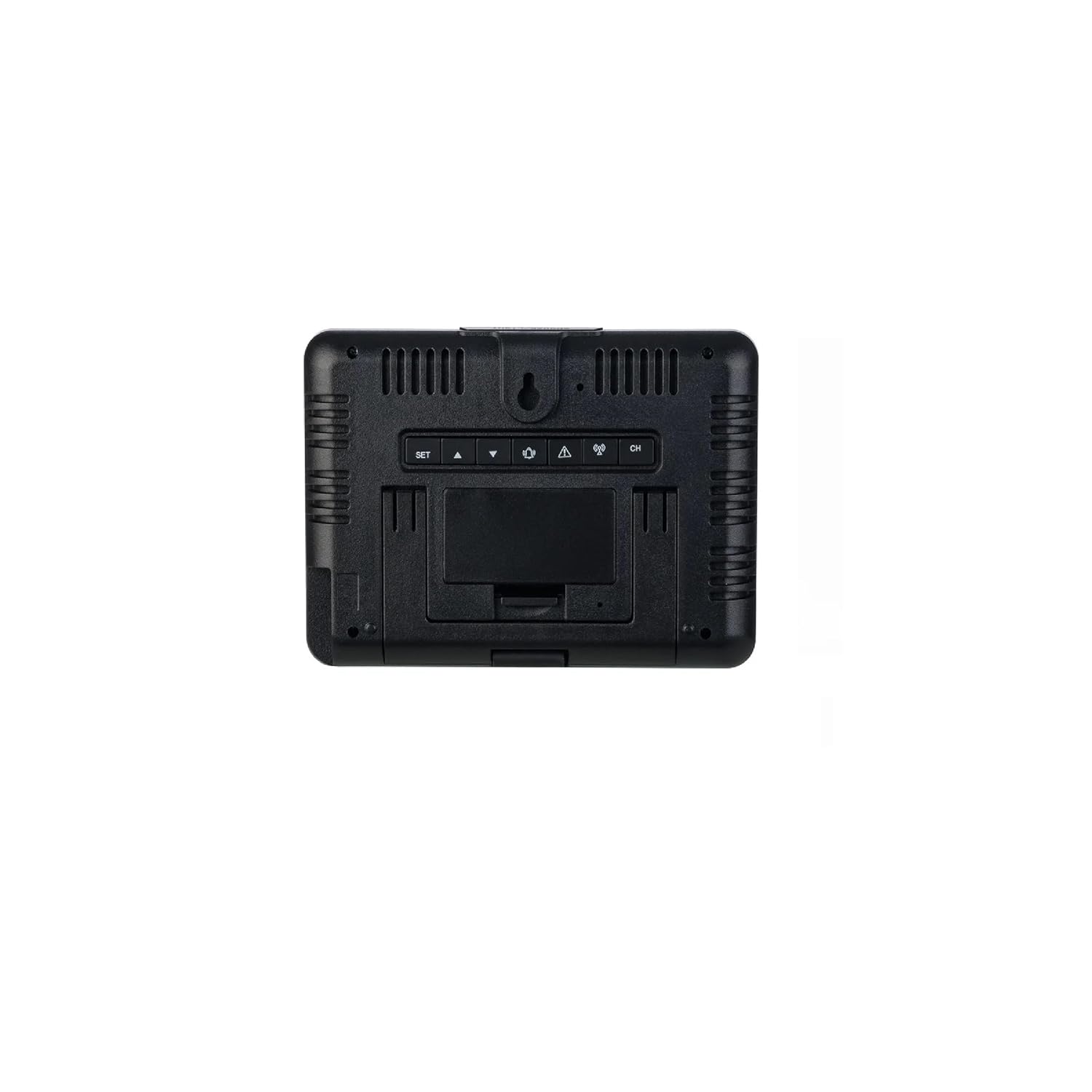
그림 4.3: 뒤쪽 view of the main unit. Visible are the control buttons (SET, UP, DOWN, ALARM, CH) and the battery compartment cover. The unit can be placed on a flat surface or wall-mounted.
5. 설정
5.1. 배터리 설치
- 실외 센서: Open the battery compartment on the back of the wireless outdoor sensor. Insert 2 x 1.5 V AA alkaline batteries, observing the correct polarity (+/-). Close the compartment securely.
- 본체(백업 장치): Open the battery compartment on the back of the main unit (refer to Figure 4.3). Insert 2 x 1.5 V AAA alkaline batteries, observing the correct polarity (+/-). These batteries serve as a backup in case of power outage. Close the compartment.
5.2. Powering On the Main Unit
Connect the provided power adapter to the DC input port on the back of the main unit and then plug it into a wall outlet. The display will light up permanently. The backup batteries will ensure settings are retained if the power adapter is disconnected.
5.3. 센서 동기화
Once both the sensor and main unit are powered, the main unit will automatically attempt to connect with the outdoor sensor. This process may take a few minutes. The outdoor temperature and humidity readings will appear on the main unit's display once connected. If synchronization fails, press and hold the "CH" button on the main unit to initiate a manual search for the sensor.
5.4. 센서 배치
Place the outdoor sensor in a shaded, dry location, protected from direct sunlight and rain, but within the 100m wireless range of the main unit. Avoid placing it near large metal objects or electrical appliances that could interfere with the signal. The sensor can be placed on a flat surface or mounted to a wall using the integrated hanging hole.
6. 사용 설명서
6.1. 디스플레이 오버view
컬러 디스플레이는 여러 부분으로 나뉘어 있습니다.
- 왼쪽 상단: Animated Weather Forecast symbols.
- 맨 위 오른쪽: 실외 온도 및 습도.
- 왼쪽 중간: 달의 위상.
- 오른쪽 중간: 실내 온도 및 습도.
- 맨 아래: Time, Date, Day of the Week, Alarm Indicators (AL1, AL2).
6.2. Setting Time, Date, and Day of the Week
- Press and hold the "SET" button (refer to Figure 4.3) for 3 seconds to enter time setting mode. The hour digit will flash.
- Use the "UP" or "DOWN" buttons to adjust the value.
- Press "SET" again to confirm and move to the next setting (minutes, 12/24-hour format, year, month, day, day of week language).
- Repeat steps 2 and 3 until all settings are configured. Press "SET" one last time to exit.
6.3. 알람 설정
The weather station features two separate alarms (AL1, AL2).
- Press the "ALARM" button repeatedly to cycle through AL1, AL2, and alarm off.
- To set an alarm, press and hold the "ALARM" button for 3 seconds when the desired alarm (AL1 or AL2) is displayed. The hour digit will flash.
- Use "UP" or "DOWN" to adjust the hour, then press "ALARM" to confirm and move to minutes.
- Adjust minutes with "UP" or "DOWN", then press "ALARM" to confirm and exit.
- When an alarm sounds, press any button (except "SNOOZE") to stop it. Press "SNOOZE" for a temporary pause.
6.4. 온도 및 습도 표시
- 본체는 실내와 실외의 온도와 습도를 모두 표시합니다.
- Press the "UP" button to switch between Celsius (°C) and Fahrenheit (°F) temperature units.
- The display also shows minimum and maximum recorded temperatures and humidity for both indoor and outdoor. These values reset automatically every 24 hours or can be manually reset by pressing and holding the "DOWN" button.
6.5. 날씨 예보
The weather station predicts weather conditions for the next 12-24 hours based on atmospheric pressure changes. The animated symbols (e.g., sunny, partly cloudy, cloudy, rainy, snowy) indicate the forecast. This is a prediction and may not always be 100% accurate.
6.6. 달의 위상 표시
The moon phase icon on the display changes to reflect the current lunar phase.
6.7. Temperature/Freeze Alarm
The device features a temperature alarm and a freeze alarm. When the outdoor temperature drops to a certain threshold (typically near freezing point), a special icon or sound may activate to warn of potential frost conditions. Refer to the specific settings menu (usually accessed via "SET" or "ALARM" button in conjunction with "UP"/"DOWN") to configure these thresholds.
6.8. 배터리 상태 표시기
Battery icons on the display will indicate the battery status for both the main unit (backup) and the outdoor sensor. Replace batteries promptly when the low battery indicator appears to ensure continuous operation.
7. 유지관리
- 청소: 부드러운 천으로 장치를 닦으십시오. damp 천. 연마성 세척제나 용매를 사용하지 마십시오.
- 배터리 교체: Replace batteries in both the main unit (backup) and the outdoor sensor when the low battery indicator appears. Ensure correct polarity.
- 저장: 장기간 기기를 보관할 경우, 누출을 방지하기 위해 모든 배터리를 제거하세요.
8. 문제 해결
| 문제 | 가능한 원인 | 해결책 |
|---|---|---|
| 본체에 디스플레이가 없습니다. | 전원 어댑터가 연결되지 않았거나 고장났습니다. 백업 배터리가 방전되었거나 잘못 삽입되었습니다. | Ensure power adapter is securely connected. Check and replace backup batteries if necessary, verifying polarity. |
| 실외 측정값이 표시되지 않거나 정확하지 않습니다. | Sensor out of range; sensor batteries depleted; interference; sensor not synchronized. | Move sensor closer to the main unit. Replace sensor batteries. Relocate sensor away from interference sources. Press and hold "CH" button on main unit to re-synchronize. |
| 일기예보가 틀린 것 같습니다. | Forecast is a prediction based on atmospheric pressure and may not always match actual conditions. | This is normal. The forecast is an estimation. Ensure the unit has been operating for at least 24 hours for initial pressure calibration. |
| 알람이 울리지 않습니다. | 알람이 활성화되지 않았거나 잘못 설정되었습니다. | Verify that the alarm (AL1 or AL2) is enabled and the time is set correctly. |
9. 사양
- 모델: 456364
- 상표: 오리올
- 연결 기술 : 433 MHz, 868 MHz (Wireless)
- 실외 센서 범위: 최대 100m(오픈 필드)
- 전원(주 장치): Power Adapter (included), 2 x 1.5 V AAA Alkaline Batteries (backup, included)
- 전원(실외 센서): 2 x 1.5 V AA Alkaline Batteries (included)
- 특징: Color Display, Min/Max Temperature/Humidity, Animated Weather Forecast, Moon Phase, Dual Alarms, Temperature/Freeze Alarm
- 재료: 플라스틱
- 색상: 검은색
- 실외 센서 보호: IPX4(방수)
- 권장 사용: 집
- 특정 용도: 온도 모니터링
10. 보증 및 지원
This AURIOL product comes with a standard manufacturer's warranty. For detailed warranty terms and conditions, please refer to the warranty card included in your package or contact your retailer. For technical support, troubleshooting assistance, or to inquire about replacement parts, please contact AURIOL customer service through their official web사이트 또는 구매 문서에 제공된 연락처 정보를 참조하세요.


