소개
The SONRU B110 is a versatile 2-in-1 Bluetooth 5.3 audio adapter designed to transform your audio experience. It functions as both a Bluetooth transmitter (TX mode) and a Bluetooth receiver (RX mode), allowing you to wirelessly stream audio to and from various devices. Enjoy high-fidelity sound, low latency, and extended battery life for home entertainment, travel, and on-the-go use.
패키지 내용
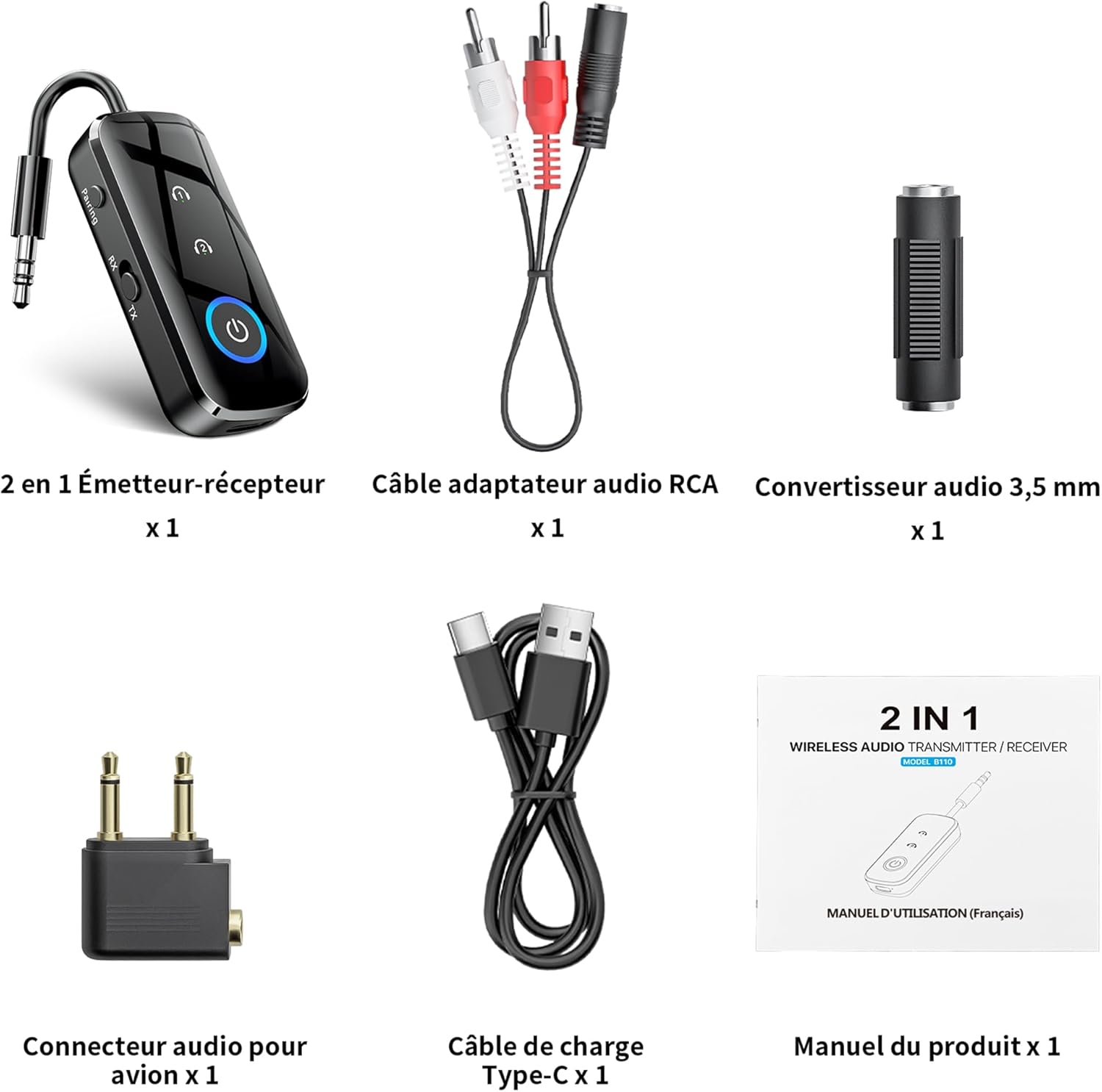
그림 1: 패키지 내용물
- 1 x SONRU B110 2-in-1 Bluetooth Transmitter/Receiver
- 1 x RCA Audio Adapter Cable
- 1 x 3.5mm Audio Converter
- 1 x Airplane Audio Connector
- 1 x USB 유형 C 충전 케이블
- 1 x 사용자 설명서
제품 끝view

Figure 2: Device Features and Controls
The SONRU B110 features a compact design with essential controls for easy operation. It includes a 3.5mm audio jack, a mode switch (RX/TX), power button, and volume/track control buttons. The device also has a USB-C charging port.
명세서
| 특징 | 세부 사항 |
|---|---|
| 모델 | B110 |
| 블루투스 버전 | 5.3 |
| 블루투스 프로토콜 | A2DP/AVRCP (Reception), A2DP (Emission) |
| 작동 범위 | >10 meters (open space) |
| 오디오 인터페이스 | Universal 3.5 mm audio input/output |
| 배터리 용량 | 250mAh |
| 충전 시간 | 약 1.5시간 (USB-C) |
| 배터리 수명(TX 모드) | 최대 15시간 |
| 배터리 수명(RX 모드) | 최대 12시간 |
| 치수 | 13.9 x 11.6 x 2cm |
| 무게 | 110그램 |
| 특별 기능 | Automatic connection memory, Dual connection, Fast Charging, Hands-Free Calls, Low Latency |
설정
1. 장치 충전
Before first use, fully charge your SONRU B110.
- 제공된 USB Type-C 충전 케이블을 기기의 충전 포트에 연결하십시오.
- 케이블의 다른 쪽 끝을 USB 전원 어댑터(포함되지 않음)나 컴퓨터의 USB 포트에 연결합니다.
- 충전 표시등이 충전 상태를 보여줍니다. 완전 충전에는 약 1시간 30분이 소요됩니다.
- Once fully charged, the device offers up to 15 hours of use in Transmitter (TX) mode and 12 hours in Receiver (RX) mode.

그림 3: 충전 및 배터리 수명
2. 송신기(TX) 모드에서의 페어링
TX mode allows you to transmit audio from non-Bluetooth devices (e.g., TV, PC, airplane entertainment system) to Bluetooth headphones or speakers.
- Switch the device to TX mode.
- Connect the SONRU B110 to your audio source (e.g., TV, PC, MP3 player) using the 3.5mm audio cable. For airplane entertainment systems, use the provided airplane audio connector.
- Bluetooth 헤드폰이나 스피커를 켜고 페어링 모드로 설정하세요.
- The SONRU B110 will automatically search for and connect to nearby Bluetooth devices. The indicator light will confirm a successful connection.
- 이중 연결: The device supports connecting to two Bluetooth headphones/speakers simultaneously. After connecting the first device, put the second device into pairing mode. The B110 will automatically connect to it.

Figure 4: TX Mode in an Airplane

Figure 5: Dual Connection in TX Mode
3. 수신(RX) 모드에서의 페어링
RX mode allows you to receive audio from your Bluetooth-enabled smartphone, tablet, or computer and play it through non-Bluetooth devices like car stereos, wired headphones, or home speaker systems.
- Switch the device to RX mode.
- Connect the SONRU B110 to your non-Bluetooth audio device (e.g., car stereo, wired speaker) using the 3.5mm audio cable.
- Enable Bluetooth on your smartphone, tablet, or computer and search for "SONRU B110" in the list of available devices.
- Select "SONRU B110" to pair. The indicator light will confirm a successful connection.
- 자동 재연결: The device has an automatic connection memory function. After a successful connection, re-enabling Bluetooth on your phone will automatically connect to the B110.

Figure 6: RX Mode in a Car

Figure 7: TX and RX Mode Compatibility
작동 지침
전원 켜기/끄기
- 전원 켜기: 표시등이 켜질 때까지 전원 버튼을 길게 누르세요.
- 전원 끄기 : 표시등이 꺼질 때까지 전원 버튼을 길게 누르세요.
모드 전환
- Use the TX/RX switch on the side of the device to select the desired mode (Transmitter or Receiver).
Music Control (RX Mode)
- 재생/일시 중지: 전원 버튼을 한 번 누르세요.
- 다음 트랙: "+" 버튼을 길게 누르세요.
- 이전 트랙 : "-" 버튼을 길게 누르세요.
- 볼륨 업: "+" 버튼을 짧게 누르세요.
- 볼륨 작게 : "-" 버튼을 짧게 누르세요.
Call Management (RX Mode)
The SONRU B110 features a built-in microphone for hands-free calls when in RX mode.
- 전화 받기/종료: 전원 버튼을 한 번 누르세요.
- 전화 거부: 전원 버튼을 길게 누르세요.
- 마지막 번호 재다이얼: 전원 버튼을 두 번 누르세요.
유지
- 기기를 건조한 곳에 보관하세요. 습기나 액체에 노출되지 않도록 하세요.
- 장치를 분해하거나 개조하지 마십시오.
- 부드럽고 마른 천으로 기기를 닦으세요. 강한 화학 물질이나 연마성 세제는 사용하지 마세요.
- 사용하지 않을 때는 장치를 서늘하고 건조한 곳에 보관하십시오.
- 극한의 온도를 피하세요.
문제 해결
- 기기의 전원이 켜지지 않습니다:
- 기기가 완전히 충전되었는지 확인하세요. USB-C 케이블을 사용하여 전원에 연결한 후 다시 시도해 보세요.
- Bluetooth 장치와 페어링할 수 없습니다.
- Make sure the SONRU B110 is in the correct mode (TX for transmitting, RX for receiving).
- Ensure your target Bluetooth device (headphones, speaker, phone) is in pairing mode.
- Place the devices close to each other.
- 양쪽 기기에서 이전 페어링 기록을 모두 삭제하고 다시 페어링을 시도하세요.
- 소리가 나지 않거나 오디오 품질이 좋지 않음:
- Check if the 3.5mm audio cable is securely connected to both the SONRU B110 and the audio source/receiver.
- Ensure the volume on both the SONRU B110 and the connected audio device is turned up.
- Verify that the correct input/output source is selected on your audio system (e.g., AUX input on car stereo).
- Reduce the distance between the B110 and the paired Bluetooth device, and remove any obstacles.
- 다른 무선 기기와의 간섭이 없는지 확인하십시오.
- Dual connection not working:
- Ensure both target Bluetooth devices are in pairing mode when attempting to connect the second device.
- Device not compatible with musical instruments or hearing aids:
- As stated in the product features, this device is not designed for use with musical instruments or hearing aids.
보증 및 지원
SONRU products are designed for reliability and performance. For warranty information or technical support, please refer to the contact details provided on the product packaging or visit the official SONRU web사이트. 보증 청구를 위해 구매 증빙 자료를 보관하세요.


