1. 서론
This user manual provides comprehensive instructions for the Jedel KL69 60% Mechanical Gaming Keyboard. It covers setup, operation, maintenance, troubleshooting, and detailed specifications to help you maximize your keyboard's performance and lifespan. The Jedel KL69 is a compact, wired mechanical keyboard featuring a 61-key layout, rainbow LED backlighting, and durable blue mechanical switches, designed for an optimal gaming and typing experience.

Figure 1: Jedel KL69 60% Mechanical Gaming Keyboard. This image displays the compact keyboard with its vibrant rainbow LED backlighting and black/red keycap design.
2. 설정
The Jedel KL69 keyboard is designed for simple plug-and-play setup. Follow these steps to connect your keyboard:
- 포장에서 키보드와 USB 케이블을 꺼내세요.
- Locate an available USB Type-A port on your computer (desktop or laptop).
- 키보드 케이블의 USB 커넥터를 컴퓨터의 USB 포트에 단단히 꽂으세요.
- Your operating system (Windows, Android, Linux, etc.) will automatically detect and install the necessary drivers. This process may take a few moments.
- Once the drivers are installed, the keyboard's LED backlight will illuminate, indicating it is ready for use.

Figure 2: Connecting the Jedel KL69 Keyboard. This image shows the keyboard with its attached USB cable, ready for connection to a computer.
3. 사용 설명서
3.1 주요 특징
- 60% 컴팩트한 디자인: The KL69 features a space-saving 61-key layout, ideal for gaming setups and smaller desks.
- 아랍어/영어 레이아웃: Keycaps are designed with both Arabic and English characters for versatile use.
- 블루 기계식 스위치: Provides tactile feedback and an audible click, preferred by many for typing and gaming precision.
- 레인보우 LED 백라이트: Offers vibrant, customizable lighting effects to enhance your experience.
- 더블샷 키캡: Ensures legends never fade, providing long-lasting durability.
- 완벽한 고스팅 방지: All 61 keys support N-key rollover, ensuring every keystroke is registered accurately, even during intense gaming sessions.
- 유선 USB 연결: Provides a stable and reliable connection with minimal latency.

그림 3: 이상view of the 60% Mechanical Gaming Keyboard. This image emphasizes the compact size and key features like RGB backlight, ABS double injection keycaps, 50 million switch lifespan, and ergonomic design.
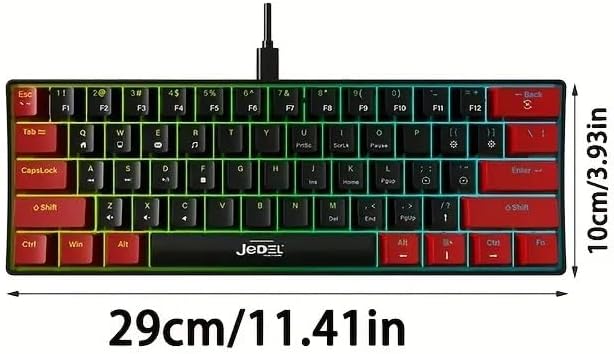
Figure 4: Blue Switches and Double-Shot Keycaps. This close-up view shows the transparent housing of the blue mechanical switches and the durable double-shot keycaps, designed for fast response and longevity.
3.2 Lighting Adjustment Function
The Jedel KL69 keyboard offers 10 distinct rainbow LED lighting modes. Use the following key combinations to adjust the lighting effects:
- Fn + \: Switch between 19 stunning LED lighting effects. (Note: The product description states 10 modes, while the image indicates 19. Please refer to the image for the most accurate number of effects.)
- Fn + [: 백라이트의 밝기를 줄입니다.
- Fn + ]: 백라이트의 밝기를 높입니다.
- Fn + ": Slow down the lighting effect speed.
- Fn + .: Speed up the lighting effect speed.

Figure 5: Introduction to Light Adjustment Functions. This diagram illustrates the Fn key combinations for controlling LED lighting effects, brightness, and speed.
3.3 특수 키 기능
The 60% layout utilizes the Function (Fn) key to access secondary functions of certain keys. Refer to the keycap legends for specific Fn combinations. For example, multimedia controls or F-keys (F1-F12) are typically accessed by holding down the Fn key and pressing the corresponding key.
4. 유지관리
Proper maintenance will ensure the longevity and optimal performance of your Jedel KL69 keyboard. Follow these guidelines for cleaning and care:
- 정기 청소: 부드러운 브러시나 압축 공기를 사용하여 키캡 사이의 먼지와 이물질을 제거하세요.
- 키캡 청소: For deeper cleaning, you can carefully remove keycaps using a keycap puller (if included or purchased separately). Clean the keycaps with a damp 천과 순한 비누로 닦은 후, 다시 부착하기 전에 완전히 말랐는지 확인하세요.
- 표면 청소: 부드럽고 약간 거친 천으로 키보드 표면을 닦으세요.amp 옷감. 가혹한 화학 물질이나 연마재를 사용하지 마십시오.
- 액체 유출: In case of a liquid spill, immediately unplug the keyboard from your computer. Invert the keyboard to drain as much liquid as possible. Allow it to air dry completely for at least 24-48 hours before plugging it back in. Do not use a hairdryer as excessive heat can damage components.
- 저장: 장기간 사용하지 않을 때는 키보드를 건조하고 먼지 없는 곳에 보관하십시오.
5. 문제 해결
If you encounter issues with your Jedel KL69 keyboard, refer to the following common problems and solutions:
| 문제 | 가능한 원인 | 해결책 |
|---|---|---|
| 키보드가 응답하지 않습니다. | USB 연결이 느슨하거나, USB 포트에 결함이 있거나, 드라이버에 문제가 있습니다. |
|
| LED backlight is not working or is dim. | Lighting mode off, brightness set too low, software conflict. |
|
| 일부 키가 작동하지 않습니다. | 키캡 아래 먼지/이물질, 스위치 오작동, 소프트웨어 문제. |
|
6. 사양
Below are the detailed technical specifications for the Jedel KL69 Mechanical Gaming Keyboard:
| 특징 | 세부 사항 |
|---|---|
| 모델 번호 | KL69 |
| 브랜드 이름 | Jedel |
| 키보드 설명 | 기계적 |
| 키의 개수 | 61 |
| 연결 기술 | USB(유선) |
| 특별 기능 | 백라이트(무지개 LED) |
| 색상 | 블랙 / 레드 |
| 호환 장치 | Desktop, Laptop (Windows, Android, etc.) |
| 추천 용도 | 노름 |
| 재료 | 아크릴로니트릴 부타디엔 스티렌(ABS) |
| 포함된 구성 요소 | USB 케이블 |
| 키 수명 | 50천만 프레스 |
| 키보드 크기 (길이 x 너비 x 높이) | 290 x 101 x 38mm(11.41 x 3.93 x 1.49인치) |
| 무게 | Approx. 404 ±5 grams |
| 안티 고스팅 | 전체 N키 롤오버 |

Figure 6: Keyboard Dimensions. This image provides a visual representation of the keyboard's length (29 cm / 11.41 in) and width (10 cm / 3.93 in).
7. 보증 및 지원
For warranty information and technical support, please refer to the documentation provided with your purchase or visit the official Jedel web사이트. 보증 청구를 위해 구매 증빙 자료를 보관하세요.


