ALLPOWERS S300LUS 휴대용 발전소 사용 설명서
모델: AP-SS-005
Thank you for choosing ALLPOWERS. Please read this manual carefully before use and retain it for future reference.
1. 안전 지침
To ensure safe operation and prolong the lifespan of your ALLPOWERS S300LUS Portable Power Station, please observe the following safety guidelines:
- 본 제품을 분해, 수리 또는 개조하지 마십시오. 잘못 재조립할 경우 화재나 부상을 입을 수 있습니다.
- Do not expose the unit to fire or extreme temperatures (above 60°C / 140°F).
- Do not use or store the unit in a bathroom or in areas exposed to water or high humidity.
- 스토브나 히터와 같은 열원 근처에서 제품을 사용하거나 보관하지 마십시오.
- 떨어뜨리거나, 강한 충격을 주거나, 심한 진동을 가하지 마십시오.
- 어린이와 애완동물의 손이 닿지 않는 곳에 보관하세요.
- 정품 또는 인증된 액세서리만 사용하십시오.
- If the unit emits unusual odors, generates heat, or shows any other abnormality, discontinue use immediately and contact customer support.
- 해당 지역의 규정에 따라 제품을 폐기하십시오. 일반 생활 쓰레기와 함께 버리지 마십시오.
2. 제품 오버view
The ALLPOWERS S300LUS is a compact and portable power station designed to provide reliable power for various devices. It features multiple output ports, wireless charging, and several recharging options.
패키지 내용:
- 1 x ALLPOWERS Portable Power Station (S300LUS)
- 1 x AC Adapter and Charging Cable
- 1 x 사용자 설명서
주요 특징:
- 용량: 288Wh / 78000mAh
- AC 출력: 300W (Pure Sine Wave, Peak 600W)
- 다중 출력: AC, USB-A, USB-C, 12V Car Charger, Wireless Charging
- 충전 옵션: AC, Solar, Car Charger, AC + Solar, AC + Car Charger
- 컴팩트한 디자인: 8.1 x 6.5 x 4.3 inches, 8.8 pounds with built-in handle
- 비상등: 통합 LED 조명
- 스마트 컨트롤 : Bluetooth app compatibility (iOS 9.0+, Android 4.3+)
- 안전: Built-in Battery Management System (BMS) for protection against overcurrent, overload, overheating, and short circuits.
구성 요소 식별:

이미지: 앞면 view of the ALLPOWERS S300LUS Portable Power Station, showing the display, AC outlet, USB ports, DC input, and handle.
- AC Output Port (US Standard)
- 무선 충전 패드
- LCD 디스플레이 화면
- AC 전원 버튼
- DC/USB 전원 버튼
- USB-A 출력 포트(2개)
- USB-C 출력 포트(PD 100W)
- 12V Car Charger Output
- 비상용 LED 조명
- 핸들
3. 설정 및 초기 사용
짐 풀기:
Carefully remove the power station and all accessories from the packaging. Inspect for any damage. If any components are missing or damaged, contact customer support immediately.
초기 충전:
Before first use, it is recommended to fully charge the ALLPOWERS S300LUS. This ensures optimal battery performance and calibration.
- Connect the provided AC adapter to the DC Input Port (9) on the power station.
- AC 어댑터를 표준 벽면 콘센트에 꽂습니다.
- The LCD display (3) will show the charging status. The battery icon will animate, and the percentage 증가합니다.
- Charging is complete when the battery icon is full and the display shows 100%.
Initial AC charging typically takes approximately 1.5 hours (Max. 200W).
4. 사용 설명서
전원 켜기/끄기:
- To turn on the unit, press and hold the AC Power Button (4) or DC/USB Power Button (5) for 3 seconds. The LCD display will illuminate.
- To turn off the unit, press and hold the respective power button (AC or DC/USB) for 3 seconds.
- If no output is detected, the unit will automatically shut down after a period of inactivity to conserve power.
AC 출력 사용:
- Press the AC Power Button (4) to activate the AC output. The AC icon will appear on the LCD display.
- Plug your AC device into the AC Output Port (1).
- Ensure your device's power consumption does not exceed 300W (or 600W peak). Overloading will trigger protection and shut down the AC output.
- When finished, press the AC Power Button (4) again to turn off the AC output.
Using DC/USB Outputs:
- Press the DC/USB Power Button (5) to activate the DC and USB outputs. The DC and USB icons will appear on the LCD display.
- Connect your devices to the USB-A Ports (6), USB-C Port (7), or 12V Car Charger Output (8).
- The USB-C port supports Power Delivery (PD) up to 100W.
- When finished, press the DC/USB Power Button (5) again to turn off these outputs.
무선 충전:
- Press the DC/USB Power Button (5) to activate the wireless charging function.
- Place your Qi-compatible device on the Wireless Charging Pad (2).
- 최적의 충전을 위해 기기가 충전 패드 중앙에 위치하도록 하십시오.
- When finished, press the DC/USB Power Button (5) again to turn off wireless charging.

Image: Visual representation of the six output options available on the power station, including AC, USB-C, USB-A, wireless charging, and car charger, with examples of devices being powered.
비상용 LED 조명:
- To turn on the LED light, short press the LED Light button (usually integrated with the DC/USB button or a separate button, refer to unit for exact location).
- Press again to cycle through brightness levels or SOS mode (if available).
- Press and hold to turn off the LED light.
발전소 재충전:
The S300LUS offers multiple ways to recharge:

Image: Infographic detailing the five different ways to recharge the power station: AC, Solar, Car Charger, AC+Solar, and AC+Car Charger, along with estimated charging times.
- AC Wall Outlet (Max. 200W): Connect the provided AC adapter to the DC Input Port (9) and a wall outlet. Approximately 1.5 hours.
- Solar Panel (Max. 100W MPPT): Connect a compatible solar panel (sold separately) to the DC Input Port (9). Ensure the solar panel is placed in direct sunlight. Approximately 3-4 hours (depending on sunlight intensity).
- Car Charger (Max. 100W): Connect a car charger adapter (not included, typically) to the DC Input Port (9) and your vehicle's 12V cigarette lighter socket. Approximately 3-4 hours.
- AC + Solar (Max. 300W): Combine AC wall charging and solar panel charging for faster recharge. Approximately 1 hour.
- AC + Car Charger (Max. 300W): Combine AC wall charging and car charger for faster recharge. Approximately 1 hour.
Note: Charging times are estimates and may vary based on environmental conditions and power source.
Bluetooth 앱 제어:
The ALLPOWERS S300LUS can be controlled remotely via the ALLPOWERS app.
- Download the "ALLPOWERS" app from the App Store (iOS 9.0+) or Google Play Store (Android 4.3+).
- 스마트폰에서 Bluetooth가 활성화되어 있는지 확인하세요.
- Open the app and follow the on-screen instructions to pair with your S300LUS power station.
- Once connected, you can monitor battery status, control outputs, and adjust settings within a 10-meter range.
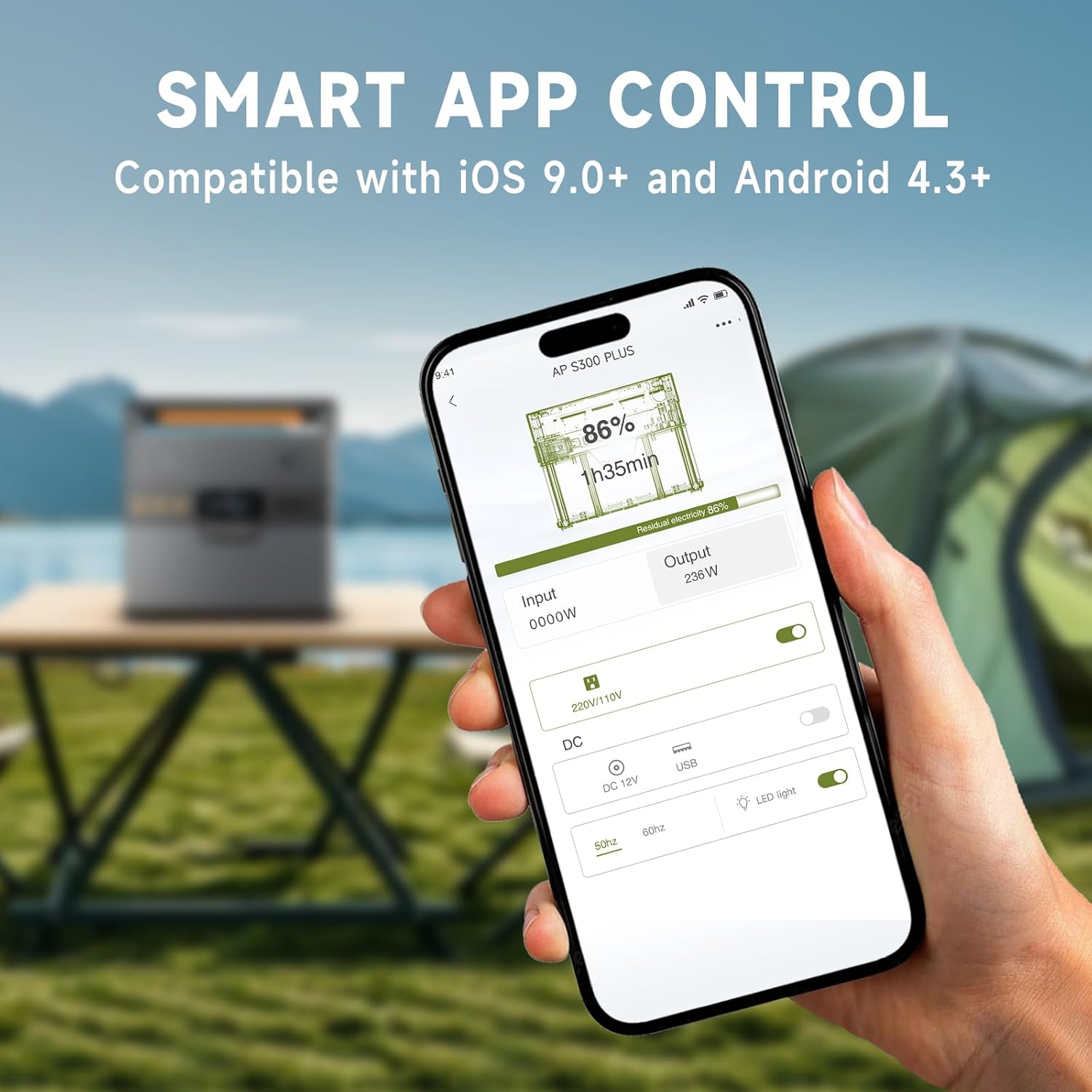
Image: A hand holding a smartphone showing the ALLPOWERS app interface, demonstrating remote control capabilities for the power station.
5. 유지관리
저장:
- Store the power station in a cool, dry place, away from direct sunlight and corrosive materials.
- 장기간 보관하려면 배터리 성능을 유지하기 위해 3~6개월마다 50~80%까지 충전하세요.
- Avoid storing in extreme temperatures (below -10°C / 14°F or above 45°C / 113°F).
청소:
- 부드럽고 마른 천으로 외부를 닦습니다.
- 연마성 세척제나 용제를 사용하지 마십시오.
- 모든 포트에 먼지와 이물질이 없는지 확인하십시오.
6. 문제 해결
| 문제 | 가능한 원인 | 해결책 |
|---|---|---|
| 기기가 켜지지 않습니다. | 배터리가 소진되었습니다. | Charge the power station using the AC adapter. |
| AC 출력이 작동하지 않습니다. | AC output not activated; device exceeds 300W. | Press the AC Power Button. Reduce load or use a lower-power device. |
| USB/DC 출력이 작동하지 않습니다. | DC/USB 출력이 활성화되지 않았습니다. | Press the DC/USB Power Button. |
| 무선 충전이 작동하지 않습니다. | Device not Qi-compatible; device not centered; DC/USB output not activated. | Ensure device is Qi-compatible and correctly placed. Activate DC/USB output. |
| 태양광을 이용한 느린 충전. | Insufficient sunlight; panel not correctly angled; panel not compatible. | Adjust panel angle for direct sunlight. Ensure panel is compatible and clean. |
| 블루투스 연결 문제. | Bluetooth off on phone; app not updated; unit too far. | Ensure phone Bluetooth is on. Update app. Move phone closer to unit (within 10m). |
문제가 지속될 경우 ALLPOWERS 고객 지원팀에 문의하십시오.
7. 사양
| 특징 | 세부 사항 |
|---|---|
| 모델명 | AP-SS-005 |
| 배터리 용량 | 288Wh / 78000mAh |
| 교류 출력 | 300W (Pure Sine Wave, Peak 600W) |
| USB-A 출력 | 2 x 18W |
| USB-C 출력 | 1 x 100W (QC3.0) |
| 12V Car Charger Output | 1 x 12V/10A |
| 무선 충전 | 1 x 5V/1A |
| AC 충전 입력 | 최대. 200W |
| 태양열 충전 입력 | Max. 100W (MPPT) |
| 제품 치수 | 8.1인치 길이 x 6.5인치 너비 x 4.3인치 높이(20.5cm x 16.5cm x 10.9cm) |
| 품목 무게 | 8.8파운드(4kg) |
| 배터리 유형 | 리튬폴리머 |
8. 보증 및 지원
보증 정보:
The ALLPOWERS S300LUS Portable Power Station comes with a 10-year ALLPOWERS warranty. This warranty covers manufacturing defects and workmanship under normal use. Please retain your proof of purchase for warranty claims.
보증은 잘못된 사용, 사고, 무단 개조 또는 자연 재해로 인한 손상에는 적용되지 않습니다.
고객 지원:
For technical assistance, warranty claims, or any questions regarding your ALLPOWERS S300LUS, please contact ALLPOWERS customer support through their official web구매 시 제공된 사이트 또는 연락처 정보.
또한 방문할 수 있습니다 ALLPOWERS Store on Amazon 자세한 제품 정보와 지원 리소스를 확인하세요.


