1. 소개 및 이상view
The DEWENWILS PTM01 is a heavy-duty 24-hour mechanical timer switch designed for automatic control of various electrical appliances. It features a robust metal enclosure, is weatherproof, and is suitable for both indoor and outdoor applications. This timer is ideal for managing devices such as pool pumps, water heaters, lights, and fans, offering reliable scheduling with its mechanical dial.
주요 특징은 다음과 같습니다.
- Automatic 24-hour control with up to two ON/OFF programs daily.
- High power load capacity: Max 40A, 120V, 2HP motor.
- Simplified wiring for easier installation.
- Weatherproof NEMA-3R metal enclosure with IP44 rating.
- 안전성과 신뢰성을 인정받아 ETL 인증을 받았습니다.
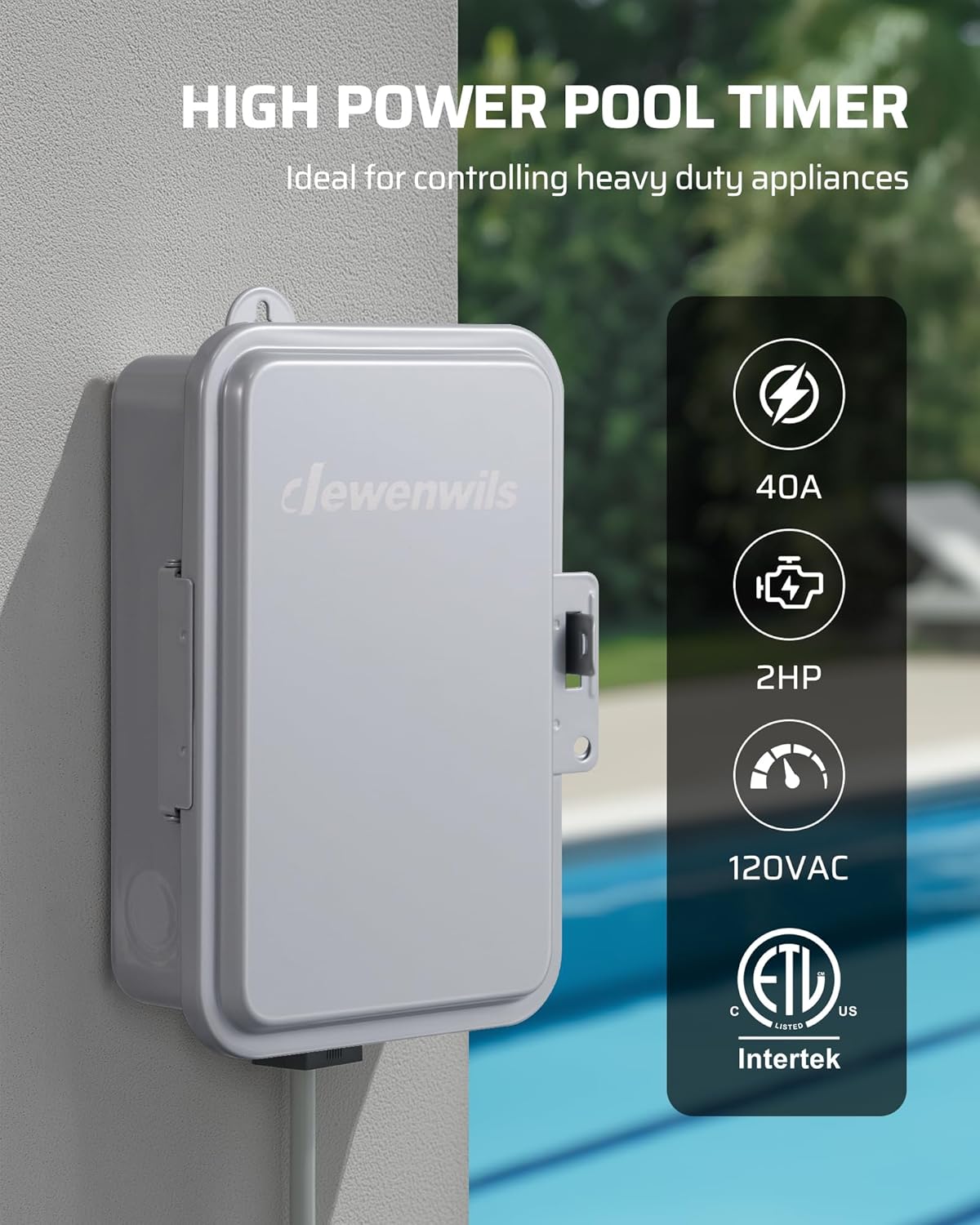
Image 1.1: The DEWENWILS PTM01 Mechanical Timer Switch, showcasing its robust design and suitability for heavy-duty applications.
2. 안전 정보
Please read and understand all instructions before installing or operating this device. Failure to follow these instructions may result in electric shock, fire, or serious injury.
- 경고: Risk of electric shock. Installation should be performed by a qualified electrician or service personnel.
- 타이머를 설치하거나 수리하기 전에 항상 회로 차단기 또는 퓨즈 박스에서 전원을 차단하십시오.
- 모든 배선 연결이 안전하고 현지 전기 규정을 준수하는지 확인하세요.
- Do not exceed the maximum load ratings of 40A, 120VAC, 2HP.
- This timer is designed for 120VAC applications only. Do not use with 240VAC systems.
- Keep the enclosure door closed and latched to maintain its weatherproof rating.
- 구리 도체만 사용하세요.
3. 패키지 내용
설치를 시작하기 전에 모든 구성 요소가 있는지 확인하세요.
- DEWENWILS PTM01 Mechanical Timer Switch Unit
- 설치 설명서(본 문서)
- 장착 하드웨어(나사, 앵커)
- ON/OFF Trippers (pre-installed or included separately)
4. 제품 특징
- 24-Hour Mechanical Dial: Allows for setting up to two ON/OFF cycles within a 24-hour period, which repeat daily.
- 고하중 용량: 최대 40의 하중을 견딜 수 있습니다. Amps at 120 Volts AC, suitable for motors up to 2 Horsepower.
- 방수형 케이스: Constructed with a NEMA-3R rated metal enclosure and IP44 waterproof protection, ensuring durability in harsh outdoor conditions (operating temperature range: -40°F to 140°F).
- 수동 오버라이드 스위치: Provides immediate ON/OFF control without affecting the programmed schedule.
- 간편한 배선: Designed with clear internal layout and wiring guides to simplify installation.
- ETL 인증: Ensures the product meets recognized safety standards.

Image 4.1: The timer's weatherproof design, suitable for outdoor installation in various weather conditions.
5. 사양
| 모델 번호 | PTM01 |
| 입력 Voltage | 120VAC, 60Hz |
| 스위치 유형 | SPST(단극 단투) |
| 최대 부하 | 40A Resistive, 2HP (120VAC) |
| 인클로저 정격 | NEMA-3R, IP44 Weatherproof |
| 작동 온도 | -40°F ~ 140°F(-40°C ~ 60°C) |
| 재료 | 금속 |
| 치수 | 4.72인치 깊이 x 6.69인치 너비 x 7.87인치 높이 |
| 인증 | ETL 등록됨 |
6. 설치
중요한: All wiring must comply with national and local electrical codes. Installation should be performed by a qualified electrician. Ensure power is disconnected at the main panel before beginning installation.
6.1 타이머 박스 장착
- Choose a suitable location for mounting the timer box. It should be easily accessible and protected from direct impact.
- Use the provided mounting hardware to securely attach the timer box to a wall or sturdy surface. Ensure the box is level.
6.2 배선 지침
The PTM01 timer box is designed for straightforward wiring. Refer to the internal wiring diagram and the images below for guidance. This timer supports controlling one or two 120VAC loads simultaneously.
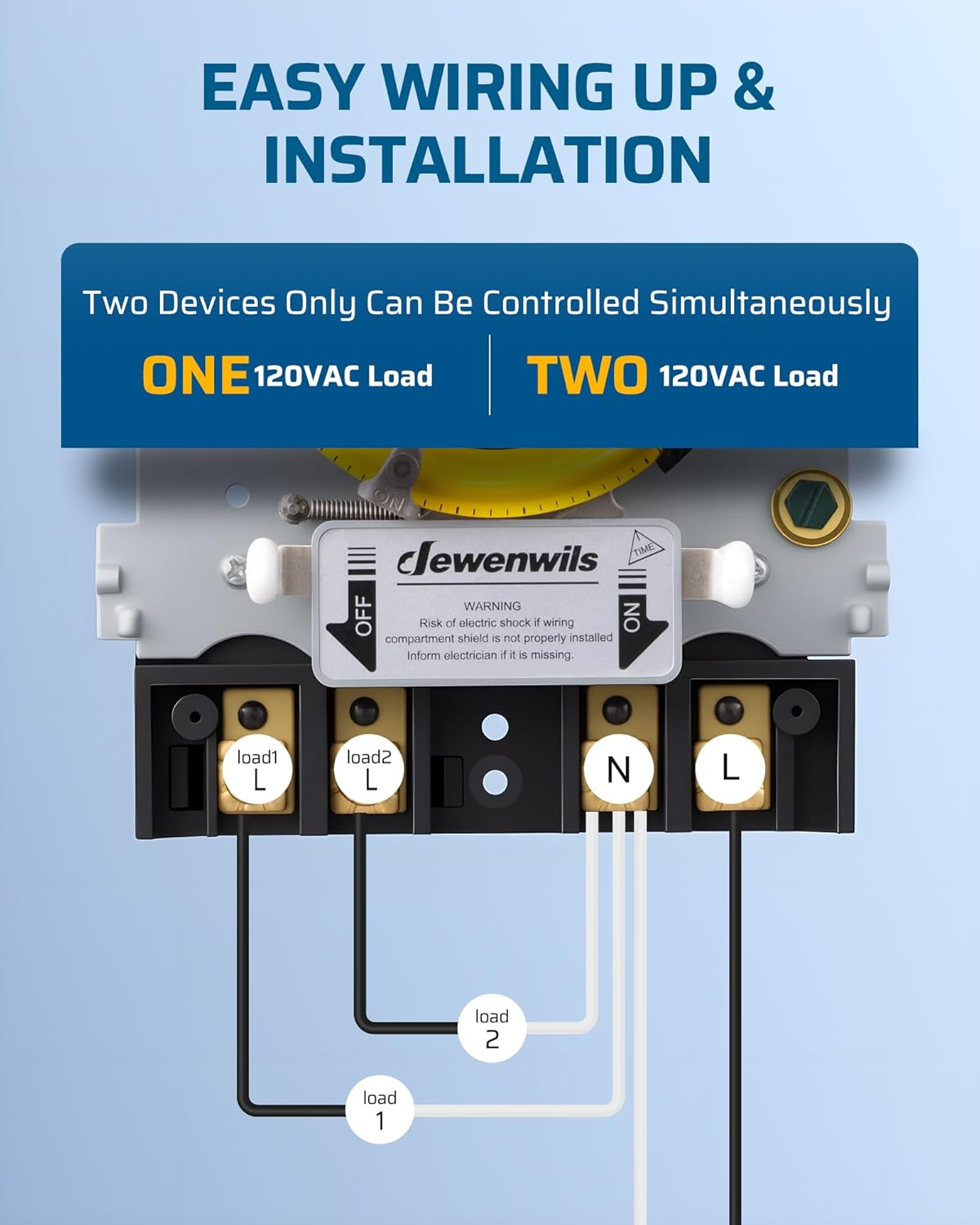
Image 6.1: Simplified wiring diagram for connecting one or two 120VAC loads to the timer switch.

이미지 6.2: 내부 view of the timer box, showing the mechanical dial, manual override switch, and clearly labeled wiring terminals.
- 전원 입력: Connect the incoming 120VAC Line (L) and Neutral (N) wires to the designated "Power L" and "Power N" terminals.
- Load Output (One Device):
- Connect the load's Line wire to the "Load L" terminal.
- Connect the load's Neutral wire to the "Load N" terminal.
- Load Output (Two Devices):
- For Load 1: Connect its Line wire to "Load1 L" and its Neutral wire to "Load1 N".
- For Load 2: Connect its Line wire to "Load2 L" and its Neutral wire to "Load2 N".
- 모든 연결이 단단하고 안전한지 확인하세요.
- After wiring, close and latch the enclosure door to maintain its weatherproof integrity.
7. 사용 설명서
7.1 현재 시간 설정
- Open the timer box door.
- Gently rotate the yellow mechanical dial clockwise until the current time aligns with the "TIME" arrow indicator on the inner housing. The dial is marked with 24 hours (1-12 AM, 1-12 PM).
- No tools are required for this adjustment.

이미지 7.1: 상세 view of the mechanical dial, showing the current time indicator and the ON/OFF trippers.
7.2 켜짐/꺼짐 주기 프로그래밍
The timer comes with two sets of trippers: a white tripper for ON and a black tripper for OFF. These trippers are inserted into the slots around the edge of the yellow dial.
- 켜짐 시간 설정: Insert a white tripper into the slot corresponding to the desired ON time.
- 꺼짐 시간 설정: Insert a black tripper into the slot corresponding to the desired OFF time.
- You can set up to two ON/OFF cycles per 24-hour period. Ensure that an ON tripper is followed by an OFF tripper for each cycle.
- Once set, the timer will automatically repeat these cycles daily.

이미지 7.2: 시각적 예시ample of setting ON/OFF times for a fountain, illustrating the daily cycle.
7.3 수동 오버라이드
The timer features a manual override switch located below the dial. This switch allows you to temporarily turn the connected device ON or OFF without altering the programmed schedule.
- Slide the switch to "ON" to keep the device continuously ON, overriding the schedule.
- Slide the switch to "OFF" to keep the device continuously OFF, overriding the schedule.
- Slide the switch to "AUTO" (center position) to resume the programmed schedule.

Image 7.3: Explanation of the manual override switch positions and their functions.
8. 유지관리
- 청소: 타이머 박스 외부를 주기적으로 닦아주세요.amp cloth. Do not use abrasive cleaners or solvents. Ensure the door seal is free of debris.
- 점검: Regularly check the timer box for any signs of damage, corrosion, or loose connections. Ensure the door latch is functioning correctly to maintain weatherproof integrity.
- 사용자가 수리할 수 없는 부품: The internal mechanism of the timer is not user-serviceable. Do not attempt to open or repair the internal components.
9. 문제 해결
| 문제 | 가능한 원인 | 해결책 |
|---|---|---|
| 장치가 프로그래밍된 시간에 켜지거나 꺼지지 않습니다. |
|
|
| 기기는 항상 켜져 있거나 항상 꺼져 있습니다. | 수동 조작 스위치가 작동 중입니다. | Set the manual override switch to "AUTO" to resume programmed operation. |
| 연결된 장치에 전원이 공급되지 않습니다. |
|
|
10. 공식 제품 영상
Video 10.1: An official product video demonstrating the features and operation of the DEWENWILS PTM01 24-Hour Mechanical Timer Switch, including its weatherproof design and ease of setting.
11. 보증 및 지원
For warranty information or technical support, please refer to the warranty card included with your product or contact DEWENWILS customer service directly. Contact details can typically be found on the manufacturer's official web사이트 또는 제품 포장에 표시되어 있습니다.


