1. 서론
Welcome to the user manual for the IKIER K1 Pro Max Laser Engraver. This powerful machine is designed for precision engraving and cutting on a variety of materials including wood, metal, acrylic, and leather. Featuring a 48000mW laser output, advanced autofocus, and high-speed capabilities, the K1 Pro Max offers versatility and efficiency for your creative projects. Please read this manual thoroughly before operation to ensure safe and optimal use of your device.

Image: The IKIER K1 Pro Max Laser Engraver, showcasing its main components and the R2 Rotary Roller accessory, along with examples of engraved and cut materials.
2. 안전 정보
Operating a laser engraver involves inherent risks. Adhere to all safety guidelines to prevent injury or damage.
- 눈 보호: Always wear appropriate laser safety goggles (OD6+) when the laser is active. Direct exposure to the laser beam can cause severe eye damage.
- 통풍: Operate the machine in a well-ventilated area or use an exhaust system to remove fumes and particles generated during engraving/cutting. Some materials produce toxic fumes.
- 화재 위험: Laser engraving/cutting can ignite materials. Never leave the machine unattended during operation. Keep a fire extinguisher nearby.
- 재료 호환성: Only engrave or cut materials approved for laser processing. Avoid PVC, vinyl, or other chlorine-containing materials as they produce corrosive and toxic gases.
- 전기 안전: Ensure the machine is properly grounded. Do not operate with wet hands or in damp conditions. Disconnect power before performing maintenance.
- Child Lock & Safety Features: Utilize the child lock feature to prevent unauthorized use. Familiarize yourself with the gyroscope, omnidirectional limit switch, and flame detector safety functions.
- 레이저 클래스: 본 제품은 4등급 레이저 기기입니다. 사용 시 각별한 주의를 기울이십시오.

Image: Illustration of the four safety functions: Child lock, Gyroscope, Omnidirectional limit switch, and Flame Detector, designed to enhance operational safety.
3. 패키지 내용
Upon opening the package, verify that all components are present and undamaged. The standard package for the IKIER K1 Pro Max typically includes:
- IKIER K1 Pro Max Laser Engraver Unit (Pre-assembled frame)
- 48000mW Laser Module
- R2 Rotary Roller (Optional, may be included depending on package)
- 전원 어댑터 및 케이블
- USB 케이블
- 안전 고글
- 공기 보조 펌프 및 튜브
- Samp시험용 재료
- 사용 설명서(본 문서)
- 조립 도구(필요한 경우)
4. 설정 가이드
Follow these steps to set up your IKIER K1 Pro Max Laser Engraver:
- 짐 풀기: 모든 구성품을 포장에서 조심스럽게 꺼내세요. 나중에 보관하거나 운반할 수 있도록 원래 포장재를 보관하세요.
- 집회: The K1 Pro Max frame comes largely pre-assembled. Attach the gantry to the main frame using the provided screws. Ensure all connections are secure.
- 레이저 모듈 설치: Mount the laser module onto the gantry according to the instructions in the quick start guide. Connect the necessary cables.
- 에어 어시스트 연결: Connect the air assist pump to the designated port on the laser module and the machine.
- 전원 연결: Connect the power adapter to the machine and then to a suitable power outlet. Do not power on yet.
- 소프트웨어 설치: Install the recommended software (e.g., LaserGRBL, LightBurn) on your computer. The IKIER APP is also available on app stores.
- 초기 연결: Connect the engraver to your computer via USB or Wi-Fi (if supported).
5. 사용 설명서
This section outlines the basic operation of your laser engraver.
- 전원 켜기: Turn on the machine using the main power switch. Observe the LED display for status.
- 재료 배치: Place your material securely on the working surface. Ensure it is flat and stable.
- 자동 초점 : The IKIER K1 Pro Max features a motorized Z-axis for automatic focusing. The machine will measure the distance to the object and adjust the focus automatically.
- Power Switching (48W/24W): Utilize the power switch on the laser module to select between 48W for cutting and 24W for fine engraving.
- 소프트웨어 준비: Open your chosen software (e.g., LightBurn). Import or create your design. Configure laser parameters (speed, power, passes) based on your material and desired outcome.
- Air Assist Control: The smart air assist system automatically adjusts airflow. Ensure it is enabled for cutting (strong airflow) and set to weak airflow for engraving.
- 작업 시작: 소프트웨어에서 조각 또는 절단 공정을 시작하십시오. 작동 중에는 기계를 면밀히 관찰하십시오.
- Offline Working: For offline operation, copy your engraving or cutting files to a USB drive and use the 4.3-inch touch screen to control the machine.
- 전원 끄기 : Once the task is complete, power off the machine and disconnect from the power source.

Image: Visual representation of the cutting mode (48W high power) and engraving mode (24W small light spot 2K fine engraving) with their respective power switching options.

Image: Depiction of the motorized Z-axis, infrared cross positioning, and autofocus sensing point, highlighting the automatic focusing and air assist features.
6. 주요 특징
- 강력한 48W 레이저 출력: The K1 Pro Max utilizes the latest laser technology, delivering up to 48000mW output power. This enables single-pass cutting of 25mm wood, 19mm black acrylic, and 0.3mm stainless steel. It can also directly carve colored patterns on mirror stainless steel, ceramics, and opaque glass.
- Resume Engraving Function: An advanced automatic power failure recovery system remembers the engraving position, allowing the machine to quickly locate and continue engraving from where it left off after an unexpected power outage. This prevents material waste and ensures uninterrupted production.
- Motorized Z-axis with Autofocus: Eliminates manual focusing. The intelligent Z-axis automatically measures the distance to the object and adjusts the focus for precise results.
- Revolutionary Design & High Engraving Speed: Upgraded optical axis and linear guides provide stability and reliability, supporting engraving speeds up to 900mm/s, which is significantly faster than many other machines.
- Super Cooling System: Features an innovative dual air duct design with 4 high-quality copper tubes for heat conduction, double rows of large fins, and a high-power fan for maximum heat dissipation of the laser module.
- 32-bit Smart Motherboard: Greatly improves data processing capacity and speeds up machine efficiency.
- 풍부한 인터페이스: Includes USB, HDMI, Type-C, Power, and Air Assist interfaces for versatile connectivity.
- PC Software and APP Compatibility: Compatible with Windows and macOS systems, supporting software like LaserGRBL and LightBurn. The IKIER APP is available on the Apple App Store and Google Play Store.
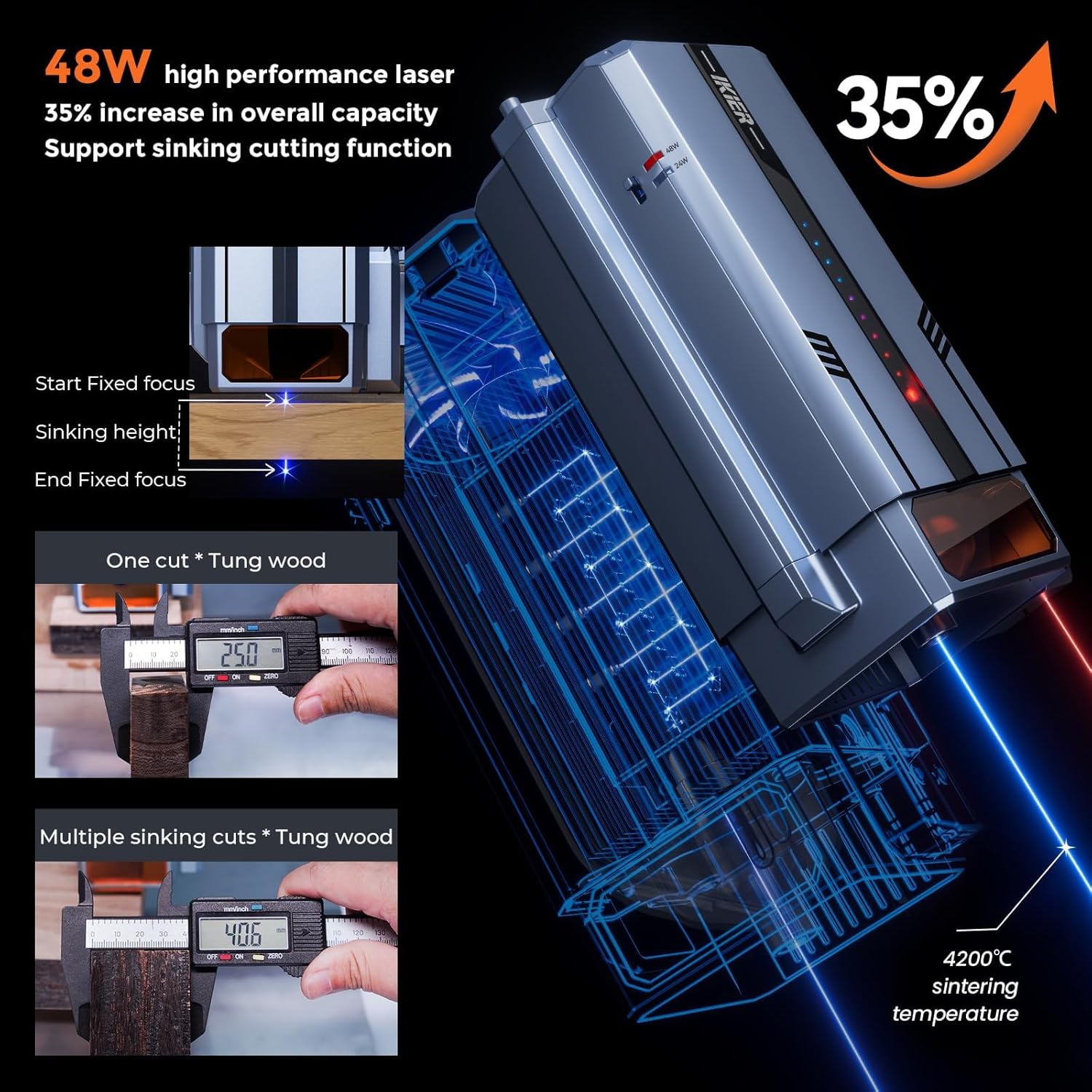
Image: Details on the 48W laser performance, including a 35% increase in overall capacity and support for the sinking cutting function, showing how the laser adjusts focus during multi-pass cuts.

이미지: 내부 view of the new 32-bit motherboard and a close-up of the upgraded optical axis and linear guides, illustrating how they contribute to the 900mm/s engraving speed and improved accuracy.
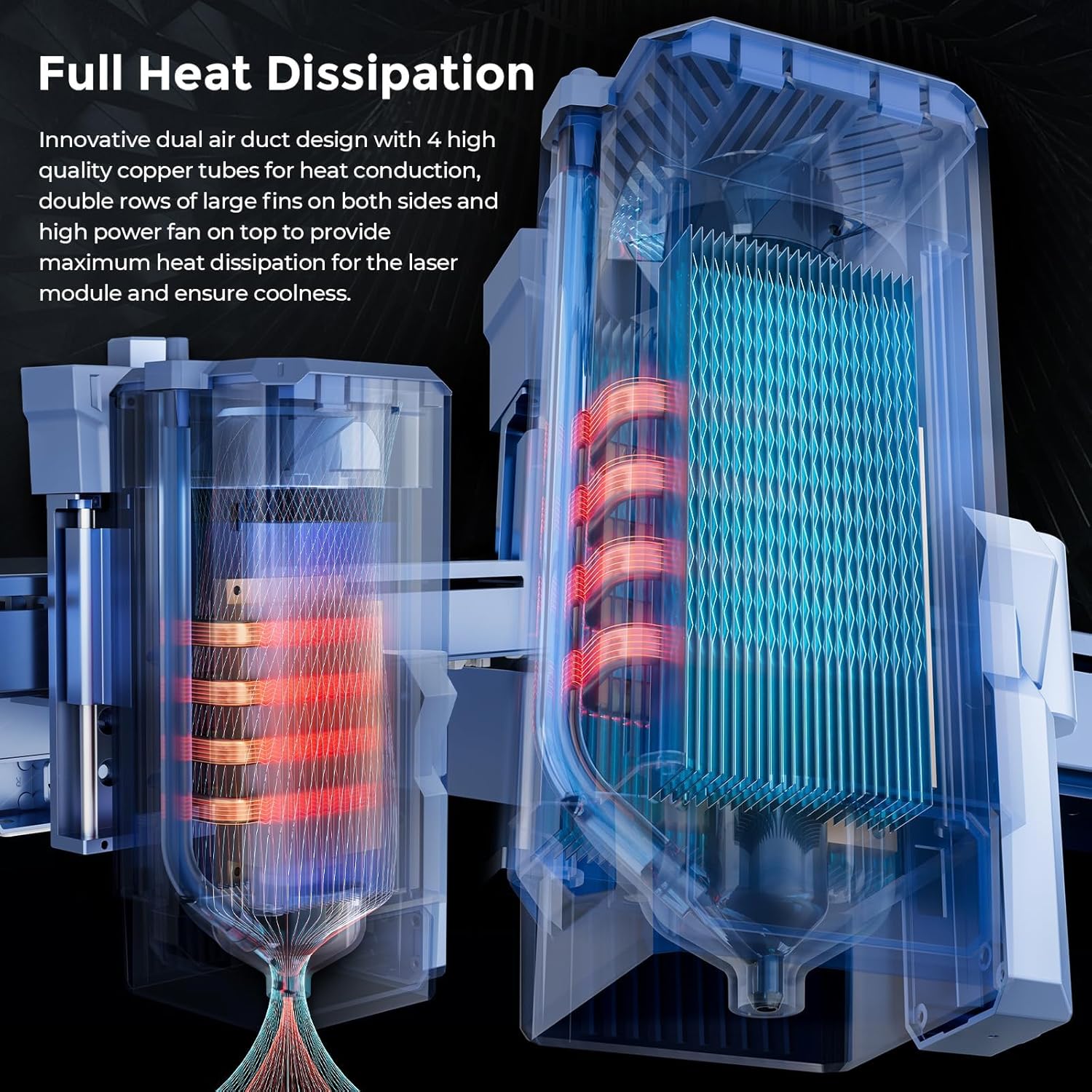
Image: Diagram illustrating the innovative dual air duct design, copper tubes, and large fins for efficient heat dissipation within the laser module.
7. 유지관리
정기적인 유지 관리는 IKIER K1 Pro Max의 수명 연장과 최적의 성능을 보장합니다.
- 레이저 렌즈 청소: Periodically clean the laser lens with a lint-free cloth and lens cleaning solution. A dirty lens can reduce laser power and engraving quality.
- 작업 공간 청소: Remove debris and dust from the working surface and around the machine after each use.
- 매끄럽게 하기: Apply a small amount of lubricant to the linear guides and screws as recommended by the manufacturer to ensure smooth movement.
- 펌웨어 업데이트: IKIER 공식 웹사이트를 확인하세요. website or app for any available firmware updates to ensure your machine operates with the latest improvements and bug fixes.
- 케이블 검사: 모든 케이블에 마모나 손상 흔적이 있는지 정기적으로 검사하세요. 손상된 케이블은 즉시 교체하세요.
8. 문제 해결
이 섹션에서는 일반적으로 발생할 수 있는 문제에 대한 해결책을 제공합니다.
| 문제 | 가능한 원인 | 해결책 |
|---|---|---|
| 기계의 전원이 켜지지 않습니다. | Power cable disconnected; power switch off; faulty power supply. | Ensure power cable is securely connected. Check main power switch. Test power outlet. Contact support if issue persists. |
| Autofocus not working correctly. | Obstruction in sensor path; Z-axis mechanism issue; software glitch. | Clear any debris around the autofocus sensor. Check for smooth movement of the Z-axis. Restart the machine and software. Ensure firmware is up to date. |
| Poor engraving/cutting quality. | Incorrect focus; dirty laser lens; wrong power/speed settings; material not flat. | Verify autofocus is correctly set. Clean the laser lens. Adjust power and speed settings for the material. Ensure material is flat on the workbed. |
| Machine moves or fires unexpectedly. | Firmware issue; software communication error; electrical interference. | Immediately power off the unit. Restart the machine and computer. Ensure software is correctly configured and updated. Check for loose connections. If persistent, contact technical support. |
| Connection issues (USB/Wi-Fi). | Driver issues; incorrect port selection; Wi-Fi interference. | Reinstall drivers. Try a different USB port or cable. Check Wi-Fi signal strength and network settings. |
9. 사양
| 특징 | 세부 사항 |
|---|---|
| 모델 번호 | IKIER K1 Pro Max |
| 레이저 출력 전력 | 48000mW (48W) |
| 조각 속도 | 최대 900mm/s |
| 제품 치수 | 25.5 x 29.5 x 8.7 인치 |
| 품목 무게 | 31파운드 |
| 제조업체 | 이키에르 |
| 레이저 클래스 | 4학년 |
| 연결성 | USB, Wi-Fi (via app) |
| 지원 자료 | Wood, Metal, Acrylic, Leather, etc. |
10. 보증 및 지원
For warranty information, technical support, or service inquiries, please contact IKIER customer service through their official web제품을 구매한 사이트 또는 소매업체에 문의하십시오. 구매 증빙을 위해 구매 영수증을 보관하십시오.
온라인 리소스:
- IKIER Official Web대지: Visit IKIER Store on Amazon
- Software Downloads & Updates: Refer to the software provider's official websites (e.g., LightBurn, LaserGRBL) or the IKIER APP.


