1. 제품 오버view
The ORICO 40Gbps M.2 NVMe SSD Enclosure (Model CNM2-U4-GY) is designed for high-speed data transfer and external storage. It features a built-in cooling fan and an aluminum alloy shell to ensure optimal thermal management during intensive use. This enclosure supports M-Key NVMe SSDs and is compatible with various interfaces including USB4, Thunderbolt 4/3, USB 3.2, USB 3.1, and USB 3.0.

이미지 1.1: 이상view of the ORICO 40Gbps M.2 NVMe SSD Enclosure.
2. 패키지 내용
패키지에 모든 품목이 들어 있는지 확인하세요.
- 1 x ORICO 40Gbps NVMe SSD Enclosure
- 1 x 2-in-1 USB Cable (USB-C to USB-C 40Gbps, USB-C to USB-A 10Gbps)
- 1 x 열 실리콘 패드
- 1 x 드라이버
- Screws for SSD installation
- 사용자 설명서

Image 2.1: Contents included in the ORICO NVMe SSD Enclosure package.
3. 사양
| 특징 | 설명 |
|---|---|
| 모델 번호 | CNM2-U4-GY |
| 인터페이스 | USB4 (40Gbps), Thunderbolt 4/3, USB 3.2/3.1/3.0 |
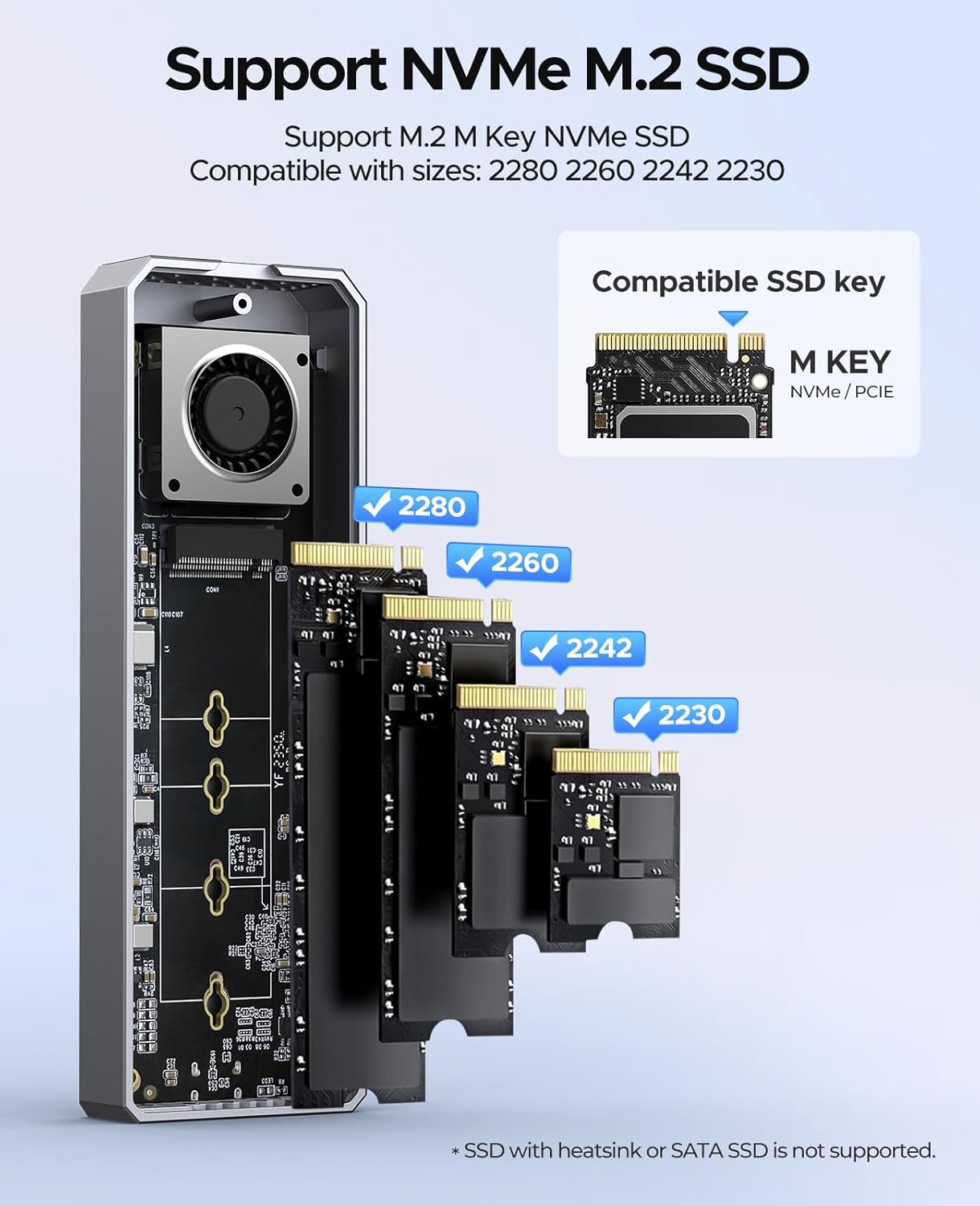
| SSD 호환성 | M-Key 2230/2242/2260/2280 NVMe SSDs (up to 8TB) |
| 냉각 시스템 | Built-in Fan, Aluminum Alloy Shell, Silicone Thermal Pads |
| 데이터 전송 속도 | Up to 40Gbps (Read: 3500 MB/s, Write: 3000 MB/s) |
| 치수(길이x너비x높이) | 5.83 x 1.93 x 0.71 인치 |
| 무게 | 9.1 온스 |
| 재료 | 알루미늄 합금 |
| 지원되는 OS | 윈도우, 맥OS, 리눅스, 안드로이드 |
Note: Not compatible with Intel CPUs prior to 12th Gen. Not recommended for SN750, 970 EVO Plus, or P3 SSDs. SATA SSDs are not supported.
4. 설정 및 설치
M.2 NVMe SSD를 외장 케이스에 설치하려면 다음 단계를 따르십시오.
- 덮개를 제거하십시오: Use the provided screwdriver to unscrew the retaining screw and gently slide open the upper cover of the enclosure.
- M.2 SSD를 설치합니다. Insert your M.2 NVMe SSD into the M.2 interface at a 45-degree angle. Gently push down the SSD and secure it with the provided screw to fix it in place. Ensure the SSD is M-Key compatible and of size 2230, 2242, 2260, or 2280.
- 써멀 패드를 부착하세요: Place the silicone thermal pad onto the installed SSD. This helps in heat dissipation.
- 전체 설치: Close the upper cover and secure it with the retaining screw.

Image 4.1: Step-by-step guide for M.2 NVMe SSD installation.

Image 4.2: Supported M.2 NVMe SSD types and sizes.
5. 운영
Once the SSD is installed, connect the enclosure to your host device using the provided 2-in-1 USB cable. The enclosure is plug-and-play and does not require additional drivers for most operating systems.
5.1 데이터 전송
Utilize the USB-C to USB-C cable for 40Gbps transfer speeds when connecting to compatible Thunderbolt 3/4 or USB4 ports. For devices with USB-A ports, use the USB-C to USB-A cable for speeds up to 10Gbps. The enclosure supports UASP and TRIM commands for optimized performance and SSD longevity.

Image 5.1: Enclosure connected to a laptop for data transfer.
5.2 전력 공급
The USB-C to USB-C cable also supports 100W Power Delivery (PD) fast charging, allowing for simultaneous data transfer and device charging if your host device supports it.

Image 5.2: The versatile 2-in-1 data cable for the enclosure.
6. 냉각 시스템
The ORICO NVMe SSD Enclosure incorporates a multi-level cooling system to maintain optimal operating temperatures for your SSD, preventing performance throttling and ensuring stability during prolonged use.
- 내장형 냉각 팬: An integrated fan actively circulates air to dissipate heat. The fan operates at 7000 RPM, producing approximately 40-60 decibels of sound.
- 알루미늄 합금 쉘: The entire enclosure is constructed from aluminum alloy, which acts as a large heatsink to draw heat away from the SSD.
- 실리콘 열 패드: These pads create direct contact between the SSD and the aluminum casing, enhancing thermal conductivity.
이미지 6.1: 내부 view 내장형 냉각 팬을 강조합니다.

Image 6.2: Illustration of the multi-level cooling design.
7. 호환성
The enclosure offers broad compatibility with various devices and operating systems:
7.1 Host Device Compatibility
- Intel 12th Gen CPUs and later
- Apple M1/M2/M3/M4 chips
- AMD CPUs
- Compatible with devices featuring Thunderbolt 3/4, USB4, USB 3.2, USB 3.1, and USB 3.0 interfaces.
Note: Not compatible with Intel CPUs prior to 12th Gen, including older Apple devices.
7.2 운영 체제 호환성
- 윈도우
- 맥 OS
- 아이패드 OS
- 리눅스
- 기계적 인조 인간

이미지 7.1: 이상view of device and system compatibility.
8. 문제 해결
If you encounter issues with your ORICO NVMe SSD Enclosure, consider the following:
- 인클로저가 감지되지 않았습니다:
- SSD가 외장 케이스에 올바르게 설치되고 고정되었는지 확인하십시오.
- Try connecting the enclosure to a different USB/Thunderbolt port on your device.
- 가능하다면 다른 USB 케이블로 테스트해보세요.
- Verify that your host device's operating system is up to date and has the necessary drivers for USB/Thunderbolt.
- 디스크 관리(Windows) 또는 디스크 유틸리티(macOS)를 사용하여 드라이브가 인식되었지만 초기화되지 않았거나 포맷되지 않았는지 확인하십시오.
- 느린 전송 속도:
- Ensure you are using a 40Gbps compatible port (Thunderbolt 3/4 or USB4) and the USB-C to USB-C cable for maximum speed.
- Confirm your SSD is capable of high speeds.
- 시스템 리소스나 디스크 I/O를 많이 사용하는 다른 애플리케이션을 종료하십시오.
- Check for background processes like antivirus scans.
- 과열:
- Ensure the thermal silicone pad is correctly placed on the SSD.
- Avoid obstructing the ventilation holes on the enclosure.
- While the fan helps, continuous heavy load can still generate heat. Allow the device to cool if it becomes excessively hot.
- SSD Not Supported:
- Confirm your SSD is an M-Key NVMe SSD and not a SATA M.2 SSD. SATA M.2 SSDs are not compatible.
- Refer to the specifications for specific SSD models that are not recommended (e.g., SN750, 970 EVO Plus, P3).
9. 보증 및 지원
ORICO products typically come with a manufacturer's warranty. Please refer to the warranty card included in your package or visit the official ORICO web자세한 보증 약관은 해당 사이트에서 확인하세요.
For technical support, product inquiries, or warranty claims, please contact ORICO customer service through their official channels. Contact information can usually be found on the ORICO web사이트 또는 제품 포장.
When contacting support, please have your product model number (CNM2-U4-GY) and purchase information readily available.


