1. 서론
This manual provides essential information for the installation, operation, and maintenance of your FSP VITA GM 650W ATX 3.1 PC Power Supply. Please read this manual thoroughly before installation to ensure proper and safe usage of the product. The FSP VITA GM 650W is designed to deliver stable and efficient power to your computer system, adhering to the ATX 3.1 and PCIe Gen 5.1 specifications.
2. 안전 정보
부상이나 장비 손상을 방지하기 위해 항상 다음 안전 수칙을 준수하십시오.
- 전원 공급 장치를 열지 마십시오. 고전압tages are present inside, and opening the casing를 사용하면 보증이 무효화되고 감전 위험이 발생합니다.
- 전원 공급 장치는 열원, 직사광선, 습기가 없는 통풍이 좋은 곳에 설치하세요.
- Ensure the power supply is correctly installed and secured in your PC case.
- Use only the modular cables provided with the power supply. Using incompatible cables can cause damage.
- Connect the power supply to a grounded electrical outlet.
- Disconnect the AC power cord from the wall outlet before installing or removing the power supply or any other components.
- 전원 공급 장치나 케이블 위에 무거운 물건을 올려놓지 마십시오.
- If the power supply is damaged or malfunctioning, discontinue use immediately and contact FSP support.
3. 패키지 내용
패키지에 모든 품목이 들어 있는지 확인하세요.
- FSP VITA GM 650W ATX 3.1 PC Power Supply
- Modular Cable Set (Motherboard, CPU, PCIe, SATA, Peripheral)
- AC 전원 코드
- 장착 나사
- 사용 설명서 (본 문서)
4. 제품 오버view
The FSP VITA GM 650W is a high-efficiency power supply designed for modern PC systems. It features:
- ATX 3.1 규정 준수: Designed to meet the latest Intel Power Design Guide ATX 3.1 specifications, ensuring compatibility with future hardware.
- PCIe Gen 5.1 지원: Ready for next-generation graphics cards.
- 80 플러스 골드 인증: Achieves high efficiency, reducing power dissipation, heat, and noise.
- Synchronous Rectifier LLC Resonance Converter Topology: Reduces switching loss and enhances efficiency.
- +5V & 3.3V DC to DC Circuit Design: Improves efficiency and stabilizes output voltage.
- 105°C Japanese Bulk Capacitor: Ensures reliability and extended lifespan.

그림 4.1: 전면 view FSP VITA GM 650W 전원 공급 장치의 쇼asin컴팩트한 디자인과 팬 그릴이 특징입니다.
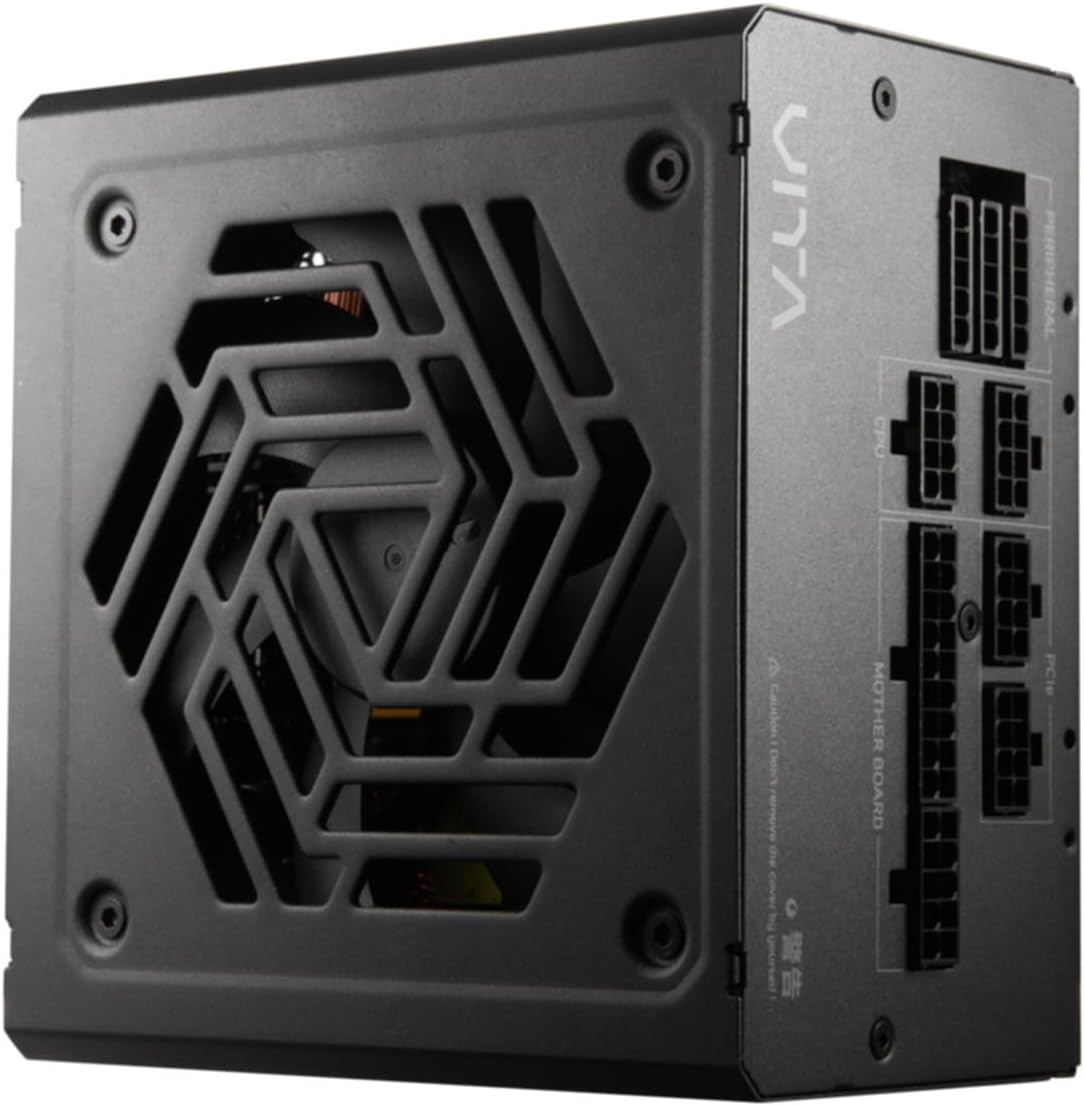
그림 4.2: 상향식 view of the FSP VITA GM 650W Power Supply, highlighting the fan and ventilation design.

그림 4.3: 측면 view of the FSP VITA GM 650W Power Supply, showing the FSP branding and VITA model name.
5. 설정 및 설치
Follow these steps to install your FSP VITA GM 650W power supply:
- 준비:
- 컴퓨터를 끄고 벽면 콘센트에서 AC 전원 코드를 뽑으세요.
- 컴퓨터 케이스를 엽니다.
- 기존 전원 공급 장치를 교체하는 경우 기존 PSU에서 모든 케이블을 분리하고 케이스에서 PSU를 제거하세요.
- PSU 장착:
- Carefully place the FSP VITA GM 650W into the power supply bay of your PC case.
- 파워서플라이의 나사 구멍과 케이스의 나사 구멍을 맞춰주세요.
- 제공된 장착 나사를 사용하여 전원 공급 장치를 고정합니다.
- 모듈형 케이블 연결:
The FSP VITA GM 650W is a modular power supply. Connect only the cables required for your system components.

Figure 5.1: Modular cable connection panel. Ensure cables are firmly seated.
- 마더보드 전원: 24핀 ATX 케이블을 마더보드에 연결합니다.
- CPU 파워: Connect the 4+4-pin or 8-pin EPS/ATX12V cable(s) to the CPU power connector(s) on your motherboard.
- PCIe 전원: Connect the 6+2-pin PCIe cables to your graphics card(s).
- SATA 전원: SATA 전원 케이블을 SSD, HDD 및 광학 드라이브에 연결하십시오.
- 주변 전원: Connect 4-pin Molex cables to other peripherals as needed.
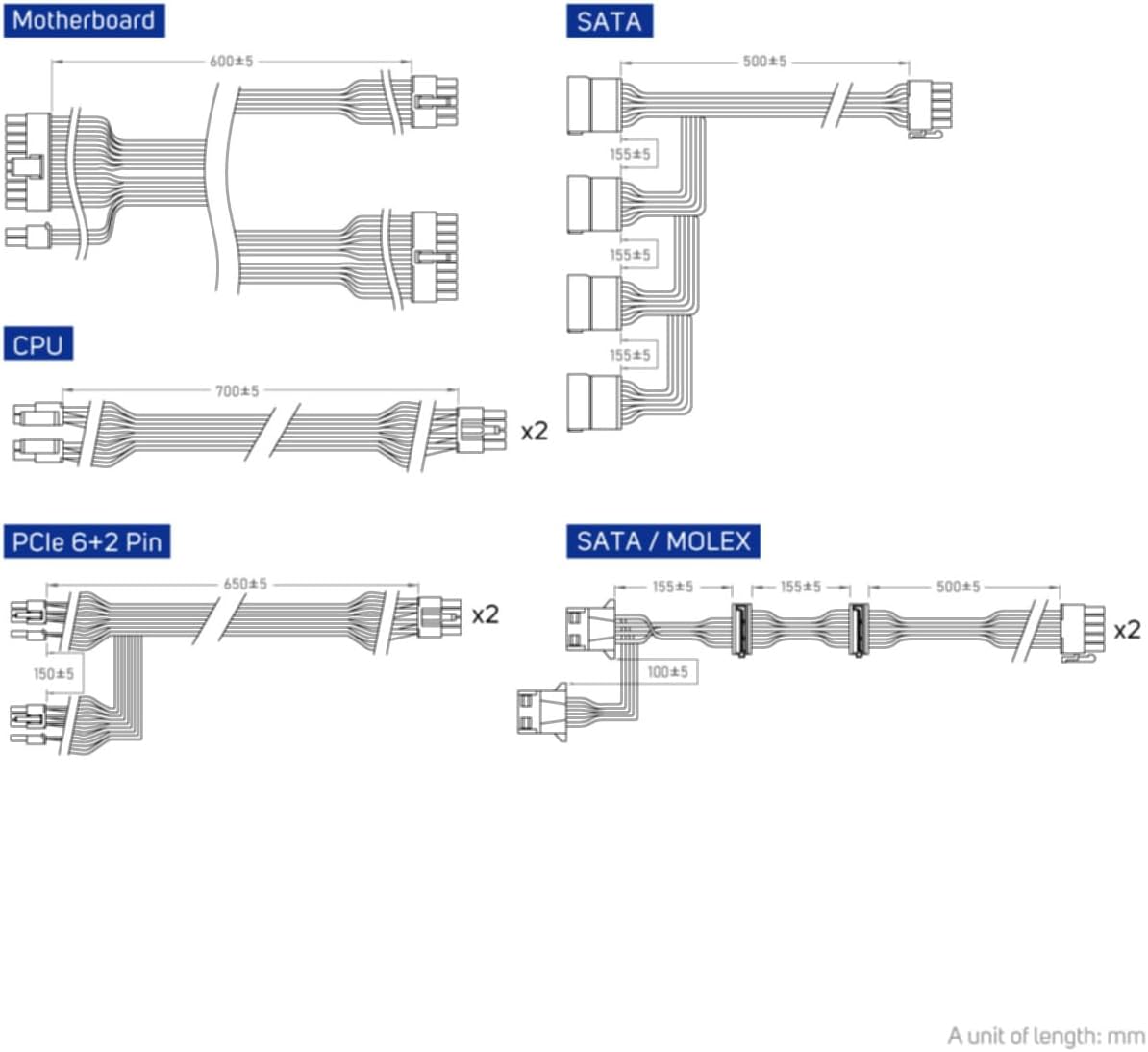
Figure 5.2: Diagram illustrating the various modular cables included and their approximate lengths (in mm).
- 최종 점검:
- Ensure all cables are securely connected and routed to avoid obstructing airflow.
- 컴퓨터 케이스를 닫습니다.
- AC 전원 코드를 전원 공급 장치에 연결한 다음 접지된 벽면 콘센트에 연결하세요.
6. 사용 설명서
After installation, you can power on your system:
- Ensure the power switch on the back of the power supply is in the "ON" (I) position.
- 컴퓨터 케이스의 전원 버튼을 누르세요.
- The power supply will provide stable power to your components.

그림 6.1: 후면 view of the power supply, showing the AC power input and the main power switch.
Bridge Time Importance: The FSP VITA GM 650W adheres to the recommended ATX 3.1 bridge time values. This feature ensures the power supply can maintain a stable output voltage for a critical duration after a power interruption, preventing system instability or damage during sudden power fluctuations or outag에스.
7. 유지관리
전원 공급 장치의 최적 성능과 수명 연장을 위해서는 다음 사항을 준수하십시오.
- 먼지 청소: 전원 공급 장치의 팬 그릴과 통풍구에 쌓인 먼지를 주기적으로 압축 공기를 사용하여 청소하십시오. 청소하기 전에 시스템의 전원을 끄고 전원 플러그를 뽑으십시오.
- 케이블 관리 : Maintain good cable management inside your PC case to ensure proper airflow and prevent overheating.
- 환경 조건: 권장 온도 및 습도 범위 내에서 전원 공급 장치를 작동하십시오.
8. 문제 해결
If you encounter issues with your FSP VITA GM 650W power supply, refer to the following common problems and solutions:
| 문제 | 가능한 원인 | 해결책 |
|---|---|---|
| 시스템 전원이 켜지지 않습니다. |
|
|
| 시스템이 켜지지만 즉시 종료됩니다. |
|
|
| 파워서플라이에서 이상한 소음이 납니다. |
|
|
If the problem persists after trying these solutions, please contact FSP customer support for further assistance.
9. 사양
| 특징 | 세부 사항 |
|---|---|
| 모델 번호 | 790980 |
| 상표 | FSP |
| 왓tage | 650와트 |
| ATX 버전 | 3.1 |
| 효율성 인증 | 80 PLUS 골드 |
| 품목 무게 | 2.72킬로그램(5.98파운드) |
| 제조업체 | FSP |
| 첫 번째 이용 가능 날짜 | 15년 2024월 XNUMX일 |
10. 보증 및 지원
For warranty information, technical support, or service inquiries, please refer to the official FSP web사이트를 방문하거나 고객 서비스 부서에 문의하세요. 보증 청구를 위해 구매 증빙 자료를 보관하세요.
FSP 공식 Web대지: www.fsp-group.com
11. 재활용 및 폐기
Please dispose of this product responsibly. Electronic waste should not be disposed of with household waste. Contact your local authorities or recycling center for information on proper disposal methods for electronic components.


