1. 서론
The Beafon Silverline ML10 LTE Desk Phone is designed for ease of use and reliability, offering essential communication features with enhanced safety options. This manual provides detailed instructions for setting up, operating, and maintaining your device.
주요 특징은 다음과 같습니다.
- 4G LTE Desk Phone connectivity
- Hearing Aid Compatible (HAC M4/T4)
- Programmable SOS emergency numbers with included SOS wristband/necklace (433 MHz range)
- Three quick dial keys for photos or symbols
- Digital announcement when pressing keys
- Extra-large XXL digits on display
- Extra loud ringer (90 dB) and earpiece volume (+40 dB)
- Hands-free function and Bluetooth LE
- SMS functionality and Audio Booster button

2. 중요한 안전 정보
부상이나 기기 손상을 방지하기 위해 사용 전에 모든 안전 지침을 읽어 주십시오. 나중에 참조할 수 있도록 이 설명서를 보관하십시오.
- 기기를 극한의 온도, 직사광선 또는 습기에 노출시키지 마세요.
- 승인된 액세서리와 전원 어댑터만 사용하십시오.
- 장치를 떨어뜨리거나 강한 충격을 가하지 마십시오.
- 직접 기기를 분해하거나 수리하지 마십시오. 자격을 갖춘 서비스 담당자에게 문의하세요.
- Keep the device away from medical devices, such as pacemakers, to avoid interference.
3. 패키지 내용
패키지에 모든 품목이 들어 있는지 확인하세요.
- Beafon Silverline ML10 LTE Desk Phone unit
- 핸드셋과 코일 코드
- 전원 어댑터
- USB charger cable (USB-C)
- SOS wristband
- SOS necklace
- Lithium-ion battery (pre-installed or separate)
- 사용 설명서 (본 문서)
4. 제품 오버view
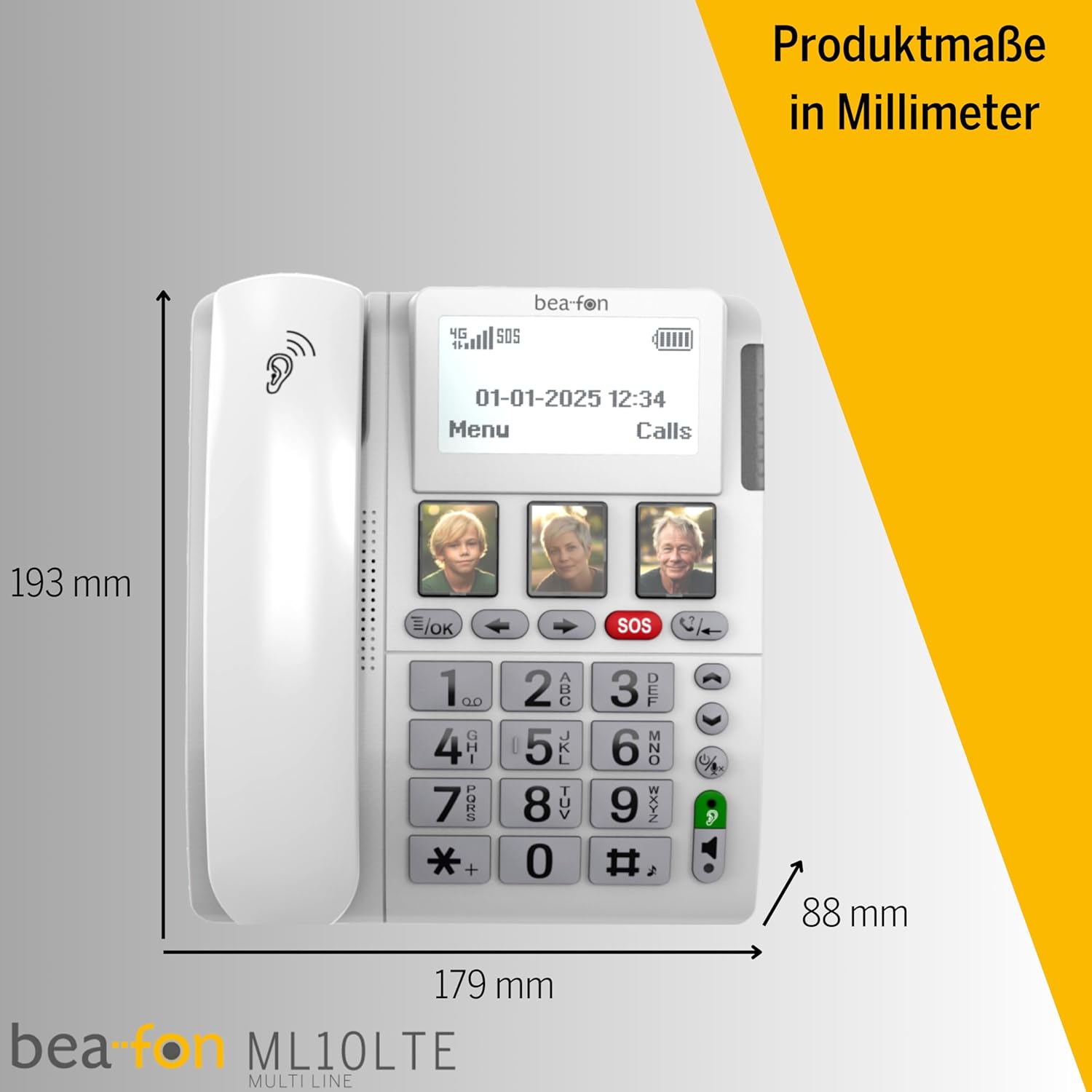
Familiarize yourself with the various parts of your Beafon ML10 desk phone.


5. 설정
5.1. SIM 카드 삽입
- Ensure the phone is powered off and disconnected from the power source.
- Locate the SIM card slot, usually on the back or side of the device.
- Insert a Nano SIM card into the designated slot, ensuring correct orientation.
- SIM 카드 슬롯 덮개를 단단히 닫으세요.
5.2. 전원 연결하기
- Connect the USB-C charger cable to the phone's charging port.
- 전원 어댑터를 벽면 콘센트에 꽂으세요.
- The phone can operate on battery power via 4G LTE, eliminating the need for a fixed line connection.
5.3. 초기 전원 켜기 및 언어 선택
- Press and hold the Power button until the display turns on.
- 화면의 지시에 따라 원하는 언어를 선택하세요.
- The phone will automatically search for a 4G LTE network.

6. 사용 설명서
6.1. 전화 걸고 받기
- 전화 걸기: Lift the handset, dial the number using the large keypad, and press the green call button.
- 전화 받기: When the phone rings (up to 90 dB), lift the handset or press the hands-free button to answer.
- 핸즈프리 기능: Press the dedicated hands-free button to activate speakerphone during a call.
6.2. Quick Dial Keys
The phone features three programmable quick dial keys (I, II, III) that can be customized with photos or symbols for easy access to frequently called contacts.
- 프로그램 작성: Navigate to the phone's menu, select 'Quick Dial Settings', and assign a contact number to each key. You can also associate a photo or symbol.
- 사용: Simply press the desired quick dial key to call the assigned contact.
6.3. SOS 비상 기능
The SOS function allows you to quickly contact pre-selected emergency numbers. It includes an SOS button on the phone and a separate SOS wristband/necklace.
- SOS 번호 프로그래밍: Access the 'SOS Settings' in the menu to program up to five emergency contact numbers.
- Activating SOS (Phone): Press and hold the red SOS button on the phone. The phone will automatically call the programmed numbers in sequence until an answer is received.
- Activating SOS (Wristband/Necklace): Press the button on the SOS wristband or necklace. This will trigger the phone to initiate the emergency call sequence. The wristband/necklace has a range of 433 MHz.


6.4. 기타 기능
- 문자: The phone supports sending and receiving text messages. Access the 'Messages' menu to compose or read SMS.
- Audio Booster: Press the Audio Booster button during a call to temporarily increase the earpiece volume for clearer audio.
- 블루투스 르: Use Bluetooth Low Energy to connect compatible wireless accessories.
- HAC Compatibility: The phone is certified HAC M4/T4, making it suitable for users with hearing aids.
7. 유지관리
7.1. 장치 청소
휴대폰을 최적의 상태로 유지하려면:
- 부드러운 천으로 휴대폰 표면을 닦으세요.amp 옷감.
- 독한 화학 물질이나 연마성 세제를 사용하지 마십시오.
- Ensure no moisture enters openings such as the microphone or speaker.
7.2. 배터리 관리
The phone is powered by a Lithium-ion battery. To prolong battery life:
- 배터리를 자주 완전히 방전시키지 마세요.
- Charge the phone regularly, especially if not in use for extended periods.
- 사용하지 않을 때는 장치를 서늘하고 건조한 곳에 보관하십시오.
8. 문제 해결
If you encounter issues with your Beafon ML10, refer to the following common problems and solutions:
| 문제 | 가능한 해결책 |
|---|---|
| 전화기 전원이 켜지지 않습니다 | Check if the power adapter is correctly connected and the battery is charged. Ensure the battery is properly inserted. |
| 전화를 걸거나 받을 수 없습니다 | Verify that the SIM card is correctly inserted and activated. Check for network signal strength on the display. Restart the phone. |
| SOS 기능이 작동하지 않습니다 | Ensure SOS numbers are correctly programmed. Check the battery level of the SOS wristband/necklace. Verify the wristband/necklace is within range (433 MHz). |
| 오디오 품질이 좋지 않음 | Adjust the earpiece volume. Ensure the microphone is not blocked. If using hands-free, ensure you are close to the phone. |
| 디스플레이가 비어 있거나 멈췄습니다. | Try restarting the phone by holding the power button. If unresponsive, disconnect power and re-connect. |
9. 사양
Technical details of the Beafon Silverline ML10 LTE Desk Phone:
| 특징 | 세부 사항 |
|---|---|
| 상표 | 비폰 |
| 모델 번호 | 15031162187 |
| 운영 체제 | 실시간 운영체제 |
| 전화 유형 | 나노 SIM |
| 연결성 | 4G LTE, Bluetooth LE |
| 배터리 구성 | 리튬이온(1개 포함) |
| 전원 | 배터리 구동 |
| 벨소리 볼륨 | 최대 90dB |
| Earpiece Volume | + 40dB |
| 보청기 호환성 | HAC M4/T4 |
| SOS Wristband/Necklace Range | 433MHz |
| 무게 | 210그램 |
| 거는 사람 확인 | 예 |
| 다중 라인 작업 | 단일 라인 작업 |
10. 보증 및 지원
Information regarding the specific warranty period and detailed support contact information for the Beafon Silverline ML10 LTE Desk Phone is not available in the provided product data. Please refer to the product packaging or the manufacturer's official website for the most current warranty terms and customer support details.


