1. 제품 오버view
Thank you for choosing the BACKWIN In-Ear Wired Earphones. These earphones are designed to provide a high-quality audio experience with deep bass, comfort, and noise isolation. They feature a standard 3.5mm jack for broad compatibility and an integrated microphone for convenient communication.
주요 특징:
- 프리미엄 사운드: Dynamic subwoofer unit delivers immersive, high-quality audio.
- 편안한 핏: Includes three types of ear hooks and S/M/L ear pads for a secure and comfortable fit.
- 광범위한 호환성: Standard 3.5mm audio jack connects seamlessly to various devices.
- 내구성: Features durable, fold-resistant wires and enhanced metallic design.
- 고화질 마이크: Equipped with an HD microphone for clear voice and calls.
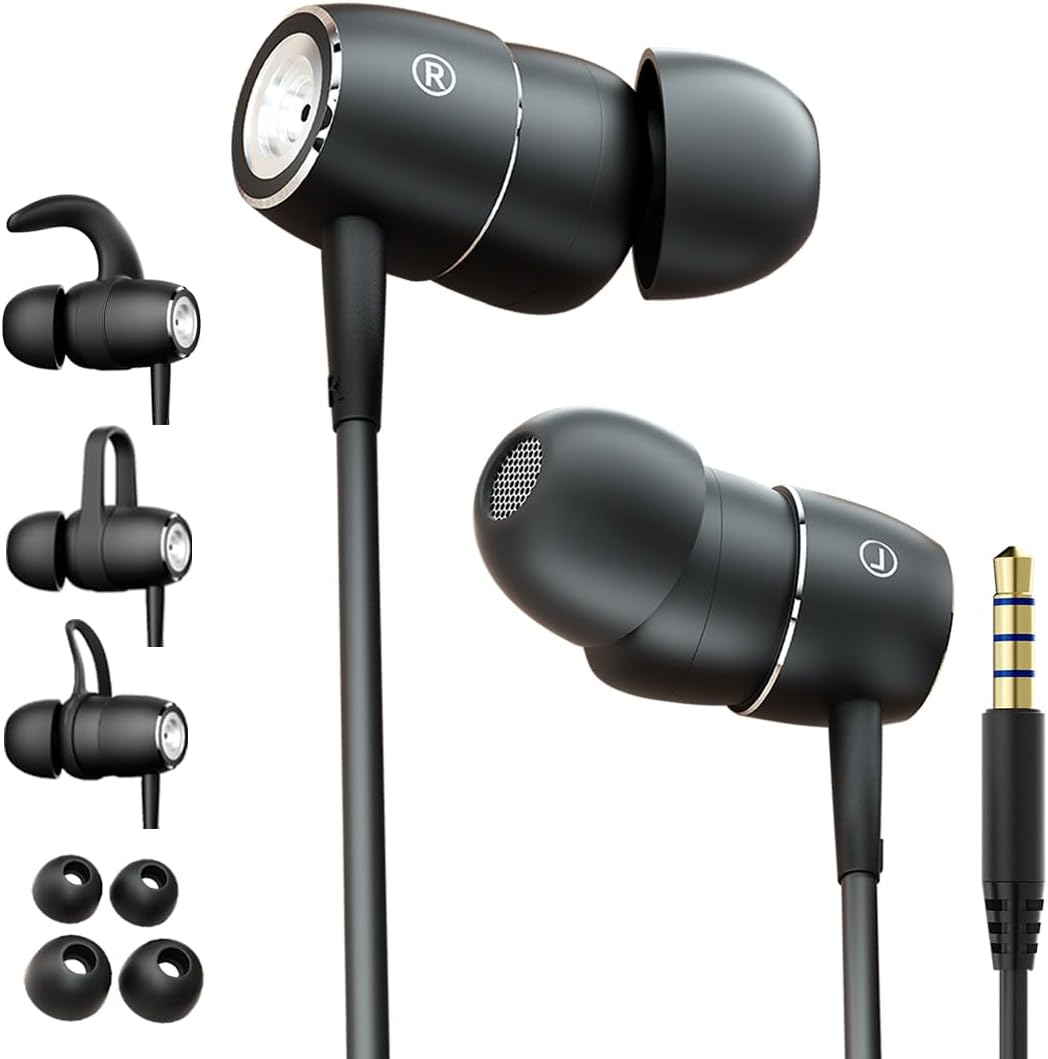
Figure 1: BACKWIN In-Ear Wired Earphones. This image displays the BACKWIN In-Ear Wired Earphones, highlighting their sleek black design, the 3.5mm audio jack, and the various ear hooks and ear tips provided for a customized fit.
2. 설정 및 설치
2.1 Choosing the Right Ear Tips and Ear Hooks
For optimal sound quality and comfort, select the ear tips and ear hooks that best fit your ears. Experiment with the different sizes (S/M/L ear pads) and styles of ear hooks provided.
- 귀 팁: Gently pull off the pre-installed ear tips. Select a size that creates a good seal in your ear canal without causing discomfort. Push the new ear tip firmly onto the earphone nozzle.
- 귀걸이: The ear hooks provide additional stability, especially during physical activity. Choose a hook style that comfortably secures the earphone in your outer ear. Attach the ear hook to the designated slot on the earphone body.

Figure 2: Earphones with interchangeable ear hooks and ear tips. A close-up view of the BACKWIN earphones alongside their interchangeable ear hooks and ear tips, demonstrating the customization options for comfort and secure fit.

Figure 3: Three types of ear hooks. This image provides a detailed look at the earphone unit and the three distinct styles of ear hooks, illustrating how they can be attached to secure the earphone in place.
2.2 장치에 연결하기
The earphones feature a standard 3.5mm audio jack for universal compatibility.
- 스마트폰, 태블릿, 노트북 또는 기타 오디오 기기에서 3.5mm 오디오 포트를 찾으세요.
- Insert the 3.5mm jack of the earphones firmly into the device's audio port until it clicks into place.
- 오디오 중단을 방지하려면 연결이 안전한지 확인하세요.

Figure 4: Earphones with 3.5mm jack and inline controls. The earphones are shown with their 3.5mm jack and the integrated inline remote control, which includes buttons for volume adjustment and playback.
2.3 이어폰 착용하기
Proper placement ensures comfort and optimal sound isolation.
- 왼쪽(L) 이어폰과 오른쪽(R) 이어폰을 구분하세요.
- 각 이어폰을 해당 귓구멍에 부드럽게 삽입하십시오.
- Adjust the earphone and ear hook (if used) until it feels secure and comfortable. The ear tip should form a gentle seal in your ear canal.

Figure 5: Proper earphone placement. A young man wearing the BACKWIN In-Ear Wired Earphones, demonstrating their discreet and comfortable fit during use.

Figure 6: Secure fit with ear hooks. A young woman wearing the BACKWIN In-Ear Wired Earphones, illustrating how the ear hooks provide a secure and stable fit, ideal for active use.
3. 사용 설명서
3.1 오디오 재생
Once connected, audio from your device will automatically play through the earphones. Adjust the volume using your device's controls or the inline remote control.
3.2 Inline Remote Control Functions
The earphones are equipped with an inline remote for convenient control of audio and calls.
- 재생/일시 중지: 오디오를 재생하거나 일시 정지하려면 중앙 버튼을 한 번 누르세요.
- 다음 트랙: 다음 트랙으로 건너뛰려면 가운데 버튼을 빠르게 두 번 누르세요.
- 이전 트랙 : Press the center button three times quickly to go back to the previous track.
- 볼륨 업: 볼륨을 높이려면 '+' 버튼을 누르세요.
- 볼륨 작게 : '-' 버튼을 눌러 볼륨을 줄이세요.
3.3 전화 걸기 및 받기
The integrated high-definition microphone allows for hands-free calls.
- 전화 받기/종료: 가운데 버튼을 한 번 누르면 걸려오는 전화를 받거나 통화 중인 전화를 종료할 수 있습니다.
- 전화 거부: 수신 전화를 거부하려면 중앙 버튼을 약 2초간 길게 누르세요.
4. 유지관리 및 관리
Proper maintenance will extend the lifespan of your earphones and ensure optimal performance.
- 귀마개 청소 방법: 정기적으로 이어팁을 분리하여 부드러운 천으로 닦아주세요.amp cloth. For deeper cleaning, they can be washed with mild soap and water, then thoroughly dried before reattaching.
- Cleaning Earphones: Wipe the earphone bodies and cable with a dry, soft cloth. Avoid using harsh chemicals or abrasive materials.
- 저장: When not in use, store the earphones in a clean, dry place, preferably in a small pouch or case to prevent tangling and damage to the wires.
- 극한의 환경을 피하세요: 이어폰을 극한의 온도, 습도 또는 직사광선에 노출시키지 마세요.
- 조심스럽게 다루십시오: While the wires are designed to be fold-resistant, avoid excessive bending or pulling on the cable, especially near the connectors.
5. 문제 해결
이어폰 사용 중 문제가 발생하면 다음의 일반적인 해결 방법을 참조하십시오.
- 소리 없음:
- 3.5mm 잭이 기기의 오디오 포트에 완전히 삽입되었는지 확인하세요.
- Check the volume level on your device and using the inline remote.
- Test the earphones with another device to rule out a device-specific issue.
- Ensure the audio output is directed to the headphone jack on your device settings.
- 음질이 좋지 않음(왜곡, 볼륨 낮음):
- 이어팁이 귓구멍에 제대로 밀착되었는지 확인하세요. 다양한 크기의 이어팁을 사용해 보세요.
- Clean any debris from the earphone nozzles and ear tips.
- 음원의 음질이 양호한지 확인하십시오.
- 마이크가 작동하지 않음:
- Ensure the 3.5mm jack is fully inserted. Some devices require a TRRS (4-pole) jack for microphone functionality, which these earphones provide.
- 기기의 오디오 입력 설정을 확인하여 외부 마이크가 선택되어 있는지 확인하세요.
- 다른 애플리케이션이나 장치로 마이크를 테스트해 보세요.
- Earphones Keep Falling Out:
- Experiment with different ear tip sizes and ear hook styles to find the most secure fit for your ears.
- Ensure the ear hooks are correctly attached and positioned.
6. 사양
| 특징 | 사양 |
|---|---|
| 모델명 | B220 |
| 연결 기술 | 열광한 |
| 헤드폰 잭 | 3.5 mm 잭 |
| 감광도 | 106데시벨 |
| 주파수 응답 | 2000 kHz (XNUMX kHz) |
| 임피던스 | 16옴 |
| 소음 제어 | 소리 차단 |
| 폼 팩터 | 귀에 |
| 귀 위치 | 귀에 |
| 색상 | 검은색 |
| 재료 | 금속 |
| 제조업체 | backwin |
| 호환 장치 | Laptops, Mobile phones |
| 제어 유형 | 볼륨 조절 |
| 포함된 구성 요소 | 이어팁 |
7. 보증 및 지원
For warranty information and customer support, please refer to the documentation included with your purchase or contact the manufacturer directly. You can typically find contact details on the product packaging or the manufacturer's official web대지.
제조업체: backwin


