소개
This user manual provides important information for the safe and efficient operation of your Technaxx TX-315 10000mAh 3-in-1 Wireless Fast Charging Power Bank. Please read this manual thoroughly before using the device and keep it for future reference.
안전 지침
- 모바일 기기를 극한의 온도, 직사광선 또는 불에 노출시키지 마세요.
- 기기를 직접 분해, 수리 또는 개조하지 마십시오. 모든 정비는 자격을 갖춘 기술자에게 맡기십시오.
- 보조 배터리를 물이나 기타 액체에 닿지 않게 보관하세요.
- Do not drop, hit, or subject the device to strong impacts.
- 충전이나 방전 시에는 적절한 환기를 유지하세요.
- 어린이의 손이 닿지 않는 곳에 보관하세요.
- 전자 폐기물 처리 관련 지역 규정에 따라 보조 배터리를 폐기하십시오.
제품 끝view
Familiarize yourself with the components of your Technaxx TX-315 power bank:
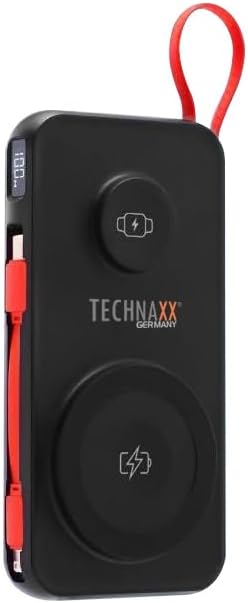
Image: The Technaxx TX-315 power bank, a black rectangular device with a red lanyard. It features a digital display on the side, a USB-C port, a USB-A port, a built-in red USB-C cable, a magnetic wireless charging pad for smartphones, and a smaller wireless charging pad for smartwatches. The Technaxx logo is visible on the front.
- 디지털 디스플레이: 배터리 비율을 표시합니다.tage.
- Magnetic Wireless Charging Pad (15W): 호환되는 스마트폰용.
- Smartwatch Wireless Charging Pad (3W): For compatible smartwatches.
- USB-A Output Port (22.5W): For wired charging of various devices.
- USB-C Input/Output Port (20W PD): For charging the power bank or wired charging of devices.
- 내장형 USB-C 케이블: 장치 충전에 편리합니다.
- 전원 버튼: Activates the display and charging functions.
설정
파워뱅크 충전하기
- Connect the power bank to a USB wall charger (not included) using the built-in USB-C cable or a separate USB-C to USB-C cable via the USB-C port.
- 디지털 디스플레이는 충전 진행 상황을 표시하며 배터리 잔량을 나타냅니다.tage.
- 보조 배터리의 디스플레이에 "100%"가 표시되면 완전히 충전된 것입니다.
운영
Charging Smartphones Wirelessly (15W)
- 전원 버튼을 눌러 보조 배터리를 활성화하세요.
- Place your MagSafe-compatible or Qi-enabled smartphone onto the larger magnetic wireless charging pad. Ensure proper alignment for optimal charging.
- The phone's charging indicator will confirm charging has begun.
Charging Smartwatches Wirelessly (3W)
- 전원 버튼을 눌러 보조 배터리를 활성화하세요.
- Place your compatible smartwatch onto the smaller wireless charging pad.
- The smartwatch's display will indicate that it is charging.
Wired Charging via USB-A or USB-C Ports
- 전원 버튼을 눌러 보조 배터리를 활성화하세요.
- Connect your device to the USB-A port or the USB-C port using an appropriate charging cable.
- 모바일 기기가 자동으로 충전을 시작합니다.
- The built-in USB-C cable can also be used for convenient wired charging.
디지털 디스플레이 이해하기
디지털 디스플레이에는 현재 배터리 잔량이 표시됩니다.tage of the power bank. This allows you to monitor the remaining power and know when to recharge the unit.
유지
- 부드럽고 마른 천으로 보조 배터리를 닦으세요. 연마성 세제나 용제는 사용하지 마세요.
- 모바일 배터리는 직사광선과 극한의 온도를 피해 서늘하고 건조한 곳에 보관하세요.
- 장기간 사용하지 않을 경우, 배터리 수명을 유지하기 위해 최소 3개월에 한 번씩 전원 은행을 충전하세요.
문제 해결
| 문제 | 가능한 원인 | 해결책 |
|---|---|---|
| 모바일 기기가 충전되지 않습니다. | Cable not connected properly; charger not working; power bank battery depleted. | Check cable connections; try a different charger; allow power bank to charge for a few minutes. |
| 전원 은행에서 기기를 충전할 수 없습니다. | Power bank not activated; device not compatible; cable faulty; power bank battery low. | Press power button; ensure device supports wireless/wired charging; try a different cable; recharge power bank. |
| Wireless charging is slow or intermittent. | Misalignment of device; thick phone case; foreign objects between device and pad. | Realign device on charging pad; remove thick phone case; remove any metal objects or cards. |
| 디지털 디스플레이가 작동하지 않습니다. | Power bank battery depleted; internal fault. | Recharge power bank; if issue persists, contact support. |
명세서
- 모델 이름: TX-315
- 배터리 용량: 10000mAh
- 배터리 셀 구성: 리튬폴리머
- Wireless Charging (Smartphone): 15W (자석식)
- Wireless Charging (Smartwatch): 3W
- USB-A 출력: 22.5와트
- USB-C 입력/출력: 20W 전력 공급(PD)
- 제품 크기: 144 x 73 x 16 mm (approx. 7.2L x 2W x 14Th centimetres)
- 품목 무게: 250g (approx. 0.56 Pounds)
- 제조업체: 테크낙스
- 원산지: 중국
보증 및 지원
Your Technaxx TX-315 Power Bank comes with a standard manufacturer's warranty. For detailed warranty information, please refer to the warranty card included in the product packaging or visit the official Technaxx website. If you encounter any issues or require technical assistance, please contact Technaxx customer support or your retailer.
The product package includes the Powerbank 10000mAh TX-315 and this user manual.


