1. 서론
The DOOGEE Blade 10 Pro is a rugged smartphone designed for durability and performance. It features an ultra-thin body, a large display, a powerful processor, and a high-capacity battery, making it suitable for various environments and daily use. This manual provides essential information for setting up, operating, and maintaining your device.

그림 1: 이상view of the DOOGEE Blade 10 Pro Rugged Smartphone with key features.
2. 상자 안에 무엇이 들어있나요?
패키지에 모든 품목이 들어 있는지 확인하세요.
- 1 x Blade10 Pro Rugged Smartphone
- 1 x 매뉴얼
- 1 x 포장 상자
- 1 x Type-C USB Cable and 1 x Charger
- 1 x 보증 카드
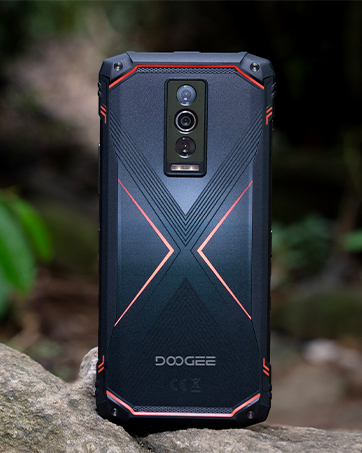
Figure 2: Package contents of the DOOGEE Blade 10 Pro.
3. 디바이스 오버view
The Blade 10 Pro features a slim 10.7mm body, a 6.56-inch HD+ IPS display, and a robust design. It includes a 50MP AI main camera and an 8MP front camera.
3.1 물리적 특징
- 치수: 7.63 x 4.09 x 2.02 인치
- 무게: 9.2 온스(262그램)
- 폼 팩터: 술집
- 색상: 은
3.2 버튼 및 포트
The device includes standard volume and power buttons, a custom key function, and a Type-C USB port. It also features a SIM/TF card slot.

Figure 3: The 10.7mm ultra-thin body design of the Blade 10 Pro.
4. 초기 설정
4.1 SIM 카드 및 TF 카드 삽입
The Blade 10 Pro supports triple SIM slots with independent channels for dual nano SIM cards and one TF card for memory expansion up to 2TB.

Figure 4: Triple card slot for SIM and TF card installation.
4.2 전원 켜기 및 초기 구성
Press and hold the power button to turn on the device. Follow the on-screen prompts to select your language, connect to Wi-Fi, and set up your Google account.
4.3 Security Features: Face Unlock
The device is equipped with a facial unlock feature for quick and secure access. Configure this feature in the security settings.

Figure 5: NFC and Face Unlock features.
4.4 메모리 확장
The Blade 10 Pro comes with 30GB (6GB + 24GB extended) RAM and 256GB internal storage. You can expand the memory up to 2TB with a TF card.
Video 1: Instructions on how to expand memory on the smartphone.
5. 사용 설명서
5.1 디스플레이 및 탐색
The 6.56-inch HD+ IPS waterdrop screen offers a 90 Hz refresh rate for smooth interaction and 400 nits of brightness for clear visibility.

Figure 6: Display features of the Blade 10 Pro.
5.2 카메라 사용
Capture moments with the 50MP AI main camera and 8MP front camera. Advanced shooting modes like HDR, Panorama, Pro Mode, and Beauty Mode are available.

Figure 7: Camera system and shooting modes.
5.3 네트워크 및 연결성
The device supports various network bands (GSM, WCDMA, TDD, FDD) and features NFC, USB, and Wi-Fi connectivity.
중요한: 구매 전asing, ensure compatibility with your local frequency band. Supported bands include: GSM:B2/3/5/8 WCDMA:B1/2/4/5/8 TDD:B34/38/39/40/41 FDD:B1/2/3/4/5/7/8/18/19/20/25/26/28AB/66.
6. 유지관리 및 내구성
The DOOGEE Blade 10 Pro is built to be rugged, featuring IP68, IP69K, and MIL-STD-810H certifications for water, dust, and drop resistance.
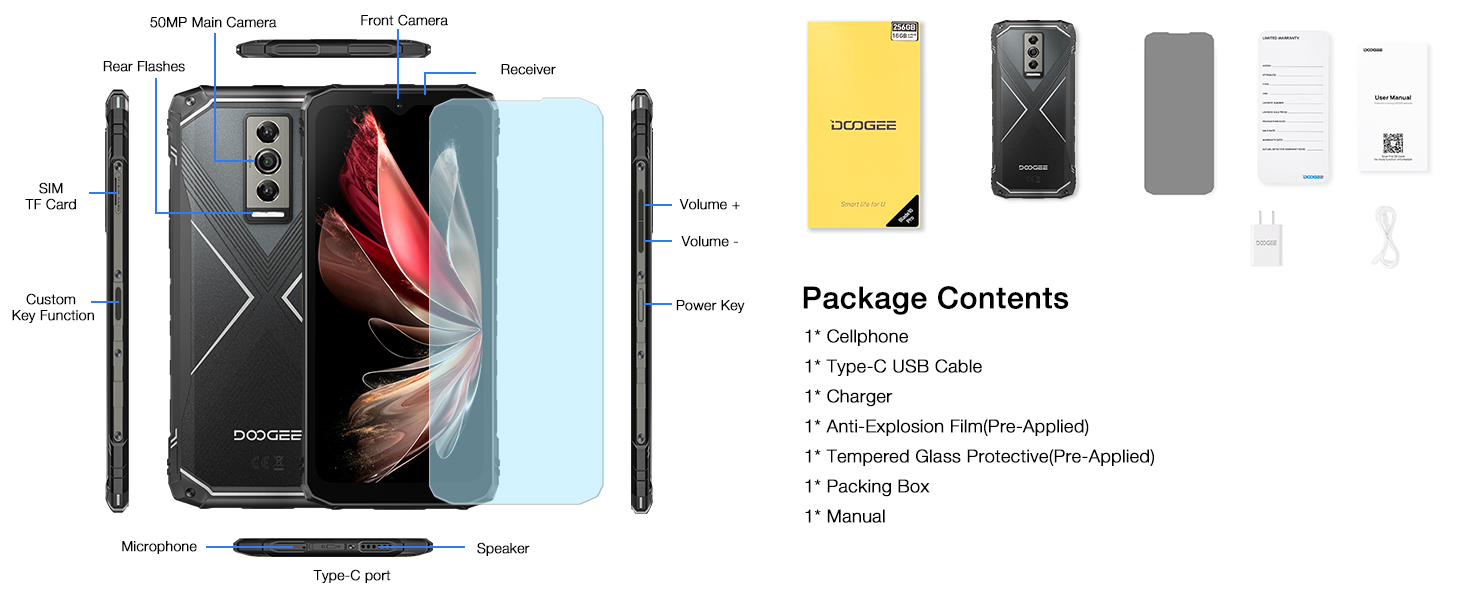
Figure 8: Ruggedness features: Waterproof, Dust-proof, Drop-proof.
6.1 배터리 관리
The device is equipped with a large 5150 mAh battery. Use the provided 10W charger and Type-C USB cable for optimal charging. Avoid extreme temperatures and prolonged exposure to direct sunlight to preserve battery life.
Video 2: Demonstration of the Blade 10 Pro Energy's 6150mAh battery and reverse charging capabilities.
7. 문제 해결
7.1 일반적인 문제
- 장치가 켜지지 않음: 배터리가 충전되어 있는지 확인하세요. 충전기에 연결한 후 다시 시도해 보세요.
- 네트워크 연결 문제: Check SIM card insertion and network settings. Verify compatibility with local frequency bands.
- 느린 성능: 불필요한 백그라운드 애플리케이션을 종료하세요. 캐시와 임시 저장 공간을 지우세요. files.
8. 사양
| 운영 체제 | 안드로이드 15 |
| 프로세서 | UNISOC T7200 옥타코어(1.6GHz) |
| 숫양 | 30GB (기본 6GB + 확장형 24GB) |
| 내부 저장소 | 256GB (XNUMX기가바이트) |
| 확장 가능한 스토리지 | TF 카드를 사용하면 최대 2TB까지 지원 |
| 디스플레이 크기 | 6.56 인치 |
| 해결 | 720 x 1560 |
| 새로 고침 빈도 | 90Hz |
| 메인 카메라 | 50MP AI |
| 전면 카메라 | 8 MP |
| 배터리 용량 | 5150mAh |
| 연결성 | NFC, USB, Wi-Fi, GPS |
| 내구성 | IP68, IP69K, MIL-STD-810H |
9. 보증 및 지원
Your DOOGEE Blade 10 Pro comes with a warranty. Please refer to the included Warranty Card for details on coverage and terms. For technical support or service inquiries, please visit the official DOOGEE web사이트를 방문하거나 고객 서비스에 문의하세요.
제조업체: 두기
첫 이용 가능 날짜: 25년 2025월 XNUMX일
보호 계획: Additional protection plans are available for purchase. Refer to product listing for details.


