1. 서론
This manual provides essential information for setting up, operating, and maintaining your MOREFINE Mini PC M9. Please read these instructions carefully before using the device to ensure optimal performance and safety.
The MOREFINE Mini PC M9 is a compact desktop computer designed for various applications, including office work, business tasks, and home entertainment. It features a 13th Generation Twin Lake N150 processor, 8GB DDR4 RAM, and a 256GB PCIe M.2 SSD, offering efficient performance in a small form factor.
2. 안전 정보
- 전원 어댑터가 해당 지역의 전원 공급 장치와 호환되는지 확인하세요.
- 기기를 물, 습기 또는 극한 온도에 노출시키지 마세요.
- 직사광선이나 열원 근처에 장치를 두지 마십시오.
- c를 열지 마세요asin기기를 직접 수리하려고 시도하지 마십시오. 자격을 갖춘 서비스 담당자에게 문의하십시오.
- 과열을 방지하려면 환기구를 깨끗하게 유지하십시오.
- 승인된 액세서리 및 주변 장치만 사용하십시오.
3. 패키지 내용
패키지에 모든 품목이 들어 있는지 확인하세요.
- MOREFINE Mini PC M9 Unit
- 전원 어댑터
- HDMI 케이블
- 사용자 설명서
- VESA 마운트 (선택 사항, 패키지에 따라 다를 수 있음)
4. 제품 오버view
The MOREFINE Mini PC M9 is designed for efficiency and connectivity. Below are the key features and port layouts.
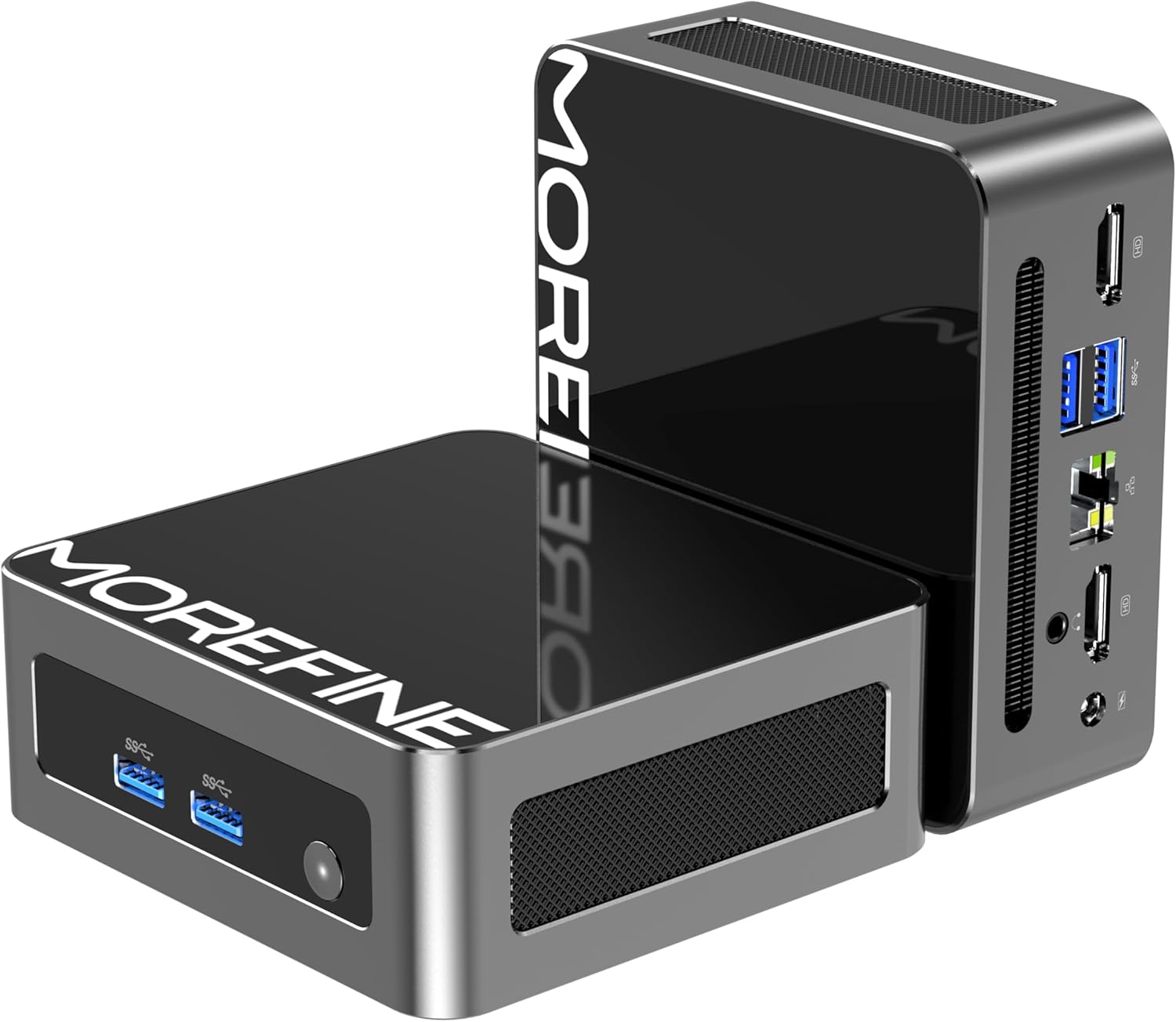
이미지: 앞면과 측면 view of the MOREFINE Mini PC M9, showcasin컴팩트한 디자인과 접근하기 쉬운 포트가 특징입니다.

이미지: 이상view of the Mini PC's features including Twin Lake N150 processor, dual 4K output, space-saving design, quiet fan, DDR4 RAM, WiFi+Bluetooth, and 2.5G LAN.
포트 레이아웃
- 전면 포트: Power Button, USB 3.2 x 2
- 후면 포트: USB 3.2 x 2, 2.5GbE RJ45 x 1, HDMI 2.0 x 2, 3.5mm Audio Jack x 1, DC Power Input x 1

Image: Close-up of the side ports on the MOREFINE Mini PC M9, showing USB 3.2 ports and the power button.

이미지: 후면 view of the MOREFINE Mini PC M9, detailing the HDMI, USB, RJ45, and power input ports.
5. 설정
Follow these steps to set up your MOREFINE Mini PC M9:
- 주변기기 연결: Connect your monitor(s) to the HDMI ports using HDMI cables. Connect your keyboard and mouse to the USB ports.
- 네트워크 연결 : For a wired connection, connect an Ethernet cable to the 2.5GbE RJ45 port. For wireless, the device supports WiFi 6 and Bluetooth 5.2, which can be configured after initial boot.
- 전원 연결: Connect the power adapter to the DC power input port on the Mini PC, then plug the adapter into a power outlet.
- 전원 켜기: 기기 전면에 있는 전원 버튼을 누르세요. 시스템이 부팅됩니다.
- 초기 설정 : Follow the on-screen instructions to complete the operating system setup (e.g., Windows 11). This typically involves selecting language, region, and creating a user account.

Image: Demonstrates the compact size and multiple placement options for the Mini PC, including laying flat or mounting on the back of a monitor.
6. 운영
듀얼 디스플레이 설정
The Mini PC supports dual 4K display output via its two HDMI 2.0 ports. To set up dual monitors:
- 두 모니터를 미니 PC의 HDMI 포트에 연결하세요.
- 미니 PC와 두 모니터의 전원을 켜세요.
- Once the operating system loads, right-click on the desktop and select 'Display settings' (Windows) or similar.
- Configure the display mode (e.g., Extend, Duplicate) and resolution for each monitor as desired.

Image: Illustration of the Mini PC connected to two monitors, demonstrating its dual 4K display capability for enhanced multitasking.
네트워크 및 블루투스 연결
- 와이파이 6: Access network settings in your operating system to connect to available wireless networks.
- 블루투스 5.2 : Enable Bluetooth in your operating system settings to pair with compatible devices like keyboards, mice, or headphones.
Auto Power On and Wake On LAN
The Mini PC supports Auto Power On and Wake On LAN features. These settings can typically be configured within the BIOS/UEFI setup. To access BIOS/UEFI, press the 'Del' key repeatedly during startup. You may need to adjust the boot delay in Windows advanced startup options if the default 1-second delay is too short.
7. 유지관리
청소
- 부드럽고 마른 천을 사용하여 장치 외부를 청소하세요.
- 완고한 먼지에는 약간 damp천에 물을 묻혀 닦으세요. 강한 화학 물질은 피하세요.
- Periodically clean the ventilation openings with a soft brush or compressed air to prevent dust buildup.
Storage and RAM Expansion
The MOREFINE Mini PC M9 supports storage and RAM upgrades:
- 숫양: The device has one DDR4 SODIMM slot, supporting up to 32GB DDR4 3200MHz RAM.
- 저장: It features one M.2 2280 NVMe PCIe 3.0 slot and one M.2 2242 SATA3 slot, supporting up to 4TB of storage expansion.
To perform upgrades, it is recommended to consult a qualified technician or refer to detailed online guides specific to the M9 model to avoid damaging internal components.

이미지: 내부 view of the Mini PC, highlighting the DDR4 SODIMM slot, M.2 2280 NVMe PCIe, and M.2 2242 SATA slots for memory and storage expansion.
8. 문제 해결
미니 PC 사용 중 문제가 발생하면 다음의 일반적인 문제 및 해결 방법을 참조하십시오.
- 전원 없음:
- 전원 어댑터가 Mini PC와 작동하는 전원 콘센트에 모두 단단히 연결되어 있는지 확인하세요.
- 다른 장치로 전원 콘센트를 테스트하세요.
- If the power button LED does not illuminate, there might be an issue with the power button or internal power delivery. Contact support if basic checks fail.
- 디스플레이 없음:
- HDMI 케이블이 미니 PC와 모니터에 제대로 연결되어 있는지 확인하십시오.
- 모니터 전원이 켜져 있고 올바른 입력 소스(HDMI 1, HDMI 2 등)로 설정되어 있는지 확인하십시오.
- 다른 모니터에 연결하거나 다른 HDMI 케이블을 사용해 보세요.
- No Network Connection (WiFi/Ethernet):
- 이더넷의 경우 케이블 연결 상태와 라우터 상태를 확인하십시오.
- For WiFi, ensure WiFi is enabled in the operating system and you are connecting to the correct network with the correct password.
- 라우터/모뎀과 미니 PC를 재시작하세요.
- Operating System Issues (e.g., updates failing):
- Ensure you have a stable internet connection for updates.
- Check for available disk space.
- Run the operating system's built-in troubleshooters.
- Consider performing a clean installation of the operating system if issues persist and are not resolved by standard troubleshooting.
9. 사양
Detailed technical specifications for the MOREFINE Mini PC M9:
| 특징 | 사양 |
|---|---|
| 모델 | M9 |
| 프로세서 | 인텔 13세대 트윈 레이크 N150 (4코어, 4스레드, 최대 3.6GHz) |
| 제도법 | Intel UHD 그래픽(통합) |
| 숫양 | 8GB DDR4 3200MHz (최대 32GB까지 확장 가능) |
| 저장 | 256GB PCIe M.2 SSD (Expandable up to 4TB via M.2 2280 NVMe PCIe 3.0 and M.2 2242 SATA3 slots) |
| 운영 체제 | OS (Pre-installed, typically Windows) |
| 비디오 출력 | HDMI 2.0 포트 2개 (듀얼 4K@60Hz 지원) |
| USB 포트 | 4개의 USB 3.2 |
| 회로망 | 1 x 2.5GbE RJ45, WiFi 6 (802.11ax Dual-band), Bluetooth 5.2 |
| 오디오 | 1 x 3.5mm 오디오 잭 |
| 전원 입력 | 직류 12V/3A |
| 치수 | 약 4.49 x 4.17 x 1.73인치 |
| 무게 | 약 1.43파운드 |
10. 보증 및 지원
보증 정보
Your MOREFINE Mini PC M9 comes with a standard manufacturer's warranty. Please refer to the warranty card included in your package or the product listing for specific terms and duration. Keep your proof of purchase for warranty claims.
기술 지원
For technical assistance, troubleshooting beyond this manual, or warranty inquiries, please contact MOREFINE customer support through the retailer where you purchased the product or visit the official MOREFINE web연락처 정보 사이트.


