1. 제품 오버view
The Macap MI40 Touch Instant Burr Coffee Grinder is a high-performance appliance designed for precise and consistent coffee grinding. Featuring 65mm flat burrs, a responsive 3.5-inch touchscreen, and multiple operating modes, it is suitable for various brewing methods from espresso to cold brew. Its robust construction ensures quiet operation and stability.
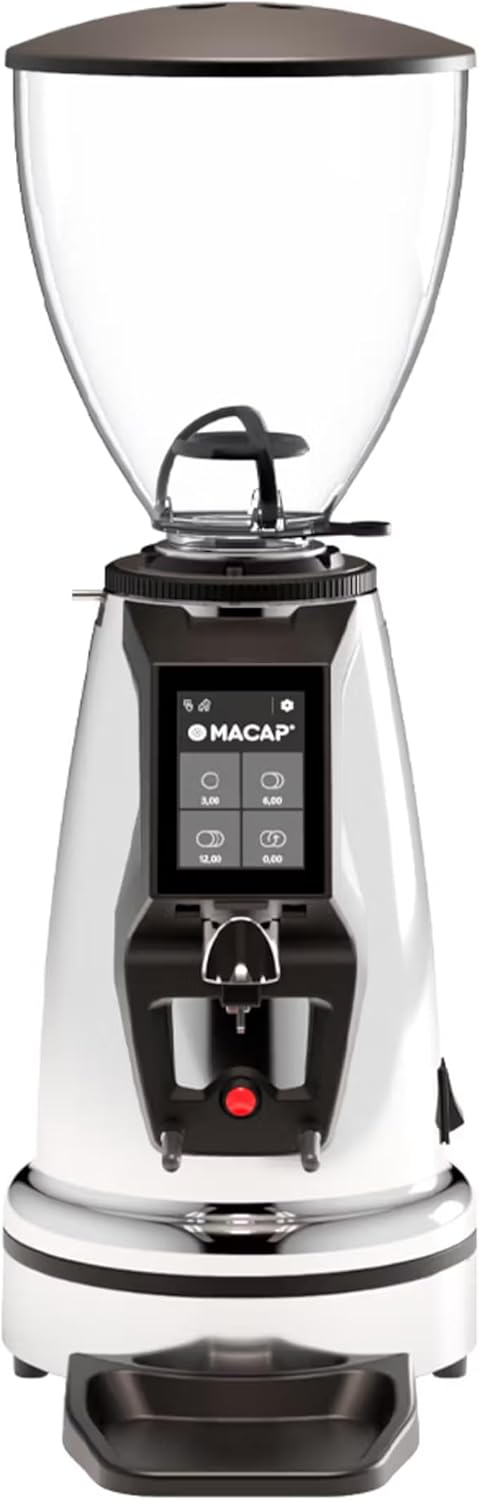
앞쪽 view of the Macap MI40 Touch Instant Burr Coffee Grinder, showcasing its sleek chrome finish and integrated touchscreen display.
2. 안전 정보
Please read all safety instructions carefully before operating the grinder to prevent injury or damage.
- Always unplug the grinder from the power outlet before cleaning, maintenance, or if it will be left unattended.
- Do not immerse the grinder, power cord, or plug in water or any other liquid.
- Keep hands and utensils out of the bean hopper and grind chute during operation.
- Ensure the bean hopper lid is securely in place before grinding.
- This appliance is intended for grinding whole roasted coffee beans only. Do not grind other substances.
- Do not operate the grinder with a damaged cord or plug, or if the appliance malfunctions or has been damaged in any manner.
- 어린이의 손이 닿지 않는 곳에 보관하세요.
3. 구성 요소
Familiarize yourself with the main components of your MI40 Touch coffee grinder:
콩 호퍼: Transparent container for holding whole coffee beans. Capacity: 1.2 Kilograms.

3.5'' Touchscreen Display: Intuitive interface for controlling grind settings, dose programming, and operating modes.

연삭 조정 칼라: Stepless micrometric adjustment for precise control over grind particle size.

Portafilter Fork & Drip Tray: Adjustable fork to hold your portafilter for hands-free grinding, with a removable drip tray for easy cleaning.
4. 설정
Follow these steps to set up your Macap MI40 Touch grinder:
- 짐 풀기: Carefully remove the grinder and all accessories from the packaging. Retain the packaging for future transport or storage.
- 놓기: Place the grinder on a stable, flat, and dry surface. Ensure there is adequate ventilation around the unit.
- 호퍼 설치: Place the bean hopper onto the grinder body, aligning the tabs. Rotate the hopper clockwise until it locks securely into place.
- 물받이 설치: Slide the removable drip tray into its designated slot at the base of the grinder.
- 전원 연결: 전원 코드를 접지된 콘센트에 꽂으세요.
- 초기 청소: 처음 사용하기 전에 외부를 광고로 닦아주세요.amp cloth. Ensure the burrs and grind chute are free of any packing debris.

옆 view of the Macap MI40 Touch grinder, illustrating its compact design and the placement of the bean hopper and drip tray.
5. 사용 설명서
5.1. 연삭 조정
The MI40 Touch features stepless micrometric grind adjustment, allowing for precise control over particle size. To adjust the grind:
- Ensure the grinder is off or not actively grinding.
- Rotate the grind adjustment collar located below the bean hopper.
- 회전하다 시계 방향으로 for a finer grind (e.g., for espresso).
- 회전하다 반 시계 방향 for a coarser grind (e.g., for drip, French press, or cold brew).
- Make small adjustments and test the grind to achieve the desired consistency for your brewing method.
클로즈업 view of the grind adjustment collar, showing the numerical markings for reference.
5.2. 터치스크린 인터페이스
The 3.5-inch touchscreen allows for intuitive control and customization of your grinding experience. It features four programmable dose buttons and various settings.
The 3.5-inch touchscreen display showing the main interface with programmable dose buttons.
For a detailed demonstration of the touchscreen interface and its functionalities, please refer to the official video below:
This video demonstrates the various features and customization options of the 3.5-inch touchscreen interface on the Macap MI Series coffee grinders, including dose programming, color customization, and different operating modes.
5.3. 작동 모드
The MI40 Touch offers three primary operating modes:
- 표준 모드: Allows you to select a pre-programmed dose by pressing the corresponding button on the touchscreen. The grinder will dispense the set amount of coffee.
- 푸시 및 그라인드 모드: Grinding starts when the portafilter activates the button on the fork and stops when the portafilter is removed. This mode is ideal for manual control.
- Barista Hands-Free Mode: Similar to Push and Grind, but designed for continuous grinding as long as the portafilter is in place, allowing baristas to multitask.
6. 유지관리 및 청소
정기적인 청소 및 유지 관리는 분쇄기의 최적 성능과 수명 연장을 보장합니다.
6.1. 매일 청소
- 분쇄 슈트: Use a brush or vacuum to clear any residual coffee grounds from the grind chute after each use.
- 드립 트레이: Remove and empty the drip tray regularly. Wipe it clean with a damp 천으로 닦아서 완전히 말리세요.
- 외부: 그라인더 외부를 부드러운 천으로 닦으세요.amp 천. 연마성 세척제나 용매를 사용하지 마십시오.

The removable drip tray and portafilter fork area, designed for easy cleaning.
6.2. Deep Cleaning (Weekly/Bi-Weekly)
- 그라인더의 플러그를 뽑습니다.
- 빈 호퍼 제거: Empty any remaining beans. Rotate the hopper counter-clockwise to unlock and remove it.
- 깨끗한 버: Use a stiff brush or a specialized grinder brush to remove accumulated coffee oils and grounds from the burrs. You may need to remove the upper burr for thorough cleaning (refer to specific instructions in the full manual for burr removal).
- Clean Grind Chamber: Use a vacuum cleaner with a narrow attachment to remove grounds from the grind chamber.
- 재조립: Reinstall the burrs (if removed) and the bean hopper securely.
7. 문제 해결
If you encounter issues with your MI40 Touch grinder, refer to the table below for common problems and solutions.
| 문제 | 가능한 원인 | 해결책 |
|---|---|---|
| 그라인더가 켜지지 않습니다. | 전원이 꽂혀 있지 않음; 전원 스위치가 꺼짐; 회로 차단기가 작동함. | Check power connection; ensure power switch is on; reset circuit breaker. |
| 커피 제공이 없습니다. | Hopper empty; grind chute clogged; burrs jammed. | Fill hopper; clean grind chute; clear any foreign objects from burrs (unplug first). |
| 일관성 없는 분쇄. | Burrs dirty or worn; grind setting too coarse/fine. | 버를 철저히 청소하고 분쇄 설정을 단계적으로 조정하십시오. 버가 마모된 경우 교체를 고려하십시오. |
| Grinder is excessively noisy. | 버(burr)에 이물질이 끼어 있거나, 부품이 헐거워져 있습니다. | Unplug and inspect burrs for foreign objects; check for loose parts. If noise persists, contact support. |
| 터치스크린이 응답하지 않습니다. | 일시적인 소프트웨어 오류 및 전원 문제입니다. | Unplug the grinder for 30 seconds, then plug back in. If issue persists, contact support. |
8. 사양
Key technical specifications for the Macap MI40 Touch Instant Burr Coffee Grinder:
| 특징 | 사양 |
|---|---|
| 모델 | MI40 Touch |
| 버 타입 | Flat Burrs |
| 버 직경 | 65mm |
| 모터 파워 | 480와트 |
| 호퍼 용량 | 1.2 킬로그램 |
| 분쇄도 조절 | 무단계 미세 측정 |
| 표시하다 | 3.5'' Touchscreen |
| 제품 크기(L x W x H) | 12인치 x 7.63인치 x 22인치 |
| 품목 무게 | 19.58파운드 |
| 원산지 | 이탈리아 |
9. 보증 및 지원
Macap products are manufactured to high standards and undergo rigorous quality control. For warranty information, technical support, or service inquiries, please refer to the warranty card included with your product or visit the official Macap website. Please have your model number (MI40 Touch) and purchase date available when contacting support.


