1. 서론
Welcome to the TABWEE T80 Tablet user manual. This guide provides comprehensive instructions to help you get the most out of your new Android 15 tablet. The T80 is designed for a seamless and powerful user experience, featuring advanced AI capabilities, a vibrant display, and robust performance for both work and entertainment.
주요 특징:
- 안드로이드 15 운영체제: Experience the latest features and security enhancements.
- Gemini AI 2.0: Enhanced AI for smarter interactions and controls.
- 10.5인치 HD+ IPS 디스플레이: Enjoy clear and vibrant visuals with a wide view잉 각도.
- 강력한 성능: Equipped with a 2.0GHz CPU, 12GB RAM, and 64GB ROM (expandable up to 2TB via TF card).
- 오래 지속되는 배터리: 6000mAh mega battery for extended use.
- 고급 연결성 : Supports 5G WiFi and Bluetooth 5.0.
- 5MP Google Lens Camera: For clear photos and smart scene recognition.

Figure 1.1: The TABWEE T80 Tablet, showcasin세련된 디자인과 디스플레이.
2. 설정
2.1 언박싱 및 초기 충전
Carefully remove your TABWEE T80 Tablet from its packaging. Before first use, it is recommended to fully charge the device using the provided USB-C cable and power adapter. The charging port is located on the side of the tablet.
2.2 전원 켜기 및 초기 구성
- Press and hold the Power button (located on the side) until the TABWEE logo appears on the screen.
- 화면의 안내에 따라 언어를 선택하고, Wi-Fi 네트워크에 연결하고, Google 계정을 설정하세요.
- Review 설정 과정을 완료하려면 이용 약관에 동의하십시오.

그림 2.1: 오버view of the TABWEE T80's core specifications and features.
3. 태블릿 작동
3.1 안드로이드 15 기능
Your TABWEE T80 runs on the latest Android 15, offering enhanced user experience, improved privacy, and smart features.
Split-Screen Combo
The split-screen feature allows you to run two applications simultaneously, enhancing multitasking and productivity. You can easily save app pairs for quick access.
Video 3.1: Demonstrates how to use the split-screen feature to run two applications concurrently on the TABWEE T80 tablet.
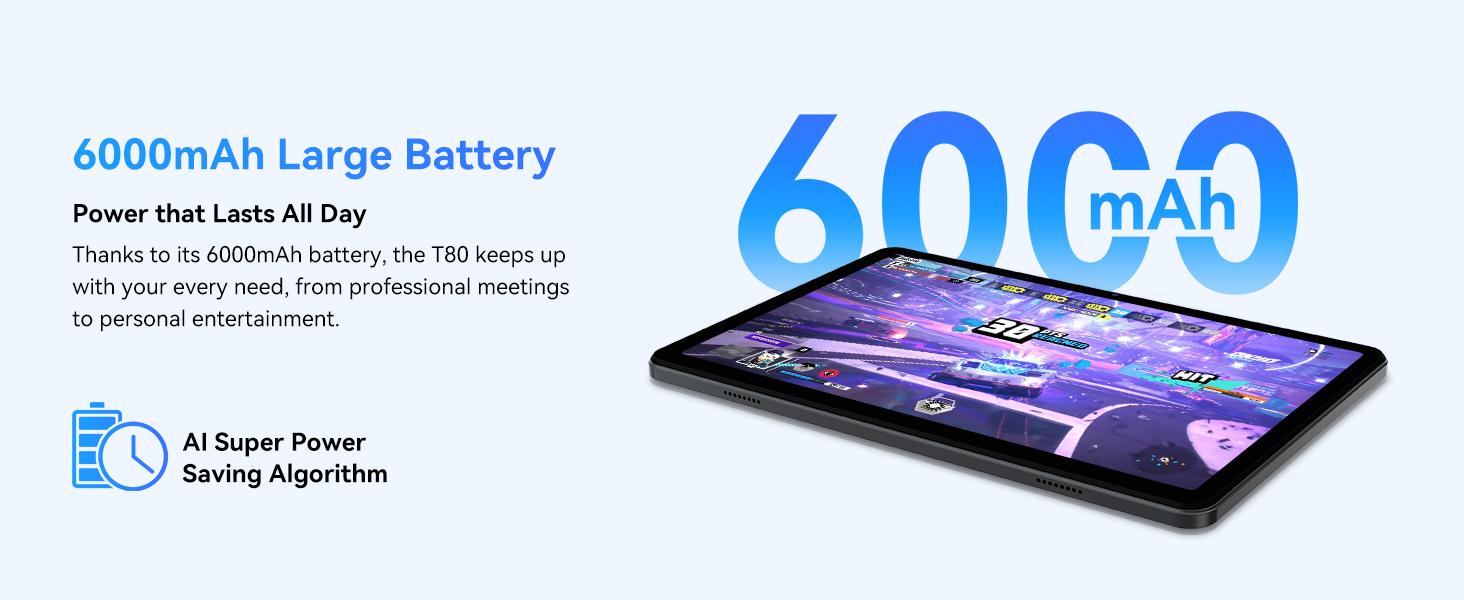
Figure 3.1: Visual representation of the split-screen functionality, allowing for efficient multitasking.
Desktop Customization and Widgets
Personalize your home screen by dragging and grouping apps freely. You can also add various widgets, such as the calendar, to quickly access information and tasks.
Video 3.2: Illustrates how to customize your desktop layout and add widgets for quick access to information.
개인정보 보호 제어
Android 15 offers enhanced privacy controls, allowing you to manage app permissions and secure your data. You can block app access to sensitive information like location.
Video 3.3: Shows how to manage privacy settings and control app access to your data on the TABWEE T80.
Parental Controls with Gemini AI
Utilize Gemini AI parental controls to manage screen time, automatically lock games during homework, and ensure a safe digital environment for children.
Figure 3.2: The Digital Wellbeing interface, demonstrating options for managing screen time and parental controls.
3.2 디스플레이 및 비주얼
The 10.5-inch HD+ IPS display provides a clear and immersive viewing experience with a 1280x800 resolution and 84.9% screen-to-body ratio. It's ideal for watching videos, browsing, and reading.

Figure 3.3: Details of the tablet's display, highlighting its resolution and IPS full view 능력.
3.3 성능 및 스토리지
Powered by a 2.0GHz Unisoc T310 CPU and 12GB RAM (expandable via software memory extension), the T80 ensures smooth multitasking and responsive performance. With 64GB of internal storage and support for up to 2TB TF cards, you have amp모든 것을 위한 공간 file앱, 미디어.

Figure 3.4: Illustration of the tablet's processing power and memory, enabling seamless multitasking and productivity.
3.4 배터리 수명
The 6000mAh mega battery provides extended usage, offering up to 8 hours of video streaming, 6 hours of gaming, or 30 hours of music playback. Smart power-saving modes further optimize battery longevity.

Figure 3.5: Depiction of the tablet's large 6000mAh battery and its USB-C charging port.
3.5 카메라 기능
The T80 features a 5MP Google Lens enabled camera. This allows for scene recognition, night mode optimization, and useful functions like text translation and object identification.

그림 3.6: 오버view of the tablet's camera and its integration with Google Lens for smart functions.
4. 유지관리
To ensure the longevity and optimal performance of your TABWEE T80 Tablet, follow these maintenance guidelines:
- 청소: 부드럽고 보풀이 없는 천을 사용하여 화면과 본체를 닦으세요. 연마재나 강한 화학 물질은 사용하지 마세요.
- 소프트웨어 업데이트: 최신 기능, 보안 패치, 성능 개선 등의 이점을 얻으려면 시스템 업데이트를 정기적으로 확인하고 설치하세요.
- 배터리 관리 : 극한 온도에 노출시키지 마십시오. 배터리를 자주 완전히 방전시키지 마십시오. 장기간 보관할 경우 배터리를 약 50% 정도 충전하십시오.
- 스토리지 관리: 불필요한 것을 주기적으로 정리하세요 file저장 공간을 확보하고 원활한 작동을 유지하기 위해 앱과 앱을 정리합니다.
- 보호: 떨어뜨리거나 긁히지 않도록 보호 케이스와 화면 보호 필름을 사용하는 것을 고려하세요.
5. 문제 해결
This section addresses common issues you might encounter with your TABWEE T80 Tablet.
5.1 장치 전원이 켜지지 않음
- 배터리 확인: Ensure the tablet has sufficient charge. Connect it to the charger and wait a few minutes before attempting to power on again.
- 하드 리셋: 기기가 다시 시작될 때까지 전원 버튼을 약 10~15초 동안 길게 누르세요.
5.2 Wi-Fi 연결 문제
- 와이파이 켜기/끄기: 설정에서 Wi-Fi를 껐다가 다시 켜세요.
- 라우터 다시 시작: Wi-Fi 라우터의 전원을 껐다가 다시 켜세요.
- 네트워크 잊어버리기: Go to Wi-Fi settings, forget the problematic network, and then reconnect.
5.3 느린 성능
- 백그라운드 앱 닫기: 백그라운드에서 실행 중인 사용하지 않는 애플리케이션을 닫습니다.
- 캐시 지우기: Regularly clear app caches in Settings > Apps.
- 저장 공간 확보: 불필요한 삭제 file거의 사용하지 않는 앱은 삭제하거나 제거하세요.
- 장치 재시작: A simple restart can often resolve temporary slowdowns.
5.4 Apps Crashing or Not Responding
- Force Stop App: Go to Settings > Apps, select the problematic app, and choose 'Force Stop'.
- Clear App Data/Cache: In the same app settings, try clearing its cache or data (note: clearing data will reset the app to its default state).
- 앱 재설치: Uninstall and then reinstall the app from the Google Play Store.
6. 사양
Detailed technical specifications for the TABWEE T80 Tablet:
| 특징 | 사양 |
|---|---|
| 상표 | TABWEE |
| 모델명 | T80 |
| 운영 체제 | 안드로이드 15 |
| 화면 크기 | 10.5 인치 |
| 화면 해상도 | 1280 x 800 픽셀 |
| 프로세서 | 2.0 GHz Unisoc T310 |
| 메모리(RAM) | 12GB (XNUMX기가바이트) |
| 저장 장치(ROM) | 64GB (XNUMX기가바이트) |
| 확장 가능한 스토리지 | 최대 2TB TF 카드 |
| 뒤쪽 Web캠 해상도 | 5 MP |
| 무선형 | 802.11n, 802.11b, 802.11a, 802.11ac, 802.11g (5G WiFi) |
| 블루투스 | 블루투스 5.0 |
| 배터리 용량 | 6000mAh |
| 평균 배터리 수명 | 550시간 (대기) |
| 품목 무게 | 1.1파운드(약 523그램) |
| 제품 치수 | 9.5 x 6.4 x 0.3 인치 |
| 색상 | 회색 |
7. 보증 및 지원
TABWEE is committed to quality and customer satisfaction. Your T80 Tablet comes with comprehensive support to ensure a worry-free experience.
7.1 보증 정보
The TABWEE T80 Tablet is backed by a 2년 보증. This warranty covers manufacturing defects and ensures free repair service for eligible issues. Please retain your proof of purchase for warranty claims.
7.2 고객 지원
문의 사항, 기술 지원 또는 보증 청구 관련 문의는 전담 지원팀으로 연락해 주십시오.
- 연중무휴 24시간 온라인 전화 지원: 즉시 지원 가능합니다.
- 평생 기술 지원: Expert help whenever you need it.
- Hassle-Free Service: Assistance available through the TABWEE Official Flagship Store.
We are dedicated to providing prompt and effective solutions to all your inquiries.

그림 7.1: 저희 전담 고객 지원팀이 언제든지 도와드릴 준비가 되어 있습니다.


