1. 서론
The SMALLRIG Magic Arm 5141 is a versatile accessory designed for mounting monitors and other equipment during shoulder or tripod shooting. It features a unique damping arm for precise adjustments and an integrated cable organizer for a tidy setup. Constructed from CNC-machined aluminum alloy, it offers robust support for loads up to 2.0kg (4.4lb).

Image 1.1: The Magic Arm 5141 facilitating seamless monitor positioning for both shoulder and tripod setups.
2. 설정
2.1 패키지 내용
- 매직 암 × 1
- 케이블 정리함 × 1
- 알렌 렌치 × 1

Image 2.1: Package contents and dimensions of the Magic Arm 5141.
2.2 Attaching the Magic Arm
- Identify the mounting points on your shoulder support (e.g., SmallRig ID 4480/4181) or tripod system. The Magic Arm features 1/4"-20 screws on both ends for universal compatibility.
- Thread one end of the Magic Arm onto the desired mounting point. Ensure the anti-twist retractable pins engage with compatible holes on your equipment to prevent accidental rotation.
- Securely tighten the thumbscrew on the Magic Arm to firmly attach it to your rig. An Allen wrench is provided for additional tightening if necessary.
- Attach your monitor, camera, or accessory to the other end of the Magic Arm using the 1/4"-20 screw. The rubber pads on the mounting surface protect your equipment from scratches.

Image 2.2: Detail of the 1/4"-20 screw connection with anti-twist pins and protective rubber pads.
3. 사용 설명서
3.1 Adjusting Position and Angle
- Damping Arm Adjustment: 디amping arm allows for 360° pan and 160° tilt adjustments. Loosen the locking knob to adjust the angle, then tighten it to secure the position. This design enables one-handed adjustments, allowing you to maintain focus on your shot.
- 360° 볼 헤드: The ball head on one end provides additional flexibility for precise positioning of your attached device. Loosen the corresponding thumbscrew to adjust the ball head, then tighten to lock.

Image 3.1: Flexible adjustments with 360° ball head and 160° tilt damp잉 팔.
3.2 케이블 관리
Utilize the integrated cable organizer to route and secure any cables connected to your monitor or accessory. This helps to prevent clutter and ensures a professional, tidy setup during operation.

Image 3.2: The built-in cable organizer for efficient cable management.
3.3 Ambidextrous Use
The Magic Arm is designed for interchangeable left or right side mounting, accommodating various shooting styles and preferences.

Image 3.3: Left and right-hand adaptable configurations.
4. 유지관리
- 청소: Wipe the Magic Arm with a soft, dry cloth to remove dust and debris. Avoid using harsh chemicals or abrasive materials that could damage the finish.
- 조임: Periodically check all screws and knobs for tightness. If any joint feels loose, use the provided Allen wrench to tighten the corresponding thumbscrew until secure.
- 저장: Store the Magic Arm in a clean, dry environment when not in use to prevent corrosion or damage.
5. 문제 해결
5.1 Instability or Sagging
- 문제: The attached monitor or accessory is not holding its position or sags.
- 해결책: Ensure all locking knobs and thumbscrews on the Magic Arm are fully tightened. Use the included Allen wrench to apply additional torque to the thumbscrews if necessary. Verify that the load capacity of 2.0kg (4.4lb) is not exceeded.
5.2 Difficulty Adjusting Joints
- 문제: 관절이 뻣뻣하거나 움직이기 어렵습니다.
- 해결책: Loosen the locking knobs slightly before attempting to adjust. If the joints remain excessively stiff, ensure no debris is obstructing the mechanism. Avoid over-tightening, which can cause premature wear.
6. 사양
| 제품 치수 | 237.0 × 102.7 × 25.4mm(9.3 × 4.0 × 1.0인치) |
| 품목 무게 | 241.0 ± 5.0g (8.5 ± 0.2oz) |
| 기재) | 알루미늄 합금 |
| 하중 용량 | 2.0kg (4.4lb) |
| 조정 | 360° Pan, 160° Tilt (Damping Arm), 360° Rotation (Ball Head) |
| 장착점 | 1/4"-20 screws with anti-twist retractable pins |
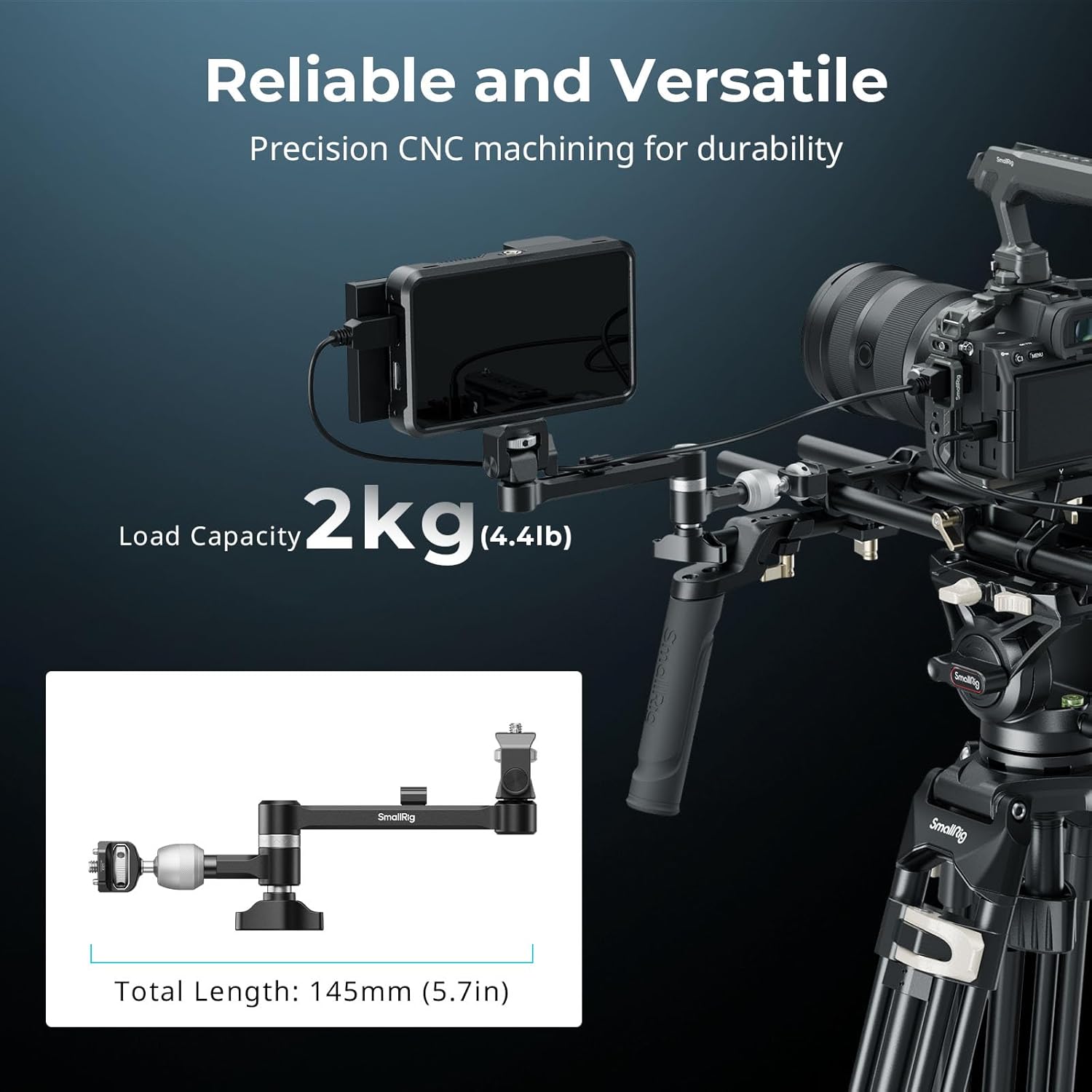
Image 6.1: Load capacity and dimensions of the Magic Arm 5141.
7. 보증 및 지원
7.1 반품 정책
본 제품은 일반 소매 약관에 따라 30일 이내 환불 또는 교환이 가능합니다.
7.2 제조업체 지원
For technical assistance, product inquiries, or warranty claims, please contact SMALLRIG directly through their official website or customer service channels. Refer to your purchase documentation for specific contact details.


