소개
This instruction manual provides comprehensive guidance for the safe and effective use of your DARKBEAM UV Flashlight, Model B97-365. This powerful 365nm ultraviolet flashlight is designed for various detection and inspection tasks, including mineral identification, pet urine detection, uranium glass verification, resin curing, and security code authentication. Please read this manual thoroughly before operating the device to ensure optimal performance and longevity.
제품 끝view
포함된 구성 요소
The DARKBEAM UV Flashlight B97-365 package includes the following items:
- B97 6xLED (quad-core) UV 365nm flashlight (battery pre-inserted)
- UV protective glasses
- Cloth holster
- 핸드 스트랩
- USB-C 충전 케이블
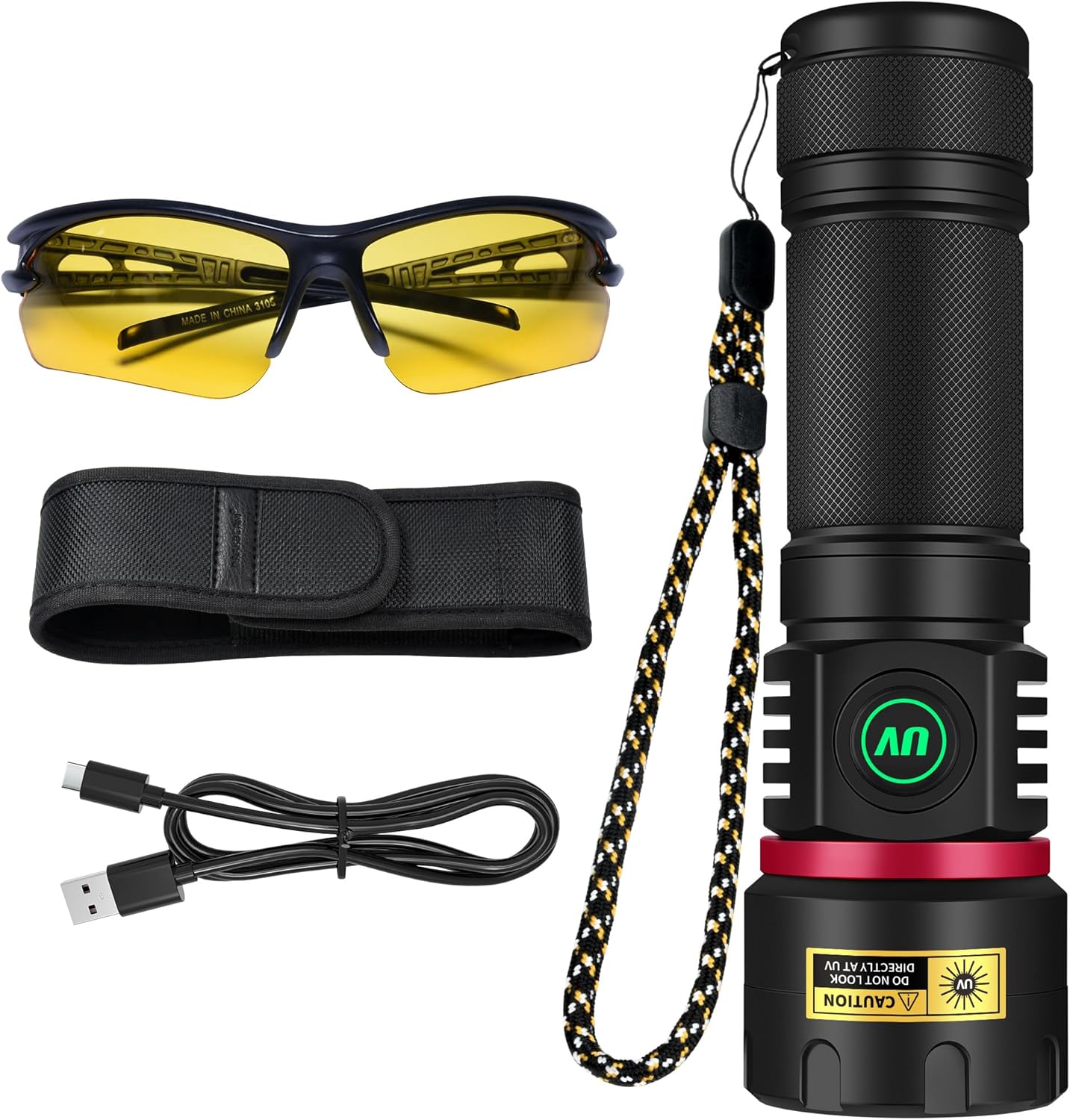
Image: All components included with the DARKBEAM UV Flashlight B97-365, laid out for clear identification.
주요 특징
- High Intensity & Power: Equipped with 6 quad-core P50 UV LEDs, providing 80W power and 8040mW radiant intensity for effective detection.
- Professional Filtered 365nm UV Light: Features a hard toughened black filter optical lens to block visible light, emitting purer invisible UV365 light for enhanced detection of fluorescent agents, security codes, and minerals.
- 조정 가능한 밝기: Offers infinitely adjustable brightness from 20% to 100% via a long-press function, allowing precise control for various applications.
- USB-C Rechargeable & Power Bank Function: Built-in high-capacity rechargeable battery provides 4-6 hours runtime. USB-C direct charging and USB output for emergency power supply to other devices.
- 내구성 및 휴대성이 뛰어난 디자인: Constructed from high-quality aluminum alloy with IPX65 waterproof rating, ensuring durability against rain, snow, shock, and dust. Compact size (5.9"D x 1.8"W x 1.4"H) and lightweight (10.8 oz) for easy handling.
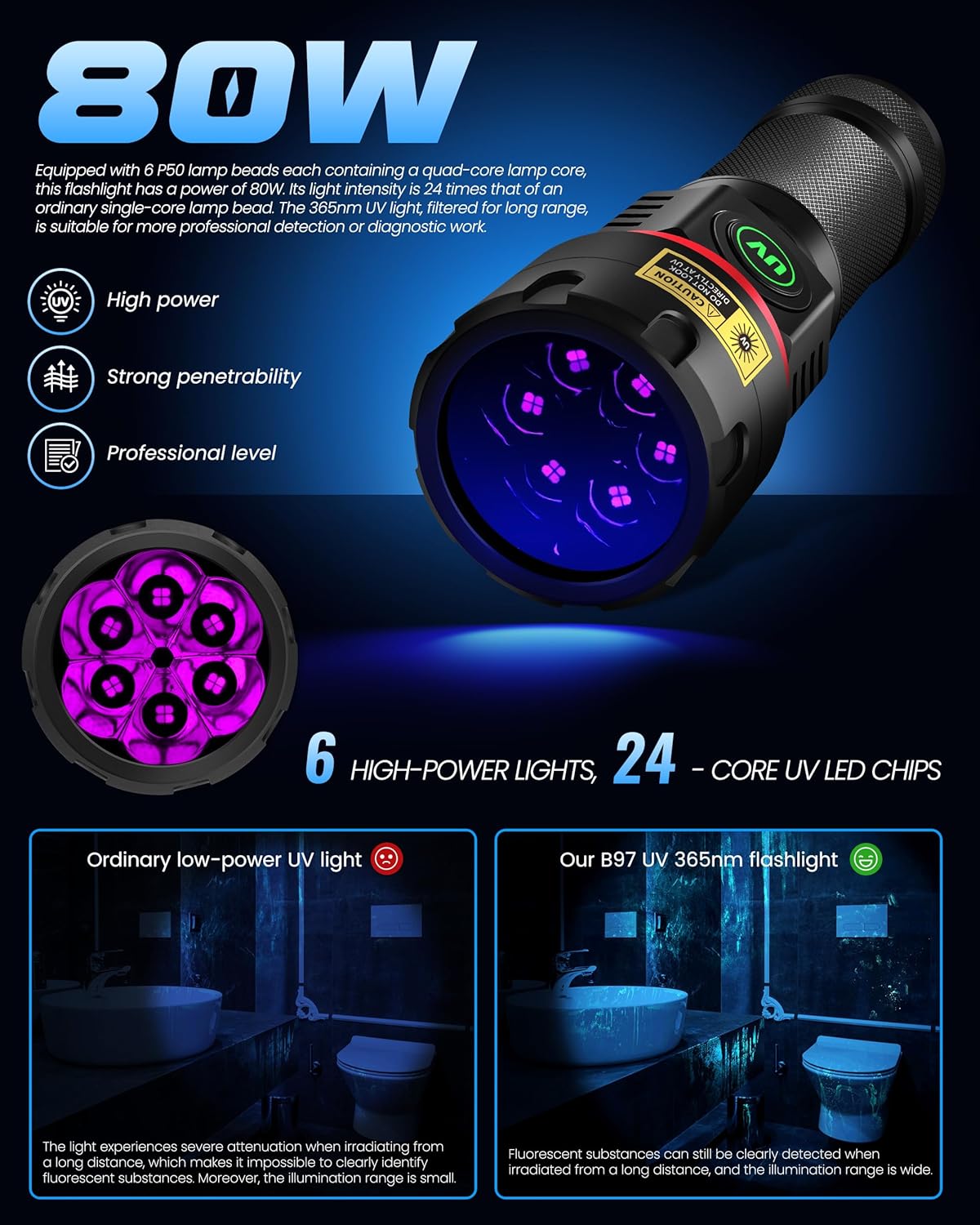
Image: Visual representation of the flashlight's 80W power and its 6 high-power, 24-core UV LED chip configuration.

Image: Detail of the UV black filter lens, which filters out visible light, and the flashlight's excellent heat dissipation design.

Image: Illustration of the flashlight's IPX65 rating, highlighting its resistance to water, snow, shock, and dust.
설정
초기 충전
Your DARKBEAM UV Flashlight comes with a pre-inserted rechargeable battery. For optimal performance, it is recommended to fully charge the flashlight before its first use.
- 손전등에서 USB-C 충전 포트를 찾으세요.
- 제공된 USB-C 케이블을 손전등의 충전 포트에 연결하십시오.
- Connect the other end of the USB-C cable to a compatible USB power source (e.g., wall adapter, computer USB port, power bank) with an output within 5V/2A.
- The power indicator light on the switch will turn RED during charging.
- Once fully charged, the indicator light will turn GREEN. Disconnect the cable.
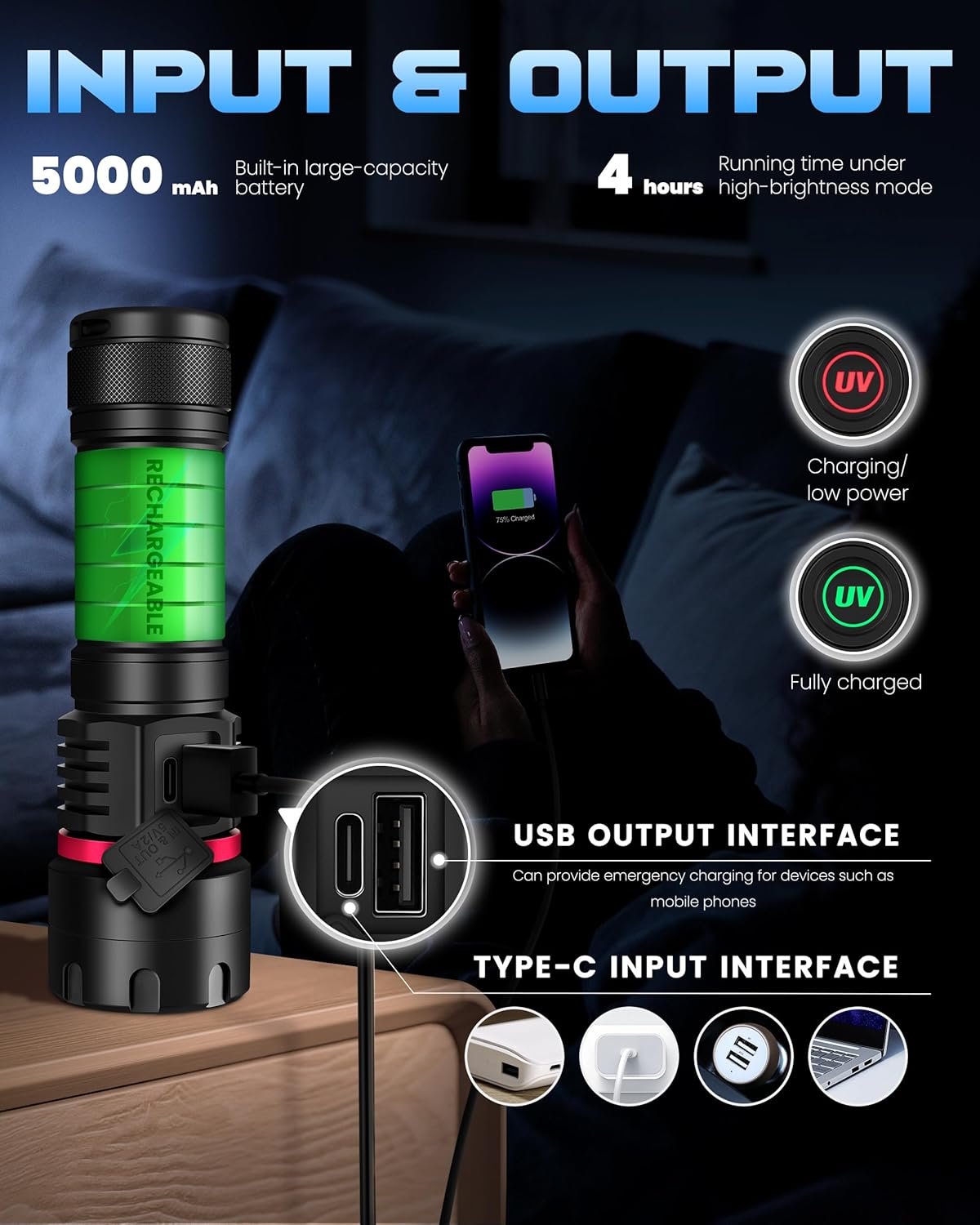
Image: Illustration of the flashlight's USB-C input for charging and its USB output for emergency power supply to other devices.
안전 예방 조치
- DO NOT LOOK DIRECTLY AT UV LIGHT: Direct exposure to UV light can cause eye damage. Always use the provided UV protective glasses when operating the flashlight.
- 어린이의 손이 닿지 않는 곳에 보관하세요.
- 손전등을 분해하지 마세요.
- 손전등을 극한의 온도나 직사광선에 장시간 노출시키지 마세요.
- 방수 기능을 유지하려면 충전하지 않을 때 충전 포트 덮개를 단단히 닫아 두십시오.
작동 지침
전원 켜기/끄기 및 밝기 조정
The flashlight features a multi-gear switch design for easy operation.
- 켜기/끄기: Press the power switch once to turn the flashlight on or off.
- 밝기 조절(무단계 밝기 조절): While the flashlight is on, press and hold the power switch. The brightness will gradually adjust from 20% to 100%. Release the switch at your desired brightness level.
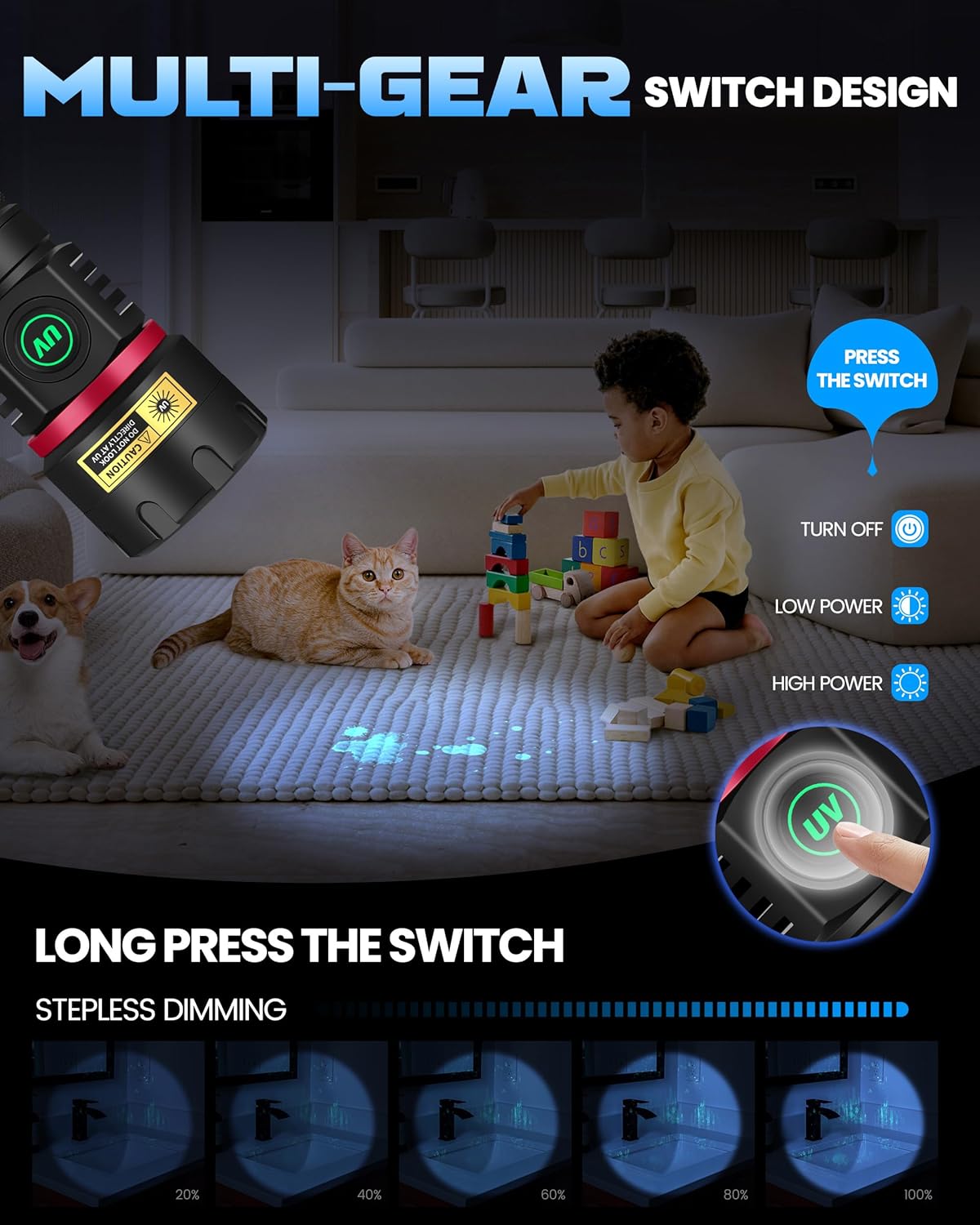
Image: Visual guide to the flashlight's multi-gear switch, demonstrating how to turn it on/off and use the stepless dimming feature by long-pressing the switch.
응용 프로그램
The DARKBEAM UV Flashlight is versatile and can be used for a variety of purposes:
- Mineral and Rock Identification: Ideal for searching for fluorescent minerals and uranium glass.
- 반려동물 소변 및 얼룩 감지: Helps reveal hidden pet stains on carpets, rugs, and furniture.
- 통화 및 문서 확인: Detects security features on banknotes, passports, and other official documents.
- 수지 경화: Suitable for curing UV-sensitive resins in 3D printing or nail art.
- 누출 감지: Can be used with fluorescent dyes to detect leaks in HVAC systems, automotive fluids, or plumbing.
- 호텔 객실 점검: Identify unhygienic spots or hidden stains.
- 고양이 무좀 진단: Aids in identifying fungal infections on pets.

이미지: 전amples of the wide applicability of the UV flashlight, demonstrating its use for detecting cat ringworm, fluorescent agents, identifying ores, verifying currency, and discovering hidden stains.
Emergency Power Supply (USB Output)
The flashlight can also function as an emergency power bank:
- Connect your electronic device (e.g., smartphone) to the USB-A output port on the flashlight using a compatible USB cable.
- 손전등이 기기 충전을 시작합니다.
유지
청소
- 손전등 본체를 부드러운 천으로 닦으세요.amp 옷감.
- 렌즈에 흠집이 생기는 것을 방지하기 위해 렌즈 클리닝 천과 세척액을 사용하십시오.
- 연마성 세척제나 용제를 사용하지 마십시오.
저장
- 손전등은 직사광선을 피해 서늘하고 건조한 곳에 보관하십시오.
- If storing for an extended period, ensure the battery is partially charged (around 50%) to preserve battery health. Recharge every 3-6 months.
배터리 관리
- 배터리를 자주 완전히 방전시키지 마세요.
- Do not overcharge the battery; disconnect once the indicator turns green.
- If the flashlight will not be used for a long time, charge it periodically to maintain battery life.
문제 해결
| 문제 | 가능한 원인 | 해결책 |
|---|---|---|
| 손전등이 켜지지 않습니다. | 배터리가 소진되었습니다. | Charge the flashlight using the provided USB-C cable. Check if the indicator light turns RED. |
| 손전등이 충전되지 않습니다. | Charging cable or adapter issue; port obstruction. | Ensure the USB-C cable is properly connected. Try a different USB power source or cable. Check the charging port for debris. |
| 조명이 어둡거나 불규칙적입니다. | Low battery; brightness setting too low. | Recharge the flashlight. Long-press the power switch to increase brightness. |
| USB 출력이 기기를 충전하지 않습니다. | Flashlight battery too low; incorrect cable. | Ensure the flashlight is sufficiently charged. Use a compatible USB-A cable for your device. |
명세서
| 특징 | 세부 사항 |
|---|---|
| 모델 번호 | B97-365 |
| 광원 유형 | 자외선(365nm) |
| LED | 6x Quad-core P50 UV LEDs |
| 힘 | 80와트 |
| Radiant Intensity | 8040mW |
| 밝기 조정 | 20%-100% 무단계 조광 |
| 전원 | 배터리 구동(충전식 리튬 이온) |
| 배터리 용량 | 5000mAh (내장) |
| Runtime (High Brightness) | 4-6시간 |
| 충전 포트 | USB-C Input (5V/2A max) |
| 출력 포트 | USB-A Output (Emergency Power Supply) |
| 재료 | 알루미늄 합금 |
| 방수 레벨 | IPX65 (Waterproof, Snowproof, Shockproof, Dustproof) |
| 제품 치수 | 5.9인치 깊이 x 1.8인치 너비 x 1.4인치 높이 |
| 품목 무게 | 10.8 온스 |
보증 및 지원
For warranty information or technical support, please contact DARKBEAM customer service through the retailer where the product was purchased or visit the official DARKBEAM website. Please have your model number (B97-365) and purchase details ready when contacting support.
온라인 리소스:


