1. 서론
This manual provides essential information for the safe and efficient operation of your Renogy 12V 20A AC-to-DC Portable LFP Battery Charger. Please read this manual thoroughly before use and retain it for future reference. This charger is designed specifically for Lithium Iron Phosphate (LiFePO4) batteries, offering automatic charging with a wide input voltage range and multiple electronic protections.
2. 안전 지침
Always observe the following safety precautions to prevent personal injury or damage to the charger or battery.
- 모든 지침을 읽으십시오. 충전기를 사용하기 전에 충전기, 배터리 및 배터리를 사용하는 제품에 있는 모든 지침과 주의 표시를 읽으십시오.
- 환기가 잘 되는 곳에서 사용하십시오. Operate the charger in a well-ventilated area. Do not cover the charger during operation.
- 습기를 피하세요: Do not expose the charger to rain, snow, or excessive moisture.
- 적절한 연결: Ensure all connections are secure and correct before plugging the charger into an AC outlet.
- 전원 분리: Always disconnect the AC power before making or breaking connections to the battery.
- 배터리 유형: This charger is designed exclusively for 12V Lithium Iron Phosphate (LiFePO4) batteries. Do not attempt to charge other battery types (e.g., lead-acid, Ni-Cd, Ni-MH) as this may cause damage or injury.
- Damaged equipment: Do not operate the charger if it has received a sharp blow, been dropped, or otherwise damaged. Contact Renogy support for assistance.
- Children and unauthorized personnel: Keep the charger out of reach of children and ensure only qualified individuals operate the device.
3. 패키지 내용
포장을 풀 때 모든 품목이 있는지 확인하세요.
- Renogy 12V 20A AC-to-DC Portable LFP Battery Charger (Model RBC20A1P)
- AC Charger Power Adapter Cable (1200mm 18AWG)
- Alligator Clips Cable (600mm 14AWG) with Blade Automotive Fuse Holder (30A) and Blade Fuse (30A)

4. 제품 특징
The Renogy 12V 20A AC-to-DC Portable LFP Battery Charger offers advanced features for reliable battery charging:
- Automatic LFP Battery Charging: Designed for 12V Lithium Iron Phosphate (LiFePO4) batteries, providing an optimal charging profile.
- 넓은 입력 볼륨tag전자 범위: Compatible with 100-240V AC power sources, making it versatile for various regions.
- Easy-to-Understand LED Indicator: A single LED provides clear status updates on the charging process.
- Simple Plug-and-Play Technology: Features alligator clips for straightforward connection to battery terminals.
- 전자적 보호: Includes safeguards against short circuit, over-current, over-voltage, 언더볼륨tage, 극성을 반대로 합니다.
- Lithium Activation: Capable of activating deeply discharged lithium batteries.
- Silent and Efficient Heat Dissipation: 팬리스 설계로 조용한 작동을 보장합니다.


5. 설정 및 설치
Follow these steps to set up your Renogy battery charger:
- 배터리 준비: Ensure the battery is a 12V Lithium Iron Phosphate (LiFePO4) type. Check the battery terminals for cleanliness and ensure they are free of corrosion.
- Connect Alligator Clips: Connect the red positive (+) alligator clip to the positive (+) terminal of the battery. Connect the black negative (-) alligator clip to the negative (-) terminal of the battery. Ensure a secure connection.
- AC 전원 연결: Plug the AC Charger Power Adapter Cable into the charger's AC port. Then, plug the other end of the AC power adapter cable into a standard 100-240V AC electrical outlet.
- 연결 확인: 충전기의 LED 표시등이 켜져 충전 상태를 보여줍니다.
6. 사용 설명서
Once connected, the charger will automatically begin the charging process. The LED indicator provides visual feedback:
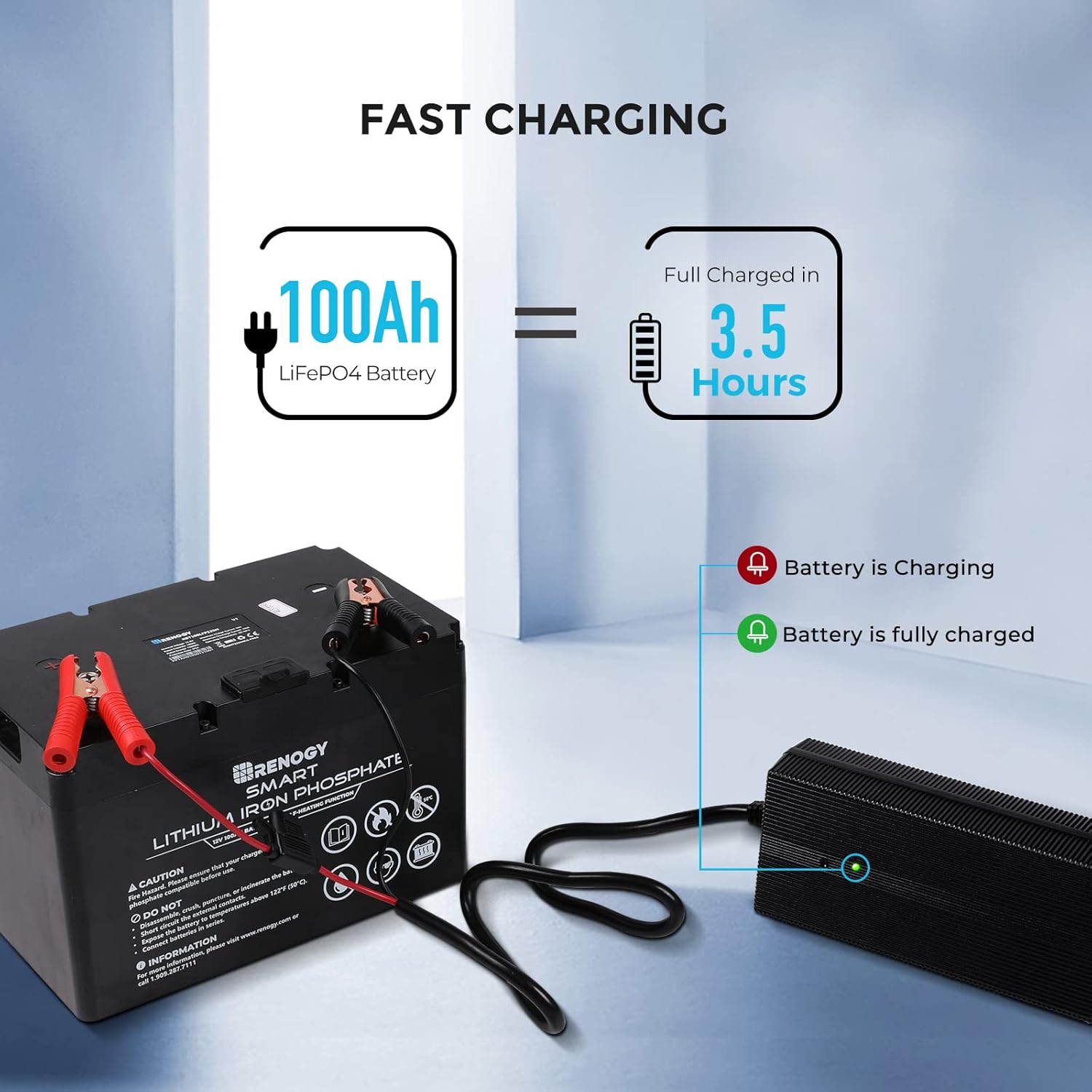
- 적색 LED : 배터리가 현재 충전 중임을 나타냅니다.
- 녹색 LED : 배터리가 완전히 충전되었음을 나타냅니다.
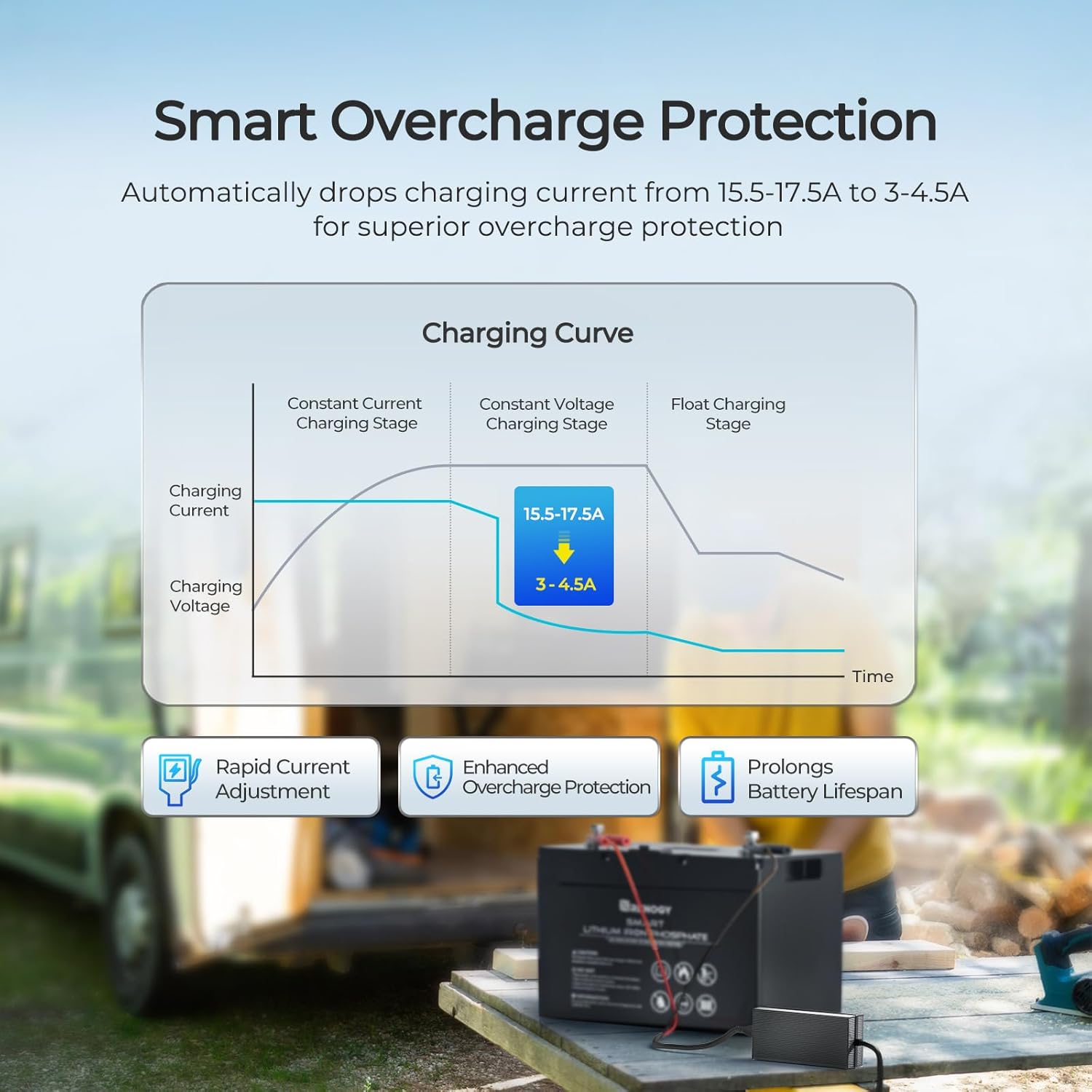
The charger employs a smart overcharge protection mechanism, automatically adjusting the charging current to maintain optimal battery health and prolong lifespan.
A 100Ah LiFePO4 battery can be fully charged in approximately 3.5 hours with this 20A charger.
7. 유지관리
충전기의 수명과 최적의 성능을 보장하려면 다음 사항을 준수하십시오.
- 청소: 충전기를 깨끗하게 유지하고 먼지와 이물질이 묻지 않도록 하십시오. 마른 천으로 외부를 닦아주세요.
- 저장: 사용하지 않을 때는 충전기를 직사광선과 극한 온도 변화를 피해 서늘하고 건조한 곳에 보관하십시오.
- 케이블 검사: Periodically inspect the AC power cable and alligator clips cable for any signs of damage, fraying, or exposed wires. Replace if damaged.
- 퓨즈 점검: The alligator clips cable includes an inline blade fuse. If the charger stops working, check and replace the fuse if necessary (30A blade fuse).
8. 문제 해결
충전기에 문제가 발생하면 다음 표를 참조하십시오.
| 문제 | 가능한 원인 | 해결책 |
|---|---|---|
| 충전기 LED가 켜지지 않습니다. | No AC power; Loose connections; Blown fuse; Faulty charger. | Check AC outlet and power cable. Ensure all connections are secure. Check and replace the 30A blade fuse in the alligator clips cable. If issues persist, contact Renogy support. |
| Charger LED is red but battery is not charging. | Poor battery connection; Battery fault. | Ensure alligator clips are securely attached to battery terminals. Verify battery voltag전자와 건강. |
| Charger LED is green but battery is not fully charged. | Incorrect battery type; Battery fault. | Confirm battery is a 12V LiFePO4 type. Test battery health. |
| 충전기가 지나치게 뜨거워집니다. | Poor ventilation; Overload. | Ensure charger is in a well-ventilated area and not covered. Disconnect and allow to cool. If overheating persists, contact Renogy support. |
9. 사양
| 매개변수 | 값 |
|---|---|
| 모델 | RBC20A1P |
| 제품 치수 | 2.52인치 깊이 x 9.17인치 너비 x 4.25인치 높이(64 x 233 x 108mm) |
| 품목 무게 | 5파운드(2.27kg) |
| 출력 볼륨tage | 12볼트(DC) |
| 충전 전류 | 20A |
| 입력 Voltag및 범위 | 100-240V AC |
| 자기 소비 | 50mA |
| 호환 배터리 유형 | 리튬철인산(LiFePO4) |
| 안전 인증 | UKCA, CE, CB, PSE |
| 색상 | 검은색 |
10. 보증 및 지원
Renogy products are manufactured to high-quality standards. For warranty information, technical support, or service inquiries, please visit the official Renogy web사이트를 방문하거나 고객 서비스 부서에 문의하세요. 보증 청구를 위해 구매 증빙 자료로 구매 영수증을 보관하세요.
Renogy Contact Information:
Web대지: www.renogy.com
Support Email: [Refer to Renogy website for current support email]
Support Phone: [Refer to Renogy website for current support phone number]


