소개
구매해주셔서 감사합니다asing the VTech VM5267 Digital Video Baby Monitor. This manual provides comprehensive instructions for setting up, operating, and maintaining your new baby monitor. Please read this manual thoroughly before use to ensure proper operation and safety.
패키지 내용
- 부모용 유닛(5인치 LCD 화면 포함)
- 베이비 유닛(카메라)
- 전원 어댑터 2개
- 사용자 설명서
- 빠른 시작 가이드

Image: The VTech VM5267 Digital Video Baby Monitor package contents, including the parent unit with a 5-inch display and the baby unit (camera).
설정
1. Powering On the Baby Unit
- Connect the small plug of the power adapter to the DC jack on the back of the baby unit.
- 전원 어댑터의 큰 플러그를 벽면 콘센트에 연결하세요.
- 아기용 유닛은 자동으로 전원이 켜집니다.
2. Powering On the Parent Unit
- Connect the small plug of the power adapter to the DC jack on the side of the parent unit.
- 전원 어댑터의 큰 플러그를 벽면 콘센트에 연결하세요.
- 를 누르고 계세요 힘 화면이 켜질 때까지 부모 기기의 버튼을 누르세요.
Note: For optimal performance, ensure both units are placed within range and away from other electronic devices that may cause interference.
모니터 작동
View아기를 낳으세요
Once both units are powered on and linked, the parent unit will display the video feed from the baby unit. The 5-inch high-resolution color LCD screen provides a clear view.
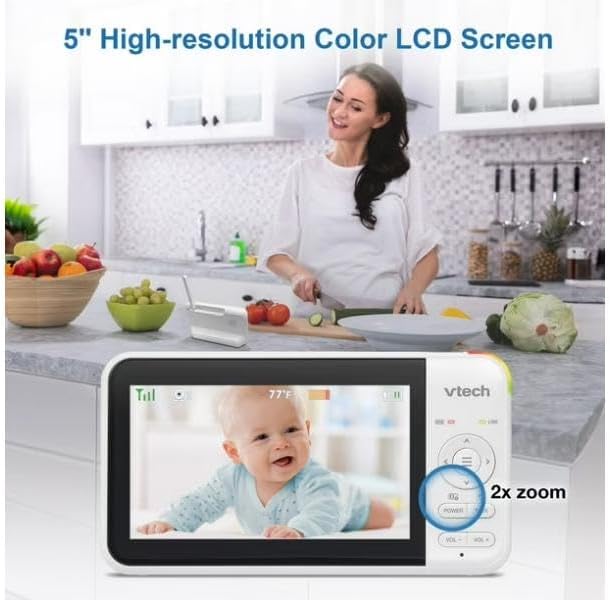
Image: The parent unit's 5-inch high-resolution color LCD screen showing a clear image of a baby, with an indication of 2x zoom capability.
팬 및 틸트 기능
Use the navigation buttons on the parent unit to remotely pan (move horizontally) and tilt (move vertically) the camera lens of the baby unit. This allows you to adjust the viewing angle without physically moving the camera.
양방향 통화 인터콤
를 누르고 계세요 말하다 부모 유닛의 버튼을 눌러 아기 유닛 스피커를 통해 아기에게 말하세요. 아기의 목소리를 들으려면 버튼에서 손을 떼세요.

Image: A visual representation of the two-way talk-back intercom, demonstrating communication between the parent unit and the baby unit.
Night Light and Soothing Sounds
The baby unit features a multi-color night light and can play soothing sounds and lullabies. Use the dedicated buttons on the parent unit to control these features.
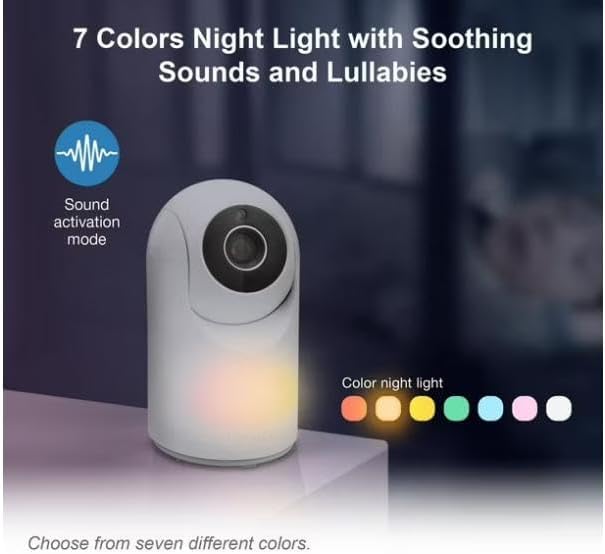
Image: The baby unit showcasing its 7-color night light feature, along with an icon indicating sound activation mode.
자동 적외선 야간 투시경
The baby unit is equipped with infrared LEDs that automatically activate in low-light conditions, providing a clear black-and-white video image of your baby, even in complete darkness.

Image: A side-by-side comparison illustrating the superior clarity of VTech's enhanced night vision compared to standard night vision.
Sound Activation Screen
The parent unit screen can be set to automatically turn on when sound is detected from the baby unit, conserving battery life. The night light on the baby unit can also be configured to turn on with sound detection.

Image: The parent unit displaying a baby, with visual cues indicating the sound activation feature that turns the screen on when noise is detected.
유지
유닛 청소
- 부모 유닛과 아기 유닛의 표면을 부드러운 천으로 닦아주세요.amp 옷감.
- 청소 스프레이나 액체 세제를 사용하지 마십시오.
- Ensure units are dry before reconnecting to power.
배터리 관리(본체)
- The parent unit uses a rechargeable battery.
- 처음 사용하기 전에 배터리를 최소 12시간 동안 충전하세요.
- To prolong battery life, fully discharge the battery periodically before recharging.
- If storing the unit for an extended period, remove the battery.
문제 해결
| 문제 | 가능한 해결책 |
|---|---|
| 링크 없음 / 범위를 벗어남 |
|
| 사진 없음 / 검은색 화면 |
|
| 정적 또는 간섭 |
|
명세서
- 모델: VM5267
- 표시하다: 5-inch (12.7 cm) Color LCD
- 카메라 기능: Pan, Tilt, Digital Zoom, Automatic Infrared Night Vision, Multi-color Night Light
- 오디오 기능 : Two-Way Talk-Back Intercom, Soothing Sounds & Lullabies, Sound Activation
- 힘: AC power adapters for both units; Rechargeable battery for Parent Unit
- 작동 주파수: 2.4GHz FHSS
- 작동 범위: 최대 300m (개방된 들판)
- 치수(부모 장치): Approximately 7.62 x 7.62 x 5.08 cm (as per parcel dimensions, actual unit dimensions may vary slightly)
- 무게: Approximately 750 g (total package weight)
보증 및 지원
보증 정보 및 기술 지원은 제품 포장에 포함된 보증 카드를 참조하거나 VTech 공식 웹사이트를 방문하십시오. website. Please have your product model number (VM5267) and purchase date ready when contacting support.
VTech 공식 Web대지: www.vtechphones.com


