1. 서론
This manual provides detailed instructions for the proper setup, operation, and maintenance of your Daakro AK45 Home Audio Amplifier. Please read this manual thoroughly before using the device to ensure optimal performance and safety. The AK45 is a 2-channel stereo amplifier designed for passive speakers, featuring Bluetooth 5.4 connectivity, multiple input options, and adjustable audio controls.

Figure 1: Daakro AK45 Home Audio Amp앰프 및 리모컨
2. 제품 오버view
2.1 전면 패널 컨트롤

그림 2: 전면 패널 레이아웃
- 전원 스위치: 토글 ampliifier를 켜거나 끕니다.
- USB/SD 입력: Ports for connecting USB flash drives or SD cards for media playback.
- 트레블 컨트롤: Adjusts the high-frequency audio output (±12dB).
- 베이스 컨트롤: Adjusts the low-frequency audio output (±12dB).
- 마이크 볼륨 조절: Adjusts the volume level for connected microphones.
- 마이크 입력(MIC1, MIC2): Two 1/4" (6.5mm) jacks for connecting microphones.
- 마스터 볼륨 컨트롤: Adjusts the overall output volume (0-32dB).
- 모드 버튼: Cycles through input sources (Bluetooth, RCA, USB, SD, FM).
- 재생 컨트롤: Buttons for previous track, play/pause, next track.
- LED 디스플레이: 현재 모드, 볼륨 레벨 및 트랙 정보를 표시합니다.
2.2 후면 패널 연결
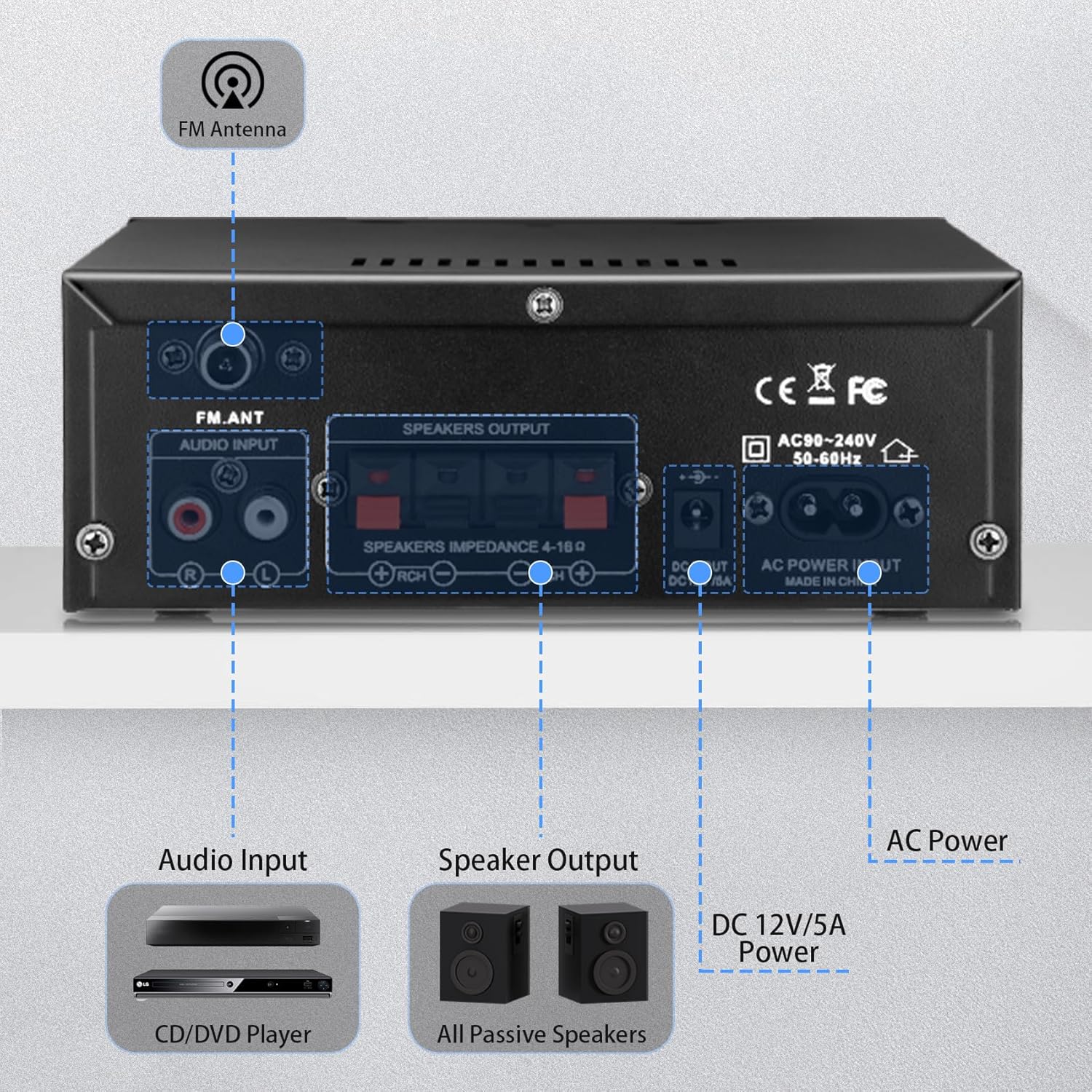
그림 3: 후면 패널 연결
- FM 안테나 입력: 동봉된 FM 안테나를 연결하여 라디오를 수신하세요.
- 오디오 입력(RCA): Red and white RCA jacks for connecting external audio sources like CD players or tape decks.
- 스피커 출력: Terminals for connecting passive speakers (4-16Ω impedance). Ensure correct polarity (+ to + and - to -).
- DC 12V/5A 전원 입력: Connects to a 12V/5A DC power adapter (not included).
- AC 전원 입력: Connects the included AC power cable (AC90-240V, 50-60Hz).
2.3 리모컨
함께 제공되는 리모컨을 사용하면 편리하게 작동할 수 있습니다. amplifier from a distance. Functions include power on/off, mode selection, volume adjustment, track control, and EQ settings (if available).
그림 4: 원격 제어
메모: Remove the isolation plastic sheet from the battery compartment of the remote control before first use.
3. 설정
- 스피커 연결: Connect your passive speakers to the 'SPEAKERS OUTPUT' terminals on the rear panel. Ensure the positive (+) terminal of the amplifier connects to the positive (+) terminal of the speaker, and the negative (-) terminal connects to the negative (-). The amp이 앰프는 임피던스가 4~16Ω인 스피커를 지원합니다.
- 오디오 소스 연결:
- RCA 입력: Use an RCA cable to connect devices like CD players or tape decks to the 'AUDIO INPUT' jacks.
- USB/SD 카드: 전면 패널의 해당 슬롯에 USB 플래시 드라이브 또는 SD 카드를 삽입하십시오.
- 블루투스: For Bluetooth connection, ensure the amplifier is powered on and in Bluetooth mode.
- FM 안테나를 연결하세요: Attach the included FM antenna to the 'FM_ANT' connector on the rear panel for improved radio reception.
- 마이크 연결: If using microphones, plug them into the 'MIC1' or 'MIC2' 1/4" jacks on the front panel.
- 전원 연결: Connect the AC power cable to the 'AC POWER INPUT' on the rear panel and then to a wall outlet. Alternatively, if using a DC power source, connect a 12V/5A DC adapter to the 'DC 12V/5A' input.
4. 사용 설명서
4.1 전원 켜기/끄기
전면 패널의 'POWER' 스위치를 눌러 전원을 켜세요. amp앰프 켜짐/꺼짐. 전원이 켜지면 LED 디스플레이에 불이 들어옵니다.
4.2 입력 모드 선택
Press the 'MODE' button on the front panel or remote control to cycle through the available input sources: Bluetooth (BLUE), RCA (AUX), USB, SD, and FM radio.
4.3 블루투스 페어링
- 전환하다 amplifier to Bluetooth mode using the 'MODE' button. The LED display will show 'BLUE'.
- 기기(스마트폰, 태블릿, 컴퓨터)에서 Bluetooth를 활성화하고 사용 가능한 기기를 검색하세요.
- Select 'AK45' from the list of devices to pair. A confirmation sound will indicate successful pairing.
메모: Maintain a distance of within 30ft/10m between the device and amplifier without obstructions for optimal Bluetooth performance. For TV or PC connections, keep the distance within 15ft/5m.

그림 5: Bluetooth 5.4 연결
4.4 오디오 레벨 조정
- 마스터 볼륨: Rotate the large 'VOLUME' knob on the front panel or use the volume buttons on the remote control to adjust the overall sound level.
- 고음/저음: Use the 'TREBLE' and 'BASS' knobs to fine-tune the high and low frequencies according to your preference.
- 마이크 볼륨: Adjust the 'MIC/VOL' knob to control the volume of connected microphones.
4.5 USB/SD 카드 재생
When a USB drive or SD card is inserted, the amp앰프는 자동으로 USB/SD 모드로 전환되어 호환되는 오디오 파일을 재생하기 시작합니다. files. Use the playback controls (previous, play/pause, next) on the front panel or remote to manage your music.
4.6 마이크 사용
Connect up to two microphones to the 'MIC1' and 'MIC2' inputs. Adjust the 'MIC/VOL' knob to control microphone volume. This feature is suitable for home karaoke or public address applications.
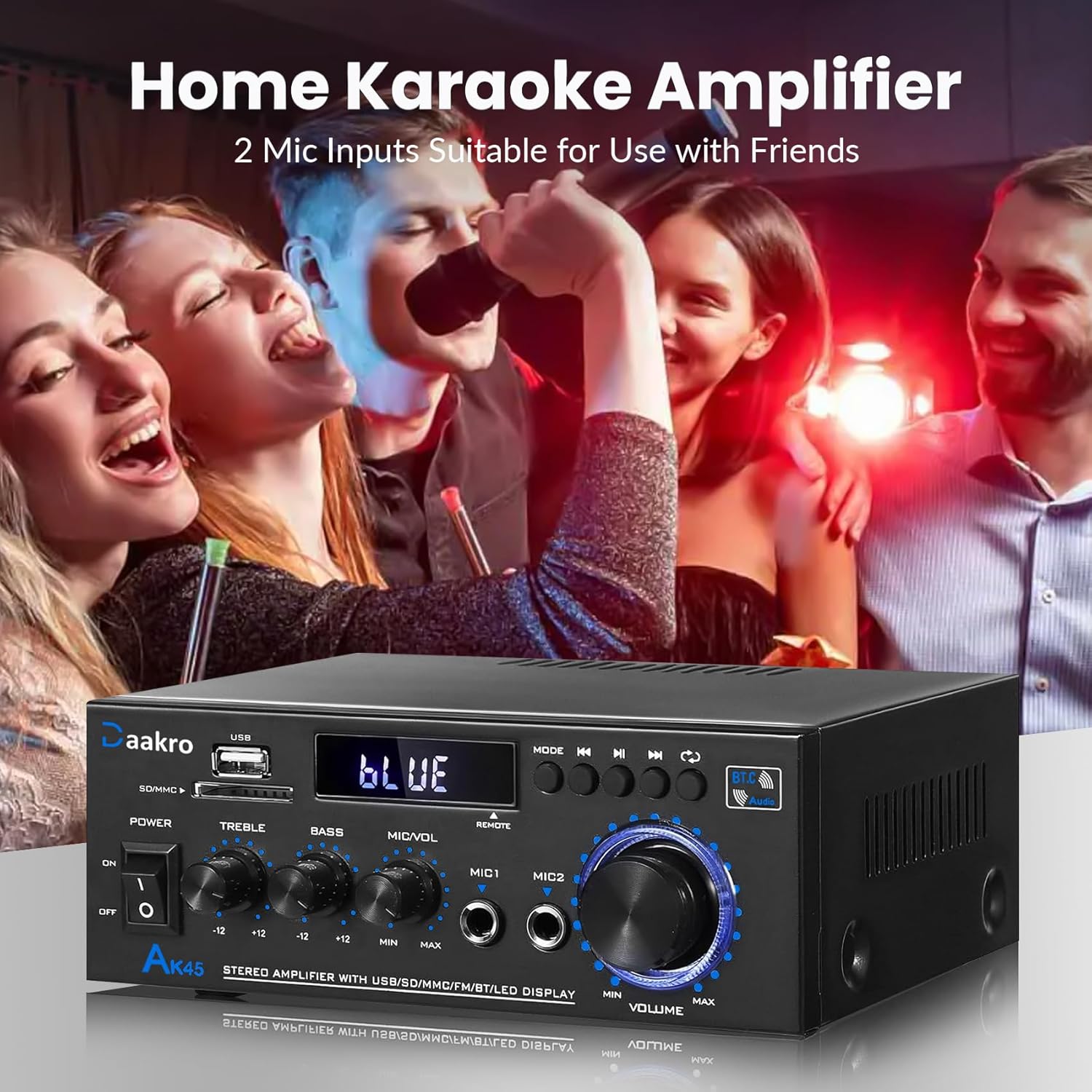
Figure 6: Home Karaoke Application
5. 유지관리
- 청소: 부드럽고 마른 천을 사용하여 외부를 청소하십시오. amp증폭기. 액체 세척제나 용제는 마감재나 내부 부품을 손상시킬 수 있으므로 사용하지 마십시오.
- 통풍: 확인하십시오 amp앰프는 적절한 환기 기능을 갖추고 있어야 합니다. 제품 상단이나 측면의 통풍구를 막지 마십시오.
- 저장: 장기간 사용하지 않을 경우 보관하세요 amp직사광선과 극한의 온도를 피해 시원하고 건조한 곳에 보관하세요.
- 전원 차단: Always disconnect the power cable from the wall outlet before performing any cleaning or maintenance.
6. 문제 해결
- 전원 없음:
- 전원 케이블이 양쪽에 안전하게 연결되어 있는지 확인하십시오. amp리파이어와 벽면 콘센트.
- 전면 패널의 전원 스위치가 '켜짐' 위치에 있는지 확인하십시오.
- 다른 장치를 연결하여 벽면 콘센트가 제대로 작동하는지 확인하세요.
- 소리 없음:
- Confirm that speakers are correctly connected to the 'SPEAKERS OUTPUT' terminals with correct polarity.
- Check that the correct input mode is selected (Bluetooth, RCA, USB, SD, FM).
- Increase the 'MASTER VOLUME' knob and ensure it is not at minimum.
- Verify that the audio source device is playing and its volume is turned up.
- Ensure passive speakers are used, as the AK45 is not compatible with active speakers.
- 블루투스 연결 문제:
- 확인하십시오 amplifier is in Bluetooth mode ('BLUE' on display).
- Delete 'AK45' from your device's Bluetooth list and attempt to re-pair.
- Reduce the distance between your device and the amplifier, and remove any obstructions.
- 두 가지 모두 다시 시작하세요 amplifier와 Bluetooth 장치.
- 음질이 좋지 않음(왜곡, 볼륨 낮음):
- 스피커 연결부의 배선이 헐거워졌거나 극성이 잘못 연결되었는지 확인하십시오.
- Adjust 'TREBLE' and 'BASS' controls.
- 오디오 소스가 깨끗한 신호를 제공하는지 확인하세요.
- Verify that the speaker impedance is within the supported 4-16Ω range.
- 그만큼 amplifier uses an upgraded TPA3116 chip for clear audio.

Figure 7: TPA3116D2 Chip for Enhanced Audio Performance
- USB/SD 카드 인식 안 됨:
- USB 드라이브나 SD 카드가 올바르게 삽입되었는지 확인하세요.
- 확인해보십시오 files on the USB/SD card are in a compatible audio format.
- 다른 USB 드라이브나 SD 카드를 사용해 보세요.
- 원격 제어가 작동하지 않음:
- Ensure the isolation plastic sheet has been removed from the battery compartment.
- 리모콘의 배터리를 교체하세요.
- 리모컨을 정면으로 향하게 하세요. amp앰프의 전면 패널 센서.
7. 사양
- 모델: AK45
- 출력 전력: 50W + 50W (Theoretical, at 24V/5A, 4-8Ω impedance)
- Amp리퍼 칩: TPA3116
- 블루투스 버전: 5.4 (QCC3040 core)
- 입력 인터페이스: 1x RCA, 2x 1/4" Microphone, 1x USB, 1x SD Card Slot, Bluetooth 5.4, FM Radio
- 스피커 임피던스: 4-16Ω (Passive Speakers Only)
- 주파수 응답: 20Hz - 20kHz
- 톤 컨트롤: Treble ±12dB, Bass ±12dB
- 전원 공급 장치: AC90-240V, 50-60Hz (or DC 12V/5A)
- 치수: 8.78 x 8.31 x 3.7 인치
- 품목 무게: 1.94파운드
7.1 Output Power vs. Power Supply and Impedance

Figure 8: Power Output Table
| 전원 공급 장치 | 스피커 임피던스 | 최대 출력 전력 |
|---|---|---|
| 9V | 4Ω | 15와트 |
| 6Ω | 12와트 | |
| 8Ω | 10와트 | |
| 12V | 4Ω | 20와트 |
| 6Ω | 15와트 | |
| 8Ω | 12와트 | |
| 18V | 4Ω | 30와트 |
| 6Ω | 20와트 | |
| 8Ω | 15와트 | |
| 22V | 4Ω | 40와트 |
| 6Ω | 30와트 | |
| 8Ω | 20와트 | |
| 24V | 4Ω | 50와트 |
| 6Ω | 40와트 | |
| 8Ω | 30와트 |
8. 상자 안에 무엇이 들어있나요?
Upon opening your Daakro AK45 Home Audio Amplifier package, you should find the following items:
- 1x Daakro AK45 Home Audio AmpLIFIER 단위
- 1x 리모콘
- 1x AC 전원 케이블
- 1x FM 안테나
- 1x 사용 설명서(이 문서)
그림 9: 패키지 내용물
9. 보증 및 지원
Daakro is committed to providing high-quality audio equipment and customer satisfaction.
- 보증: 본 제품은 구매일로부터 30일간 보증됩니다.
- 고객 서비스: We offer 24-hour online customer service to assist with any inquiries or issues you may encounter.
- 만족 보장: We strive for 100% customer satisfaction.
For support, please refer to the contact information provided with your purchase or visit the official Daakro store on Amazon.


