1. 서론
This manual provides detailed instructions for the safe and effective use of your TOTAL TMT57026 Laser Distance Meter. Please read this manual thoroughly before operating the device and keep it for future reference. This device is designed for accurate distance measurements up to 70 meters, suitable for various professional and DIY applications.
2. 안전 지침
- 레이저 방사선: This device emits Class 2 laser radiation. Do not stare into the laser beam or direct it at other people or animals.
- 눈 보호: 레이저 빔이 눈에 직접 닿지 않도록 하세요.
- 운영 환경: 폭발성 환경이나 가연성 물질 근처에서는 장치를 작동하지 마십시오.
- 방수 기능: 이 장치는 방수가 안 됨. 물이나 습도가 높은 곳에 보관하지 마세요.
- 유지: Only qualified personnel should repair the device.
- 배터리: Use only specified AAA batteries. Do not mix old and new batteries or different types of batteries.
3. 제품 오버view
Familiarize yourself with the components of your TOTAL TMT57026 Laser Distance Meter.
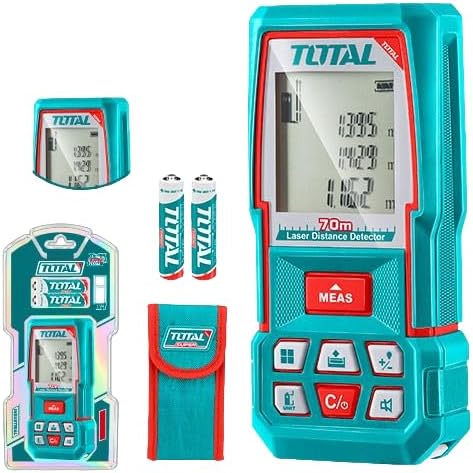
Figure 1: The TOTAL TMT57026 Laser Distance Meter, showing the device itself, two AAA batteries, a carrying pouch, and retail packaging. The device features a digital display and multiple function buttons.
주요 구성 요소:
- 레이저 송신기/수신기: 기기 상단에 위치합니다.
- 디스플레이 화면: Shows measurements, units, and mode indicators.
- MEAS 버튼: Initiates single or continuous measurement.
- 단위 버튼: Changes measurement units (e.g., meters, feet, inches).
- C/O Button: Clears the last measurement or turns the device off.
- 기능 버튼: For area, volume, addition, subtraction, and other calculations.
- 배터리 칸: 기기 뒷면에 위치해 있습니다.
4. 설정
4.1 배터리 설치
- 장치 뒷면에서 배터리 덮개를 찾으세요.
- 덮개를 밀거나 풀어서 여세요.
- Insert two (2) AAA 1.5V disposable batteries, ensuring correct polarity (+/-). The device includes two AAA batteries.
- 배터리 덮개를 단단히 닫으세요.
4.2 전원 켜기/끄기
- 전원을 켜려면: 를 누르세요 측정 button briefly. The display will light up.
- 전원을 끄려면: 를 누르고 계세요 직통번호 버튼을 약 3초 동안 누르세요. 또한, 배터리 수명 절약을 위해 일정 시간 동안 사용하지 않으면 기기가 자동으로 꺼집니다.
5. 사용 설명서
5.1 기본 거리 측정
- 장치의 전원이 켜져 있는지 확인합니다.
- 레이저 빔을 표적 표면에 향하게 합니다.
- 를 누르세요 측정 button once. The laser will activate, and the measurement will appear on the display.
- The measurement will be held on the screen until a new measurement is taken or the device is turned off.
5.2 연속 측정(추적)
- 를 누르고 계세요 측정 버튼을 약 2초간 누릅니다.
- The device will enter continuous measurement mode, displaying real-time distance as you move the device.
- 를 누르세요 측정 버튼을 다시 누르면 연속 측정이 중지되고 마지막 값이 유지됩니다.
5.3 측정 단위 변경
- 를 누르세요 단위 button repeatedly to cycle through available units: meters (m), feet (ft), and inches (in).
- 선택된 장치가 디스플레이에 표시됩니다.
5.4 면적 및 부피 측정
The device supports calculation of area and volume. Refer to the icons on the function buttons for specific modes.
- Press the appropriate function button (e.g., the button with the square icon for area, or cube icon for volume).
- 화면의 안내에 따라 필요한 측정값을 기록하세요(예: 면적 측정 시 길이, 너비; 부피 측정 시 길이, 너비, 높이).
- The calculated result will be displayed.
5.5 덧셈과 뺄셈
사용하세요 +/- button to add or subtract measurements.
- 첫 번째 측정을 하세요.
- 를 누르세요 +/- button to select addition or subtraction mode.
- Take the second measurement. The device will automatically perform the calculation and display the result.
6. 유지관리
6.1 청소
- 부드러운 천으로 장치를 닦으십시오. damp 천. 연마성 세척제나 용매를 사용하지 마십시오.
- Clean the laser lens carefully with a soft, lint-free cloth, similar to cleaning camera lenses.
6.2 보관
- 기기를 직사광선과 극한의 온도를 피해 건조하고 서늘한 곳에 보관하세요.
- 장기간 보관할 경우 누액을 방지하기 위해 배터리를 제거하십시오.
6.3 배터리 교체
- When the battery indicator on the display shows low power, replace both AAA batteries following the instructions in Section 4.1.
7. 문제 해결
| 문제 | 가능한 원인 | 해결책 |
|---|---|---|
| 장치의 전원이 켜지지 않습니다. | 배터리가 소진되었거나 올바르게 설치되지 않았습니다. | 배터리 극성을 확인하거나 새 AAA 배터리로 교체하세요. |
| 부정확한 측정. | Laser lens is dirty; target surface is too reflective/non-reflective; device is unstable. | Clean the laser lens. Measure against a suitable, stable surface. Ensure device is held steady. |
| 레이저 빔은 보이지 않습니다. | Bright ambient light; laser is off. | Operate in lower light conditions. Ensure device is powered on and MEAS button is pressed. |
| 디스플레이에 오류 코드가 표시됩니다. | 측정 범위를 벗어났습니다. 내부 오류입니다. | Ensure target is within 0.05m to 70m range. Try restarting the device. If error persists, contact support. |
8. 사양
- 모델: TMT57026
- 상표: 총
- 측정 범위: 0.05~70미터
- 측정 단위: Meters (m), Feet (ft), Inches (in)
- 레이저 클래스: 2학년
- 배터리: 2 x AAA, 1.5V (included)
- 배터리 유형: 일회용의
- Automatic Laser Shut-off: 예 (활동이 없었던 후)
- Automatic Device Shut-off: 예 (활동이 없었던 후)
- 제품 크기: 약 17×5×0.1 cm
- 품목 무게: Approximately 160 g (0.16 Kilograms)
- 재료: 플라스틱
- 색상: 터키 옥
- 방수 수준: 방수가 되지 않음
- 제조업체: 총
- 원산지: 중국
9. 보증 및 지원
For warranty information and technical support, please contact TOTAL customer service. Keep your purchase receipt as proof of purchase.
For further assistance, please refer to the official TOTAL web사이트를 방문하거나 현지 유통업체에 문의하세요.


