1. 중요한 안전 정보
Operating a laser engraver involves inherent risks. Adhere strictly to all safety guidelines to prevent injury and damage. This device is a Class 4 laser product.
- 눈 보호: Always wear the provided safety glasses or equivalent laser-protective eyewear when the machine is in operation. The panoramic magnetic eye protection shield filters 97% of strong light, but direct exposure to the laser beam can cause permanent eye damage.
- 통풍: Operate the laser engraver in a well-ventilated area to dissipate fumes and smoke produced during engraving and cutting.
- 화재 안전: Keep a fire extinguisher nearby. Never leave the machine unattended during operation, especially when cutting materials that may ignite.
- 재료 안전: Engrave and cut only approved materials. Certain materials can produce toxic fumes or catch fire easily.
- 비상 정지 : 비상 정지 버튼의 위치와 사용 방법을 숙지하십시오.
내장된 안전 기능:
- 화염 감지기: The IKIER X5 Pro is equipped with a flame detector that will automatically stop processing and trigger a buzzer alarm if it detects a flame.
- Tilt Sensor (Gyroscope): The machine will automatically stop operation and sound an alarm if it tilts more than 15 degrees, preventing accidents from unexpected movement.

Image: The IKIER X5 Pro's integrated flame detector and gyroscope for enhanced operational safety.
2. 패키지 내용
조립을 진행하기 전에 아래 나열된 모든 구성품이 패키지에 포함되어 있는지 확인하십시오.
- IKIER X5 Pro Laser Engraver (main unit)
- Installation Toolkit (screws, wrenches, etc.)
- 전원 케이블
- 전원 어댑터
- USB 플래시 드라이브(소프트웨어 및 드라이버 포함)
- C형 케이블
- X축 연결선
- 포커스 심
- 안전 안경
- 제품 설명서

Image: All components included in the IKIER X5 Pro Laser Engraver package.
3. 조립 및 설정
The IKIER X5 Pro is designed for quick assembly, typically completed within 10-20 minutes. The full aluminum alloy structure ensures stability and durability.
- 구성 요소 풀기: 포장에서 모든 물품을 조심스럽게 꺼내어 깨끗하고 평평한 표면에 놓으십시오.
- 프레임 조립: Follow the step-by-step instructions in the included Product Manual to connect the frame components using the provided toolkit. Ensure all screws are securely tightened, but avoid over-tightening, which can cause rail friction.
- 레이저 모듈 설치: Mount the laser module onto the gantry. The integral lead screw design ensures precise laser movement.
- 케이블 연결: Connect the power cable, Type C cable, and X-axis connecting line as indicated in the manual.
- 초기 전원 켜기: Connect the power adapter and turn on the machine. Observe for any unusual sounds or movements.

Image: Visual guide for quick assembly, mobile app connection, and direct engraving setup.
4. 사용 설명서
소프트웨어 및 연결성:
The IKIER X5 Pro supports various operating systems and file formats, offering flexible control options.
- 운영 체제: Compatible with Linux, Mac OS, and Windows.
- File 형식: Supports SVG, PNG, DXF, TIF, BMP, and PDF.
- Next-Generation APP Control: Utilize the dedicated mobile application for a streamlined user experience and enhanced control functions. This allows for convenient operation directly from your smartphone or tablet.
- 오프라인 조각: The machine supports offline engraving, enabling you to engrave projects without a continuous computer connection once the file 로드되었습니다.
- 전력 손실 복구: 갑자기 정전이 된 경우tage or accidental interruption, the machine features a power loss recovery function, allowing it to resume engraving from the exact original position.
Engraving and Cutting Process:
- 재료 준비: Place your chosen material securely within the working area (410x380mm).
- 레이저를 집중시키세요: Use the provided focus shims to set the correct focal distance for optimal engraving and cutting precision. The laser spot area is 0.06*0.06mm, balancing precision and cutting energy.
- 하중 설계: Transfer your design file to the machine via USB or the connected software/APP.
- 매개변수 설정: Adjust engraving/cutting parameters (speed, power, passes) based on the material type and desired outcome.
- 작업 시작: Initiate the engraving or cutting process. Monitor the machine closely, especially during the initial stag에스.
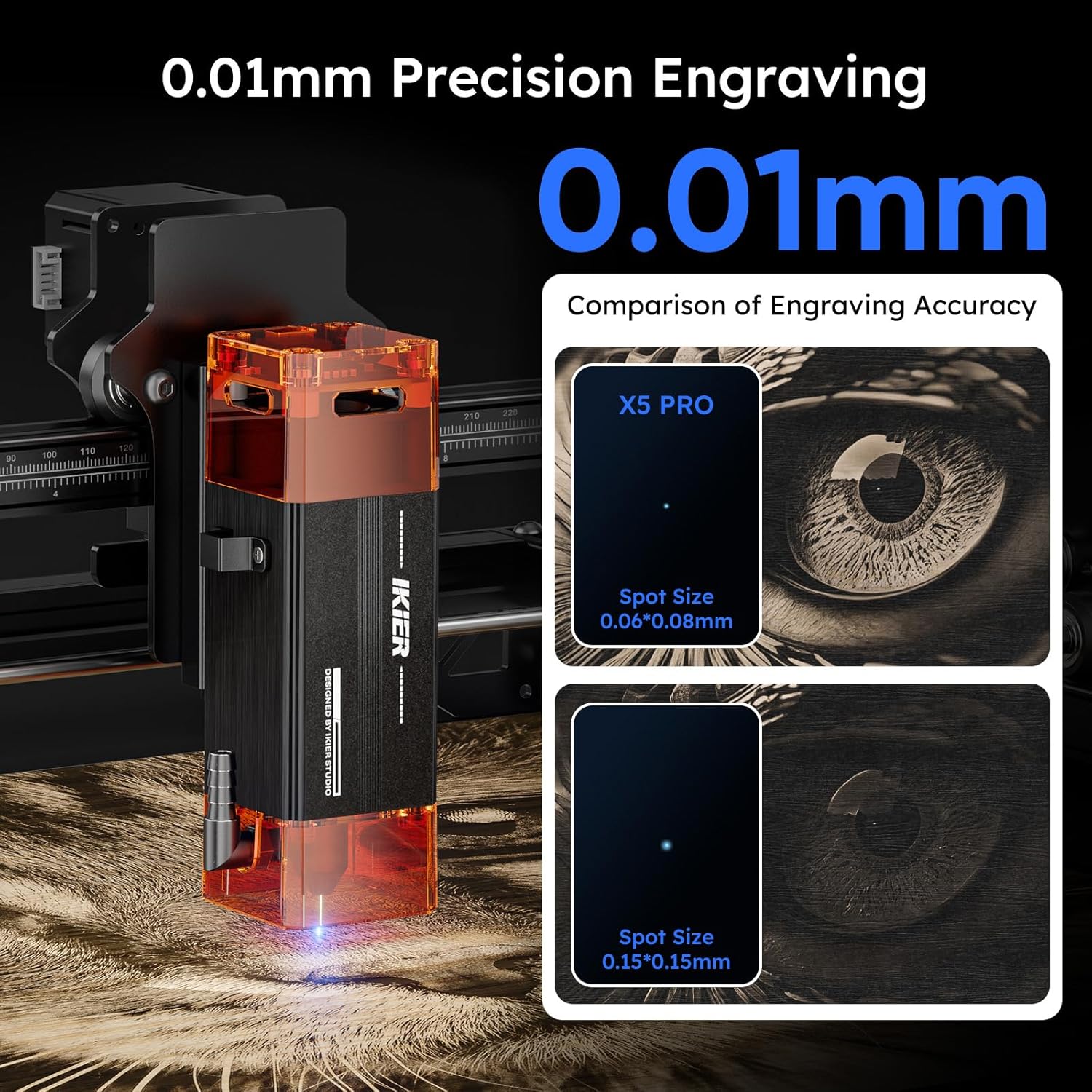
Image: The IKIER X5 Pro offers 0.01mm precision engraving with a fine laser spot size of 0.06*0.06mm.

Image: Demonstrates the 5W laser's ability to cut 5mm Paulownia wood and 3mm black acrylic in a single pass.
5. 재료 호환성
The IKIER X5 Pro is suitable for engraving and cutting a wide range of materials. Always test on a small, inconspicuous area first to determine optimal settings.
- 조각: Wood, Glass, Plastic, Leather, Rubber, Paper, Cardboard, Anodized Aluminum, Stainless Steel (with coating), Ceramics (with coating), Stone.
- 절단: Wood (up to 5mm Paulownia), Paper, Cardboard, Leather, Non-transparent Acrylic (up to 3mm black acrylic), Fabric.
메모: Transparent materials like clear acrylic or glass may require a dark coating (e.g., paint or marker) on the surface for the laser to interact effectively.
6. 유지관리
Regular maintenance ensures the longevity and optimal performance of your IKIER X5 Pro laser engraver.
- 레이저 렌즈 청소: 레이저 렌즈를 주기적으로 부드럽고 보풀 없는 천과 렌즈 세척액으로 닦아 깨끗한 레이저 출력을 유지하십시오.
- 레일과 바퀴를 깨끗하게 유지하세요: Keep the X and Y axis rails and wheels free from dust and debris. A build-up can affect movement precision.
- 벨트 장력을 확인하세요: Ensure the timing belts are properly tensioned. Loose belts can lead to inaccurate engraving.
- 펌웨어 업데이트: IKIER 공식 웹사이트를 확인하세요. website or APP for any available firmware updates to ensure your machine has the latest features and bug fixes.
7. 문제 해결
이 섹션에서는 발생할 수 있는 일반적인 문제에 대해 설명합니다. 더 복잡한 문제는 전체 설명서를 참조하거나 고객 지원팀에 문의하십시오.
| 문제 | 가능한 원인 | 해결책 |
|---|---|---|
| 기계의 전원이 켜지지 않습니다. | Power cable loose, power adapter faulty, power switch off. | Check all power connections. Ensure the power switch is in the 'ON' position. Test power adapter if possible. |
| 레이저가 발사되지 않거나 약합니다. | Laser lens dirty, focus incorrect, power setting too low, laser module faulty. | Clean the laser lens. Re-focus the laser using shims. Increase laser power in software. Contact support if issue persists. |
| Engraving/cutting is inaccurate or skipped lines. | Loose belts, dirty rails, stepper motor issue, material not secured. | Check and tighten timing belts. Clean X and Y axis rails. Ensure material is firmly secured. Verify all assembly bolts are appropriately tightened, as over-tightening can cause rough movement. |
| Machine stops unexpectedly with alarm. | Flame detected, machine tilted, emergency stop pressed. | Check for flames or smoke. Ensure the machine is on a stable, level surface. Release emergency stop button if pressed. |
| Software/APP not connecting to machine. | Incorrect cable connection, driver issues, software version mismatch. | Verify USB/Type C cable connection. Reinstall drivers from the USB flash drive. Ensure software/APP is the latest version. |
8. 사양
Key technical specifications for the IKIER X5 Pro Laser Engraver.
| 특징 | 사양 |
|---|---|
| 모델 | IKIER X5 Pro |
| 레이저 출력 전력 | 5000mW (5W) |
| 레이저 클래스 | 4학년 |
| 레이저 조사 영역 | 0.06*0.06mm |
| 조각 영역 | 410 x 380mm(16.14 x 14.96인치) |
| 제품 치수 | 22.8 x 22.6 x 7.6 인치 |
| 품목 무게 | 12.18파운드 |
| 재료 | 알루미늄 합금 |
| 전원 | 교류/직류 |
| 지원되는 OS | 리눅스, 맥 OS, 윈도우 |
| 지원됨 File 형식 | SVG, PNG, DXF, TIF, BMP, PDF |

Image: The generous 410x380mm working area of the IKIER X5 Pro.
9. 보증 및 지원
For warranty information, please refer to the documentation included with your product or visit the official IKIER website. If you encounter any issues or require technical assistance, please contact IKIER customer support. They are available to help with troubleshooting and provide guidance for optimal use of your laser engraver.
연락처 정보: Refer to the official IKIER website or the contact details provided in your product manual for the most up-to-date support channels.
온라인 리소스: Explore online forums, community groups, and official IKIER tutorials for additional tips and project ideas.