1. 제품 오버view
The ARES WING Dual Monitor Stand is engineered for heavy-duty computer monitors, specifically designed to support both flat and curved ultrawide screens. This robust mount provides an ergonomic solution to optimize your workspace, offering extensive adjustability and integrated features like USB ports and cable management.
It is compatible with monitors ranging from 24 to 57 inches, supporting flat monitors up to 59 lbs and curved monitors up to 48 lbs. The stand features a durable steel and aluminum construction with a gas spring system for smooth and stable positioning.

Figure 1: ARES WING Dual Monitor Stand and included components, including the main stand, monitor arms, VESA plates, and mounting hardware.

Figure 2: The monitor stand supports flat screens up to 59.4 lbs and curved screens up to 48.4 lbs, designed for unmatched strength with ultrawide displays.
2. 패키지 내용
Before beginning installation, please verify that all components are present and undamaged. If any parts are missing or damaged, please contact customer support.
- 주극 조립체
- Dual Monitor Arms (2 units)
- VESA 마운팅 플레이트 (2개)
- C-Clamp 장착베이스
- 그로밋 장착 베이스
- USB-A and USB-C Cable (integrated into base)
- 하드웨어 키트(나사, 와셔, 스페이서)
- 공구 (육각 렌치)

그림 3: 상세 view of all components included in the package, ensuring you have everything needed for assembly.
3. 설정 및 설치
3.1 책상 호환성
The monitor stand offers two mounting options to suit various desk types:
- C-Clamp 산: Fits desk thickness from 0.47 inches to 1.77 inches (12mm - 45mm).
- 그로밋 마운트: Fits desk thickness from 0.47 inches to 1.97 inches (12mm - 50mm). Requires an existing hole in the desk.
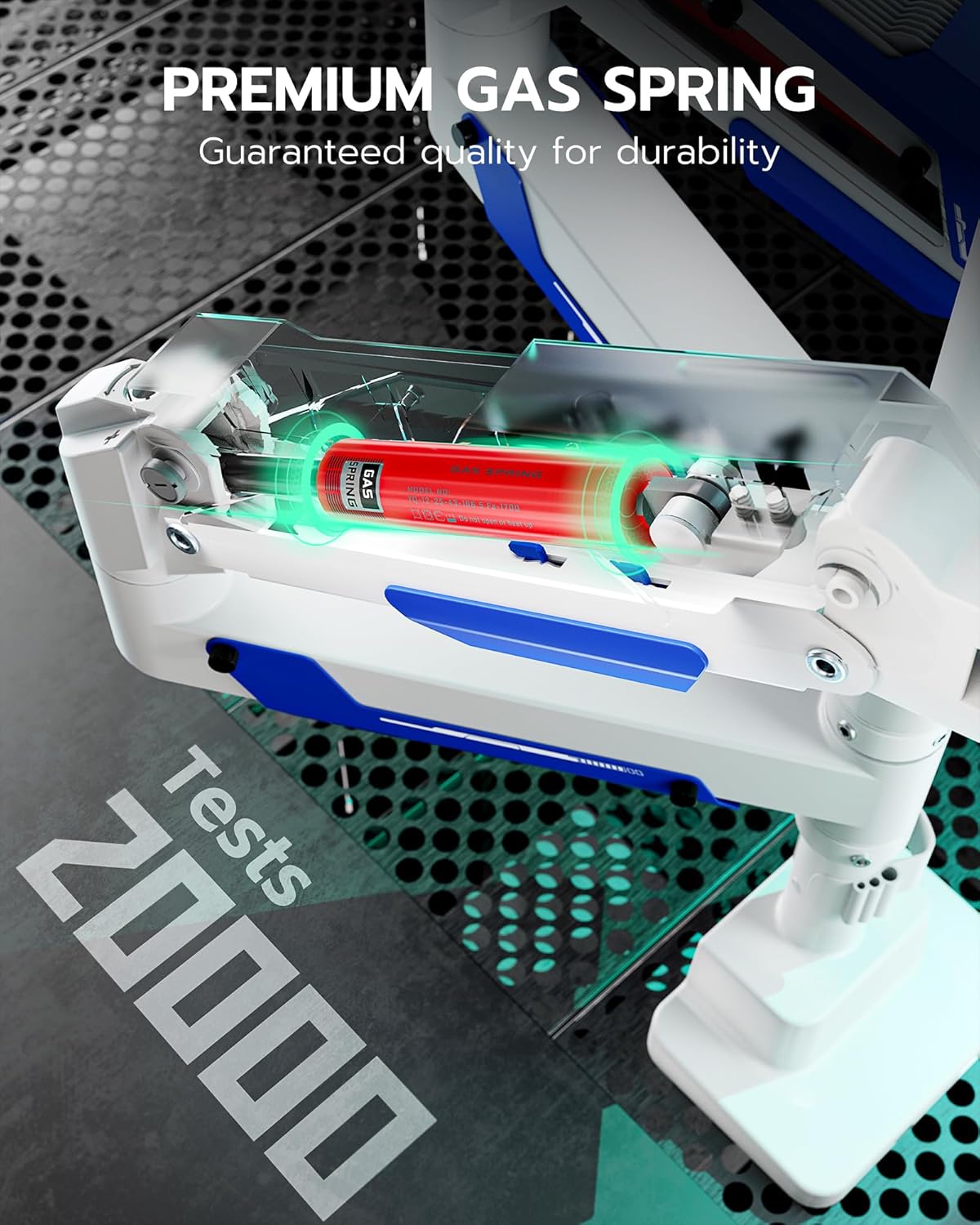
Figure 4: Illustration of the two mounting methods: C-clamp for desk edges and grommet for desks with existing holes, showing compatible desk thicknesses.
3.2 조립 단계
- 장착 방법을 선택하세요: C-cl 중에서 선택하세요amp or grommet mount based on your desk.
- Attach Base to Desk: Secure the chosen mounting base to your desk. For C-clamp, 클을 조입니다amp. For grommet, insert the bolt through the desk hole and secure with the nut from underneath.
- Install Main Pole: Insert the main pole into the secured base and tighten any retaining screws.
- 모니터 암을 부착하세요: Slide the monitor arms onto the main pole at your desired height and secure them.
- 모니터에 VESA 플레이트를 부착하세요: Secure the VESA mounting plates to the back of your monitors using the provided screws. The stand supports VESA patterns of 75x75mm, 100x100mm, 100x200mm, 200x100mm, and 200x200mm.
- 모니터를 암에 장착하기: Carefully lift each monitor and slide its VESA plate onto the corresponding arm's mounting head until it clicks into place. Ensure it is securely seated.
- USB 케이블 연결: Connect the integrated USB-A and USB-C cables from the stand's base to your computer's USB ports to enable the charging and data passthrough functionality.
4. 운영 및 조정
4.1 모니터 위치 지정
The ARES WING monitor stand offers extensive flexibility for optimal ergonomic positioning:
- 높이 조정: The arms can be moved up and down the main pole. The maximum height is 25.8 inches (65.5 cm) from the desk surface.
- 팔 뻗기: Each arm can extend up to 29.7 inches (75.4 cm) from the pole.
- 경사: Adjust the monitor tilt from +70° to -45° to reduce glare and find your preferred view잉 각도.
- 받침: Swivel the monitor +90° to -90° horizontally.
- 회전: Rotate the monitor 360° for portrait or landscape orientation.

Figure 5: The stand is designed to elevate ultrawide screens up to a maximum of 57 inches, providing ample space and flexibility for large displays.

Figure 6: The monitor stand offers a wider height range, allowing for up to 19 inches of vertical adjustment to tailor the monitor position for ultimate flexibility.

Figure 7: The stand provides flexible adjustment capabilities including +70° to -45° tilt, +90° to -90° swivel, and 360° rotation for perfect view각도를 나타냅니다.
4.2 가스 스프링 장력 조정
The gas spring mechanism allows for smooth and stable monitor movement. If your monitor is too heavy and sags, or too light and floats up, you may need to adjust the gas spring tension. Use the provided Allen wrench to turn the adjustment screw located on the arm. Turn clockwise to increase tension for heavier monitors, and counter-clockwise to decrease tension for lighter monitors.

Figure 8: The premium gas spring inside the arm ensures smooth and durable operation, having undergone over 20,000 fatigue tests for reliability.
4.3 USB Ports and Cable Management
The stand features integrated USB-A 3.0 and USB-C ports in the base, providing convenient access for charging and data transfer. These ports offer 5Gbps data transmission and 10W charging. Utilize the built-in cable management system along the arms and pole to route and conceal your monitor and power cables, maintaining a clean and organized workspace.

Figure 9: The stand includes convenient USB-A 3.0 and USB-C ports for 5Gbps data transmission and 10W charging, compatible with various devices.
5. 유지관리
To ensure the longevity and optimal performance of your ARES WING Dual Monitor Stand, follow these simple maintenance guidelines:
- 청소: 스탠드 표면을 부드러운 천으로 닦으세요.amp 천으로 닦아주세요. 연마성 세제나 용제는 마감재를 손상시킬 수 있으므로 사용하지 마세요.
- 정기 점검: 모든 나사와 연결부가 단단히 조여져 있는지 정기적으로 점검하세요. 필요하면 다시 조이세요.
- 가스 스프링: The gas spring is designed for long-term durability. If you notice a change in the arm's movement or stability, re-adjust the tension as described in Section 4.2.
6. 문제 해결
- 처짐 또는 부력 모니터링:
This indicates incorrect gas spring tension. Adjust the gas spring screw on the arm. Turn clockwise to increase tension for heavier monitors, counter-clockwise for lighter monitors. Make small adjustments and test.
- 서 있을 때 흔들림:
장착 베이스(C-cl)를 확인하십시오.amp or grommet) is securely tightened to the desk. Check that the main pole is firmly seated in the base and its retaining screws are tight.
- USB 포트가 작동하지 않음:
Verify that the integrated USB-A and USB-C cables from the stand's base are properly connected to active USB ports on your computer or power source.
- 모니터 위치 조정에 어려움:
Ensure all adjustment points (tilt, swivel, rotation) are not overly tightened. If the gas spring tension is too high or low, it can also affect ease of movement. Refer to Section 4.2 for gas spring adjustment.
7. 사양
| 상표 | 아레스 윙 |
| 모델 번호 | GDT1006UCP-2WH |
| 호환 장치 | 모니터 (24~57인치) |
| Maximum Flat Screen Weight | 팔당 59kg(26.7파운드) |
| Maximum Curved Screen Weight | 팔당 48kg(21.7파운드) |
| VESA 호환성 | 75x75mm, 100x100mm, 100x200mm, 200x100mm, 200x200mm |
| 장착 유형 | 탁상용 마운트(C-Cl)amp & Grommet) |
| 책상 두께(C-Cl)amp) | 0.47인치 - 1.77인치 (12mm - 45mm) |
| 책상 두께(그로밋) | 0.47인치 - 1.97인치 (12mm - 50mm) |
| 재료 | Premium-grade Steel and Aluminum |
| 이동 유형 | Tilt (+70° to -45°), Swivel (+90° to -90°), Rotation (360°) |
| 제품 치수 | 43.18 x 33.02 x 15.24cm (포장) |
| 품목 무게 | 10.91kg(24.05파운드) |
8. 보증 및 지원
For warranty information and customer support, please refer to the documentation included with your purchase or visit the official ARES WING website. You can also contact the seller directly for assistance with product inquiries or technical support.
온라인 리소스:
- ARES WING Official Web대지: www.areswing.com
- Amazon 제품 페이지: https://www.amazon.ca/ARES-WING-Adjustable-Monitors-Ultrawide/dp/B0DY7R7L83


