소개
Thank you for choosing the Vrabocry DC12-24V WiFi SPI Music LED Controller. This device is designed to provide versatile control over compatible LED strips, offering a wide range of lighting effects, music synchronization, and smart app integration. Please read this manual carefully before installation and operation to ensure proper use and optimal performance.
제품 끝view
포함된 구성 요소
- 1x Vrabocry WiFi SPI Music LED Controller
- 1x 28-Key Remote Control
메모: The remote control requires one CR2025 battery, which is not included in the package.
주요 특징
- Supports WS2812, WS2811, 16703, 16704, 1903, 6812, 1003, 2904 IC types.
- Maximum control of 2048 pixels.
- Dual control methods: 28-key IR remote and SurpLife mobile application.
- Music synchronization mode: Lights change with music rhythm.
- Timing function: Schedule on/off times and lighting effects.
- Group control: Manage multiple controllers simultaneously.
- Linkage function: Synchronize lighting effects across multiple connected devices.
- Various dynamic and static lighting effects, including colorful, scenario, rotation, and rhythmic functions.
설치 지침
1. Power and LED Strip Connection
전원을 공급하기 전에 모든 연결이 안전한지 확인하십시오.
- Connect a DC12-24V power supply (not included) to the DC input port of the LED controller. Ensure the voltage matches the requirements of your LED strip.
- Connect your compatible LED strip (e.g., WS2811, WS2815) to the output port of the LED controller. Pay attention to the data (DAT), clock (CLK, if applicable), and ground (GND) connections.
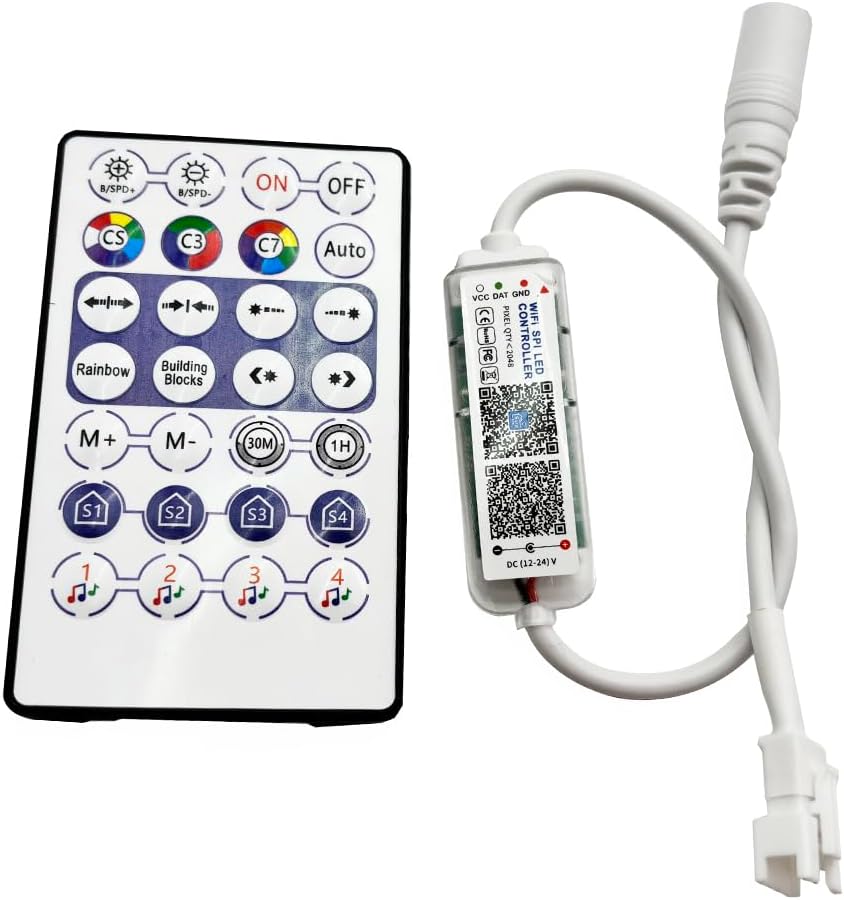
Image: The Vrabocry LED Controller and its accompanying 28-key remote control. The controller is a small, clear plastic unit with a white cable, and the remote is a white rectangular device with various colored buttons.
2. 리모컨 배터리 설치
The remote control requires one CR2025 button cell battery.
- 리모콘 뒷면에서 배터리함을 찾으세요.
- Slide open the battery tray or press the release tab as indicated.
- CR2025 배터리 하나를 양극(+)이 위를 향하도록 삽입하세요.
- 배터리 칸을 단단히 닫으세요.

Image: The back of the Vrabocry remote control, showing the battery compartment designed for a CR2025 or CR2032 battery. Instructions for opening and inserting the battery are visible.
3. Mobile Application Installation and Pairing (SurpLife App)
The controller can be managed via the SurpLife mobile application.
- Download the "SurpLife" application from your smartphone's app store (iOS App Store or Google Play Store).
- Ensure your smartphone's Bluetooth and/or Wi-Fi is enabled.
- Open the SurpLife app and follow the on-screen instructions to discover and pair with your Vrabocry LED Controller. The app will guide you through the connection process.
작동 지침
1. 원격 제어 작동
The 28-key remote control provides direct access to various functions.

Image: A diagram illustrating the functions of each button on the Vrabocry 28-key remote control. Buttons include On/Off, Speed/Brightness adjustment, static color switching, various dynamic modes like Rainbow Flow and Left Stone Meteor, mode increase/decrease, timed off settings (30M, 1H), 4 scene mode settings (S1-S4), and 4 music mode settings.
- 켜기/끄기: Power on or off the LED strip.
- B/SPD+ / B/SPD-: Increase/decrease brightness or adjust speed of dynamic modes.
- CS, C3, C7, Auto: Static color switching (CS for single color, C3 for three-color static, C7 for seven-color static, Auto for recurrent mode).
- 화살표 버튼: Opening/closing modalities, Left Stone Meteor Mode, Left/Right Running Mode.
- Rainbow, Building Blocks: Activate Rainbow Flow Mode and Building Block Model.
- M+ / M-: Increase or decrease the current mode.
- 30M / 1H: Set a timer for the lights to turn off after 30 minutes or 1 hour.
- S1, S2, S3, S4: Activate preset scene modes.
- Music Notes (1, 2, 3, 4): Activate different music synchronization modes.
2. SurpLife App Functions
The SurpLife app offers advanced control and customization options.
- 다채로운 기능: Access a wide spectrum of colors and adjust saturation and brightness.
- Scenario Function: Choose from various pre-programmed lighting scenarios or create custom ones.
- 회전 기능: Control the direction and speed of rotating light patterns.
- 리드미컬한 기능: Engage dynamic lighting effects that respond to sound or music.
- 음악 모드: Synchronize LED strip lighting with music played through your device's microphone or internal audio.
- 타이밍 기능: Set specific schedules for the LED strip to turn on/off, change modes, or adjust brightness at designated times.
- 그룹 제어 기능: If you have multiple Vrabocry controllers, group them within the app to control them simultaneously for unified dimming, color changes, and on/off states.
- 연동 기능: Arrange the order of lighting fixtures in the device list and change their direction to create seamless, synchronized lighting effects across multiple linked devices.
명세서
| 매개변수 | 값 |
|---|---|
| 상표 | 브라보크리 |
| 모델 번호 | wifi 28key |
| 정격 볼륨tage | 직류12~24V |
| Controllable Pixels | Max 2048 points |
| Supported IC Types | WS2812, WS2811, 16703, 16704, 1903, 6812, 1003, 2904 |
| 제어 방법 | Mobile APP (SurpLife), 28-Key IR Remote |
| 제어 범위 | 40m (개방된 공간) |
| 원격 배터리 유형 | CR2025(포함되지 않음) |
| 재료 | 플라스틱 |
| 품목 무게 | 1.28 온스 |
| 패키지 크기 | 4.9 x 3.5 x 0.59 인치 |
| 실내/실외 사용 | 실내 |
| 광원 유형 | 주도의 |
| 전원 | 코드식 전기 |
문제 해결
- LED 스트립에 불이 들어오지 않음:
- Check if the power supply is correctly connected and providing the correct DC12-24V voltage.
- Ensure the LED strip is properly connected to the controller's output, paying attention to DAT, GND, and CLK (if applicable) polarity.
- Verify that the LED strip itself is functional and compatible with the controller's supported IC types.
- 리모콘이 응답하지 않음:
- Check if the CR2025 battery is installed correctly and has sufficient power. Replace if necessary.
- Ensure there are no obstructions between the remote control and the controller's IR receiver.
- Point the remote directly at the controller.
- 앱 연결 문제:
- Ensure your smartphone's Bluetooth and/or Wi-Fi is enabled.
- Restart the SurpLife app and try pairing again.
- 컨트롤러의 전원이 켜져 있는지 확인하세요.
- If issues persist, try restarting your smartphone and the LED controller.
- 색상이나 효과가 잘못되었습니다:
- Verify that the correct IC type is selected in the SurpLife app settings, if applicable.
- Ensure the LED strip is connected in the correct orientation.
유지
- 청소: Use a soft, dry cloth to clean the controller and remote. Do not use harsh chemicals or abrasive cleaners.
- 저장: 장기간 사용하지 않을 때는 직사광선과 극한의 온도를 피해 시원하고 건조한 곳에 보관하세요.
- 배터리 교체: Replace the CR2025 battery in the remote control as needed. Dispose of old batteries responsibly.
보증 및 지원
Specific warranty information for this product is not provided in the available data. For any technical support, troubleshooting assistance, or warranty inquiries, please contact Vrabocry customer service through your purchase platform or their official support channels.


