소개
This manual provides detailed instructions for the safe and effective use of your Monster Open Ear AC326 Headphones. Please read this guide thoroughly before operating the device and retain it for future reference.
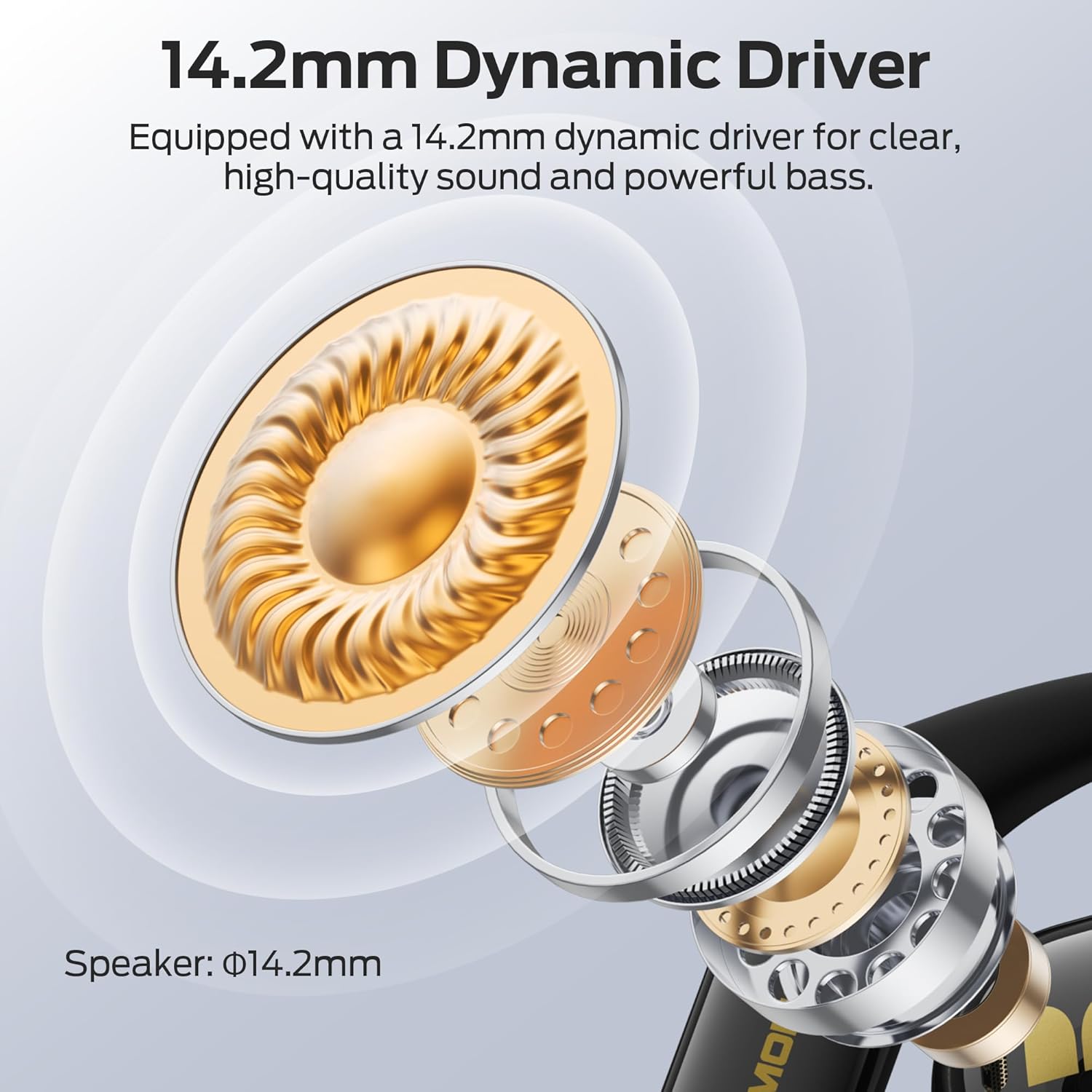
Image: Monster Open Ear AC326 Headphones shown in their charging case.
주요 특징
- 오픈 이어 디자인: Maintains situational awareness by allowing you to hear your surroundings while enjoying audio.
- 프리미엄 음질: Equipped with a 14.2mm dynamic driver for clear audio, deep bass, and crisp highs. Features dual noise-reducing microphones for clear calls.
- 고급 Bluetooth 6.0: Ensures fast, stable connections with ultra-low latency for seamless audio streaming and calls.
- 편안하고 안전한 착용감: Ergonomic ear hooks and soft silicone material provide a stable, pressure-free fit suitable for extended wear and sports.
- 긴 배터리 수명: Up to 10 hours of playtime per charge, extended to 35 hours with the charging case.
- IPX5 방수 : 땀과 가벼운 비에도 견딜 수 있도록 설계되어 운동 및 야외 활동에 적합합니다.
- 공간 오디오: Experience immersive sound with 3D six-axis head tracking and spatial audio output.

Image: Diagram highlighting the open-ear design, allowing users to remain aware of their surroundings.
상자 안에 무엇이 들어있나요?
포장을 뜯으실 때 모든 물품이 있는지 확인해 주세요.
- Wireless Earbuds x2 (Left and Right)
- 충전 케이스 x1
- 충전 케이블 x1
- Product Manual x1 (This document)
- Spare Silicone Tips x1 (Note: The product description mentions ear tips, but the AC326 is an open-ear design. This might refer to ear hook adjustments or a general inclusion for other models. Please verify if physical ear tips are included.)

이미지: 제품 포장에 포함된 구성품을 시각적으로 나타낸 것입니다.
설치 지침
1. 초기 요금
Before first use, fully charge the headphones and charging case. Connect the provided USB-C cable to the charging port on the case and a power source. The indicator lights on the case will show charging status.

Image: The charging case and earbuds, illustrating battery life and Bluetooth version.
2. 헤드폰 착용
- 충전 케이스에서 이어버드를 꺼냅니다.
- 귀걸이 고리를 귀에 걸어주세요.
- Rotate the earbuds backward until they fit snugly and comfortably. Adjust the ear hooks for optimal fit and sound direction.

Image: Step-by-step guide on correctly placing the earbuds over the ear for a secure fit.

Image: The flexible ear hook design ensures a secure and stable fit, ideal for sports and active use.
3. 블루투스 페어링
- 충전 케이스를 여세요. 이어버드가 자동으로 페어링 모드로 진입합니다(표시등이 깜빡입니다).
- 기기(스마트폰, 태블릿 등)에서 Bluetooth 설정으로 이동합니다.
- 사용 가능한 장치 목록에서 "Monster AC326"를 선택하세요.
- 연결이 완료되면 확인음이 들리고 표시등이 깜빡임을 멈춥니다.
작동 지침
The Monster AC326 Headphones feature touch controls on each earbud. The functions can be customized via the companion app.
터치 컨트롤view:
- Long press for 2s (L/R): 전화를 거부합니다.
- Long press for 3s (R): 음성 지원을 활성화합니다.
- Long press for 3s (L): Toggle Spatial Audio.
- Short press (L): 용량 -.
- Short press (R): 볼륨 +.
- 더블 클릭(L/R): Play/Pause music, Answer/End Call.
- Triple click (L): 이전 노래.
- Triple click (R): 다음 노래

Image: Visual guide to the various touch controls available on the earbuds.
음악 재생:
- To play or pause music, double-click either earbud.
- To skip to the next track, triple-click the right earbud.
- To go to the previous track, triple-click the left earbud.
- Adjust volume with a short press on the left (down) or right (up) earbud.
통화 관리:
- To answer or end a call, double-click either earbud.
- 걸려오는 전화를 거절하려면 이어버드 중 하나를 2초 동안 길게 누르세요.

Image: The dual-mic ENC technology ensures clear calls by reducing ambient noise.
유지
청소:
- 부드럽고 마른 보푸라기 없는 천으로 이어버드와 충전 케이스를 정기적으로 청소하세요.
- 연마재, 용제 또는 화학 세척제의 사용을 피하세요.
- 정상적인 충전을 위해 이어버드와 케이스의 충전 접점이 깨끗하고 건조한지 확인하십시오.
방수(IPX5):
The headphones are IPX5 water-resistant, meaning they can withstand splashes of water and sweat. They are not designed for submersion in water. Ensure the earbuds are completely dry before placing them back in the charging case to prevent damage.

Image: The earbuds are shown with water droplets, indicating their IPX5 water-resistant rating.
문제 해결
소리가 나지 않거나 연결이 간헐적으로 끊김:
- 양쪽 이어버드가 모두 충전되어 있는지 확인하세요.
- 기기에서 Bluetooth가 활성화되어 있고 헤드폰이 연결되어 있는지 확인하세요.
- 간섭을 피하려면 장치에 더 가까이 다가가세요.
- 헤드폰과 기기의 페어링을 해제한 후 다시 페어링해보세요.
이어버드가 충전되지 않음:
- 충전 케이블이 케이스와 전원에 모두 단단히 연결되어 있는지 확인하세요.
- 이어버드의 충전 접점과 케이스 내부가 깨끗하고 이물질이 없는지 확인하세요.
- 이어버드가 충전 케이스에 제대로 장착되었는지 확인하십시오.
통화 품질이 좋지 않음:
- 마이크가 가려지지 않았는지 확인하세요.
- 주변 소음이 심할 경우, 좀 더 조용한 환경으로 이동하십시오.
- 기기의 통화 음량 설정을 확인하세요.
명세서
| 상표 | 괴물 |
| 모델명 | E69(AC326) |
| 폼 팩터 | 오픈 이어 |
| 연결 기술 | 무선(블루투스 6.0) |
| 무선 통신 기술 | 블루투스 |
| 방수 레벨 | IPX5 방수 |
| 품목 무게 | 6.4 온스 |
| 패키지 크기 | 5.08 x 4.57 x 1.54 인치 |
| 배터리 | 1A 배터리 필요(포함) |
| 첫 번째 이용 가능 날짜 | 19년 2025월 XNUMX일 |
보증 및 지원
보증 정보 및 고객 지원에 대해서는 공식 Monster를 참조하세요. web해당 웹사이트를 방문하거나 고객 서비스 센터에 직접 문의하십시오. 자세한 내용은 일반적으로 제품 포장이나 제조업체의 공식 온라인 자료에서 확인할 수 있습니다.


