1. 서론
Thank you for choosing the Hama WK-300 Multi-Device Wireless Keyboard. This compact office keyboard is designed for wireless control of computers, smartphones, and tablets, offering versatile connectivity via Bluetooth or a 2.4 GHz radio connection with a USB-A receiver. It allows simultaneous connection to up to three devices, providing a seamless experience for various tasks.
2. 안전 지침
- 장치가 손상된 경우 열거나 계속해서 작동하지 마십시오.
- 제품을 직접 서비스하거나 수리하려고 시도하지 마십시오. 모든 서비스 작업은 자격을 갖춘 전문가에게 맡기십시오.
- 먼지, 습기, 과열로부터 제품을 보호하고 건조한 환경에서만 사용하십시오.
- 모든 전기 제품과 마찬가지로 이 제품을 어린이의 손이 닿지 않는 곳에 보관하십시오.
- 전자기기 사용이 허용되지 않은 곳에서는 본 제품을 사용하지 마십시오.
- 해당 지역의 적용 규정에 따라 포장재를 즉시 폐기하세요.
3. 패키지 내용
패키지에 다음 품목들이 모두 들어 있는지 확인해 주십시오.
- 1 Hama WK-300 Multi-Device Wireless Keyboard
- 1 USB-A Receiver (typically stored in the battery compartment)
- 1 사용 설명서
메모: AAA 배터리가 작동에 필요하며 패키지에 포함되어 있지 않습니다.
4. 설정
4.1 배터리 설치
- 키보드 아랫부분에서 배터리 칸을 찾으세요.
- 배터리 덮개를 엽니다.
- AAA 배터리 1개를 올바른 극성(+/-)에 맞춰 삽입합니다.
- 배터리 덮개를 단단히 닫으세요.
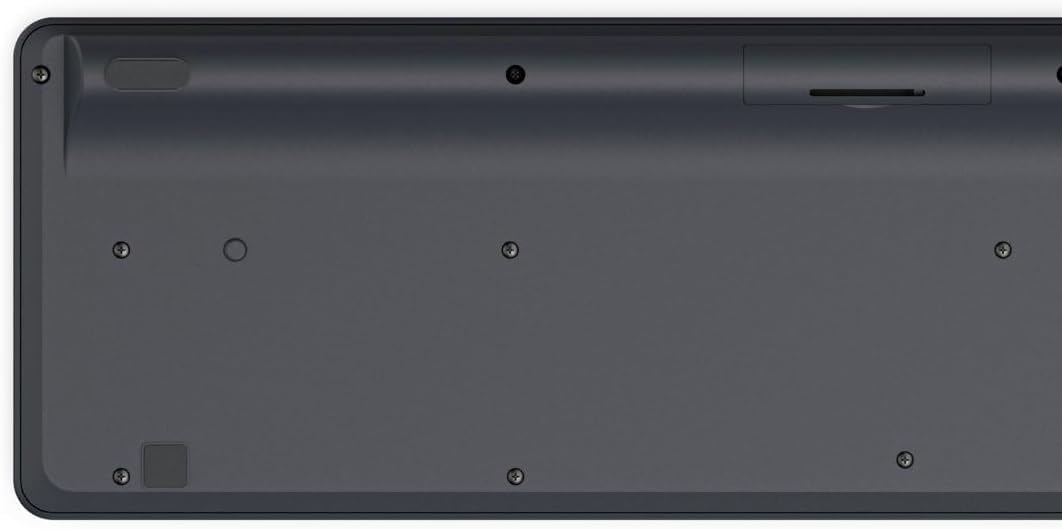
Image: Underside of the Hama WK-300 keyboard, illustrating the battery compartment and the storage slot for the USB receiver.
4.2 장치에 연결하기
The Hama WK-300 keyboard supports connection to up to three devices simultaneously via 2.4 GHz radio (channel 1) and Bluetooth (channels 2 and 3).
4.2.1 2.4 GHz Radio Connection (Channel 1)
- Remove the USB-A receiver from its storage slot in the battery compartment.
- Plug the USB-A receiver into a free USB port on your computer.
- Switch the keyboard to channel 1 (usually indicated by a switch or button on the keyboard). The keyboard should automatically connect to your computer.
4.2.2 Bluetooth Connection (Channels 2 & 3)
- Switch the keyboard to either channel 2 or channel 3.
- Press and hold the pairing button (refer to keyboard layout for exact location, often combined with the channel switch) until the indicator light flashes, signifying pairing mode.
- On your device (smartphone, tablet, computer), go to Bluetooth settings and search for new devices.
- Select "Hama WK-300" from the list of available devices to complete the pairing process.
4.3 장치 간 전환
To switch between connected devices, simply press the corresponding channel button (1, 2, or 3) on the keyboard. The keyboard will instantly connect to the selected device.
5. 키보드 작동
5.1 Basic Typing Functions
The Hama WK-300 features a QWERTY layout with quiet keys, ensuring a comfortable and undisturbed typing experience. Simply begin typing after connecting to your device.

이미지: 위에서 아래로 view of the Hama WK-300 keyboard, highlighting its 90% layout and key functions, including the Fn key for multimedia controls.
5.2 Multimedia Functions (Fn Keys)
The F keys (F1-F12) have secondary assignments for multimedia control. To activate these functions, press and hold the Fn key simultaneously with the desired F key. This allows for quick control of media playback, volume, and other system functions without navigating through system settings.
5.3 AI Assist Button
The dedicated Assist button activates a cross-program AI assistant, enhancing productivity by providing quick access to intelligent features.
5.4 절전
The keyboard is battery-operated and designed for efficiency, making it ideal for mobile use. It will enter a low-power state after a period of inactivity to conserve battery life.
6. 유지관리
6.1 키보드 청소
To clean your keyboard, ensure it is turned off and disconnected from any devices. Use a soft, lint-free cloth slightly dampened with water or a mild cleaning solution. Avoid excessive moisture and abrasive cleaners. Do not immerse the keyboard in water.
6.2 배터리 교체
When the keyboard's performance diminishes or it stops responding, it may be time to replace the AAA battery. Follow the battery installation steps outlined in Section 4.1.
7. 문제 해결
- 키보드가 연결되지 않음: Ensure the keyboard has fresh batteries and is switched to the correct channel (1 for 2.4 GHz, 2 or 3 for Bluetooth). For Bluetooth, ensure the keyboard is in pairing mode and your device's Bluetooth is enabled. For 2.4 GHz, ensure the USB receiver is properly inserted into your device.
- 키가 응답하지 않음: Check battery level. If using 2.4 GHz, try plugging the USB receiver into a different USB port. If using Bluetooth, try re-pairing the keyboard with your device.
- 간헐적 연결: Ensure there are no strong interference sources nearby (e.g., other wireless devices, large metal objects). Try moving closer to your device.
- 멀티미디어 키가 작동하지 않습니다: 당신이 누르고 있는지 확인하십시오 Fn key simultaneously with the desired F key.
8. 사양
| 상표 | 하마 |
| 모델 번호 | 182641 |
| 색상 | 검은색 |
| 연결성 | 2.4 GHz Radio (USB-A receiver), Bluetooth (2 channels) |
| 장치 수 | 최대 3개 기기 동시 접속 가능 |
| 키보드 레이아웃 | 쿼티 |
| 제품 크기(LxWxH) | 16 x 43.8 x 2.6 센티미터 |
| 품목 무게 | 447g |
| 필요한 배터리 | 1 AAA 배터리 (포함되어 있지 않음) |
9. 보증
The Hama WK-300 Multi-Device Wireless Keyboard comes with a 5년 보증. Please retain your proof of purchase for warranty claims. For detailed warranty terms and conditions, refer to the official Hama web사이트를 방문하거나 고객 지원팀에 문의하세요.
10. 지원
For further assistance, technical support, or to inquire about spare parts, please contact Hama customer service. You can find contact information on the official Hama web사이트 (www.hama.com) or through your local retailer.


