1. 서론
The Alcatel XL685 Voice is a DECT cordless phone designed for ease of use, particularly for seniors. It features a large, backlit display, big buttons, audio amplification, and a hands-free function. This manual provides detailed instructions for setting up, operating, and maintaining your phone, ensuring you can utilize all its features effectively.
Please read this manual carefully before using your phone and keep it for future reference.
2. 상자 안에 무엇이 들어있나요?
패키지에 모든 품목이 들어 있는지 확인하세요.
- 알카텔 XL685 휴대폰
- Base Unit with integrated answering machine
- 전원 어댑터
- 전화선 코드
- AAA 니켈수소(NiMH) 충전식 배터리 2개
- 사용자 설명서
3. 제품 오버view
Familiarize yourself with the main components and controls of your Alcatel XL685 Voice phone.

이미지 3.1: The Alcatel XL685 Voice cordless phone, showing the handset docked in its base unit. The handset features a large display, clearly visible numeric keypad, and function buttons. The base unit includes controls for the answering machine.
3.1 휴대폰 기능
- XL Graphic Display: White backlit screen with large characters for optimal readability.
- Large, Contrasted Buttons: Easy to see and press for dialing and navigation.
- Audio Boost Button: Instantly doubles the earpiece volume by +10dB, up to a maximum of 25dB.
- 핸즈프리 기능: Allows conversations without holding the handset, with adjustable volume.
- 표시등: Flashes for incoming calls.
- Direct Memory Keys (M1, M2): For quick dialing of favorite contacts.
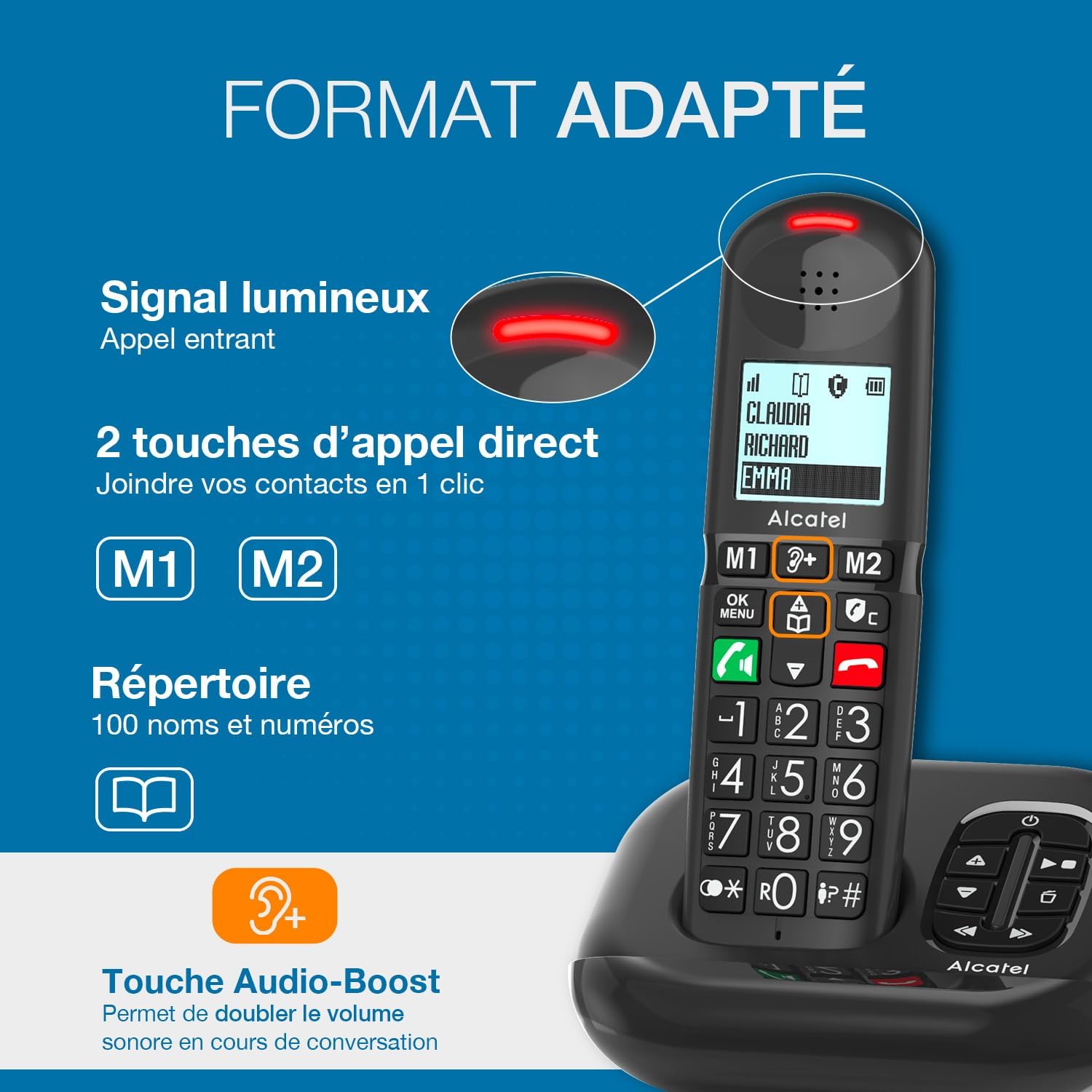
이미지 3.2: A close-up of the Alcatel XL685 Voice handset, highlighting the large display, direct call keys (M1, M2), and the Audio Boost button. The image also shows the luminous signal for incoming calls and the phonebook icon, indicating its capacity for 100 contacts.
3.2 Base Unit Features
- 통합 자동 응답기: Up to 50 minutes of recording time.
- 메시지 카운터: Digital display on the base unit shows the number of new messages.
- Answering Machine Controls: Play, stop, skip, and delete messages directly from the base.
4. 설정
Follow these steps for the initial setup of your Alcatel XL685 Voice phone.
4.1 베이스 유닛 연결
- Connect the telephone line cord to the socket on the base unit and to your telephone wall socket.
- Connect the power adapter to the base unit and plug it into a mains power outlet.
- 본체는 간섭을 피하기 위해 다른 전기 제품과 떨어져 평평하고 안정적인 표면에 놓아야 합니다.
4.2 배터리 설치 및 충전
- 핸드셋 뒷면의 배터리 덮개를 엽니다.
- Insert the 2 AAA NiMH rechargeable batteries, observing the correct polarity (+ and -).
- 배터리 덮개를 닫습니다.
- Place the handset on the base unit. The display will show a charging indicator. Allow the handset to charge for at least 15 hours before its first use to ensure optimal battery performance.
4.3 초기 설정 (날짜 및 시간)
After the initial charge, the phone may prompt you to set the date and time. Follow the on-screen instructions or refer to the "Settings" section in this manual for detailed steps.
5. 사용 설명서
5.1 전화 걸기
- 직접 전화 걸기: 키패드를 사용하여 전화번호를 입력한 다음 누르세요. 녹색 통화 버튼.
- 전화번호부에서: 를 누르세요 전화번호부 버튼, navigate to the desired contact, then press the 녹색 통화 버튼.
- Using Direct Memory Keys (M1/M2): 를 누르고 계세요 M1 or M2 button for a few seconds to dial the stored number.
5.2 전화 받기
전화가 울리면 누르세요 녹색 통화 버튼 to answer. The indicator light on the handset will flash during an incoming call.
5.3 핸즈프리 기능
통화 중에 핸즈프리 버튼 (speaker icon) to activate or deactivate the speakerphone. Adjust the volume using the navigation keys.
5.4 Audio Boost
For increased listening volume during a call, press the dedicated Audio Boost button (ear icon with '+'). This will amplify the sound by an additional 10dB, up to 25dB total. Press it again to deactivate.
5.5 전화번호부 관리
Your phone can store up to 100 contacts. Each contact can have a name and number.
- 연락처 추가: Access the menu, select "Phonebook", then "Add New". Enter the name and number, then save.
- Editing a Contact: Navigate to the contact in the phonebook, select "Edit", make changes, and save.
- Deleting a Contact: Navigate to the contact, select "Delete", and confirm.
- Assigning Direct Memory Keys (M1/M2): Access the menu, select "Settings", then "Direct Memory". Choose M1 or M2 and assign a contact from your phonebook.
5.6 응답기
내장된 자동응답기는 최대 50분 분량의 메시지를 녹음할 수 있습니다.
- 활성화/비활성화: 를 누르세요 켜기/끄기 버튼 본체 또는 핸드셋 메뉴를 통해 설정할 수 있습니다.
- 재생 메시지: 를 누르세요 재생 버튼 on the base unit. Use the skip buttons to move between messages.
- 메시지 삭제: 메시지 재생 중, 버튼을 누르세요 삭제 버튼 기본 장치에.
- 공지사항 녹음: 수화기 메뉴를 통해 자동응답기 설정에 접근하여 원하는 인사말을 녹음할 수 있습니다.
6. 통화 차단 기능
The Alcatel XL685 Voice offers advanced call blocking to protect you from unwanted calls.

이미지 6.1: This image illustrates the call blocking features of the Alcatel XL685 Voice. It shows the dedicated call blocking button on the handset, explaining both manual blocking (up to 100 numbers) and automatic blocking modes, which only allow registered contacts to ring through.
6.1 수동 통화 차단
You can block up to 100 unwanted numbers manually.
- During an Incoming Call: 전용 버튼을 누르세요 Call Block button (shield icon) to immediately block the number.
- 통화 기록에서: Access the call log, select the unwanted number, then press the Call Block button to add it to the block list.
6.2 자동 통화 차단
Activate the automatic mode to only receive calls from numbers stored in your phonebook or VIP list.
- Access the phone's menu, navigate to "Call Blocking" settings, and select "Automatic Mode".
- In this mode, all anonymous calls will be blocked automatically.
7. 유지관리
Proper care ensures the longevity of your phone.
- 청소: 부드러운 d를 사용하세요amp 핸드셋과 본체를 닦을 때는 천을 사용하십시오. 연마성 세제나 용제를 사용하지 마십시오.
- 배터리 관리 : Only use the supplied rechargeable NiMH batteries. If the phone will not be used for an extended period, remove the batteries.
- 환경 조건: 휴대전화를 직사광선, 극한 온도 또는 높은 습도에 노출시키지 마십시오.
8. 문제 해결
일반적으로 발생할 수 있는 문제에 대한 해결책은 다음과 같습니다.
| 문제 | 해결책 |
|---|---|
| 다이얼 톤이 없습니다 | Check that the telephone line cord is securely connected to both the base unit and the wall socket. Ensure the power adapter is plugged in. |
| 핸드셋이 충전되지 않습니다 | Ensure the handset is correctly placed on the base unit. Check that the power adapter is connected. Verify batteries are inserted correctly. |
| 음질이 좋지 않음 | Move the handset closer to the base unit. Check for interference from other electronic devices. Ensure batteries are sufficiently charged. |
| 전화를 걸거나 받을 수 없습니다 | Check the telephone line connection. Ensure call blocking is not preventing desired calls (check automatic mode settings). |
| 응답기가 녹음되지 않음 | Ensure the answering machine is activated. Check if the memory is full; delete old messages if necessary. |
9. 사양
| 상표 | 알카텔 |
| 모델 번호 | ATL1428407 |
| 색상 | 검은색 |
| 전화 유형 | 무선(DECT) |
| 호환 장치 | 표준 전화망(PSTN, ISDN) |
| 배터리 유형 | NiMH (2 AAA included) |
| 응답 시스템 유형 | 디지털 |
| 응답기 녹음 시간 | 50 분 |
| 전화번호부 용량 | 100개의 연락처 |
| 통화 기록 용량 | 마지막 호출 50개 |
| 통화 차단 용량 | 최대 100개 숫자 |
| 치수(길이 x 너비 x 높이) | 14 x 6.5 x 11.2cm |
| 품목 무게 | 266그램 |
| 재료 | 플라스틱 |
10. 보증 및 지원
Your Alcatel XL685 Voice phone comes with a manufacturer's warranty.
- 제조업체 보증: 2년.
- For technical support or warranty claims, please refer to the contact information provided with your purchase or visit the official Alcatel support web대지.


