1. 서론
This instruction manual provides detailed guidance for the assembly, operation, and maintenance of your Fenge Dual Monitor Stand with Drawer. Please read this manual thoroughly before assembly and use to ensure proper function and safety. Keep this manual for future reference.
안전 정보
- 조립하기 전에 모든 부품이 있고 손상이 없는지 확인하세요. 부품이 없거나 파손된 경우 사용하지 마세요.
- 긁힘을 방지하려면 부드럽고 깨끗한 표면에 장치를 조립하세요.
- 조립하는 동안 나사를 너무 세게 조이지 마세요. 재료가 손상될 수 있습니다.
- Place the monitor stand on a stable, level surface.
- 최대 하중 용량 99파운드(45kg)을 초과하지 마십시오.
- 작은 부품은 어린이의 손이 닿지 않는 곳에 보관하세요.
2. 패키지 내용
아래 나열된 모든 구성품이 패키지에 포함되어 있는지 확인하세요.
| 목 | 설명 | 수량 |
|---|---|---|
| 상단 선반 패널 | Main surface for monitors | 1 |
| 하단 선반 패널 | 하단 보관 선반 | 1 |
| Side Support Frames | Metal frames for structural support | 2 |
| Middle Support Blocks | Internal wooden blocks for stability | 2 |
| Acrylic Drawers | Semi-transparent storage drawers | 2 |
| 하드웨어 팩 | Screws, dowels, L-wrench, adhesive pads | 1세트 |
3. 설치 및 조립 지침
The Fenge Dual Monitor Stand is designed for quick and easy assembly. Follow these steps carefully:
조립 비디오 가이드
Official Fenge Monitor Stand Assembly Video (Excludes Drawer Section). This video demonstrates the step-by-step process for assembling the main structure of the monitor stand.
단계별 조립
- 패널을 준비하세요: Lay out the top and bottom shelf panels (labeled 1# and 2# in the video) on a clean, soft surface. Identify the pre-drilled holes.
- Attach Middle Support Blocks: Secure the two middle support blocks (labeled 3# in the video) to the top shelf panel using the provided screws and dowels. Ensure they are aligned with the pre-drilled holes.
- Connect Top and Bottom Panels: Carefully align the top shelf panel with the bottom shelf panel, ensuring the middle support blocks fit into their designated slots. Secure them using the appropriate screws.
- Install Side Support Frames: Attach the metal side support frames (labeled 5# in the video) to both ends of the assembled panels. Note that one side of the frame is slanted (front) and the other is vertical (back). Do not fully tighten the screws on the slanted side initially.
- 모든 나사를 조이세요: Once all components are in place, tighten all screws securely using the provided L-wrench. Ensure the stand is stable.
- 서랍 삽입: Slide the two semi-transparent acrylic drawers into their designated compartments. The stand features a back panel behind the drawers to prevent them from sliding out easily.
- Apply Adhesive Pads: Attach the adhesive pads to the bottom of the metal feet to prevent scratching your desk surface and provide additional stability.
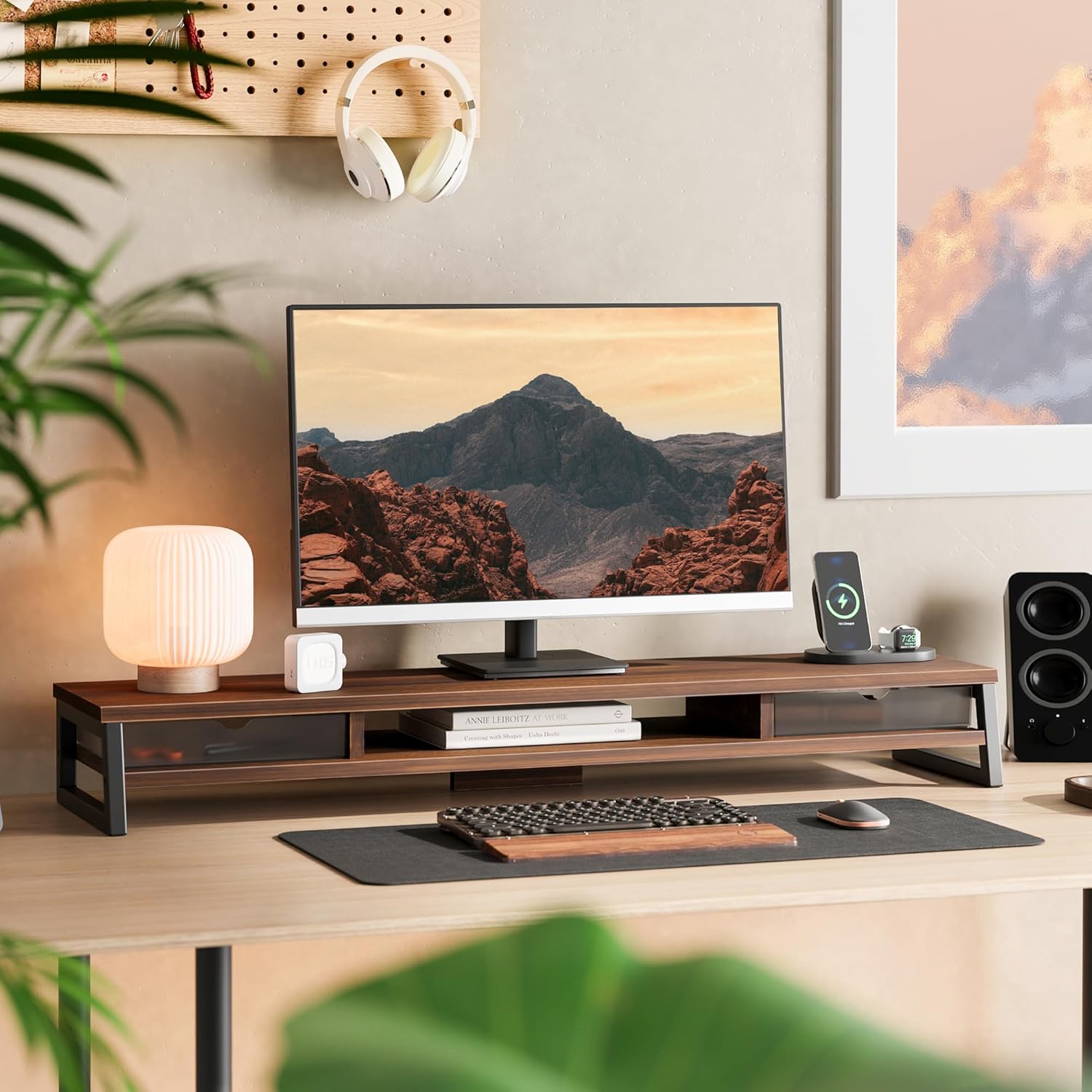

4. 사용 설명서
Your Fenge Dual Monitor Stand is designed to enhance your workspace ergonomics and organization.
인체공학적 이점
- The stand raises your screen by 5.4 inches, promoting an ergonomically correct viewing height. This helps alleviate neck and eye strain during prolonged use.
보관 및 구성
- 듀얼 모니터 지원: The 42.5-inch length accommodates two monitors, providing a unified and elevated display area.
- 일체형 서랍: Utilize the two semi-transparent frosted acrylic drawers for storing small office supplies, pens, or personal items, keeping your desktop clutter-free.
- Under-Shelf Space: The 1.9-inch bottom space is ideal for securely storing keyboards, mice, notebooks, or other office essentials when not in use.
- 케이블 관리 : An open compartment is integrated to help organize and route cables, maintaining a tidy workspace.


제품 끝view 동영상
간략한 이상view of the Fenge Dual Monitor Stand with Drawer, highlighting its features and benefits in a typical workspace setting.
5. 유지관리
To ensure the longevity and appearance of your Fenge Dual Monitor Stand, follow these simple maintenance guidelines:
- 청소: The high-quality thickened MDF panel surface is waterproof and resistant to scratches and fingerprints. Wipe clean with a soft, damp 옷감. 가혹한 화학 물질이나 연마성 세제를 사용하지 마십시오.
- 점검: 모든 나사와 연결부가 단단히 조여져 있는지 정기적으로 점검하세요. 필요하면 다시 조이세요.
- 무게 분포 : Distribute weight evenly across the top surface to maintain stability and prevent stress on any single point.
6. 문제 해결
If you encounter any issues with your Fenge Dual Monitor Stand, refer to the following common problems and solutions:
| 문제 | 가능한 원인 | 해결책 |
|---|---|---|
| 스탠드가 흔들리거나 불안정합니다. | 나사가 느슨하거나 표면이 고르지 않음. | Ensure all screws are tightened. Place the stand on a flat, level surface. |
| 서랍이 매끄럽게 미끄러지지 않습니다. | 장애물 또는 부적절한 정렬. | Check for any items blocking the drawer path. Ensure drawers are inserted correctly. |
| 조립 중 부품이 누락되었습니다. | 포장 오류. | 구매 내역과 누락된 부품 목록을 고객 지원팀에 보내주세요. |
| Monitors exceed weight capacity. | Overloading the stand. | Remove excess weight. The maximum load capacity is 99 lbs (45 kg). |
7. 사양
Detailed technical specifications for the Fenge Dual Monitor Stand:
| 특징 | 세부 사항 |
|---|---|
| 제품 크기(L x W x H) | 42.52 x 10.04 x 5.43 인치 |
| 품목 무게 | 17.18파운드 |
| 재료 | Engineered Wood, Iron, Polycarbonate (PC) |
| 색상 | 갈색 |
| 하중 용량 | 99파운드(45kg) |
| 조립이 필요합니다 | 예 |
| 특징 | Drawer, Cable Management |
| 제조업체 | 펜지 |

8. 보증 및 지원
Fenge products are manufactured with quality and durability in mind. For specific warranty information, please refer to the warranty card included with your product or visit the official Fenge web대지.
고객 지원
If you have any questions, require assistance with assembly, or need to report a missing/damaged part, please contact Fenge customer support. Have your product model and purchase date ready for faster service.
- 온라인 지원: Visit the Fenge official webFAQ 및 연락처 정보는 사이트를 참조하세요.
- 이메일 지원: Refer to your product packaging or the Fenge web고객 서비스 이메일 주소 사이트입니다.