1. 서론
This user manual provides essential information for the safe and efficient operation of your iFFALCON 65U85 4K Mini LED Google TV. Please read this manual thoroughly before using the product and retain it for future reference.
2. 안전 정보
화재, 감전, 부상의 위험을 줄이려면 이 텔레비전을 사용할 때 항상 기본적인 안전 예방 조치를 따르세요.
- TV를 비나 습기에 노출시키지 마세요.
- TV를 열지 마세요asing; 모든 서비스는 자격을 갖춘 인력에게 의뢰하세요.
- 적절한 환기를 확보하고 통풍구를 막지 마십시오.
- 제조업체에서 지정한 전원 코드와 액세서리만 사용하십시오.
- TV를 열원과 직사광선으로부터 멀리 두세요.
3. 패키지 내용
패키지에 모든 품목이 들어 있는지 확인하세요.
- iFFALCON 65U85 4K Mini LED Google TV
- 원격 제어
- 전원 케이블
- 사용 설명서 (본 문서)
- 보증 카드
- Wall Bracket (if included)
4. 설정
4.1 포장 풀기 및 배치
Carefully remove the TV from its packaging. Place the TV on a stable, flat surface or mount it on a wall using a VESA-compatible bracket. Ensure adequate space around the TV for ventilation.
4.2 전원 및 장치 연결
- 전원 케이블을 TV에 연결한 다음 전원 콘센트에 연결하세요.
- Connect external devices (e.g., gaming consoles, Blu-ray players) to the HDMI 2.1 ports.
- For internet access, connect an Ethernet cable to the LAN port or prepare for Wi-Fi setup.
4.3 초기 설정 및 원격 페어링
Upon first power-on, the TV will guide you through the initial setup process. This includes language selection, network connection, and Google account login.
To pair the Bluetooth remote control:
- 리모컨을 TV쪽으로 향하게 하세요.
- 를 누르고 계세요 설정 버튼과 집 버튼을 동시에 4초 동안 누릅니다.
- The TV will display a pairing confirmation message once successful.
4.4 네트워크 연결
Connect your TV to the internet via Wi-Fi or Ethernet to access Google TV features and streaming services.
- 와이파이: Select your network from the list and enter the password.
- 이더넷: 라우터와 TV의 LAN 포트에 이더넷 케이블을 연결하세요.
5. TV 작동하기
5.1 구글 TV 인터페이스
Your iFFALCON 65U85 features Google TV, providing a personalized experience with access to a vast library of content and apps.

5.2 Google Assistant를 통한 음성 제어
Use the built-in Google Assistant for hands-free control. Press the Google Assistant button on your remote and speak your commands.
- 검색 영화와 쇼.
- 스마트 홈 기기를 제어하세요.
- 질문에 대한 답변을 얻으십시오.

5.3 Casting Content (AirPlay2 & Chromecast)
Easily share content from your smartphone or tablet to the TV screen.
- AirPlay2: For Apple devices, use AirPlay2 to stream videos, photos, and music.
- 크롬캐스트: For Android devices and Chrome browser, use Chromecast built-in to cast content.

6. 주요 특징
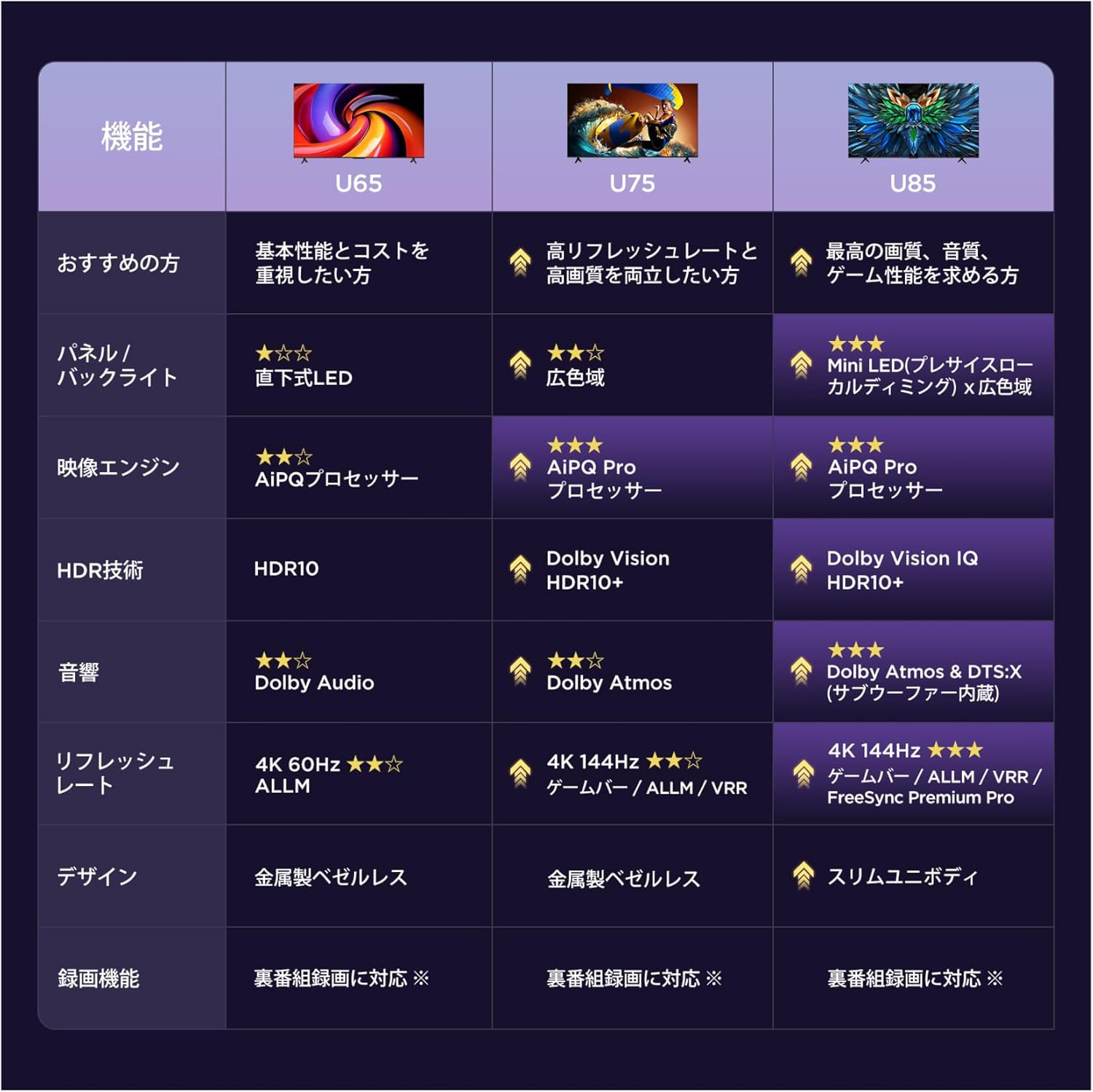
6.1 Display Technology: Mini LED & 4K HDR
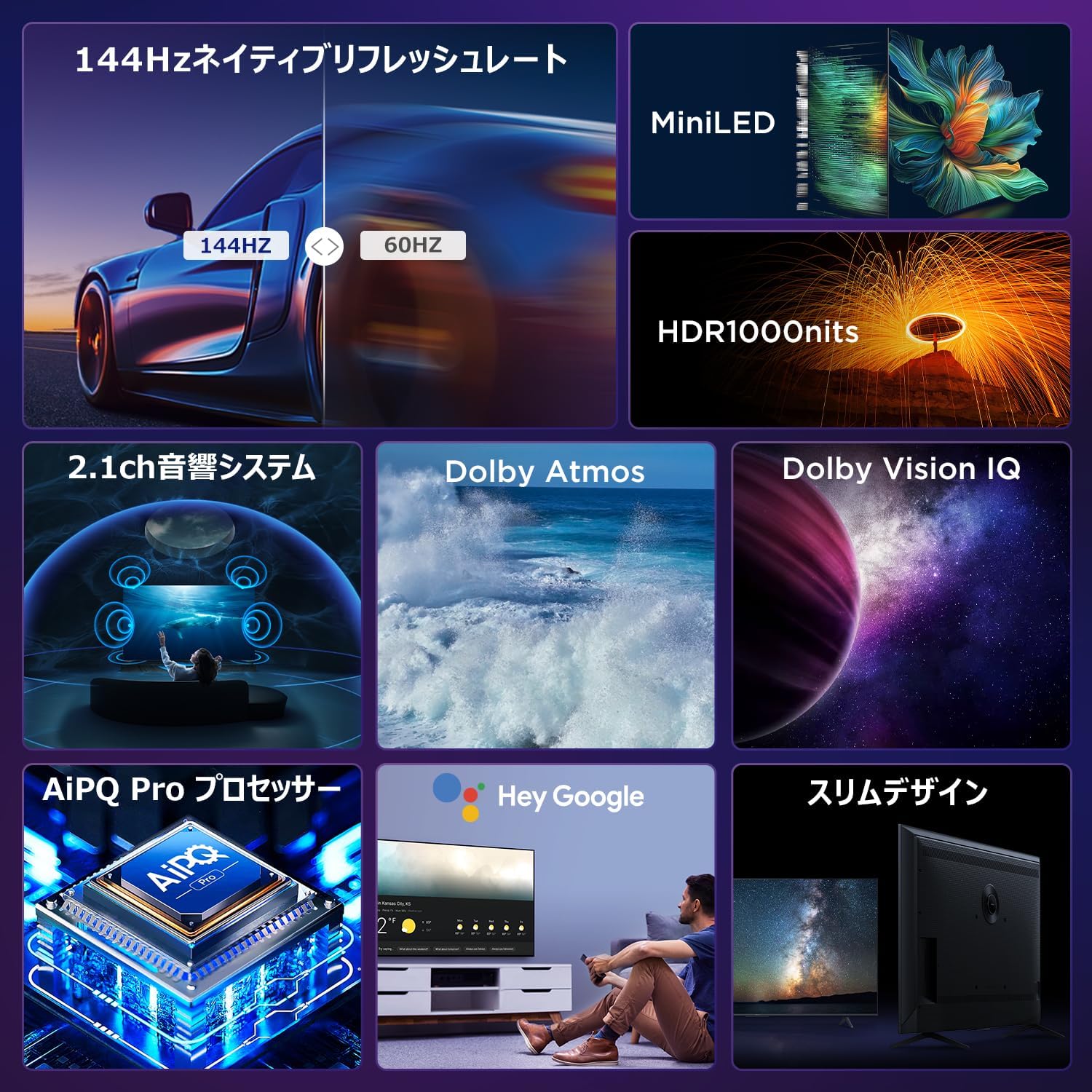
Experience stunning visuals with Mini LED backlight technology, delivering 1000 nits peak brightness and enhanced contrast. Combined with 4K resolution, Dolby Vision IQ, and HDR10+, you get precise brightness, vibrant colors, and deep blacks.


6.2 Immersive Audio: Dolby Atmos & DTS Virtual:X
Enjoy a captivating audio experience with Dolby Atmos and DTS Virtual:X, delivering multi-dimensional sound that fills your room. The 2.1ch speaker system provides powerful bass and clear audio.


6.3 Gaming Features: 144Hz VRR & Game Master
Designed for gamers, the 65U85 offers a native 144Hz refresh rate, Variable Refresh Rate (VRR), Auto Low Latency Mode (ALLM), and FreeSync Premium Pro for smooth, tear-free gameplay.


6.4 AiPQ Pro Processor
The AiPQ Pro processor intelligently optimizes color, contrast, and motion for every scene, delivering a visually stunning and immersive view경험.

6.5 Slim Metal Bezel-less Design
The TV features a sleek, metal bezel-less design that blends seamlessly into any living space, offering a premium aesthetic.

7. 사양
| 특징 | 설명 |
|---|---|
| 화면 크기 | 65인치 |
| 디스플레이 유형 | VA Panel, Mini LED |
| 해결 | 4K(3840 x 2160) |
| 새로 고침 빈도 | 144Hz (기본 주파수) |
| HDR 지원 | 돌비 비전 IQ, HDR10+ |
| 오디오 | 2.1ch Speaker System, Dolby Atmos, DTS Virtual:X |
| 스마트 TV 플랫폼 | 구글 티비 |
| 음성 지원 | 구글 어시스턴트 |
| 연결성 | 3x HDMI 2.1, 2x USB, Wi-Fi, Bluetooth |
| 치수(폭 x 깊이 x 높이) | 144.8 x 32.4 x 89.5cm (스탠드 포함) |
| 무게 | 19kg |
| VESA 호환성 | 예 |

8. 문제 해결
TV에 문제가 발생하면 다음의 일반적인 해결책을 참조하세요.
- 전원 없음: 전원 케이블이 안전하게 연결되어 있고 전원 콘센트가 작동하는지 확인하세요.
- 화면/소리 없음: Check all cable connections (HDMI, audio). Verify the correct input source is selected.
- 원격이 작동하지 않음: 배터리를 교체하십시오. 4.3절에 설명된 대로 리모컨을 다시 페어링하십시오.
- 인터넷에 연결되지 않음: Check your router and modem. Reconnect to the Wi-Fi network or ensure the Ethernet cable is properly connected.
- 화질 문제: Adjust picture settings (brightness, contrast, color). Ensure content source is high quality.
문제가 지속되는 경우 고객 지원팀에 문의하세요.
9. 유지관리
Proper maintenance ensures the longevity of your iFFALCON TV:
- 화면 청소: Gently wipe the screen with a soft, dry, lint-free cloth. Do not use harsh chemicals or abrasive cleaners.
- C 청소asing: 부드러운 d를 사용하세요amp cloth to wipe the TV casing.
- 통풍: 환기구에 먼지나 이물질이 쌓이지 않도록 하십시오.
- 전원 끄기 : 번개가 칠 때나 장시간 방치할 때는 TV의 플러그를 콘센트에서 뽑아 두세요.
10. 보증 및 지원
Your iFFALCON 65U85 TV comes with a manufacturer's warranty. Please refer to the included warranty card for details on coverage, terms, and conditions.
For technical support, service inquiries, or further assistance, please visit the official iFFALCON website or contact their customer service hotline. Contact information can be found on the warranty card or the official product page.
11. 제품 비디오
11.1 Mini LED Quantum Dot 144Hz 65-inch TV
This video showcases the Mini LED and Quantum Dot display technology of the 65-inch iFFALCON TV, highlighting its 144Hz refresh rate for smooth visuals.