1. 제품 오버view
The TP-Link TL-MC102 is a media converter designed to facilitate the conversion between 1000BASE-SX fiber and 1000Base-T copper media. It supports Gigabit Ethernet standards (IEEE802.3ab 1000Base-T and IEEE802.3z 1000Base-SX) and is compatible with multi-mode fiber optic cables using SC-Type connectors. This device operates at 850nm wavelength for both transmitting and receiving data, offering full wire-speed forwarding. It can function as a standalone unit or be integrated into TP-Link's MC1400 chassis. Key features include Auto MDI/MDI-X for the TX port and front panel status LEDs for easy monitoring.
The TL-MC102 extends fiber optic distances up to 0.55 kilometers (550 meters) when using 50/125µm multi-mode fiber, or 220 meters with 62.5/125µm multi-mode fiber.
2. 패키지 내용
패키지에 다음 품목이 포함되어 있는지 확인하십시오.
- 1 x TL-MC102 Gigabit SFP to RJ45 Fiber Media Converter
- 1 x 전원 어댑터
- 1 x 설치 가이드
3. 제품 특징
- 1000BASE-SX 광섬유를 1000BASE-T 구리 매체로, 또는 그 반대로 변환합니다.
- Supports auto-negotiation for Half-Duplex / Full-Duplex transfer modes.
- Features auto MDI/MDI-X for the TX port.
- FX 포트의 강제/자동 전송 모드에 대한 스위치 구성을 제공합니다.
- Extends fiber distance up to 550m (1,800 feet) using 50/125µm Multi-Mode Fiber.
- Extends fiber distance up to 220m (720 feet) using 62.5/125µm Multi-Mode Fiber.
- Equipped with easy-to-view 네트워크 활동 모니터링용 LED 표시등.
- External power supply for operation.
- Operates at a wavelength of 850nm.
- Maximum power consumption: 1.66W.
- Complies with IEEE 802.3ab and IEEE 802.3z standards.
4. 하드웨어 오버view
The TL-MC102 features a compact design with essential ports and LED indicators for status monitoring.
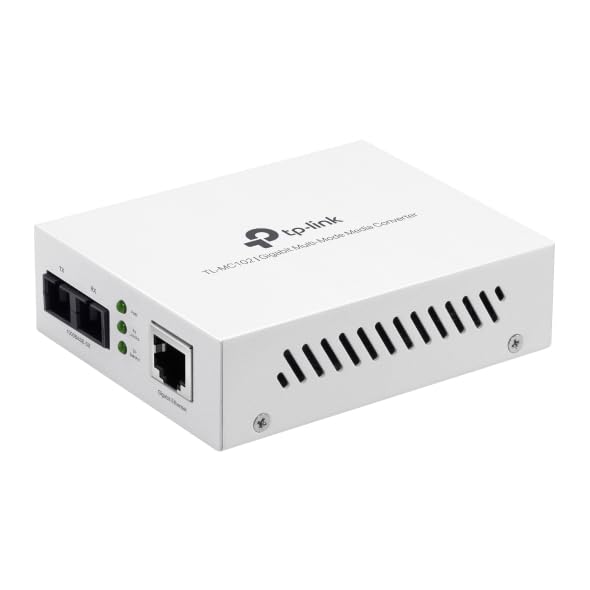
그림 1: 앞쪽 view of the TL-MC102 Gigabit SFP to RJ45 Fiber Media Converter. This image shows the compact white casing of the device, highlighting its ports and LED indicators on the front panel.
포트 및 커넥터:
- RJ45 Port (TX): Standard Ethernet port for connecting to copper-based network devices (e.g., switch, router, computer) using an Ethernet cable. Supports 10/100/1000Mbps speeds and Auto MDI/MDI-X.
- SFP Port (FX): Slot for an SFP (Small Form-Factor Pluggable) module. This port is used for fiber optic connections. The TL-MC102 is designed for 1000BASE-SX multi-mode SFP modules.
- 전원 입력: 외부 전원 어댑터용 커넥터입니다.
LED 표시등:
The front panel LEDs provide real-time status information about the converter's operation:
- PWR(전원):
- 에: The converter is powered on.
- 끄다: The converter is powered off.
- FX 링크/액트(광섬유 링크/액티비티):
- 에: A fiber link is established.
- 섬광: 광섬유 링크를 통해 데이터가 전송되거나 수신되고 있습니다.
- 끄다: No fiber link is established.
- TX Link/Act (Copper Link/Activity):
- 에: A copper Ethernet link is established.
- 섬광: Data is being transmitted or received over the copper link.
- 끄다: No copper Ethernet link is established.
- TX 1000 (Copper Speed):
- 에: The copper port is operating at 1000Mbps.
- 끄다: The copper port is operating at 10/100Mbps.
5. 설정 지침
Follow these steps to set up your TL-MC102 media converter:
- 전원 끄기 장치: Before making any connections, ensure that all devices (e.g., switch, router, computer) to be connected to the media converter are powered off.
- SFP 모듈을 삽입하십시오: Carefully insert a compatible 1000BASE-SX multi-mode SFP module into the SFP port (FX) of the TL-MC102. Ensure it clicks into place.
- 광섬유 케이블 연결: Connect one end of a multi-mode fiber optic cable (with SC-Type connectors) to the SFP module in the TL-MC102. Connect the other end of the fiber cable to a compatible fiber optic device (e.g., fiber switch, another media converter).
- 이더넷 케이블 연결: Connect one end of an Ethernet cable to the RJ45 port (TX) of the TL-MC102. Connect the other end of the Ethernet cable to the Ethernet port of your copper-based network device (e.g., switch, router, PC).
- 전원 어댑터 연결: Plug the provided power adapter into the power input of the TL-MC102, then plug the other end into a standard electrical outlet.
- 전원 켜기 장치: Power on the TL-MC102. The PWR LED should illuminate. Then, power on your connected network devices.
- 연결 확인: Check the LED indicators on the TL-MC102. The FX Link/Act and TX Link/Act LEDs should illuminate, indicating successful link establishment. If data is flowing, these LEDs will flash. The TX 1000 LED should be on if the copper connection is at Gigabit speed.
메모: Ensure that the fiber optic cable type (multi-mode) and connector type (SC) match the requirements of the SFP module and the connected fiber device.
6. 사용 설명서
Once properly set up, the TL-MC102 operates automatically to convert signals between fiber and copper media. No further configuration is typically required for basic operation.
모니터링 상태:
Regularly observe the LED indicators on the front panel to monitor the status of your network connections:
- 고체 PWR LED indicates the device is receiving power.
- 단단한 FX 링크/액트 그리고 TX 링크/액트 LEDs confirm active network links on both fiber and copper sides.
- 섬광 FX 링크/액트 그리고 TX 링크/액트 LEDs indicate active data transmission.
- 고체 텍사스 1000 LED confirms a Gigabit Ethernet connection on the copper side.
If any Link/Act LED is off when it should be on, refer to the Troubleshooting section.
7. 유지관리
To ensure optimal performance and longevity of your TL-MC102, consider the following maintenance guidelines:
- 깨끗하게 유지하십시오: Regularly clean the exterior of the device with a soft, dry cloth. Avoid using liquid or aerosol cleaners.
- 통풍: 과열을 방지하려면 기기를 환기가 잘 되는 곳에 두십시오. 환기구를 막지 마십시오.
- 케이블 관리 : Keep fiber and Ethernet cables neatly organized and free from kinks or excessive bends, especially fiber optic cables which are sensitive to bending.
- 전원 공급 장치: Use only the power adapter provided with the device. If a replacement is needed, ensure it meets the exact specifications.
- 환경: 기기 손상을 방지하기 위해 지정된 환경 조건(온도, 습도) 내에서 기기를 작동하십시오.
- 펌웨어 업데이트: While media converters typically do not require frequent firmware updates, check the TP-Link support website periodically for any recommended updates for your model.
8. 문제 해결
If you encounter issues with your TL-MC102, refer to the following common problems and solutions:
- 전원 없음(PWR LED 꺼짐):
- 전원 어댑터가 변환기와 작동하는 콘센트에 제대로 연결되어 있는지 확인하십시오.
- 다른 장치를 연결해 전기 콘센트가 작동하는지 확인하세요.
- 전원 어댑터가 손상되었는지 확인하십시오.
- 광섬유 링크 없음(FX 링크/액티브 LED 꺼짐):
- Verify that the SFP module is correctly inserted into the SFP port.
- 광섬유 케이블에 손상이나 꼬임이 없는지 확인하세요.
- Ensure the fiber cable connectors are clean and properly seated at both ends.
- Confirm that the connected fiber device is powered on and functioning correctly.
- Ensure the SFP module and the connected fiber device are compatible (e.g., multi-mode to multi-mode, correct wavelength).
- No Copper Link (TX Link/Act LED Off):
- Check the Ethernet cable for damage and ensure it is securely connected to both the TL-MC102 and the network device.
- 연결된 네트워크 장치(예: 스위치, 라우터, PC)의 전원이 켜져 있고 이더넷 포트가 활성화되어 있는지 확인하십시오.
- 다른 이더넷 케이블을 사용해 보세요.
- Ensure the network device's Ethernet port is configured correctly (e.g., not disabled).
- 네트워크 속도가 느립니다:
- Check the TX 1000 LED. If it's off, the copper connection is not at Gigabit speed. This could be due to the connected device or cable.
- Ensure all connected devices (including the SFP module) support Gigabit Ethernet.
- Inspect Ethernet and fiber cables for damage or poor connections.
- 간헐적인 연결:
- Check all cable connections (power, Ethernet, fiber) for looseness.
- 장치가 과열되지 않았는지 확인하세요.
- 전원 공급이 안정적인지 확인하십시오.
- Consider testing with different cables or SFP modules if available.
9. 사양
| 특징 | 설명 |
|---|---|
| 상표 | 티피링크 |
| 모델 번호 | TL-MC102 |
| 하드웨어 인터페이스 | Ethernet, SFP |
| 호환 장치 | NICs, Network Switch, Router |
| 데이터 링크 프로토콜 | 이더넷 |
| 데이터 전송 속도 | 초당 1기가비트 |
| 섬유 유형 | 멀티모드 광섬유(1000BASE-SX) |
| 파장 | 850나노미터 |
| 최대 광섬유 거리 | 550m (50/125µm MMF), 220m (62.5/125µm MMF) |
| 전력 소비 | 최대 1.66W |
| 표준 | IEEE 802.3ab, IEEE 802.3z |
| 품목 무게 | 0.46 파운드 |
| 한국어: | 810142823715 |
10. 보증 및 지원
보증 정보:
The TP-Link TL-MC102 comes with a 2년 제조업체 보증. Please retain your proof of purchase for warranty claims. For detailed warranty terms and conditions, refer to the official TP-Link web사이트에 접속하거나 제품에 포함된 보증 카드를 확인하세요.
기술 지원:
For technical support, product updates, and additional resources, please visit the official TP-Link support web사이트에서 FAQ, 문제 해결 가이드, 고객 서비스 연락처 정보를 찾을 수 있습니다.
TP-Link 공식 Web대지: www.tp-link.com


