1. 제품 오버view
The Grandstream WP816 is a compact, portable Wi-Fi phone designed for clear communication. It features dual-band Wi-Fi 6 for reliable connectivity, supports two SIP accounts and two lines, and delivers HD voice quality with dual microphones, Acoustic Echo Cancellation (AEC), and Noise Shield Technology. The phone includes integrated Bluetooth for headset connectivity, a long-lasting 1500mAh rechargeable battery providing 6 hours of talk time and 120 hours of standby time, and a configurable push-to-talk button. It is equipped with a Type C USB port for fast charging and a 3.5mm headset jack. Additional features include an accelerometer and an emergency button.
주요 특징:
- Dual-band Wi-Fi 6 with efficient antenna design and advanced roaming support.
- Supports 2 SIP accounts and 2 lines.
- HD voice with dual MIC design, AEC, and Noise Shield Technology.
- Integrated Bluetooth for headset connection.
- Rechargeable 1500mAh battery: 6 hours talk time, 120 hours standby.
- Configurable button for push-to-talk functionality.
- Type C USB port (supports fast charging) and 3.5mm headset jack.
- Built-in accelerometer and emergency button.
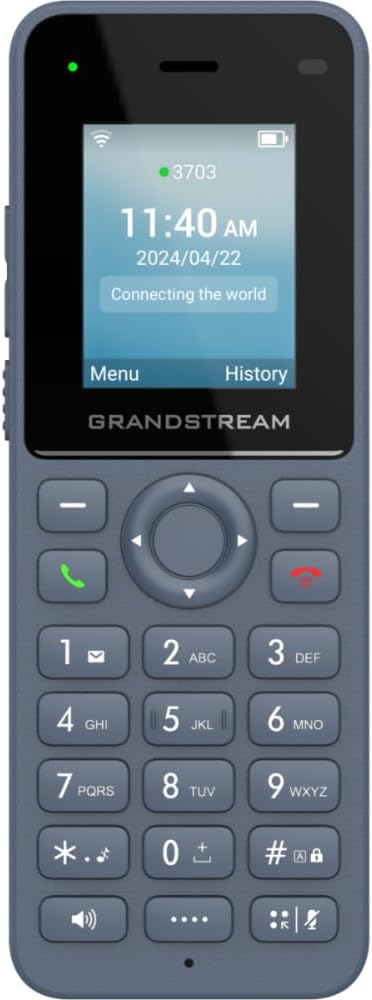
그림 1: 전면 view of the Grandstream WP816 Wi-Fi Phone, displaying its screen, keypad, and branding.
2. 설정
2.1. 박스 안에는 무엇이 들어있나요?
- 그랜드스트림 WP816 와이파이 폰
- (Additional accessories such as power adapter, charging cradle, and battery are typically included but not explicitly detailed in the provided 'whats_in_the_box' field, which only states "Phone". Assuming standard phone accessories.)
2.2. 휴대폰 충전:
- Connect the power adapter to the charging cradle and a power outlet.
- Place the WP816 phone into the charging cradle. Ensure the phone is seated correctly and the charging indicator illuminates.
- Allow the phone to charge fully before initial use. This typically takes several hours. The Type C USB port also supports fast charging.
2.3. 초기 설정:
- 전원 켜기: 화면이 켜질 때까지 전원/통화 종료 버튼을 길게 누르세요.
- Wi-Fi 연결: Navigate to the "Settings" menu, then "Wi-Fi". Select your desired Wi-Fi network and enter the password if prompted. The phone supports dual-band Wi-Fi 6.
- SIP Account Configuration: Access the "Settings" menu to configure your SIP accounts. The phone supports 2 SIP accounts. Refer to your VoIP service provider for specific SIP settings (SIP server, User ID, Password).
- 날짜 및 시간: Ensure the date and time are correctly set, either manually or via network synchronization.
3. 사용 설명서
3.1. 전화 걸기:
- 국번: 키패드를 사용하여 전화번호를 입력하세요.
- 통화 시작: Press the Green Call button to place the call.
- 통화 종료: Press the Red End Call button to terminate the conversation.
3.2. 전화 수신:
- 전화벨이 울리면 초록색 통화 버튼을 눌러 받으세요.
- To reject an incoming call, press the Red End Call button.
3.3. Speakerphone Function:
- During a call, press the Speaker button (often indicated by a speaker icon) to activate the speakerphone.
- Press the Speaker button again to switch back to the earpiece.
3.4. Push-to-Talk (PTT):
- The WP816 features a configurable button for Push-to-Talk functionality.
- Consult your system administrator or service provider for configuration details and usage of the PTT feature.
3.5. Bluetooth Headset Connectivity:
- 블루투스 헤드셋이 페어링 모드인지 확인하십시오.
- On the WP816, navigate to "Settings" > "Bluetooth".
- Turn Bluetooth on and scan for available devices.
- Select your headset from the list and follow any on-screen prompts to complete pairing.
4. 유지관리
4.1. 배터리 관리:
- 배터리 수명을 극대화하려면 극한의 온도를 피하세요.
- Charge the phone regularly. Do not let the battery completely drain for extended periods.
- If the phone will not be used for a long time, charge it to about 50% and store it in a cool, dry place.
4.2. 청소:
- 부드럽고 마른 천으로 휴대폰 외부를 닦으세요.
- 독한 화학 물질, 세척 용제 또는 강한 세제를 사용하지 마십시오.
5. 문제 해결
5.1. 전원 없음:
- 배터리가 올바르게 삽입되어 충전되었는지 확인하세요.
- Verify the charging cradle is properly connected to a power source.
5.2. Cannot Connect to Wi-Fi:
- Wi-Fi 네트워크가 활성화되어 있고 범위 내에 있는지 확인하세요.
- Confirm the Wi-Fi password is entered correctly.
- Restart the phone and the Wi-Fi router.
5.3. Poor Call Quality:
- Ensure you are within good Wi-Fi signal range.
- 인터넷 연결 속도와 안정성을 확인하세요.
- Verify SIP account settings with your service provider.
5.4. Phone Not Responding:
- 배터리를 분리했다가 다시 장착하여 소프트 리셋을 수행하십시오.
- If the issue persists, a factory reset might be necessary (refer to advanced settings, note this will erase all data).
6. 사양
| 특징 | 세부 사항 |
|---|---|
| 모델 | WP816 |
| 상표 | 그랜드스트림 |
| 제품 치수 | 7 x 5 x 4 인치 |
| 품목 무게 | 13.8온스(390그램) |
| 배터리 | 비표준 배터리 1개 필요 |
| 연결성 | Dual-band Wi-Fi 6, Integrated Bluetooth |
| SIP 계정 | SIP 계정 2개, 회선 2개 |
| 음성 기능 | HD voice, Dual MIC design with AEC and Noise Shield Technology |
| 배터리 용량 | 1500mAh |
| 통화 시간 | 6시간 |
| 대기 시간 | 120시간 |
| 포트 | Type C USB (fast charging support), 3.5mm headset jack |
| 추가 기능 | Accelerometer, Emergency button, Configurable Push-to-Talk button |
| 색상 | 회색 |
| 재료 | 플라스틱 |
| 전화 유형 | 무선 |
| 다이얼러 유형 | 톤 다이얼링 |
| 다중 라인 작업 | 다중 라인 작업 |
7. 보증 및 지원
For warranty information and technical support, please refer to the documentation provided with your purchase or visit the official Grandstream web사이트. 보증 청구를 위해 구매 증빙 자료를 보관하세요.


