Memorex MX-PS802 충전식 파티 스피커 사용 설명서
모델: MX-PS802
1. 서론
구매해주셔서 감사합니다asing the Memorex MX-PS802 Rechargeable Party Speaker. This manual provides essential information for the safe and efficient operation of your device. Please read it thoroughly before use and retain it for future reference.
2. 안전 정보
- 스피커를 물, 습기 또는 극한 온도에 노출시키지 마세요.
- 스피커를 열원 근처나 직사광선에 노출시키지 마세요.
- 스피커를 분해하거나 개조하지 마십시오. 모든 정비는 자격을 갖춘 기술자에게 맡기십시오.
- 제공된 충전 케이블과 어댑터만 사용하세요.
- 스피커를 어린이와 애완동물의 손이 닿지 않는 곳에 보관하세요.
- 스피커를 사용하는 동안 주변에 적절한 환기가 이루어지도록 하십시오.
3. 패키지 내용
패키지에 모든 품목이 들어 있는지 확인하세요.
- Memorex MX-PS802 Party Speaker
- 충전 케이블
- 사용 설명서 (본 문서)
4. 제품 오버view
The Memorex MX-PS802 is an 8-inch rechargeable party speaker featuring Bluetooth 5.3, LED flame lighting, TWS pairing, and multiple input options.
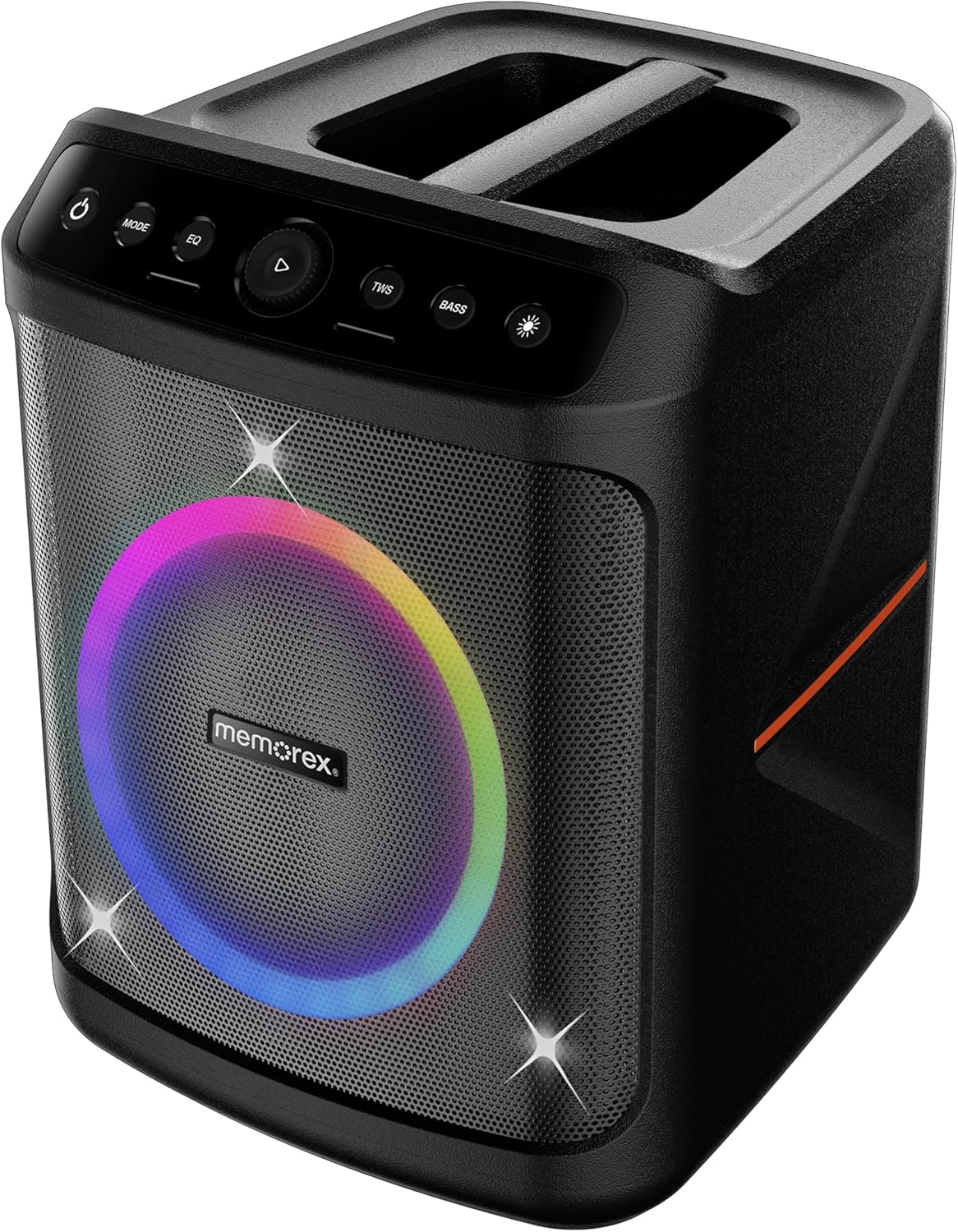
앞쪽 view of the Memorex MX-PS802 speaker, showcasing the illuminated woofer and the top-mounted control panel.
제어판 기능
- 전원 버튼(⏻): 길게 눌러 스피커를 켜거나 끌 수 있습니다.
- MODE 버튼: Short press to switch between input modes (Bluetooth, USB, SD).
- EQ 버튼: Short press to cycle through equalizer presets.
- Play/Pause/Volume Knob (▶): Press to play or pause audio. Rotate to adjust volume.
- TWS 버튼: True Wireless Stereo 페어링을 시작하려면 누르세요.
- 베이스 버튼: 눌러서 베이스 부스트 기능을 활성화 또는 비활성화하세요.
- 조명 모드 버튼(☀): Press to cycle through LED lighting modes or turn lights ON/OFF.
5. 설정
5.1 스피커 충전
- 충전 케이블을 스피커의 충전 포트에 연결합니다.
- 케이블의 다른 쪽 끝을 적절한 전원 콘센트에 꽂으십시오.
- 충전 표시등이 켜집니다. 처음 사용하기 전에 스피커를 완전히 충전하십시오(약 3~4시간).
- 충전이 완료되면 표시등이 바뀌거나 꺼집니다.
5.2 전원 켜기/끄기
- 전원을 켜려면 버튼을 길게 누르세요. 전원 버튼 (⏻) for 2-3 seconds.
- 전원을 끄려면 버튼을 길게 누르세요. 전원 버튼 (⏻) again for 2-3 seconds.
6. 사용 설명서
6.1 블루투스 페어링
- 스피커 전원을 켜세요. 그러면 LED 표시등이 깜빡이면서 자동으로 블루투스 페어링 모드로 전환됩니다.
- 모바일 기기에서 블루투스를 활성화하고 사용 가능한 기기를 검색하세요.
- 선택하다 "Memorex MX-PS802" 목록에서.
- 페어링이 완료되면 스피커에서 확인음이 나고 LED 표시등이 깜빡임을 멈춥니다.
6.2 USB/SD 카드 재생
- USB 플래시 드라이브 또는 SD 카드(MP3 파일 포함)를 삽입하세요. files) 해당 포트로 입력합니다.
- The speaker will automatically switch to USB/SD mode and begin playback. If not, press the 방법 올바른 입력값을 선택하려면 버튼을 클릭하세요.
- Use the Play/Pause/Volume knob to control playback and volume.
6.3 True Wireless Stereo(TWS) 페어링
To pair two MX-PS802 speakers for stereo sound:
- Ensure both MX-PS802 speakers are powered on and in Bluetooth mode, but not connected to any device.
- 한 스피커(기본 스피커)에서 다음을 누릅니다. 트위스 button. It will emit a pairing tone.
- The two speakers will automatically connect to each other. A confirmation tone will sound once paired.
- 이제 6.1절에 설명된 대로 블루투스를 통해 모바일 기기를 메인 스피커에 연결하세요.
6.4 마이크 및 기타 입력
- Connect a microphone or guitar to the respective input jacks on the speaker.
- Adjust the volume of the connected instrument/microphone using its own controls or the speaker's main volume knob.
6.5 LED Flame Lighting
- 를 누르세요 라이트 모드 버튼 (☀) to cycle through various LED lighting effects.
- 계속 누르시면 불이 꺼집니다.
6.6 EQ and Bass Boost
- 를 누르세요 EQ button to select different equalizer presets for optimized sound.
- 를 누르세요 베이스 button to toggle the bass boost feature ON or OFF.
7. 유지관리
- 청소: 부드럽고 마른 천을 사용하여 스피커 외부를 닦으세요. 연마성 세제나 용제를 사용하지 마세요.
- 저장: 장기간 사용하지 않을 때는 스피커를 직사광선을 피해 서늘하고 건조한 곳에 보관하십시오.
- 배터리 관리 : 배터리 수명을 연장하려면 장기간 보관하기 전에 스피커를 완전히 충전하고 3~6개월마다 한 번씩 충전하십시오.
8. 문제 해결
- 전원 없음: 스피커가 충전되어 있는지 확인하세요. 전원에 연결한 후 다시 시도해 보세요.
- 소리 없음: 스피커와 연결된 기기의 볼륨 레벨을 확인하세요. 올바른 입력 모드가 선택되었는지 확인하십시오.
- 블루투스가 연결되지 않음: Ensure the speaker is in pairing mode. Turn off and on Bluetooth on your device. Forget the speaker from your device's Bluetooth list and try pairing again. Ensure no other devices are connected to the speaker.
- TWS 페어링 실패: Ensure both speakers are MX-PS802 models and are not connected to any other Bluetooth device before initiating TWS pairing.
- 왜곡된 소리: Reduce the volume on both the speaker and your device. Check for interference from other electronic devices.
9. 사양
| 특징 | 사양 |
|---|---|
| 모델명 | MX-PS802 |
| 스피커 유형 | Mono (can be paired for Stereo via TWS) |
| 스피커 크기 | 8 인치 |
| 스피커 최대 출력 전력 | 800 Watts PMPO (80W RMS) |
| 무선 통신 기술 | 블루투스 5.3 |
| 전원 | 배터리 구동식 (충전식 리튬 이온 배터리) |
| 제품 치수 | 11.33 x 10.78 x 16.57 인치 |
| 품목 무게 | 12.12파운드 |
| 포함된 구성 요소 | 파티 스피커 |
10. 보증 및 지원
The Memorex MX-PS802 Party Speaker comes with a 한정 보증. Please refer to the warranty card included in your package for specific terms and conditions. For technical support or service inquiries, please contact Memorex customer service through their official web사이트 또는 구매 문서에 제공된 연락처 정보를 참조하세요.


