소개
This manual provides essential information for the installation, operation, maintenance, and troubleshooting of your Sapphire Nitro+ AMD Radeon RX 9070 XT Gaming OC Graphics Card. Please read this manual thoroughly before installing and using your new graphics card to ensure optimal performance and longevity.

Image: The Sapphire Nitro+ AMD Radeon RX 9070 XT Graphics Card shown alongside its retail packaging.
패키지 내용
제품 패키지에 모든 품목이 들어 있는지 확인하세요.
- Sapphire Nitro+ AMD Radeon RX 9070 XT Graphics Card
- 사용 설명서 (본 문서)
- 그래픽 카드 지지 브래킷
- Power Cable Adapter (if applicable)
- ARGB 동기화 케이블
Video: An unboxing video demonstrating the contents of the Sapphire Nitro+ AMD Radeon RX 9070 XT Graphics Card package, including the card and accessories.
설정 및 설치
그래픽 카드를 올바르게 설치하려면 다음 단계를 따르십시오.
- 준비: 컴퓨터 전원을 끄고 모든 케이블을 분리하세요. 컴퓨터 케이스를 여세요.
- (해당되는 경우) 기존 그래픽 카드를 제거하십시오. If you are replacing an existing graphics card, carefully remove it by unscrewing its retention bracket and releasinPCIe 슬롯 래치를 엽니다.
- 새 그래픽 카드를 장착하세요: Align the Sapphire Nitro+ RX 9070 XT with an available PCI Express x16 slot on your motherboard. Press down firmly until the card is securely seated and the PCIe slot latch engages. This card typically occupies three expansion slots.
- 카드를 안전하게 보호하세요: Use screws to secure the graphics card's retention bracket to your computer case.
- 전원 케이블 연결: Connect the necessary PCIe power cables from your power supply to the graphics card. Ensure all connections are firm. This model features a hidden power cable design for a cleaner aesthetic.
- 지지 브래킷 설치: Due to the size and weight of the card, it is recommended to install the included anti-sag support bracket to prevent GPU sag over time.
- 사건을 종결하고 다시 연결하세요: 컴퓨터 케이스를 닫고 모든 케이블을 다시 연결한 다음 시스템 전원을 켜십시오.
- 드라이버 설치: Once your operating system loads, install the latest AMD Radeon drivers from the official AMD or Sapphire web대지.

Image: The rear I/O panel of the graphics card, featuring multiple DisplayPort and HDMI outputs for connecting to monitors.

이미지: 다이어그램은 다음을 보여줍니다.asing the STEALTH Hidden Power Cable design, which routes power connectors for a cleaner build appearance.
그래픽 카드 작동 방법
After successful installation and driver setup, your Sapphire Nitro+ RX 9070 XT is ready for use. Connect your display(s) to the available ports (2 x HDMI, 2 x DisplayPort). For optimal performance, ensure your display cables are securely connected and your monitor is set to the correct input source.
Regularly check for driver updates through the AMD Radeon Software application to benefit from performance improvements and bug fixes. You can also utilize Sapphire's Trixx software for advanced monitoring, fan control, and RGB lighting customization.

Image: The graphics card displaying its integrated ARGB lighting, which can be customized for various visual effects.
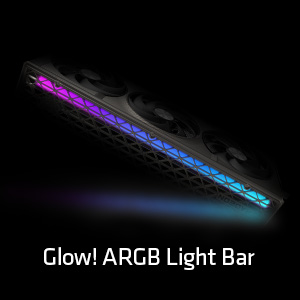
이미지: 자세한 view of the Glow! ARGB Light Bar, highlighting its customizable illumination capabilities.
유지
To maintain optimal performance and extend the lifespan of your graphics card, periodic cleaning is recommended.
- 먼지 제거: Use compressed air to gently clear dust from the fans and heatsink fins. Ensure the fans do not spin rapidly during cleaning to prevent damage.
- 팬 검사: Periodically check the fans for any obstructions or unusual noises. The Quick Connect Fan feature allows for easy removal and cleaning of individual fans.
- 일반 청소: 카드 외부를 부드럽고 마른 정전기 방지 천으로 닦으십시오. 액체 세척제를 카드에 직접 사용하지 마십시오.

Image: A diagram demonstrating the Quick Connect Fan system, which allows for easy removal and replacement of the cooling fans.
문제 해결
If you encounter issues with your graphics card, consider the following common solutions:
- 디스플레이 출력 없음:
- 모니터 케이블이 그래픽 카드와 모니터에 제대로 연결되어 있는지 확인하십시오.
- Verify that the graphics card is fully seated in the PCIe slot and the power cables are properly connected.
- 모니터의 입력 소스가 올바르게 설정되어 있는지 확인하십시오.
- 시스템 불안정 또는 충돌:
- 그래픽 드라이버를 최신 버전으로 업데이트하세요.
- 전원 공급 장치(PSU)가 최소 와트 요구 사항을 충족하는지 확인하십시오.tag그래픽 카드 및 시스템 요구 사항.
- Monitor GPU temperatures using software like AMD Radeon Software or Sapphire Trixx. Overheating can cause instability.
- 성과가 좋지 않음:
- 디스플레이가 메인보드의 내장 그래픽이 아닌 그래픽 카드에 연결되어 있는지 확인하십시오.
- Check in-game settings to ensure they are appropriate for your system's capabilities.
- 백그라운드 애플리케이션이 과도한 시스템 리소스를 소비하지 않도록 하십시오.
- 팬 소음:
- Clean the fans and heatsink to remove dust buildup.
- Adjust fan curves using AMD Radeon Software or Sapphire Trixx to find a balance between cooling and noise.
If issues persist, consult the Sapphire support web사이트를 방문하거나 고객 서비스에 문의하세요.
명세서
| 특징 | 세부 사항 |
|---|---|
| 모델 번호 | 11348-01-20G |
| 그래픽 코프로세서 | AMD 라데온 RX 9070 XT |
| 메모리 크기 | 16GB GDDR6 |
| 메모리 인터페이스 | 256비트 |
| 메모리 속도 | 20GHz |
| GPU 클럭 속도 | 3060MHz |
| 최대 화면 해상도 | 3840x2160 |
| 출력 포트 | 2 x HDMI, 2 x 디스플레이포트 |
| 품목 무게 | 5.72파운드 |
| 제품 크기(LxWxH) | 13.02 x 5.06 x 0.04 인치 |
보증 및 지원
Your Sapphire Nitro+ AMD Radeon RX 9070 XT Graphics Card is covered by a manufacturer's warranty. Please refer to the warranty card included in your product packaging or visit the official Sapphire web자세한 보증 약관은 해당 사이트에서 확인하세요.
기술 지원, 드라이버 다운로드, FAQ 및 기타 지원 정보는 다음 웹사이트를 방문하세요. 사파이어 기술 web대지. You may also find helpful resources and community support through the official AMD Radeon channels.


