1. 서론
This manual provides comprehensive instructions for the safe and effective use of your Flashpoint Zoom Li-on X PRO R2 TTL On-Camera Round Flash Speedlight for Sony and the Glow PS-B24K ParaSnap Octagonal Softbox. Please read this manual thoroughly before operating the equipment and retain it for future reference. Proper understanding of these instructions will ensure optimal performance and longevity of your product.
2. 안전 정보
- Do not disassemble or modify the product. Unauthorized repairs can cause damage and void the warranty.
- 제품을 건조한 상태로 보관하십시오. 젖은 손으로 만지거나 물에 담그지 마십시오.
- Avoid direct eye exposure to the flash light.
- 어린이의 손이 닿지 않는 곳에 보관하세요.
- 지정된 배터리와 충전기만 사용하십시오.
- 과열을 방지하기 위해 작동 중에는 적절한 환기를 보장하십시오.
3. 패키지 내용
패키지에 모든 품목이 들어 있는지 확인하세요.
- Flashpoint Zoom Li-on X PRO R2 TTL On-Camera Round Flash Speedlight
- 리튬이온 배터리
- 배터리 충전기
- USB 충전 케이블
- 미니 스탠드
- 보호 케이스
- Glow PS-B24K ParaSnap Octagonal Softbox (24")
- Flashpoint C-adapter for Round Head Flashes
- Softbox Carrying Bag
4. 제품 오버view
The Flashpoint Zoom Li-on X PRO R2 TTL Flash is a versatile on-camera speedlight designed for Sony cameras, offering a round flash head for natural light distribution. It integrates with the R2 wireless system for advanced control. The Glow PS-B24K ParaSnap Octagonal Softbox is a portable light modifier that attaches to the flash via the C-adapter, providing soft, even illumination.
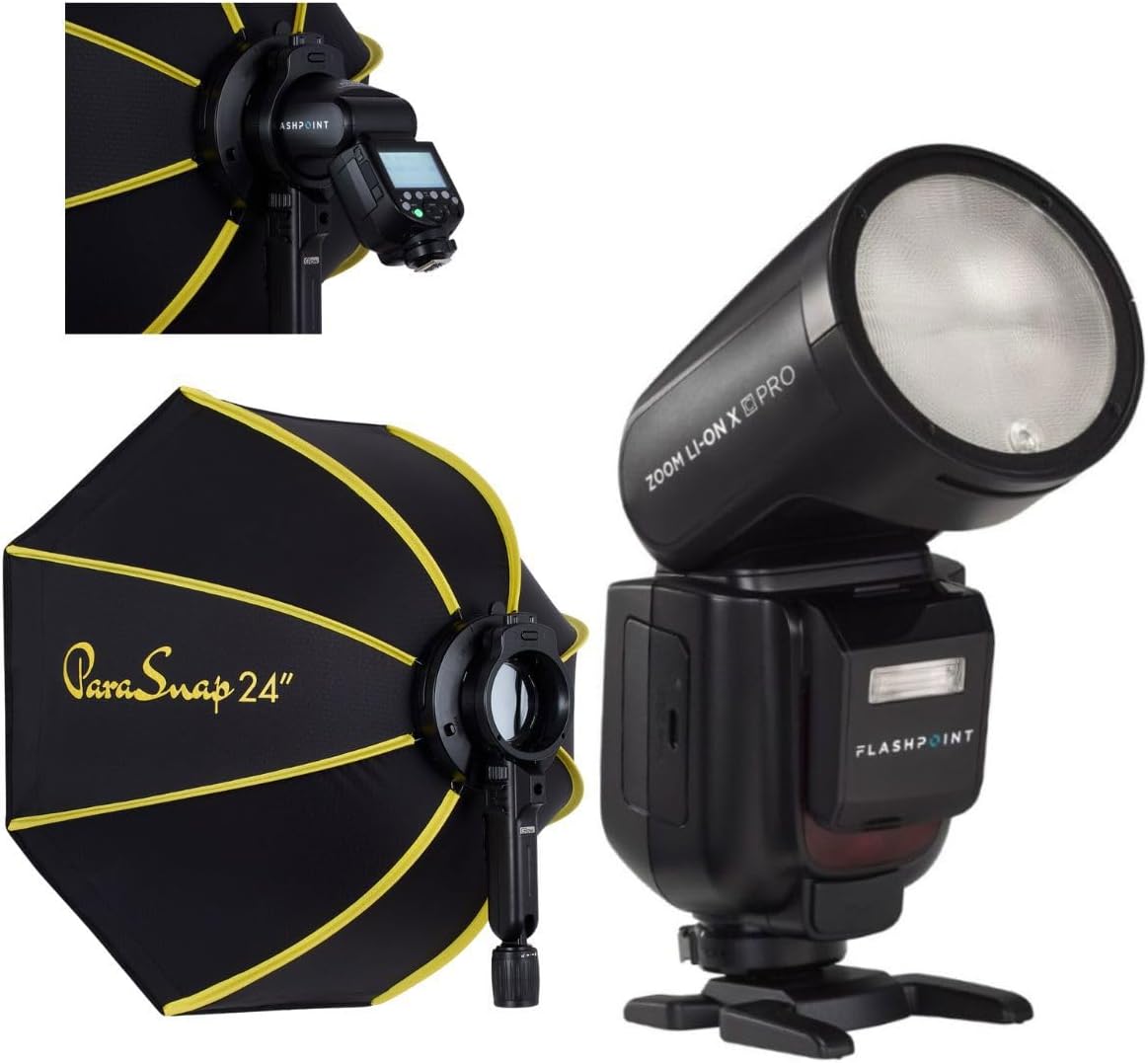
Image 1: The Flashpoint Zoom Li-on X PRO R2 TTL Flash shown alongside the Glow PS-B24K ParaSnap Octagonal Softbox, illustrating the complete kit.
4.1 Flash Unit (Zoom Li-on X PRO R2 TTL)
This unit features a round flash head, an LCD display for settings, control buttons, a hot shoe mount, and a battery compartment.

이미지 2: 클로즈업 view of the Flashpoint Zoom Li-on X PRO R2 TTL Flash unit, highlighting its round head and control panel.
4.2 Glow PS-B24K ParaSnap Octag온라인 소프트박스
The softbox is designed for quick setup and breakdown, featuring an octagonal shape for pleasing catchlights and soft light. It includes a mounting bracket for the C-adapter.

Image 3: The Glow PS-B24K ParaSnap Octagonal Softbox in its open configuration, ready for use.
4.3 Flashpoint C-adapter
This adapter facilitates the connection of the round head flash to the softbox, ensuring a secure and stable mount.

이미지 4: A view of the Flashpoint C-adapter, which connects the round flash head to light modifiers.
5. 설정
5.1 배터리 설치 및 충전
- Open the battery compartment on the flash unit.
- Insert the Lithium-Ion battery, ensuring correct polarity.
- 배터리 칸을 단단히 닫으세요.
- To charge, connect the battery to the charger, then plug the charger into a power source. The indicator light will show charging status.
5.2 카메라에 플래시 장착하기
- 플래시의 핫슈 마운트를 카메라의 핫슈에 끼우세요.
- Tighten the locking ring or lever on the flash to secure it to the camera.
5.3 Assembling and Attaching the Softbox
- Unfold the Glow PS-B24K ParaSnap Octagonal Softbox. The internal rods will snap into place.
- Attach the Flashpoint C-adapter to the mounting bracket on the softbox.
- Insert the round head of the Flashpoint Zoom Li-on X PRO R2 TTL Flash into the C-adapter, ensuring it is securely seated.
- Optionally, attach the inner and outer diffusers to the softbox for softer light.

Image 5: The Flashpoint Zoom Li-on X PRO R2 TTL Flash integrated with the Glow PS-B24K ParaSnap Octagonal Softbox, demonstrating the assembled unit.

이미지 6: 오버view of the Glow PS-B24K ParaSnap Octagonal Softbox components, including the softbox, C-adapter, and carrying bag.

이미지 7: 측면 프로필file of the Flashpoint C-adapter, showing its design for connecting the flash to the softbox.
6. 사용 설명서
6.1 전원 켜기/끄기
Press and hold the power button on the flash unit for approximately 2 seconds to turn it on or off.
6.2개의 플래시 모드
- TTL 모드: 플래시는 카메라의 측광 시스템에 따라 자동으로 출력량을 조절하여 균형 잡힌 노출을 제공합니다.
- 수동(M) 모드: Allows you to manually set the flash power from 1/1 (full power) down to 1/256 in precise steps.
- 멀티(스트로보스코픽) 모드: 움직이는 피사체의 여러 이미지를 촬영하기 위해 단일 노출 동안 여러 번의 빠른 플래시를 발사합니다.
Use the mode button to cycle through available flash modes and the dial/buttons to adjust settings within each mode.
6.3 R2 Wireless System Operation
The Flashpoint Zoom Li-on X PRO R2 TTL Flash can operate as a master or slave unit within the Flashpoint R2 wireless system. Refer to the flash unit's display and controls to set the wireless mode, channel, and group. This allows for remote control of multiple R2-compatible flashes.
6.4 Using the Softbox
The Glow PS-B24K ParaSnap Octagonal Softbox diffuses the flash light, creating a softer, more even illumination with reduced harsh shadows. Position the softbox and flash unit to achieve the desired lighting effect on your subject.
7. 유지관리
- Clean the flash head and body with a soft, dry cloth. Do not use solvents or abrasive cleaners.
- 배터리 접촉면이 깨끗한지 확인하십시오.
- When not in use for extended periods, remove the battery and store the flash and softbox in their protective cases in a cool, dry place.
8. 문제 해결
| 문제 | 가능한 원인 | 해결책 |
|---|---|---|
| 플래시가 터지지 않습니다. | 배터리 부족; 카메라/플래시 설정 오류; 플래시가 제대로 장착되지 않음. | Charge battery; check flash and camera settings (e.g., flash enabled, correct mode); re-mount flash securely. |
| 플래시 출력이 일관되지 않습니다. | Battery low; environmental factors; incorrect TTL compensation. | Ensure battery is fully charged; adjust flash exposure compensation; check for obstructions. |
| Softbox does not open/close smoothly. | Mechanism obstruction; bent rods. | Check for any fabric or debris obstructing the mechanism; gently straighten any bent rods if possible. |
9. 사양
| 특징 | 세부 사항 |
|---|---|
| 제품 치수 | 24.5 x 8.2 x 2.78 인치 |
| 품목 무게 | 4.52파운드 |
| ASIN | B0DT4TGDN7 |
| 첫 번째 이용 가능 날짜 | 15년 2025월 XNUMX일 |
| 제조업체 | 플래시포인트 |
| 상표 | 플래시포인트 |
| 한국어: | 192223270701 |
| 전력 출력 | 1/1 to 1/256 in 81 steps |
| 재활용 시간 | 약 1.5초 (최대 출력) |
| 플래시 지속 시간 | 1/300 ~ 1/20000초 |
| 배터리 | 7.2V/2980mAh Lithium-Ion |
| 무선 시스템 | Flashpoint R2 (2.4GHz) |
10. 보증 및 지원
Flashpoint products are designed for reliability and performance. For warranty information, technical support, or service inquiries, please refer to the official Flashpoint web웹사이트를 방문하거나 공인 대리점에 문의하세요. 구매 증빙 자료로 구매 영수증을 보관하세요.
방문하세요 플래시포인트 스토어 추가 제품 및 지원 자료는 다음을 참조하십시오.


