1. 제품 오버view
The Pyle 4K USB Video Conference Room Camera System is an integrated solution designed for high-quality video conferencing. It features a 4K camera with a 120° field of view, 5X digital zoom, and AI-powered auto-framing. The system includes an 8-meter microphone pickup range with echo cancellation and noise reduction for clear audio. It is compatible with various platforms such as Zoom, Skype, and Microsoft Teams, and supports PC, Mac, phone, and tablet devices.

이미지 1: 앞면 view of the Pyle 4K USB Video Conference Room Camera System.
2. 상자 안에 무엇이 들어있나요?
패키지에 모든 구성 요소가 들어 있는지 확인하세요.
- Pyle 4K USB Video Conference Room Camera System (Main Unit)
- USB 케이블
- Peeping Cover (Privacy Cover)
- Wall-mounted Components (Bracket and Screws)
- Power Adapter (12VDC 3.0A)
- 원격 제어
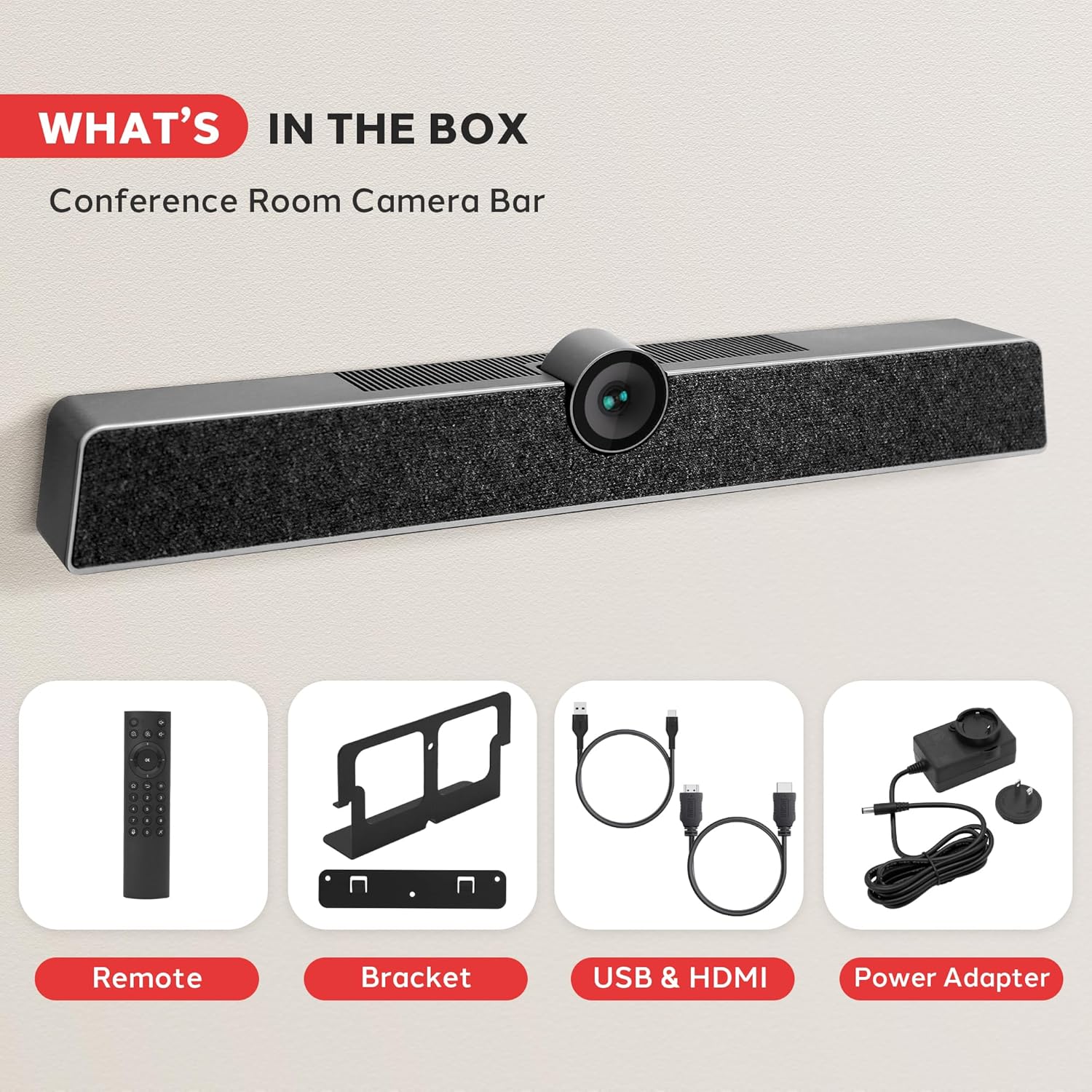
Image 2: All components included in the product package. This includes the main camera unit, remote control, mounting bracket, USB and HDMI cables, and power adapter.
3. 설정 및 설치
The Pyle 4K USB Video Conference Room Camera System offers flexible installation options for various meeting environments.
3.1 데스크탑 배치
For desktop use, simply place the camera system on a flat, stable surface in front of your display. Ensure the camera lens is unobstructed and positioned to capture the desired area.
3.2 벽면 장착
To wall-mount the system, use the provided wall-mounted components. Secure the bracket to the wall using appropriate screws, then attach the camera system to the bracket. Ensure the mounting location provides a clear line of sight for the camera and is at an optimal height for participants.

Image 3: Illustration of multiple installation methods, including wall mounting above a display and desktop placement.
3.3 연결성
Connect the camera system to your computer or display using the appropriate cables:
- USB 연결: Use the provided USB cable to connect the camera system to your computer. This enables video, audio, and control functions.
- 전원 연결: Connect the power adapter to the camera system and a power outlet.
- HDMI 출력(선택 사항): If desired, connect an HDMI cable from the camera system's HDMI OUT port to a display for direct video output.
- Aux In/Out (Optional): For external audio devices, use the Aux In/Out ports.
- LAN Port (Optional): Connect an Ethernet cable for network connectivity if required by your setup.

이미지 4: 상세 view of the multi-port connectivity options on the rear of the device.
4. 사용 설명서
Once connected, the system is generally plug-and-play. Your operating system should automatically recognize the device.
4.1 회의 시작하기
Open your preferred video conferencing application (e.g., Zoom, Microsoft Teams, Skype). In the application's settings, select the Pyle camera system as your primary video and audio input device.
4.2 카메라 기능
- 4K 비디오 화질: The camera captures video in 4K resolution, providing clear and detailed visuals.
- 120° 시야 View: The wide-angle lens ensures that all participants in a room are visible.
- 5배 디지털 줌: Use the remote control to zoom in or out, focusing on specific individuals or areas.
- AI 자동 프레임 생성: The system automatically adjusts the camera's view to keep all participants centered and optimally framed within the video feed.
- 얼굴 인식: Advanced AI identifies and tracks faces for improved framing and focus.
- Voice Localization: The system can detect the direction of speech, enhancing audio clarity for the active speaker.

Image 5: Visual representation of key features including wide viewing angle, face detection, voice localization, and clear audio output.
4.3 오디오 기능
- 8-Meter Voice Pickup: The integrated MEMS microphone array can capture voices clearly from up to 8 meters away.
- 에코 제거: Reduces echo effects for clearer communication.
- 소음 감소: Filters out background distractions, ensuring the speaker's voice is prominent.
4.4 리모콘 기능
The included remote control allows for convenient adjustment of camera settings, including zoom, volume, and other functions. Refer to the remote control's button layout for specific operations.
5. 유지관리
To ensure optimal performance and longevity of your Pyle 4K USB Video Conference Room Camera System, follow these maintenance guidelines:
- 청소: Use a soft, dry cloth to clean the exterior of the device. For the camera lens, use a lens cleaning cloth and solution specifically designed for optical surfaces. Avoid abrasive cleaners or solvents.
- 저장: 장시간 사용하지 않을 경우, 직사광선과 극한의 온도를 피해 시원하고 건조한 곳에 보관하세요.
- 케이블 관리 : 모든 케이블이 깔끔하게 정리되어 있고 무리가 가지 않는지 확인하여 손상을 방지하세요.
- 펌웨어 업데이트: Periodically check the Pyle official web성능 향상 및 새로운 기능 추가를 위한 펌웨어 업데이트가 있는지 확인하려면 해당 사이트를 방문하십시오.
6. 문제 해결
If you encounter issues with your camera system, refer to the following common problems and solutions:
- 비디오 출력 없음:
- Ensure the USB cable is securely connected to both the camera system and your computer.
- 전원 어댑터가 연결되어 있고 기기의 전원이 켜져 있는지 확인하십시오.
- Check your video conferencing application settings to confirm the Pyle camera is selected as the video source.
- 컴퓨터의 다른 USB 포트에 연결해 보십시오.
- 오디오 입력/출력 없음:
- Confirm the Pyle camera system is selected as both the microphone and speaker in your computer's sound settings and your conferencing application.
- Check the volume levels on the device, your computer, and the application.
- Ensure the microphone is not muted (check the remote control or application settings).
- 낮은 비디오 품질:
- Ensure sufficient lighting in the room.
- 부드럽고 마른 천으로 카메라 렌즈를 닦아주세요.
- Verify your internet connection speed is adequate for 4K video streaming.
- 시스템 리소스를 소모할 수 있는 다른 애플리케이션을 종료하세요.
- 리모콘이 응답하지 않음:
- 리모컨의 배터리를 확인하고 교체하세요.
- Ensure there are no obstructions between the remote control and the camera system.
7. 사양
| 특징 | 사양 |
|---|---|
| 상표 | 파일 |
| 모델 번호 | SQOCULICAMERA.6 |
| 비디오 캡처 해상도 | 4K |
| 분야 View (시야) | 120도 |
| 디지털 줌 | 5X |
| 마이크 픽업 범위 | 8 미터 |
| 연결 기술 | USB |
| 특별 기능 | AI Auto-Framing, Face Detection, Remote Control, Speakers, Wind Noise Reduction, Echo Cancellation |
| 품목 무게 | 2.27파운드 |
| 패키지 크기 | 21.3 x 7.8 x 6.61 인치 |
8. 보증 및 지원
보증 정보 및 기술 지원에 대해서는 Pyle 공식 웹사이트를 참조하십시오. web해당 사이트를 방문하거나 고객 서비스 부서에 문의하세요. 보증 청구를 위해 구매 영수증을 보관하세요.
Pyle 고객 지원:
방문하다 www.pyleusa.com for product registration, support, and contact information.


