소개
Thank you for choosing the YeeSite 180W 4-in-1 RGBA LED Stage Par Lights. This manual provides essential information for the safe and efficient operation of your new lighting system. Please read it thoroughly before use and retain it for future reference.
안전 정보
- 항상 접지된 전원 콘센트에 장치를 연결하세요.
- 전원 볼륨을 확인tage는 제품의 요구 사항(110볼트)과 일치합니다.
- 케이스를 열지 마십시오. 내부에는 사용자가 수리할 수 있는 부품이 없습니다. 모든 수리는 자격을 갖춘 기술자에게 맡기십시오.
- 눈에 직접적인 빛 노출을 피하세요. 눈에 손상을 줄 수 있습니다.
- Keep the unit away from moisture, water, and excessive heat.
- 과열을 방지하기 위해 적절한 환기를 유지하세요. 환기구를 막지 마세요.
- 제공된 전원 코드와 액세서리만 사용하세요.
패키지 내용
패키지에 모든 품목이 들어 있는지 확인하세요.
- 2 x 18LEDs Par Lights
- 2 x 전원 코드
- 2 x 리모콘
- 1 x 사용자 설명서

Image: Contents of the YeeSite 18LED Par Lights 2-pack, including two par lights, power cords, remote controls, and user manual.
설정
1. 물리적 설치
The YeeSite Par Lights come with adjustable mounting brackets for versatile placement. You can position them on walls, trusses, or floors. Ensure the mounting surface is stable and can support the weight of the lights.
2. 전원 연결
Connect the provided power cords to the power input on the back of each par light and then to a standard 110V AC power outlet. The lights are designed for corded electric operation.
3. 초기 전원 켜기
Once connected, the lights will power on. Use the onboard controls or the remote control to select your desired operating mode and settings.
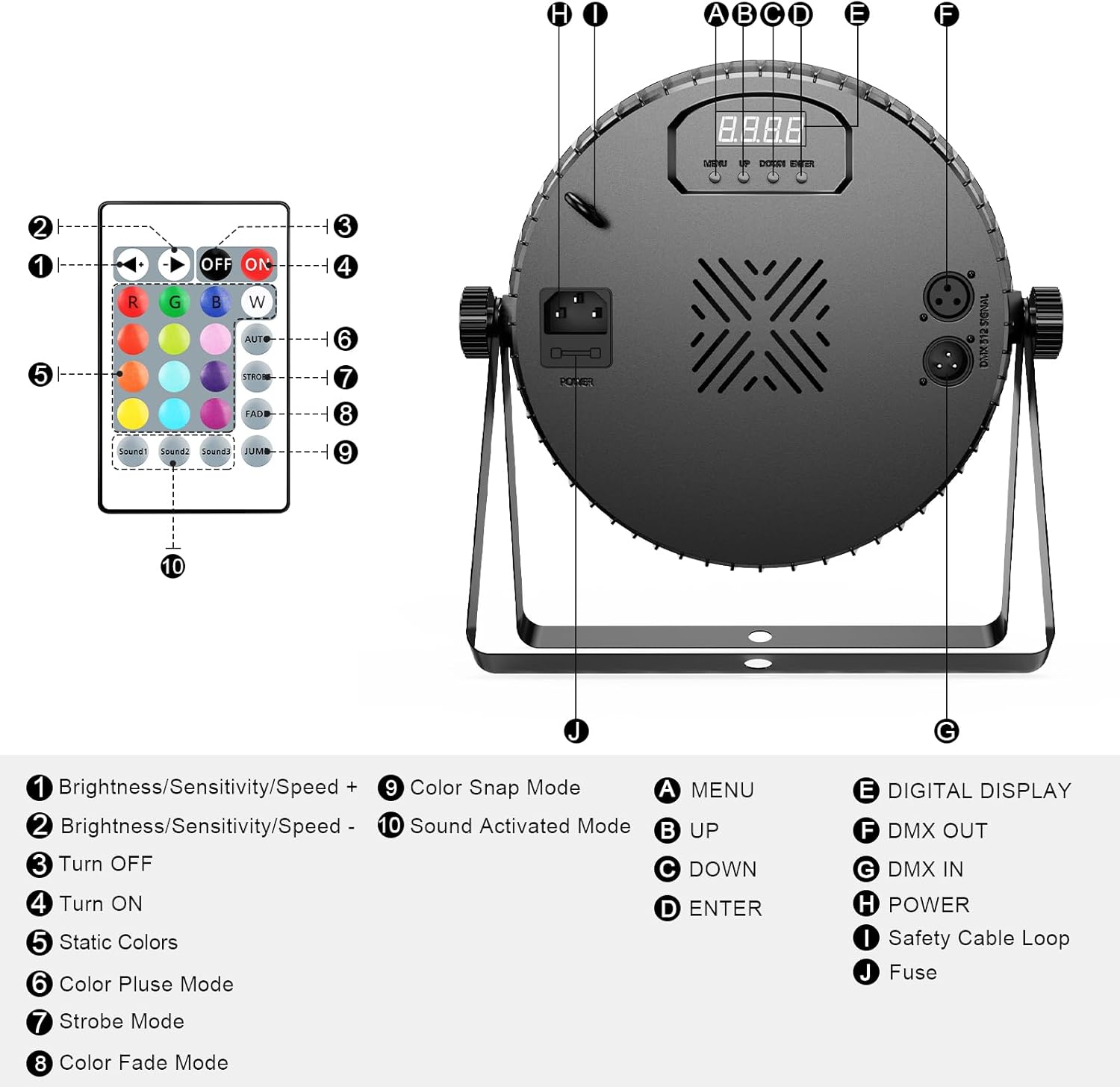
Image: Detailed diagram of the YeeSite 18LED Par Light's back panel, showing DMX input/output, power input, digital display, control buttons (Menu, Up, Down, Enter), and a diagram of the included remote control with its various functions.
Video: Official YeeSite video demonstrating the 18LED RGBA Par Lights, showcasing various color modes and features.
작동 모드
1. 원격 제어 작동
Each par light comes with a remote controller for convenient operation. The remote allows you to:
- Turn lights ON/OFF.
- Select static colors (Red, Green, Blue, Amber, White, Purple, etc.).
- Adjust brightness/sensitivity/speed.
- Choose from various modes: Color Pulse, Strobe, Fade, Color Snap, and Sound-Activated.

Image: A hand holding the remote control for the YeeSite 18LED Par Lights, with various color and mode buttons visible.
2. DMX 컨트롤
For professional setups, the lights support 4/8-channel DMX512 control. Connect your DMX controller to the DMX IN port and link multiple lights using the DMX OUT port for synchronized control. Refer to your DMX controller's manual for specific programming instructions.

Image: Multiple YeeSite 18LED Par Lights connected to a DMX controller, demonstrating advanced lighting control for stag전자 효과.
3. Sound-Activated Mode
The built-in microphone allows the lights to react to music beats, creating dynamic lighting effects that sync with the audio. Activate this mode via the remote or onboard controls.
4. 사전 프로그래밍된 모드
The lights feature several pre-programmed modes for instant effects, including color changes, fades, and strobes. Cycle through these modes using the remote or control panel.
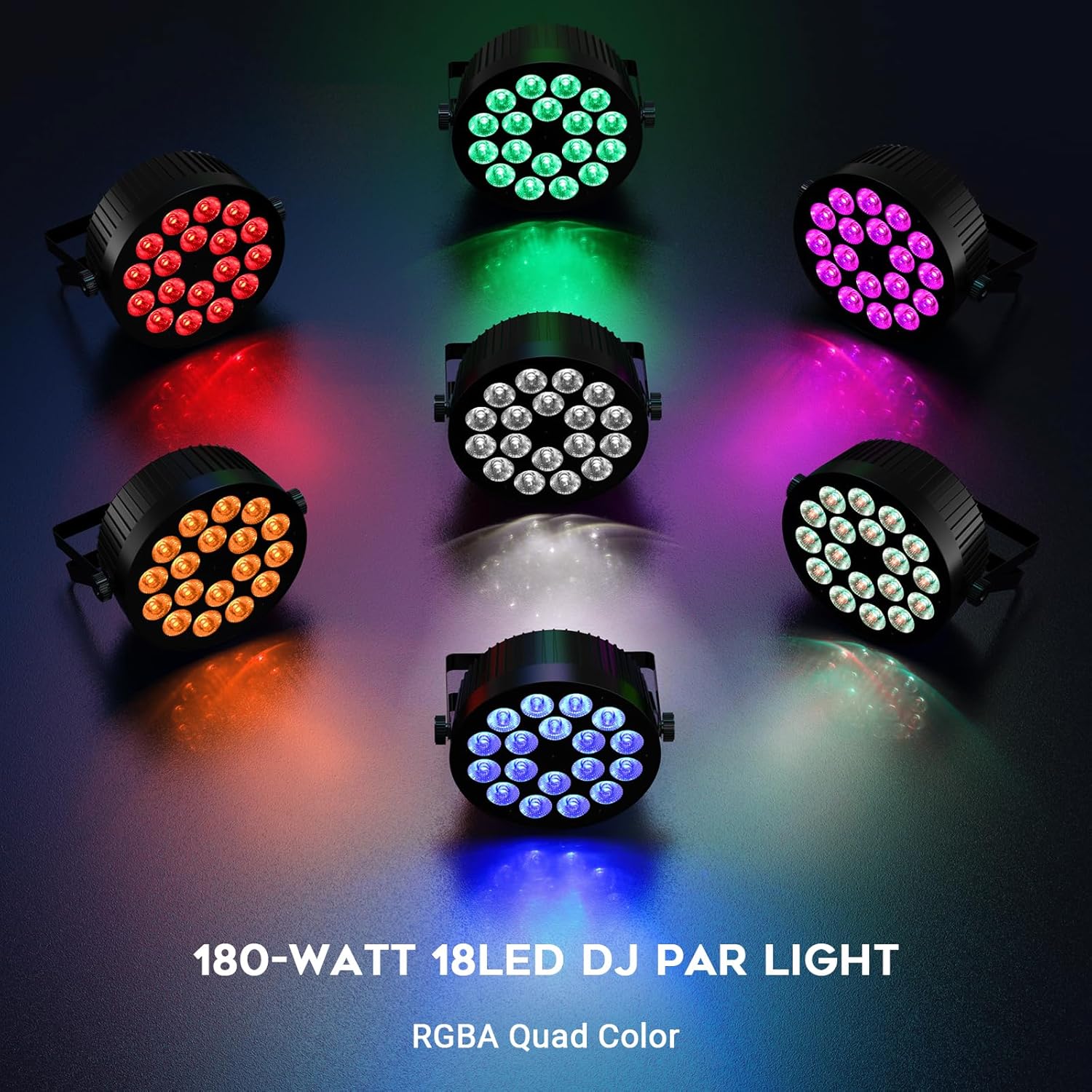
Image: A circular arrangement of YeeSite 18LED Par Lights, each displaying a different RGBA color (Red, Green, Blue, Amber, White, Purple), showcasing the wide color spectrum.
5. 마스터-슬레이브 모드
Connect multiple units using DMX cables to operate them in Master-Slave mode. One unit acts as the master, controlling all other connected slave units, ensuring synchronized lighting effects across your setup.
유지
- 청소: 최적의 광량을 유지하려면 부드럽고 보풀 없는 천으로 렌즈와 본체를 정기적으로 닦아주십시오. 연마성 세척제는 사용하지 마십시오.
- 저장: When not in use, store the lights in a cool, dry place, protected from dust and extreme temperatures.
- 점검: Periodically check power cords and DMX cables for any signs of damage. Replace damaged cables immediately.
문제 해결
| 문제 | 가능한 원인 | 해결책 |
|---|---|---|
| 불이 켜지지 않습니다 | No power, faulty cable, unit malfunction | Check power connection and outlet. Test with a different power cord. If issue persists, contact support. |
| 리모컨이 작동하지 않습니다 | Dead battery, obstruction, remote out of range | Replace remote battery. Ensure clear line of sight to the light's sensor. Move closer to the light. |
| DMX 제어 문제 | Incorrect DMX address, faulty cable, incorrect mode | Verify DMX address settings. Check DMX cables for damage. Ensure light is in DMX mode. |
| Lights not synchronized in Master-Slave | Incorrect Master/Slave setting, faulty DMX cable connection | Ensure one unit is set to Master and others to Slave. Check DMX cable connections between units. |
명세서
| 특징 | 세부 사항 |
|---|---|
| 상표 | Yee사이트 |
| 모델 번호 | YS-074-18R2RGBA |
| 광원 유형 | 발광 다이오드(LED) |
| 총 전력 | 180 Watts (18 x 10W LEDs) |
| 색상 혼합 | 4-in-1 RGBA (Red, Green, Blue, Amber) |
| 권tage | 110 볼트 |
| 제어 모드 | Remote Control, DMX512 (4/8 Channel), Sound-Activated, Auto, Master-Slave |
| 장착 유형 | Ceiling Mount, Floor Mount, Wall Mount |
| 재료 | 플라스틱 |
| 제품 치수 | 8인치 길이 x 6인치 너비 x 6인치 높이 |
| 품목 무게 | 5.5파운드(개당) |
| 빔 각도 | 25도 |
보증 및 지원
YeeSite offers a 12-month warranty for these stage par lights. For any product-related inquiries, technical assistance, or warranty claims, please contact YeeSite customer service. They are available 24/7 to ensure your stage light setup is always performance-ready.
You can find contact information on the official YeeSite web사이트나 구매 플랫폼을 통해서도 구매하실 수 있습니다.


