소개
This manual provides detailed instructions for the setup, operation, and maintenance of your Taiahiro Wireless Gaming Keyboard and Mouse Combo. This combo features a 98-key RGB backlit mechanical keyboard with blue switches and an ergonomic wireless gaming mouse, offering versatile connectivity options (USB-C, 2.4G, Bluetooth 5.0) for various devices.
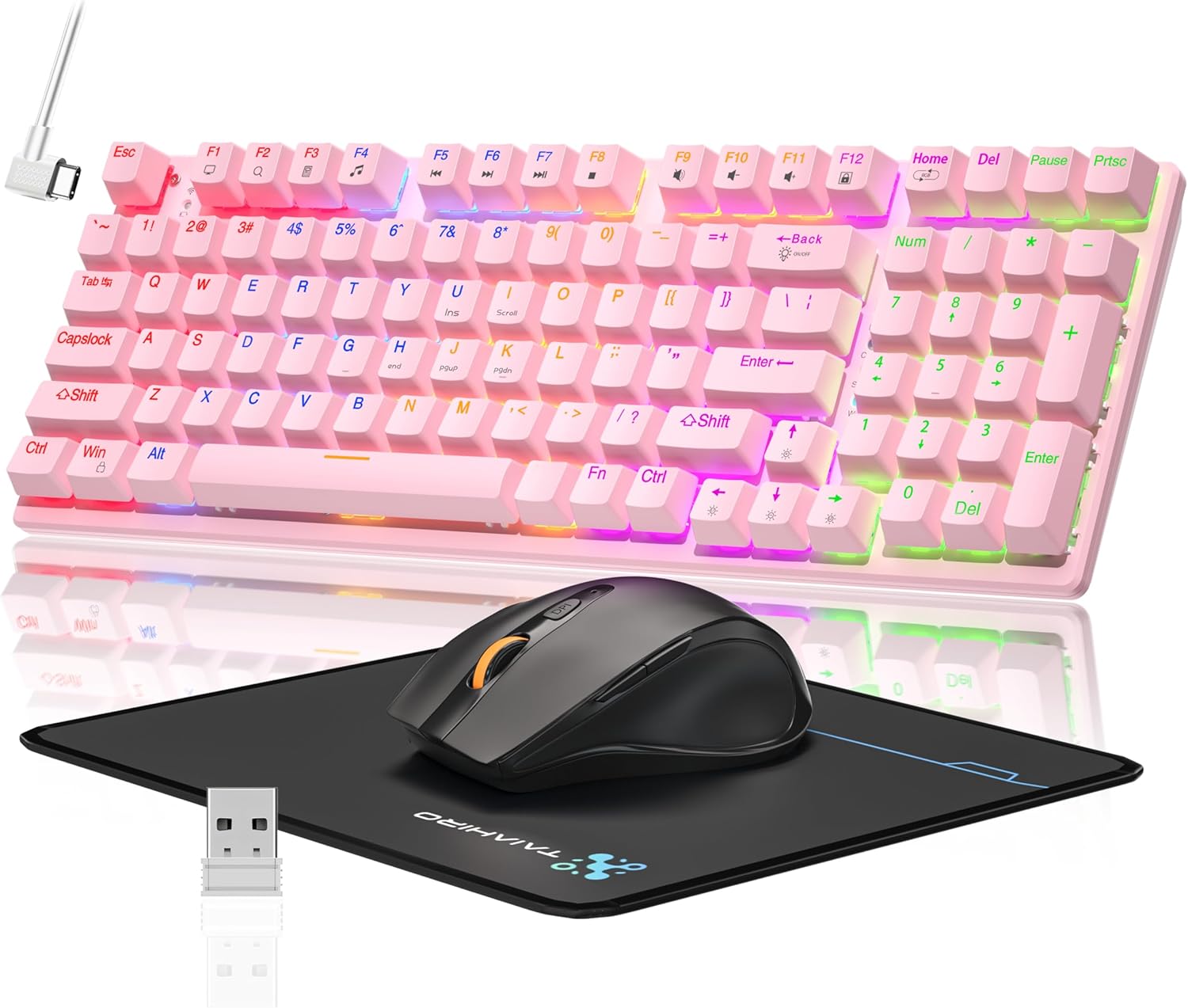
Image: The Taiahiro Wireless Gaming Keyboard and Mouse Combo, featuring a pink 98-key mechanical keyboard with RGB backlighting, a black ergonomic mouse, and a mouse pad. A USB receiver is also visible.
패키지 내용
- 무선 기계식 키보드
- 무선 게이밍 마우스
- USB-C 케이블
- 2.4G USB 수신기
- 마우스 패드
- 사용 설명서 (본 문서)
설정
키보드 설정
The keyboard supports three connectivity modes: USB-C wired, 2.4G wireless, and Bluetooth 5.0.
- USB-C 유선 연결: Connect the provided USB-C cable from the keyboard to an available USB port on your computer. The keyboard will be recognized automatically.
- 2.4G 무선 연결:
- Locate the 2.4G USB receiver, typically stored in the mouse or keyboard compartment.
- 2.4G USB 수신기를 컴퓨터의 사용 가능한 USB 포트에 꽂습니다.
- Ensure the keyboard's mode switch (usually on the back or side) is set to 2.4G mode.
- 키보드가 자동으로 연결되어야 합니다.
- Bluetooth 5.0 연결:
- 키보드의 모드 스위치가 블루투스 모드로 설정되어 있는지 확인하십시오.
- 기기(PC, 노트북, 태블릿, 스마트폰)에서 Bluetooth를 활성화하고 새로운 기기를 검색하세요.
- Select "Taiahiro Keyboard" (or similar name) from the list of available devices.
- 화면의 지시에 따라 페어링을 완료하세요.

Image: A pink mechanical keyboard connected to various devices (monitor, laptop, tablet) illustrating its triple-mode connectivity via Bluetooth, 2.4GHz, and USB-C.
마우스 설정
이 마우스는 2.4G 무선 및 블루투스 연결을 지원합니다.
- 2.4G 무선 연결:
- Insert 1 AA battery (not included) into the mouse.
- Plug the 2.4G USB receiver (shared with keyboard) into an available USB port on your computer.
- Ensure the mouse's power switch is turned ON.
- 마우스가 자동으로 연결되어야 합니다.
- 블루투스 연결 :
- Insert 1 AA battery (not included) into the mouse.
- Ensure the mouse's power switch is turned ON and set to Bluetooth mode.
- 기기에서 Bluetooth를 활성화하고 새 기기를 검색하세요.
- Select "Taiahiro Mouse" (or similar name) from the list of available devices.
- 화면의 지시에 따라 페어링을 완료하세요.

Image: A wireless gaming mouse highlighting its 4 adjustable DPI levels and showing the battery compartment with a tiny USB receiver and space for a 1AA battery.
작동 지침
키보드 기능
- RGB 백라이트: The keyboard features 8 different RGB lighting modes.
- 누르다 Fn + 홈 조명 모드를 순환하려면.
- 누르다 Fn + ↑/↓ to adjust brightness (5 levels).
- 누르다 Fn + ←/→ to adjust breathing speed (5 levels).
- 멀티미디어 키: 사용하세요 Fn key in combination with F-keys for multimedia controls (e.g., Fn+F1 for media player, Fn+F2 for volume down, etc.). Refer to the keycap legends for specific functions.
- 조절 가능한 다리: 키보드 밑면에는 인체공학적 편안함을 위해 타이핑 각도를 조절할 수 있는 높이 조절용 받침대가 있습니다.
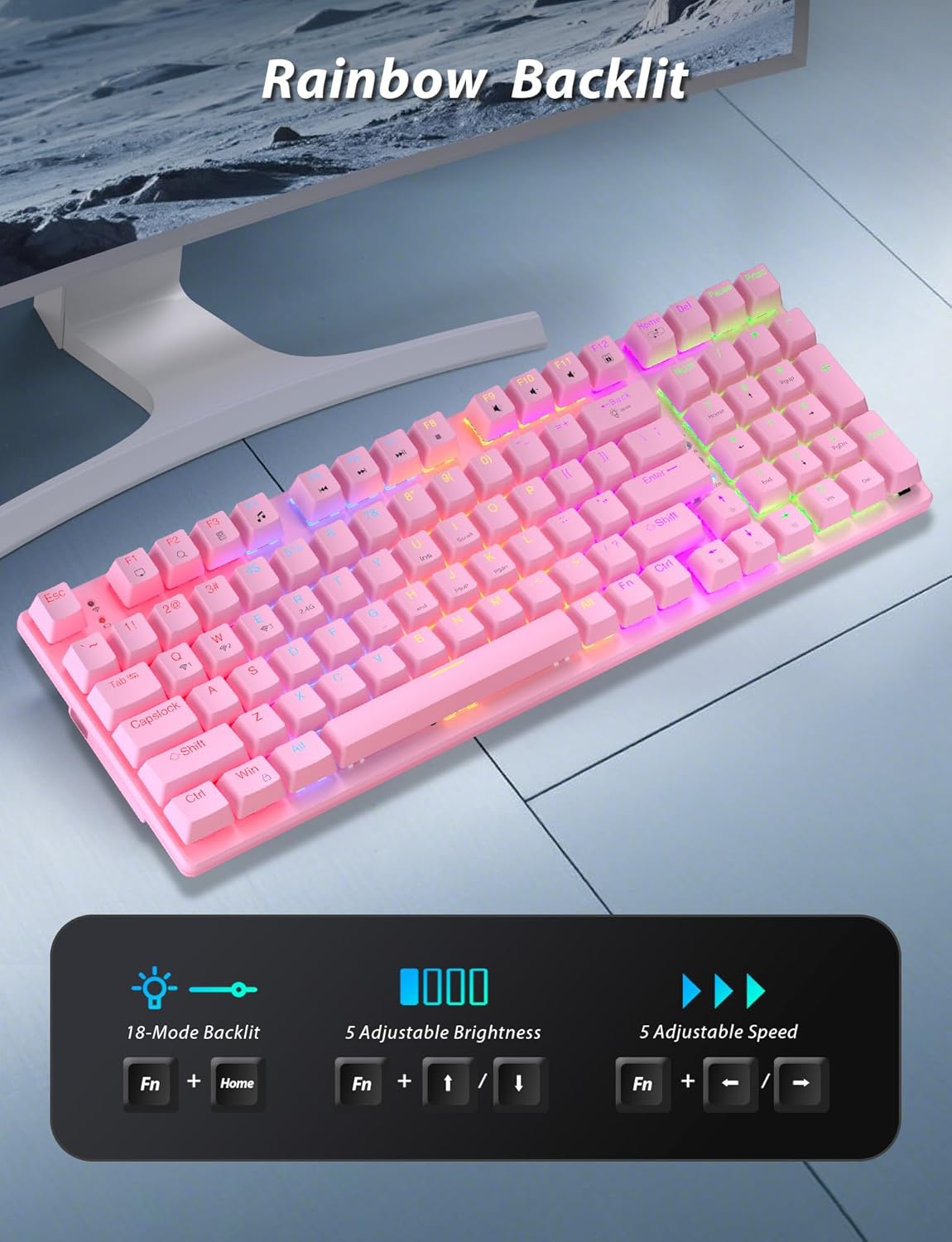
Image: A pink mechanical keyboard displaying its rainbow backlit keys, with an overlay showing the key combinations (Fn + Home, Fn + ↑/↓, Fn + ←/→) for controlling 8 modes, 5 adjustable brightness levels, and 5 adjustable speeds.

이미지: 클로즈업 view of the side of the pink mechanical keyboard, showing its ergonomic sloped design and the adjustable feet extended for comfortable typing. The accompanying mouse is also shown on a mousepad.
마우스 기능
- DPI 조정: The mouse features 4 adjustable DPI levels (800/1600/2400/3200). Press the DPI button (usually located behind the scroll wheel) to cycle through the sensitivity settings.
- 인체공학적 디자인: The contoured shape of the mouse is designed to fit comfortably in your hand, reducing fatigue during extended use.
- Anti-skid Scroll Wheel: Provides precise scrolling control.

Image: A wireless gaming mouse with a prominent scroll wheel and DPI button, illustrating its 4 adjustable DPI levels (800/1600/2400/3200), ergonomic shape, and forward/back buttons.
유지
- 청소: 부드럽고 마른 천으로 키보드와 마우스 표면을 닦으세요. 더 깨끗하게 닦으려면 약간 거친 천을 사용하세요.amp 천을 사용하여 액체가 내부 부품으로 들어가지 않도록 하십시오. 강한 화학 물질이나 연마재는 사용하지 마십시오.
- 배터리 교체: For the mouse, replace the AA battery when performance degrades. For the keyboard, recharge via the USB-C cable when the battery indicator shows low power.
- 저장: 장기간 사용하지 않을 경우, 직사광선과 극한의 온도를 피해 시원하고 건조한 곳에 보관하세요.
문제 해결
| 문제 | 해결책 |
|---|---|
| Keyboard/Mouse not connecting via 2.4G. |
|
| 키보드/마우스가 Bluetooth를 통해 연결되지 않습니다. |
|
| RGB 백라이트가 작동하지 않거나 너무 어둡습니다. |
|
| 마우스 커서가 불안정하거나 반응하지 않습니다. |
|
명세서
| 특징 | 세부 사항 |
|---|---|
| 모델 번호 | BK6301 |
| 키보드 유형 | 98키 기계식 키보드 |
| 스위치 유형 | 블루 스위치 |
| 키보드 연결 | USB-C (Wired), 2.4G Wireless, Bluetooth 5.0 |
| 마우스 연결성 | 2.4G 무선, 블루투스 |
| 마우스 DPI 레벨 | 800/1600/2400/3200 |
| 백라이트 | RGB (8 Modes, 5 Brightness, 5 Speed) |
| 호환 장치 | PC, Laptop, Smartphone, Tablet (Windows, macOS, Android) |
| 키보드 키 수명 | 50 천만 클릭 |
| 키보드 치수 | Approx. 14.96 x 5.51 x 3.15 inches (from Package Dimensions) |
| 품목 무게 | 2.72 pounds (combo weight) |
| 마우스 배터리 | AA 배터리 1개(포함되지 않음) |
| 키보드 배터리 | C형 배터리 1개 (포함) Note: This seems unusual for a keyboard, usually Li-ion. Based on input "1 C batteries required. (included)". Will state as per input. |

이미지: 클로즈업 view of the mechanical blue switches on the keyboard, showing the keycap removed and the switch mechanism, along with specifications like 50,000,000 keystrokes life, key force, and stroke travel.
보증 및 지원
Taiahiro products are designed for reliability and performance. For warranty information or technical support, please refer to the contact details provided on the product packaging or visit the official Taiahiro web대지. 보증 청구를 위해 구매 영수증을 보관하십시오.
For further assistance, you may contact Taiahiro customer service through their official channels. Please provide your product model number (BK6301) and a detailed description of the issue when seeking support.


