소개
Thank you for choosing Gsangoo USB C Wired Headphones. These earphones are designed to provide a high-fidelity audio experience with convenient wired control and broad compatibility with USB Type-C devices. This manual provides essential information for setup, operation, and maintenance to ensure optimal performance and longevity of your product.

Image: Gsangoo USB C Wired Headphones, showcasing the earbuds and USB-C connector.
제품 특징
- USB C Connectivity: Designed for devices without a 3.5mm audio jack, offering direct digital audio transmission.
- Comfortable & Ergonomic Design: Shaped to fit the ear's natural curve for extended wear comfort.
- 자석 이어버드: Integrated magnets help prevent cable tangling when not in use.
- 고품질 사운드: Features a 14.2mm sound driver for immersive audio reproduction.
- In-line Control & HD Microphone: Allows for volume adjustment, music playback control, and clear hands-free calls.
- 내구성 있는 구조: Made with a lightweight ABS shell and TPE wire for enhanced durability and service life.
- 고급 DAC 칩: Ensures wide compatibility and stable, high-quality sound transmission.
설정
To begin using your Gsangoo USB C Wired Headphones, simply plug the USB Type-C connector into the compatible port on your device. No additional drivers or software are typically required. The headphones are designed for immediate plug-and-play functionality.

Image: Illustration of connecting the USB Type-C headphones to a device, highlighting the port and built-in DAC chip.
작동 지침
인라인 제어 장치를 통해 오디오 및 통화를 간편하게 관리할 수 있습니다.
- 볼륨 업: Tap the '+' button once.
- 볼륨 작게 : Tap the '-' button once.
- 음악 재생/일시 중지: 가운데 버튼을 한 번 탭하세요.
- 다음 노래: Tap the center button twice.
- 이전 노래: Tap the center button three times.
- 전화 받기: Tap the center button once during an incoming call.
- 통화 종료: Tap the center button once during an active call.
- 전화 거부: Tap the center button three times during an incoming call.
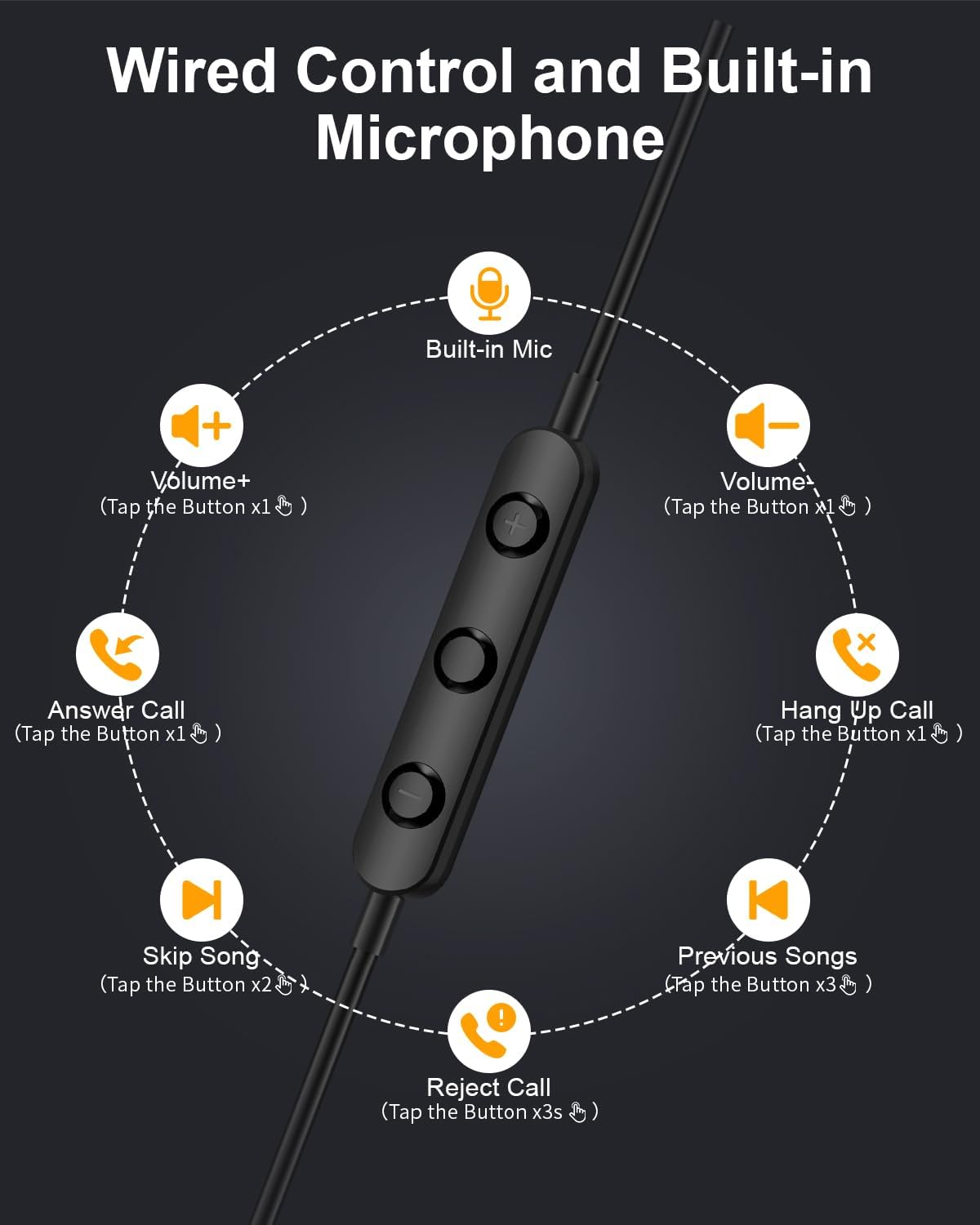
Image: Diagram illustrating the functions of the in-line control buttons for volume, music, and call management.
호환성
These USB C wired earphones are compatible with a wide range of devices that feature a USB Type-C audio output and do not have a 3.5mm headphone jack. Please note: These headphones are not compatible with devices that have both a USB-C jack and a 3.5mm jack, as the device may prioritize the 3.5mm port.
호환되는 기기는 다음과 같습니다.
- Apple의 경우: iPhone 17/17 Air/17 Pro/16/16 Pro/16 Pro Max/15/15 Plus/15 Pro/15 Pro Max, iPad 10th Gen/iPad Air 4th/5th/11/13 inch/iPad Pro 11/12.9/iPad Mini 6th.
- 삼성의 경우 : Galaxy S25 Ultra/S25/S24 Ultra/S24/S23 FE/S23/S23 Ultra/S22/S22 Ultra/S21 FE/S21/S21 Ultra/S20 FE/S20 Ultra/Z Flip6/Z Fold5/A55/A54/A16 5G/A56 5G/A34 5G/A53 5G/A33 5G.
- Google의 경우: Pixel 9 Pro/8 Pro/8/7/7 Pro/7a/6a/6/6 Pro.
- OnePlus의 경우: 12R/12/11R/11/10T/10 Pro/9/Nord/8T.
- And other Phone USB C devices without a 3.5mm jack.

Image: Visual guide to USB C headphone compatibility, showing various devices and emphasizing the requirement for a USB-C only audio port.
유지
헤드폰을 올바르게 관리하면 수명이 연장됩니다.
- 청소: 이어버드와 케이블은 부드럽고 마른 천으로 살살 닦아주세요. 강한 화학 약품이나 연마성 재질은 사용하지 마세요.
- 저장: When not in use, store the headphones in the provided storage bag to prevent tangling and damage. The magnetic design helps keep the earbuds together.
- 습기를 피하세요: 이 헤드폰은 방수 기능이 없습니다. 액체나 높은 습도로부터 멀리하십시오.
- 조심스럽게 다루십시오: 케이블을 무리하게 잡아당기거나 커넥터를 급격한 각도로 구부리지 마십시오.

Image: Close-up of the magnetic earbuds, demonstrating how they connect to prevent tangling.
문제 해결
헤드폰 사용에 문제가 발생하면 다음의 일반적인 해결 방법을 참조하십시오.
- 소리 없음:
- USB-C 커넥터가 장치에 완전히 삽입되었는지 확인하세요.
- 기기의 볼륨 설정을 확인하세요.
- Verify that your device supports audio output via its USB-C port and does not have a 3.5mm jack that might be prioritized.
- 기기 자체의 문제인지 확인하기 위해 다른 호환 기기로 헤드폰을 테스트해 보세요.
- 마이크가 작동하지 않음:
- 헤드폰이 단단히 연결되어 있는지 확인하십시오.
- 기기의 마이크 입력 설정을 확인하세요.
- 마이크가 방해받지 않는지 확인하세요.
- Sound Quality Issues (e.g., static, distortion):
- 커넥터가 깨끗하고 이물질이 없는지 확인하세요.
- 콘텐츠 자체에 문제가 있는지 확인하기 위해 다른 오디오 소스를 재생해 보세요.
- 컨트롤이 응답하지 않음:
- 헤드폰이 제대로 연결되어 있는지 확인하십시오.
- Some older devices or specific apps may have limited support for in-line controls.
If these steps do not resolve the issue, please contact Gsangoo customer support for further assistance.
명세서
| 모델명 | 945-Black-USBC |
| 헤드폰 잭 | USB-C타입 |
| 연결 기술 | 열광한 |
| 재료 | Acrylonitrile Butadiene Styrene (ABS) Shell, Thermoplastic Elastomer (TPE) Wire |
| 제어 유형 | Button Control (Push Button) |
| 케이블 기능 | 엉킴 프리 |
| 품목 무게 | 0.634온스(0.02킬로그램) |
| 방수 레벨 | 방수가 되지 않음 |
| 오디오 드라이버 유형 | 동적 드라이버 |
| 이어피스 모양 | Bud (In Ear) |
| 소음 제어 기능 | 수동 소음 제거, 소리 차단 |
| 블루투스 기술 지원 | 아니요 |
| 특징 | 가벼움 |
| 제품 치수 | 1 x 1 x 0.3 인치 |
보증 및 지원
Gsangoo is committed to providing high-quality products and customer satisfaction. We offer after-sales service to address any questions or concerns you may have regarding your USB C Wired Headphones.
For product support, troubleshooting assistance, or warranty inquiries, please contact Gsangoo customer service through the platform where you purchased the product or visit the official Gsangoo store page.
We aim to respond to all inquiries within 24 hours to provide satisfactory assistance.


