1. 서론
This manual provides essential information for the safe and effective use of your arboleaf Smart Body Composition Scale CS10E. Please read this manual thoroughly before using the device and retain it for future reference.
2. 안전 정보
중요한 안전 예방 조치:
- 심장박동기 또는 기타 이식형 의료기기를 착용 중인 경우 이 기기를 사용하지 마십시오.
- Pregnant women should consult a physician before using this scale.
- The scale uses Bioelectrical Impedance Analysis (BIA) technology. While generally safe, individuals with certain medical conditions should exercise caution.
- Ensure the scale is placed on a hard, flat surface for accurate measurements.
- 낙상 사고를 예방하기 위해 젖거나 미끄러운 표면에서는 저울을 사용하지 마십시오.
- 저울을 물과 극한 온도로부터 멀리하십시오.
3. 패키지 내용
패키지에 모든 품목이 들어 있는지 확인하세요.
- arboleaf Smart Body Composition Scale CS10E
- AAA 배터리(3개 포함)
- 사용 설명서 (본 문서)
4. 제품 오버view
The arboleaf CS10E is an advanced smart scale designed to provide comprehensive body composition analysis. It features 8 electrodes for enhanced accuracy and segmental analysis.
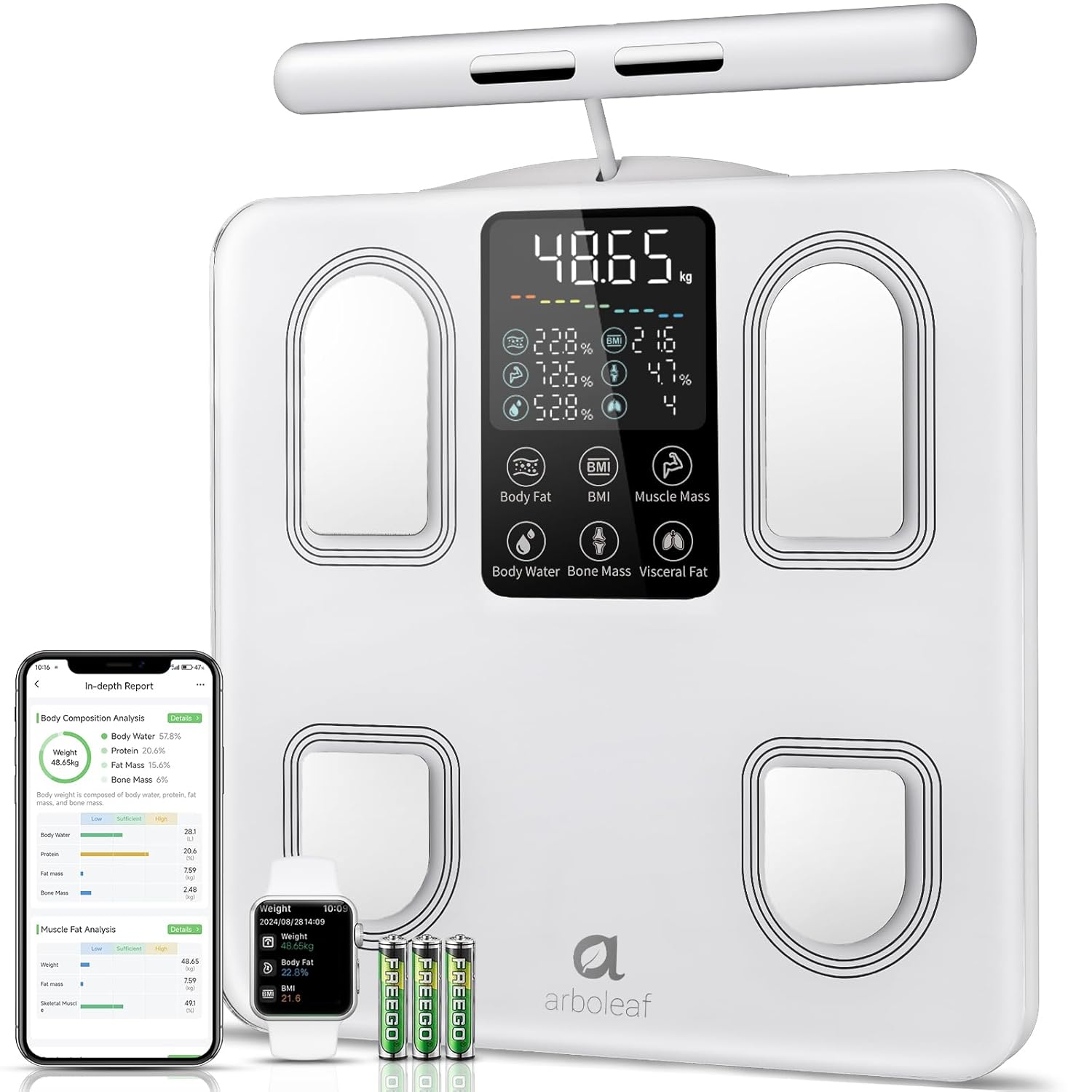
Image: arboleaf Smart Body Composition Scale CS10E, showing the scale, a smartphone displaying the app, a smartwatch, and three AAA batteries.
주요 특징:
- 8 Electrodes: Four electrodes on the scale platform for feet, and four on a retractable handle for hands, enabling full-body segmental analysis.
- 대형 LED 디스플레이: Provides clear readings of key metrics directly on the scale.
- 강화 유리 플랫폼: 튼튼하고 청소하기 쉽습니다.
- 이중 주파수 BIA 기술: For precise and reliable body composition measurements.
- High Precision Chips: Ensures accurate data collection.
- 개폐식 핸들 : Over 1.5 meters long, with a magnetic retraction system for convenient storage.
- 미끄럼 방지 디자인: For stability and safety during use.
5. 설정
5.1. 배터리 설치
- 저울 밑면에 있는 배터리 칸을 엽니다.
- Insert the three AAA batteries, ensuring correct polarity (+/-).
- 배터리 칸을 단단히 닫으세요.
5.2. 앱 다운로드 및 설치
The arboleaf scale requires the arboleaf app for full functionality and data tracking.
- Scan the QR code provided in the packaging or search for "arboleaf" in your device's app store (Apple App Store for iOS, Google Play Store for Android).
- Download and install the arboleaf app.
- 앱을 열고 화면의 지시에 따라 계정을 만들고 개인 프로필을 설정하세요.file.
5.3. 앱과 페어링
- 스마트폰에서 Bluetooth가 활성화되어 있는지 확인하세요.
- Open the arboleaf app.
- Step onto the scale barefoot. The scale display will light up.
- The app should automatically detect and connect to the scale. If not, navigate to the device pairing section within the app and follow the instructions to manually add the scale.
6. 사용 설명서
6.1. 측정하기
For accurate body composition analysis, follow these steps:
- 저울을 단단하고 평평한 표면에 놓으세요.
- Step onto the scale barefoot, ensuring your feet are positioned on the four metal electrodes on the platform.
- Grasp the retractable handle with both hands, ensuring your palms are in full contact with the four metal electrodes on the handle.
- Stand still and maintain a straight posture with your arms extended slightly away from your body. Your arms should form an angle relative to your body. Do not bend your arms during measurement.
- Wait for the measurement to complete. The scale display will show your weight and other key metrics.

Image: Illustration showing the correct posture for using the arboleaf scale, emphasizing full contact with electrodes and proper arm positioning.
6.2. 표시값 이해하기
The scale's LED display shows up to 7 key metrics in real-time:
- Weight (kg/lb/st)
- 체지방률tage
- BMI(신체질량지수)
- 근육량
- 체수분율tage
- 뼈 질량
- 내장지방 수치

Image: Close-up of the arboleaf scale display, highlighting the 7 real-time body metrics shown.
6.3. Segmental Analysis
The 8-electrode design allows for detailed segmental analysis, providing distinct measurements for each arm, each leg, and the torso. This offers a more granular understanding of your body composition.

Image: Diagram showing a human body divided into segments (arms, legs, torso) with data points for muscle balance and fat analysis in each segment.
6.4. Data Synchronization and Multi-User Support
Each measurement automatically synchronizes with the arboleaf app. The app supports an unlimited number of user profiles with automatic recognition, making it suitable for the entire family. For users with a weight difference of less than 2 kg, manual data assignment in the app may be required.

Image: Screenshot of the arboleaf app displaying a list of multiple user profiles, indicating support for unlimited users.
7. 앱 기능
The arboleaf app provides a comprehensive platform for tracking and analyzing your health data.
7.1. 27 Body Composition Metrics
Beyond the basic readings on the scale, the app provides detailed analysis of 27 body composition metrics, including:
- Body Weight, BMI, Body Fat, Muscle Mass, Body Water, Bone Mass, Visceral Fat
- Protein, BMR (Basal Metabolic Rate), Subcutaneous Fat, Body Age
- Segmental Muscle Mass (left arm, right arm, torso, left leg, right leg)
- Segmental Fat Mass (left arm, right arm, torso, left leg, right leg)

Image: A woman looking at her smartphone, with an overlay showing icons representing 27 essential body composition metrics tracked by the arboleaf app.
7.2. Health Plan and Tracking
Configure your health plan within the app. It offers continuous tracking and reminders to help you achieve your fitness and wellness goals. View your progress through clear weekly, monthly, and yearly graphs.
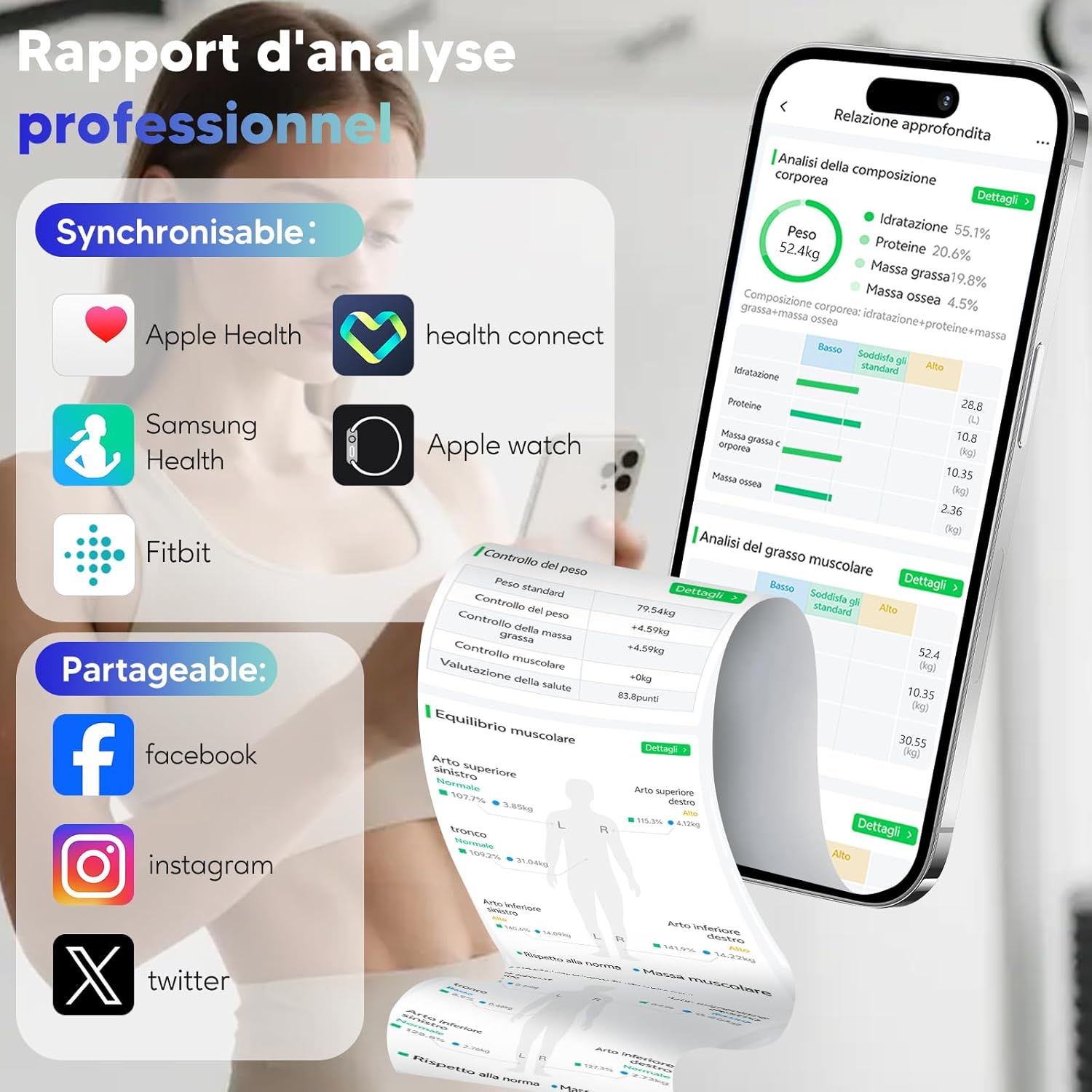
Image: A woman running on a treadmill, with an overlay showing the arboleaf app displaying weight, body fat, and BMI trends over weeks, months, and years.
7.3. Third-Party App Integration
The arboleaf app supports synchronization with popular health platforms:
- 애플 헬스
- 구글 핏
- 삼성헬스
- 핏비트
- 애플 워치

Image: Screenshot of the arboleaf app showing support for sharing and syncing data with Apple Health, Health Connect, Samsung Health, Fitbit, and Apple Watch.
7.4. Data Sharing and Reports
Share your progress on social media platforms like Facebook, Instagram, and Twitter directly from the app. You can also generate professional analysis reports in PDF format.

Image: A smartphone displaying the arboleaf app's PDF report generation feature, alongside a printed report and a person using the scale.
8. 유지관리
8.1. 청소
부드러운 천으로 저울 표면을 닦으세요.amp 천으로 닦아주세요. 연마성 세제를 사용하거나 스케일을 물에 담그지 마세요.
8.2. 보관
저울은 서늘하고 건조한 곳에 보관하세요. 사용하지 않을 때는 저울 위에 무거운 물건을 올려놓지 마세요.
9. 문제 해결
- No display/Scale not turning on: 배터리가 올바르게 설치되었는지, 충전량이 충분한지 확인하십시오. 필요한 경우 배터리를 교체하십시오.
- 부정확한 판독값: Ensure the scale is on a hard, flat surface. Make sure your feet and hands are clean, dry, and in full contact with all electrodes. Avoid wearing excessive clothing.
- 앱이 블루투스로 연결되지 않습니다. Ensure Bluetooth is enabled on your device. Restart the app and try pairing again. If issues persist, restart your smartphone.
- 데이터가 동기화되지 않음: Check your internet connection. Ensure the app is open and running in the background during measurement.
- Weight difference less than 2kg for multi-user: Manually assign the measurement data to the correct user profile 앱 내에서.
10. 사양
| 특징 | 세부 사항 |
|---|---|
| 모델 번호 | CS10E |
| 중량 제한 | 180 킬로그램 |
| 판독 정밀도 | 0.1kg |
| 재료 | 강화 유리 |
| 디스플레이 유형 | 주도의 |
| 전원 | 3 AAA 배터리(포함) |
| 제품 치수 | 31 x 31 cm (platform) |
| 품목 무게 | 1.5 킬로그램 |
| 특별 기능 | Automatic shut-off, Large screen, Smart features, Anti-slip platform |
11. 공식 제품 영상
비디오: 오버view of the arboleaf Smart Body Composition Scale CS10E, demonstrating its features, usage, and app integration for comprehensive health tracking.
12. 보증 및 지원
For warranty information, technical support, or further assistance, please refer to the official arboleaf web해당 웹사이트를 방문하거나 고객 서비스 센터에 직접 문의하세요. 연락처 정보는 일반적으로 제품 포장이나 브랜드 공식 웹사이트에서 확인할 수 있습니다.


