소개
This manual provides detailed instructions for the setup, operation, and maintenance of your LENRUE E-1103 Computer Speaker Soundbar. Please read this manual thoroughly before using the product to ensure proper function and longevity.

Image: The LENRUE E-1103 Computer Speaker Soundbar, a sleek black soundbar with RGB lighting on the ends and a USB-A cable with a USB-C adapter.
패키지 내용
패키지에 모든 품목이 들어 있는지 확인하세요.
- LENRUE E-1103 Computer Speaker Soundbar
- USB-C 어댑터
- 사용 설명서 (본 문서)
제품 끝view
The LENRUE E-1103 features a compact soundbar design with integrated stereo speakers and touch-controlled ambient lighting. It connects via a single USB cable for both power and audio.
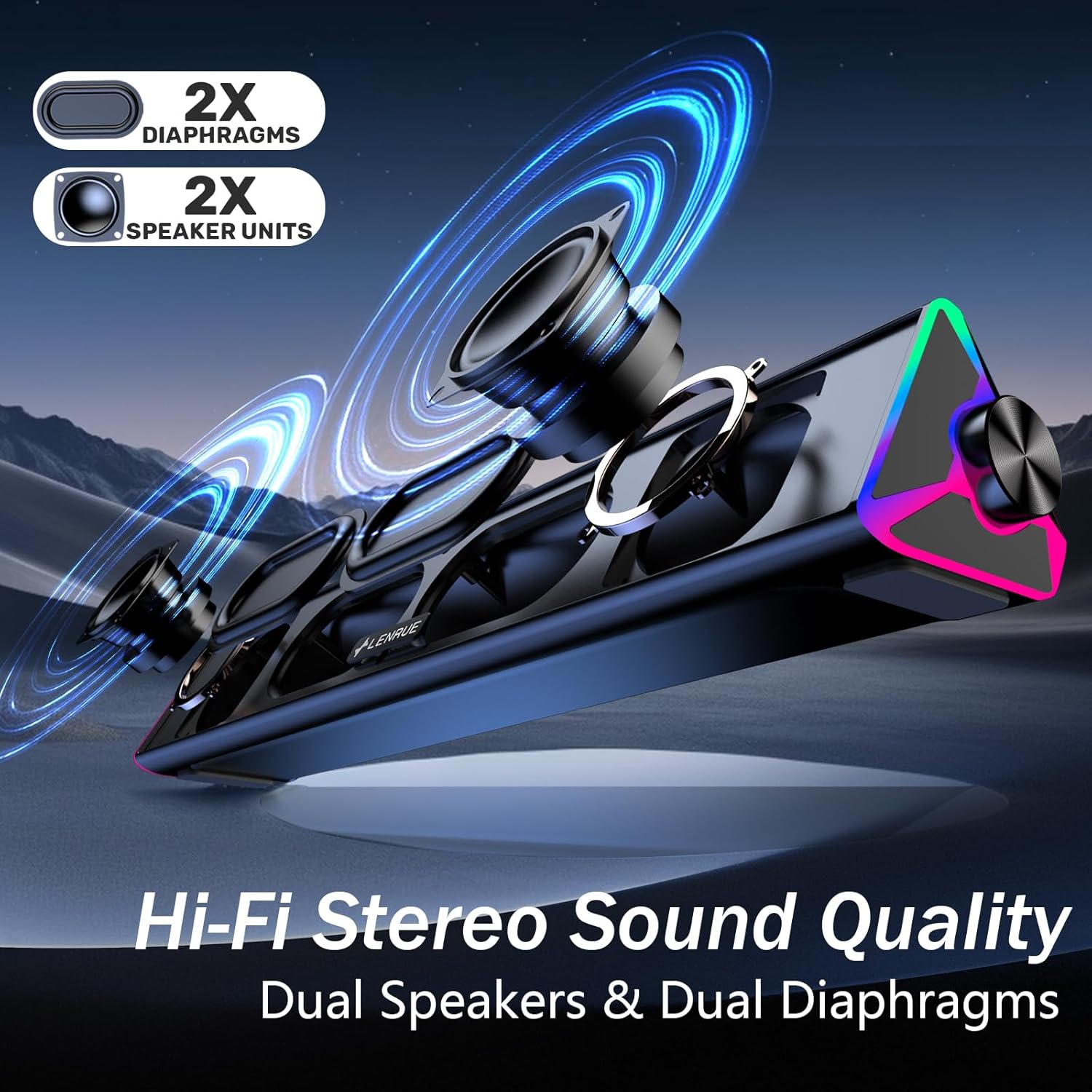
이미지: 폭발된 view of the LENRUE E-1103 speaker, highlighting its dual speaker units and dual diaphragms for stereo sound.
주요 구성 요소:
- 스피커 그릴: Front-facing mesh covering the speaker drivers.
- 볼륨 노브: Located on the right side, for adjusting audio output level.
- 터치 센서: Integrated into the right side for controlling the ambient lighting.
- USB Cable (USB-A): Main connection for power and audio.
- USB-C 어댑터: For compatibility with USB-C ports.
- RGB 조명: Dynamic lighting effects on both ends of the soundbar.
설정
Follow these steps to set up your LENRUE E-1103 speaker:
- 놓기: Position the soundbar on a stable surface, such as your desktop, beneath your monitor, or in front of your laptop. Ensure the speaker grille faces towards you for optimal sound delivery.
- 전원 및 오디오에 연결:
- USB-A 포트의 경우: Plug the USB-A connector of the speaker's cable directly into an available USB-A port on your computer (desktop PC or laptop).
- USB-C 포트의 경우: Attach the included USB-C adapter to the USB-A connector of the speaker's cable, then plug the USB-C adapter into an available USB-C port on your computer.

Image: A visual guide demonstrating how to connect the LENRUE E-1103 speaker to a laptop using either the standard USB-A cable or the included USB-C adapter.
The speaker is plug-and-play; no additional drivers or software installation is required.
- 초기 음량 조절: After connecting, ensure your computer's audio output is set to the LENRUE E-1103 speaker. Adjust the volume using the physical volume knob on the right side of the speaker. It is recommended to start with a lower volume and gradually increase it to a comfortable listening level.

Image: A diagram illustrating the compact dimensions of the LENRUE E-1103 speaker and its single USB cable for both power and audio, designed to minimize cable clutter.
작동 지침
볼륨 조절:
The speaker features a rotary volume knob located on the right side. Rotate the knob clockwise to increase the volume and counter-clockwise to decrease it. For optimal sound, ensure your computer's system volume is also appropriately set.

Image: A three-step visual guide showing how to adjust the volume, including checking computer settings and using the speaker's physical volume knob.
Ambient Lighting Control:
The LENRUE E-1103 includes dynamic RGB lighting on both ends. To control the lighting:
- 켜기/끄기: Gently touch the touch-sensitive area near the volume knob on the right side of the speaker. Each touch will toggle the lighting on or off.
- The lighting features a soft breathing effect, providing ambient illumination.

Image: A close-up of the right side of the LENRUE E-1103 speaker, highlighting the touch control icon for activating or deactivating the gentle breathing ambient lighting.
유지
적절한 유지관리는 스피커의 수명과 성능을 보장합니다.
- 청소: Use a soft, dry, lint-free cloth to wipe the surface of the speaker. Do not use liquid cleaners, aerosols, or solvents, as these may damage the finish or internal components.
- 저장: 장시간 사용하지 않을 경우, 스피커를 직사광선과 극한의 온도를 피해 서늘하고 건조한 곳에 보관하세요.
- 습기를 피하세요: Keep the speaker away from water and high humidity environments.
- 조심스럽게 다루십시오: 스피커를 떨어뜨리거나 강한 충격을 주지 마십시오.
문제 해결
If you encounter issues with your LENRUE E-1103 speaker, refer to the following common problems and solutions:
| 문제 | 가능한 원인 | 해결책 |
|---|---|---|
| 스피커에서 소리가 나지 않습니다. |
|
|
| 소리가 왜곡되거나 불분명합니다. |
|
|
| Ambient lights are not working. |
|
|
| 컴퓨터에서 스피커를 인식하지 못했습니다. |
|
|
명세서
| 특징 | 세부 사항 |
|---|---|
| 상표 | 렌루 |
| 모델명 | 이-1103 |
| 연결 기술 | USB |
| 오디오 출력 모드 | 스테레오 재생 |
| 스피커 최대 출력 전력 | 5 와트 |
| 주파수 응답 | 20 kHz (XNUMX kHz) |
| 제품 치수 | 2.5"D x 15"W x 2.5"H (6.35cm D x 38.1cm W x 6.35cm H) |
| 품목 무게 | 15.3온스(435그램) |
| 색상 | 검은색 |
| 추천 용도 | For Computers (Desktop PCs, Laptops, Monitors) |
| 호환성 | Windows PCs, some macOS and Chrome OS laptops. Not compatible with Xbox gaming systems or Projectors. |
보증 및 지원
LENRUE products are designed for reliability and performance. For warranty information or technical support, please refer to the contact details provided on the product packaging or the official LENRUE web사이트. 보증 청구를 위해 구매 증빙 자료로 구매 영수증을 보관하세요.
추가 지원이 필요하면 다음을 방문하세요. LENRUE Store on Amazon.


