소개
Welcome to your JLab Go Lux ANC Wireless Headphones. This manual provides detailed instructions to help you get the most out of your new headphones, covering setup, operation, maintenance, and troubleshooting.
상자 안에 무엇이 들어있나요?
- JLab Go Lux ANC Wireless Headphones
- USB-C 충전 케이블

Image: JLab Go Lux ANC Headphones and included USB-C charging cable.
제품 끝view
Familiarize yourself with the key components and controls of your JLab Go Lux ANC Wireless Headphones.

이미지: 클로즈업 view of the right earcup, highlighting the power button, volume controls, and ANC/Be Aware mode button.
주요 특징:
- 하이브리드 액티브 노이즈 캔슬링(ANC): Reduces external distractions by up to 30 dB.
- 주의 모드: 오디오를 듣는 동안 주변 소리를 들을 수 있습니다.
- 클라우드 폼 컴포트: Ergonomically shaped Form-Fit Earcups with 1-inch Cloud Foam cushions and adjustable hinges for extended comfort.
- JLab 앱 맞춤 설정: ANC/Be Aware 설정, 터치 컨트롤 및 사운드 기본 설정을 개인화하세요.
- 매우 깨끗한 통화: Equipped with noise-canceling microphones for clear communication.
- 블루투스 멀티포인트: 두 개의 장치에 동시에 연결합니다.
- 무선 공유 모드: Share audio wirelessly between two Lux headphones.
- Google 빠른 쌍 및 Microsoft Swift 쌍: Effortless pairing with Android and Windows devices.
- Google 내 기기 찾기: 헤드폰을 분실한 경우 찾아보세요.
- 접이식 디자인 : Rotating earcups for compact storage and portability.
설정
1. 초기 충전
Before first use, fully charge your headphones using the provided USB-C cable. The LED indicator will show charging status.
2. 전원 켜기/끄기
- 전원 켜기: LED 표시등이 켜질 때까지 전원 버튼을 길게 누릅니다.
- 전원 끄기 : LED 표시등이 꺼질 때까지 전원 버튼을 길게 누르세요.
3. 블루투스 페어링
- Turn on your JLab Go Lux ANC headphones.
- 헤드폰이 자동으로 페어링 모드로 들어갑니다(LED가 파란색/빨간색으로 깜박임).
- On your device (smartphone, laptop, etc.), open Bluetooth settings and select "JLab Go Lux ANC" from the list of available devices.
- 연결되면 LED가 파란색으로 계속 켜집니다.
Google 빠른 쌍 및 Microsoft Swift 쌍: For supported Android and Windows 10/11 devices, simply turn on your headphones near the device, and a pop-up notification will prompt you to connect with a single click.
4. JLab 앱 사용자 정의
Download the JLab App from the App Store or Google Play Store to unlock full customization options for your headphones.
- ANC/Be Aware 설정을 사용자 정의합니다.
- 터치 컨트롤을 조정합니다.
- Fine-tune sound with the equalizer (JLab Signature, Balance, Bass Boost presets available).
- Enable Safe Hearing with volume limits.
- 소프트웨어 업데이트를 받으세요.

Image: The JLab App interface on a smartphone, demonstrating sound and noise control customization options.
작동 지침
1. Active Noise Cancelling (ANC) & Be Aware Mode
Toggle between ANC, Be Aware, and ANC Off modes using the dedicated button on the earcup.
- 하이브리드 ANC: Eliminates external distractions for an immersive audio experience.
- 주의 모드: 주변 소리가 통과되도록 하여 주변 환경을 인지할 수 있도록 도와줍니다.

Image: A person wearing the headphones, demonstrating the use of ANC or Be Aware mode in a public environment.
2. 함수 호출
The built-in noise-canceling microphones ensure clear calls.
- 전화 받기/종료: 다기능 버튼을 한 번 누르세요.
- 전화 거부: 다기능 버튼을 길게 누르세요.
- Voice Assistant 활성화 : 다기능 버튼을 두 번 누르세요.

Image: A person engaged in a phone call while wearing JLab Go Lux ANC headphones, emphasizing the clear call feature.
3. 음악 재생
- 재생/일시 중지: 다기능 버튼을 한 번 누르세요.
- 볼륨 업: '+' 버튼을 짧게 누르세요.
- 볼륨 작게 : '-' 버튼을 짧게 누르세요.
- 다음 트랙: '+' 버튼을 길게 누르세요.
- 이전 트랙 : '-' 버튼을 길게 누르세요.
4. 블루투스 멀티포인트
Connect your headphones to two devices simultaneously. For example, connect to your laptop for work calls and your phone for music. The headphones will intelligently switch between devices.
5. 무선 공유 모드
Share your audio with another pair of JLab Lux headphones. Refer to the JLab App or JLab support for detailed instructions on activating Wireless Share Mode.
6. Google 내 기기 찾기
If you misplace your headphones, use the Google Find My Device feature to locate them. Ensure this feature is enabled and configured on your connected Android device.

Image: A person using the Google Find My Device app on a smartphone to locate their JLab headphones.
편안함과 핏
The JLab Go Lux ANC headphones are designed for comfort during extended use.
- 폼핏 이어컵: Ergonomically shaped to the natural outline of the ear.
- 클라우드 폼 쿠션: 1-inch thick cushions provide plush comfort.
- 조절 가능한 힌지: Customize the fit for various head sizes and shapes.

Image: A person wearing JLab Go Lux ANC headphones, showcasing the comfortable Cloud Foam earcups.
충전 및 배터리 수명
Your JLab Go Lux ANC headphones offer extended battery life.
- 배터리 수명: Up to 70+ hours of playtime (40+ hours with ANC on).
- 충전 중: Use the included USB-C cable to charge. A full charge typically takes a few hours.
- LED 표시등: The LED light on the earcup indicates charging status and battery level.
유지
- Clean headphones with a soft, damp 옷감. 가혹한 화학 물질을 피하십시오.
- 사용하지 않을 때는 시원하고 건조한 곳에 보관하세요.
- 극한의 온도나 습기에 노출시키지 마세요.
- The headphones are not water resistant. Avoid contact with liquids.
- The foldable design with rotating earcups allows for compact storage.
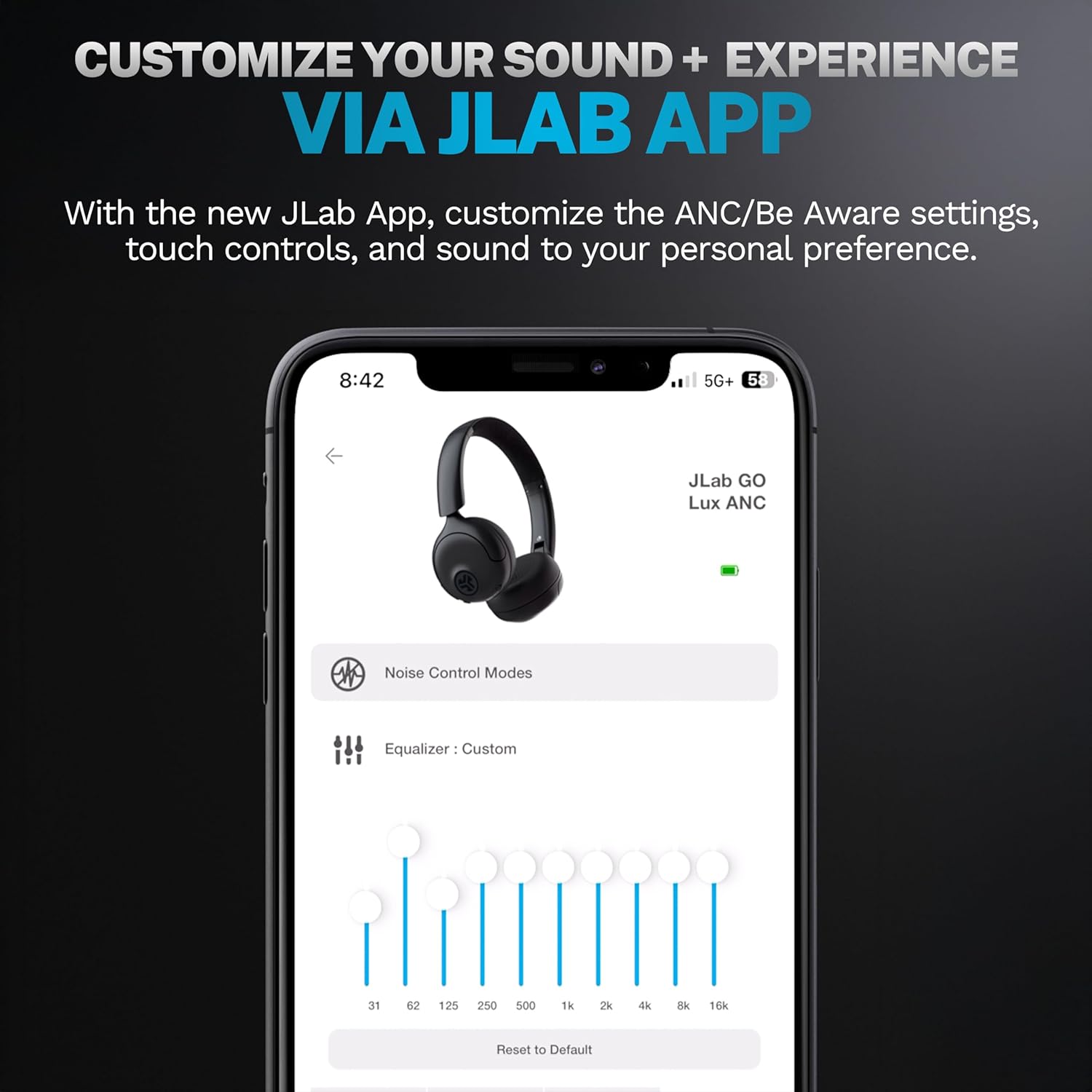
Image: JLab Go Lux ANC headphones in their folded position, demonstrating portability.
문제 해결
| 문제 | 해결책 |
|---|---|
| 헤드폰이 켜지지 않음 | Ensure headphones are charged. Press and hold the power button for 3-5 seconds. |
| 기기와 페어링할 수 없습니다 | Make sure Bluetooth is enabled on your device. Ensure headphones are in pairing mode (flashing blue/red LED). Forget the device in your Bluetooth settings and re-pair. |
| 소리가 나지 않거나 볼륨이 작음 | 헤드폰과 연결된 기기의 볼륨을 확인하세요. 헤드폰이 제대로 연결되어 있는지 확인하세요. |
| ANC가 효과적으로 작동하지 않음 | ANC 모드가 활성화되어 있는지 확인하세요. 헤드폰을 귀에 잘 밀착되도록 조절하세요. |
| 통화 품질 문제 | Ensure microphones are not obstructed. Check your device's connection and signal strength. |
명세서
| 특징 | 세부 사항 |
|---|---|
| 모델명 | HBGOLUXANCMVE20WEB |
| 연결 기술 | 무선(블루투스) |
| 블루투스 버전 | 5.0 |
| 이어피스 모양 | 온이어 |
| 소음 제어 기능 | Hybrid Active Noise Canceling, Be Aware Mode |
| 오디오 드라이버 유형 | 다이내믹 드라이버(40mm) |
| 주파수 응답 | 20Hz - 20kHz |
| 감광도 | 104데시벨 |
| 배터리 수명 | Up to 70+ hours (40+ hours with ANC) |
| 제어 방법 | 터치, 앱 제어 |
| 품목 무게 | 10.6온스(0.3킬로그램) |
| 제품 치수 | 2.95 x 6.1 x 7.48 인치 |
| 방수 레벨 | 방수가 되지 않음 |
보증 및 지원
JLab Go Lux ANC 무선 헤드폰에는 다음이 함께 제공됩니다. JLab 2년 보증.
For detailed warranty information, product support, or to contact customer service, please visit the official JLab web자세한 내용은 해당 사이트를 참조하거나 제품에 포함된 보증서를 참조하세요.
또한 방문할 수 있습니다 Amazon의 JLab 스토어 자세한 정보와 액세서리를 확인하세요.